Time processing plugins parse, extract, and standardize the time field in logs.
Plugin effect example
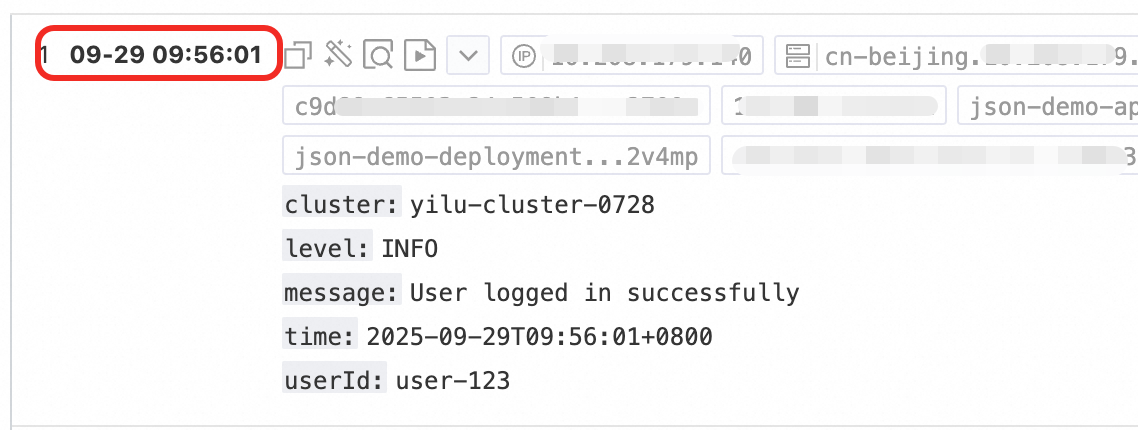
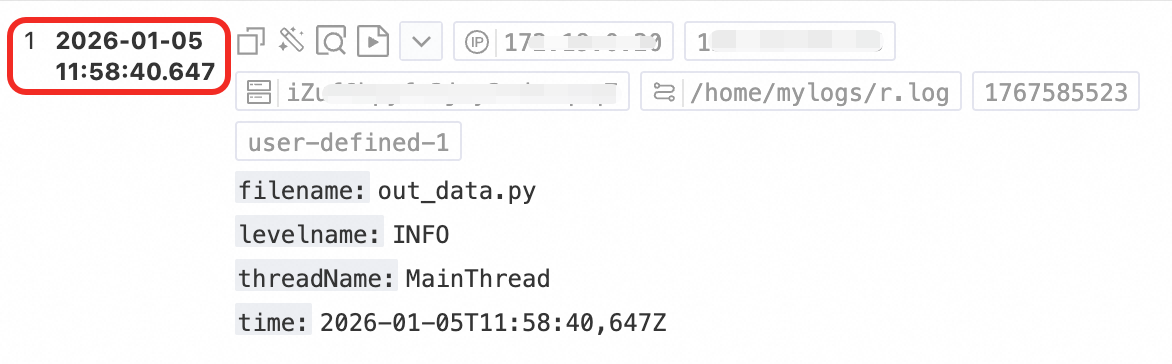
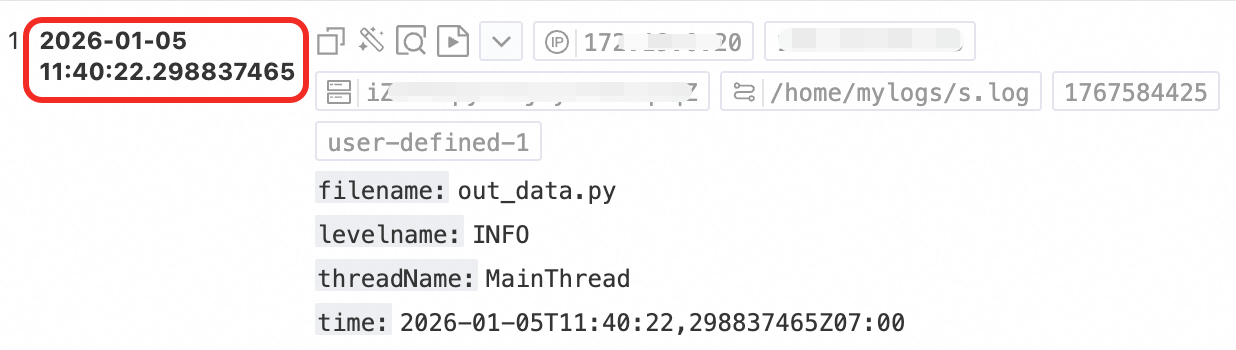
The following table compares the data structure of a raw log after it is saved to Simple Log Service with and without the native time parsing plugin.
|
Raw Logs |
Without using plugins |
Using the time parsing plugin (native) |
|
Second-level time: |
Content: "{"level":"INFO","timestamp":"2025-09-29T09:56:01+0800","cluster":"yilu-cluster-0728","message":"User logged in successfully","userId":"user-123"}" |
|
|
Millisecond time: |
Content: "{"time":"2026-01-05T11:58:40,647Z", "filename":"out_data.py","levelname": "INFO", "threadName":"MainThread"}" |
|
|
Nanosecond time: |
Content: "{"time": "2026-01-05T11:40:22,298837465Z07:00","filename":"out_data.py","levelname":"INFO","threadName": "MainThread"}" |
|
Overview of time processing plugins
Simple Log Service provides the following types of time processing plugins. Select a plugin based on your requirements.
|
Plugin name |
Type |
Description |
|
Time parsing |
Native |
Parses and standardizes the time field in logs. |
|
Extract log time |
Extension |
Parses the raw time field and can set it as the log timestamp. |
Entry point
To use a Logtail plugin for log processing, add it when you create or modify a Logtail configuration. For more information, see Overview.
Differences between native and extension plugins
Native plugins are implemented in C++ and offer better performance.
Extension plugins are implemented in Go and offer a rich and flexible ecosystem. If your business logs are too complex for native plugins, use extension plugins.
-
Performance limits of extension plugins
-
When you use an extension plugin for log processing, LoongCollector consumes more resources (primarily CPU). If necessary, adjust LoongCollector parameter settings for configuration management.
-
If the generation speed of raw data exceeds 5 MB/s, avoid overly complex plugin combinations for log processing. Use extension plugins for simple processing, and then use Data Transformation Overview for further processing.
-
-
Log collection limits
-
Extension plugins process text logs in line mode. This means file-level metadata, such as
__tag__:__path__and__topic__, is stored in each log entry. -
Adding an extension plugin affects tag-related features:
-
The context query and LiveTail features become unavailable. To use these features, you must add an aggregators configuration.
-
The
__topic__field is renamed to__log_topic__. If the aggregators configuration is added, both the__topic__and__log_topic__fields exist in the log. If you do not need the__log_topic__field, use the drop field plugin to delete it. -
Fields such as
__tag__:__path__no longer have native field indexes. You must create an index for them.
-
-
Time parsing plugin (native)
The time parsing plugin parses the time field of a log and sets the result as the value of the log's __time__ field.
Configuration description
|
Parameter Name |
Description |
|
Original Field |
The source field that stores the log content before parsing. The default value is content. Note
When you use the regex parsing plugin, set Original Field to time only. Make sure that your regex parsing configuration includes time as an extracted field. |
|
Time Format |
Set the time format that corresponds to the time content in the log. For example, if the time in the log is 10/Sep/2023:12:36:49, the corresponding time format is %d/%b/%Y:%H:%M:%S. |
|
Time Zone |
Select the time zone of the log's time field. If you do not select a time zone, the machine's time zone is used by default. This is the time zone of the environment where the Logtail process runs. |
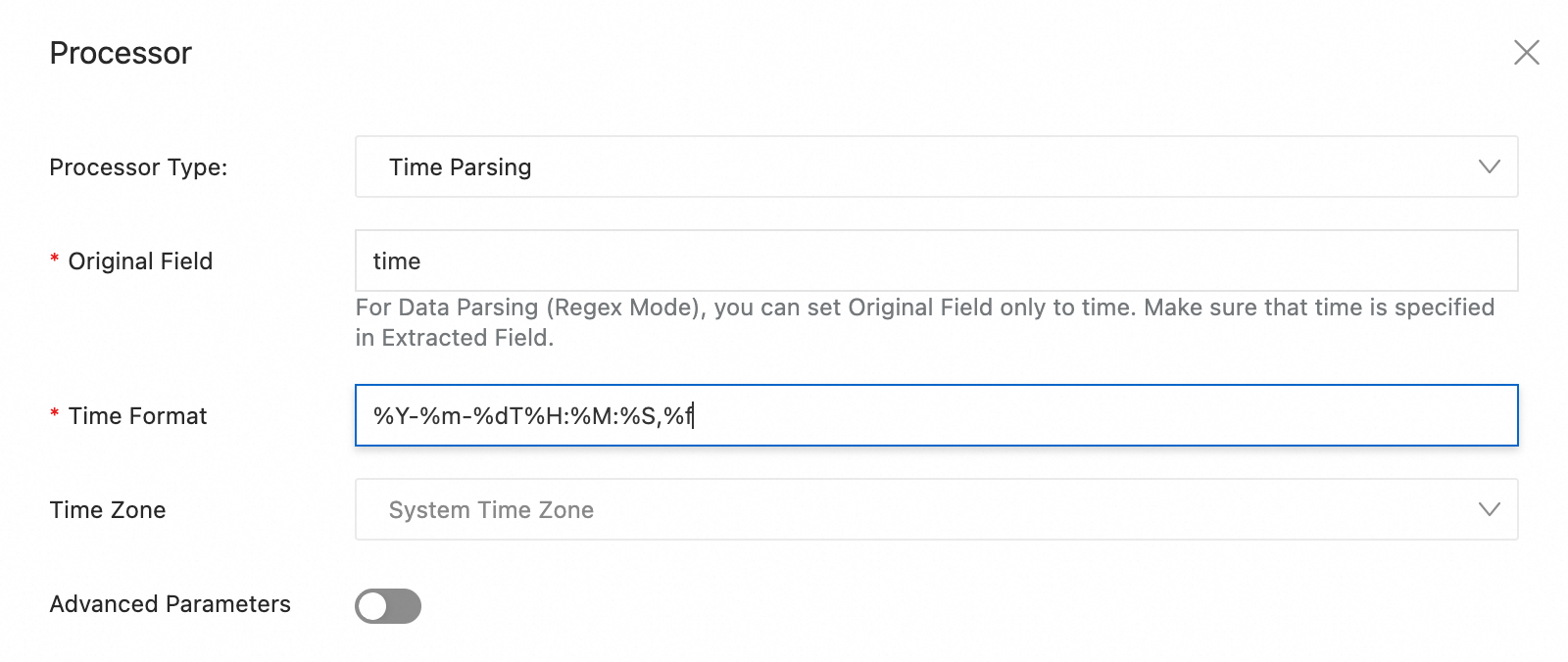
By default, log timestamps in Simple Log Service are accurate to the second. You only need to configure the time format to the second and do not need to configure milliseconds, microseconds, or other smaller units. If the time field in a raw log has millisecond, microsecond, or nanosecond precision that you want to retain, enable nanosecond precision as shown in the following example. For more information, see Log collection that supports nanosecond timestamps.
|
Raw log |
Time parsing plugin configuration |
Time format |
|
|
%Y-%m-%dT%H:%M:%S,%f |
Enable nanosecond precision support:
Go to the Logtail configuration page. In the section, turn on the Advanced Parameters switch and enter the following JSON content to enable nanosecond precision support:
{
  "EnableTimestampNanosecond": true
}
You must also enable the EnableTimestampNanosecond advanced parameter when you use extension plugins to parse nanoseconds or milliseconds.
Extract Log Time plugin (extension)
Use the processor_gotime plugin or the processor_strptime plugin to parse the time field in raw logs. The following content provides parameter descriptions and configuration examples for both plugins.
If the time field in the raw log has millisecond, microsecond, or nanosecond precision that you want to retain in Simple Log Service, see Log collection that supports nanosecond timestamps.
Go language time format (processor_gotime)
The processor_gotime plugin uses the Go language time format to parse the time field in raw logs. Set the parsing result as the log time in Simple Log Service if needed.
-
Logtail 0.16.28 and later support the processor_gotime plugin.
-
Form-based configuration is available when you collect text logs and container standard output.
-
JSON configuration is not available when you collect text logs.
Form-based configuration
-
Parameter description
Set Processor Type to Extract Log Time (Go Time Format).
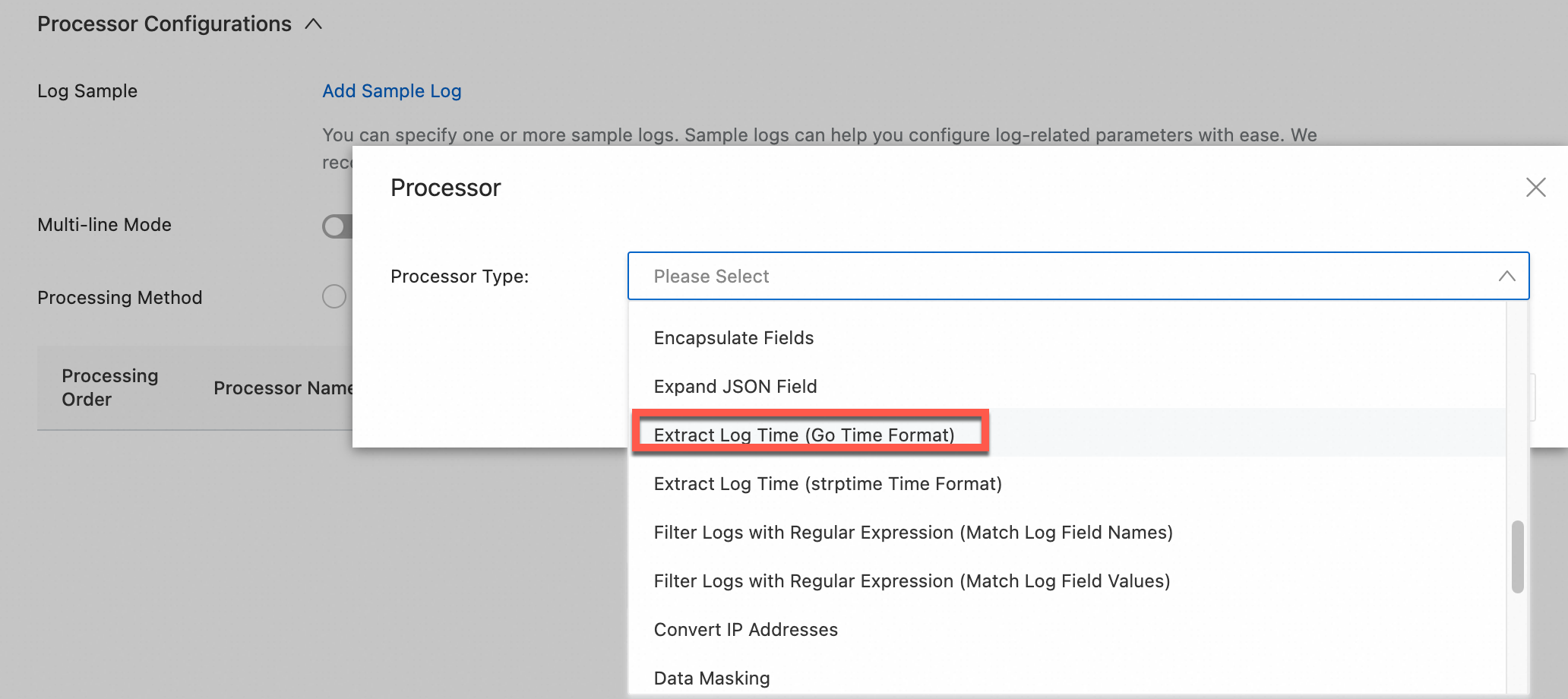
The following table describes the related parameters.
Parameter
Description
Original Time Field
The name of the source field.
Original Time Format
The format of the source time.
Original Time Zone
The time zone of the source time. If you select System Time Zone, the time zone of the host or container where Logtail runs is used.
New Time Field
The name of the destination field for the parsed result. This field cannot be set to
__time__.New Time Format
The format of the parsed time.
Custom New Time Zone
The time zone of the parsed result. If you select System Time Zone, the time zone of the host or container where Logtail is running is used.
Advanced Parameters > Use as Log Time
If you select this option, the system sets the parsed time as the log time.
Advanced Parameters > Retain Original Field
If you select this option, the source field is retained in the parsed log.
Advanced Parameters > Report Original Field Missing Error
If you select this option, the system reports an error if the specified source field does not exist in the raw log.
Advanced Parameters > Report Extraction Failure Error
If you select this option, the system reports an error if it fails to extract the log time.
-
Example
The source time is in the
s_keyfield and has the format2006-01-02 15:04:05 (UTC+8). This example parses the source time into the2006/01/02 15:04:05 (UTC+9)format, adds it to thed_keyfield, and sets the result as the log time in Simple Log Service.-
Raw log
"s_key":"2022-07-05 19:28:01" -
Logtail plugin processor configuration
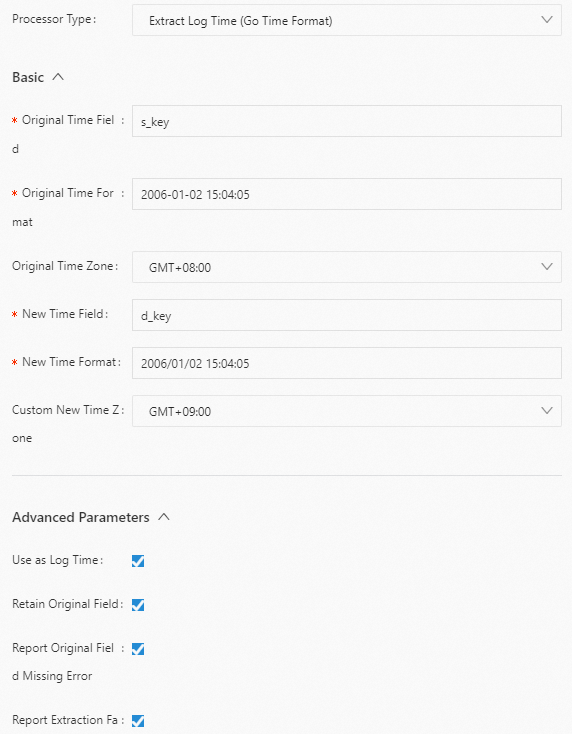
-
Processing result
"s_key":"2022-07-05 19:28:01"
"d_key":"2022/07/05 20:28:01"
-
JSON configuration
-
Parameter description
Set type to processor_gotime. The following table describes the parameters in detail.
Parameter
Type
Required
Description
SourceKey
String
Yes
The name of the source field.
SourceFormat
String
Yes
The format of the source time.
SourceLocation
Int
Yes
The time zone of the source time. If this parameter is empty, the time zone of the host or container where Logtail runs is used.
DestKey
String
Yes
The destination field for the parsed result. This field cannot be set to
__time__.DestFormat
String
Yes
The format of the parsed time.
DestLocation
Int
No
The time zone of the parsed result. If this parameter is empty, the native time zone is used.
SetTime
Boolean
No
Specifies whether to set the parsed time as the log time.
-
true (default): Yes
-
false: No
KeepSource
Boolean
No
Specifies whether to keep the source field in the parsed log.
-
true (default): Keep
-
false: Do not keep
NoKeyError
Boolean
No
Specifies whether the system reports an error if the specified source field does not exist in the raw log.
-
true (default): Report an error
-
false: Do not report an error
AlarmIfFail
Boolean
No
The system failed to fetch the log time. Was a system error reported?
-
true (default): Report an error
-
false: Do not report an error
-
-
Example
The source time is in the s_key field and has the format
2006-01-02 15:04:05 (UTC+8). This example parses the source time into the2006/01/02 15:04:05 (UTC+9)format, adds it to the d_key field, and sets the result as the log time in Simple Log Service.-
Raw log
"s_key":"2019-07-05 19:28:01" -
Logtail plugin processing configuration
{ "processors":[ { "type":"processor_gotime", "detail": { "SourceKey": "s_key", "SourceFormat":"2006-01-02 15:04:05", "SourceLocation":8, "DestKey":"d_key", "DestFormat":"2006/01/02 15:04:05", "DestLocation":9, "SetTime": true, "KeepSource": true, "NoKeyError": true, "AlarmIfFail": true } } ] } -
Processing result
"s_key":"2019-07-05 19:28:01"
"d_key":"2019/07/05 20:28:01"
-
strptime time format (processor_strptime)
The processor_strptime plugin uses the Linux strptime time format to parse the time field in logs. Set the parsing result as the log time if needed.
Logtail 0.16.28 and later support the processor_strptime plugin.
Form-based configuration
-
Parameter description
Set Processor Type to Extract Log Time (strptime Time Format). The following table describes the related parameters.
Parameter
Description
Original Field
The name of the source field.
Original Time Format
The format of the source time.
Retain Original Field
If you select this option, the source field is kept in the parsed log.
Report Extraction Failure Error
If you select this option, the system reports an error if it fails to extract the log time.
Use Time Offset
If you select this option, set the time offset in seconds.
Time Offset (Unit: Seconds)
The time offset in seconds. For example, 28800 indicates UTC+8, and -3600 indicates UTC-1.
-
Configuration example
This example parses the source time, which is the value of the
log_timefield, from the%Y/%m/%d %H:%M:%Sformat into the corresponding log time. The machine's time zone is used. In this example, the time zone is assumed to be UTC+8.-
Raw log
"log_time":"2022/01/02 12:59:59" -
Logtail plugin processing configuration
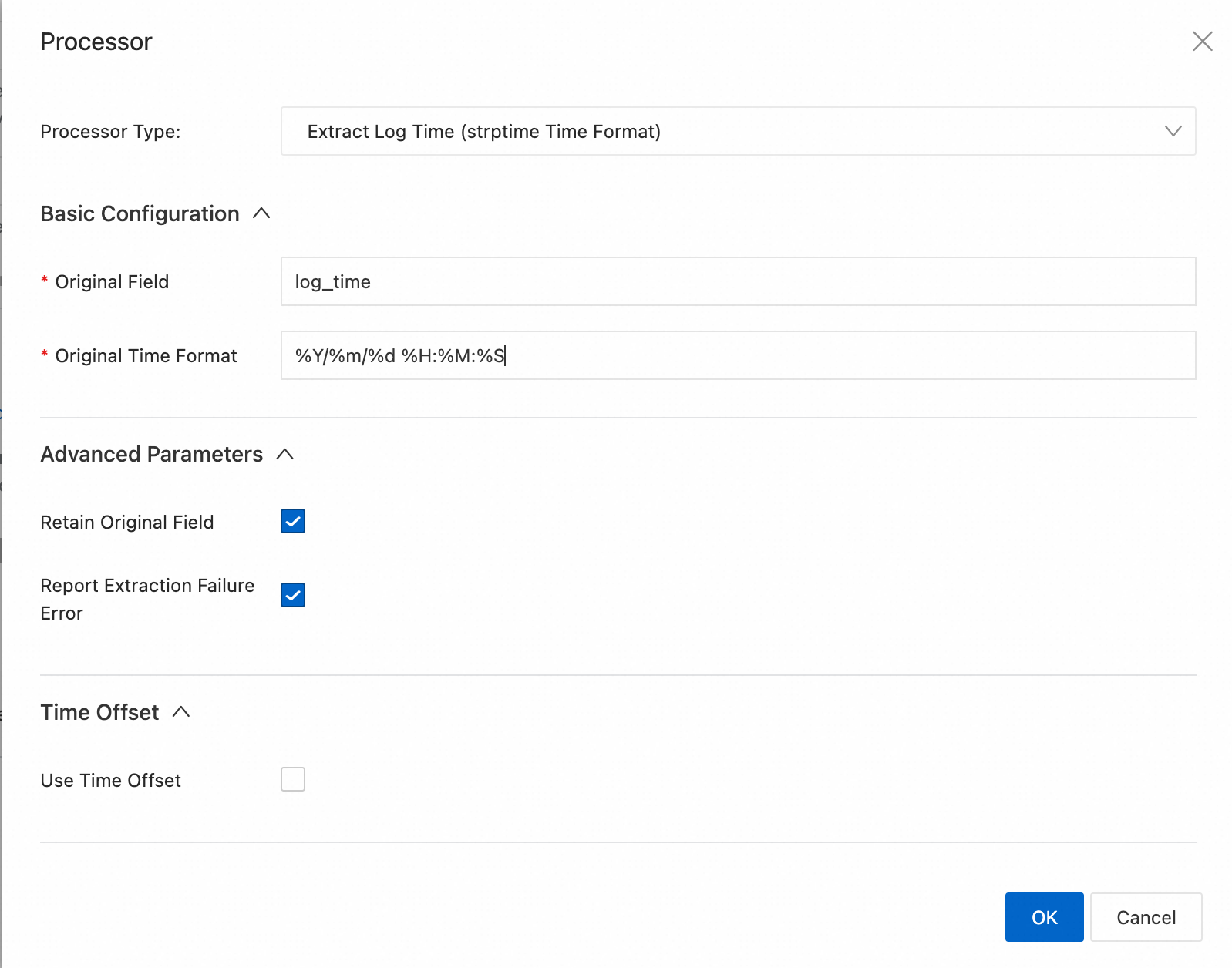
-
Processing result
"log_time":"2022/01/02 12:59:59"
Log.Time = 1451710799
-
-
Common time expressions
NoteThe
processor_strptimeplugin supports the %f format for parsing the fractional part of a second with up to nanosecond precision.Example
Time expression
2016/01/02 12:59:59
%Y/%m/%d %H:%M:%S
2016/01/02 12:59:59.1
%Y/%m/%d %H:%M:%S.%f
2016/01/02 12:59:59.987654321 +0700 (UTC)
%Y/%m/%d %H:%M:%S.%f %z (%Z)
2016/Jan/02 12:59:59,123456
%Y/%b/%d %H:%M:%S,%f
2019-07-15T04:16:47:123Z
%Y-%m-%dT%H:%M:%S:%f
JSON configuration
-
Parameter description
Set type to processor_strptime. The following table describes the parameters in detail.
Parameter
Type
Required
Description
SourceKey
String
Yes
The name of the source field.
Format
String
Yes
The format of the source time.
AdjustUTCOffset
Boolean
No
Specifies whether to adjust the time zone.
-
true: Yes.
-
false (default): No
UTCOffset
Int
No
The time zone offset in seconds for adjustment. For example, 28800 indicates UTC+8.
AlarmIfFail
Boolean
No
Specifies whether the system reports an error when it fails to extract the log.
-
true (default): Report an error.
-
false: Do not report an error.
KeepSource
Boolean
No
Specifies whether to keep the source field in the parsed log.
-
true (default): Keep.
-
false: Do not keep.
-
-
Examples
This example parses the source time, which is the value of the log_time field, from the
%Y/%m/%d %H:%M:%Sformat into the corresponding log time. The machine's time zone is used.-
Example 1: Assume the time zone is UTC+8.
-
Raw log
"log_time":"2016/01/02 12:59:59" -
Logtail plugin processing configuration
{ "processors":[ { "type":"processor_strptime", "detail": { "SourceKey": "log_time", "Format": "%Y/%m/%d %H:%M:%S" } } ] } -
Processing result
"log_time":"2016/01/02 12:59:59"
Log.Time = 1451710799
-
-
Example 2: Assume the time zone is UTC+7.
-
Raw log
"log_time":"2016/01/02 12:59:59" -
Logtail plugin processing configuration
{ "processors":[ { "type":"processor_strptime", "detail": { "SourceKey": "log_time", "Format": "%Y/%m/%d %H:%M:%S", "AdjustUTCOffset": true, "UTCOffset": 25200 } } ] } -
Processing result
"log_time":"2016/01/02 12:59:59"
Log.Time = 1451714399
-
-
Example 3: Assume the time zone is UTC+7.
-
Raw log
"log_time":"2016/01/02 12:59:59.123" -
Logtail plugin processing configuration
{ "processors":[ { "type":"processor_strptime", "detail": { "SourceKey": "log_time", "Format": "%Y/%m/%d %H:%M:%S.%f" } } ] } -
Processing result
"log_time":"2016/01/02 12:59:59.123"
Log.Time = 1451714399
-
-
-
Common time expressions
NoteThe processor_strptime plugin supports parsing that uses the %f format specifier. This specifier represents the fractional part of a second with up to nanosecond precision.
Example
Time expression
2016/01/02 12:59:59
%Y/%m/%d %H:%M:%S
2016/01/02 12:59:59.1
%Y/%m/%d %H:%M:%S.%f
2016/01/02 12:59:59.987654321 +0700 (UTC)
%Y/%m/%d %H:%M:%S.%f %z (%Z)
2016/Jan/02 12:59:59,123456
%Y/%b/%d %H:%M:%S,%f
2019-07-15T04:16:47:123Z
%Y-%m-%dT%H:%M:%S:%f
Common log time formats
For common log time formats supported by the processor_gotime extension plugin, see https://pkg.go.dev/time#pkg-constants. The following table lists the common log time formats supported by the native time parsing plugin (processor_parse_timestamp_native) and the processor_strptime extension plugin.
-
On a Linux server, Logtail supports all time formats provided by the strftime function. This means that Logtail can parse any log time string that can be formatted by the strftime function.
|
Time format |
Description |
Example |
|
%a |
Abbreviated weekday name. |
Fri |
|
%A |
Full weekday name. |
Friday |
|
%b |
Abbreviated month name. |
Jan |
|
%B |
Full month name. |
January |
|
%d |
Day of the month as a zero-padded decimal number. Range: 01 to 31. |
07, 31 |
|
%f |
Fractional seconds (milliseconds, microseconds, or nanoseconds). |
123 |
|
%h |
Abbreviated month name. Same as %b. |
Jan |
|
%H |
The hour in 24-hour format. |
22 |
|
%I |
Hour (12-hour clock) as a zero-padded decimal number. |
11 |
|
%m |
Month as a zero-padded decimal number. Range: 01 to 12. |
08 |
|
%M |
Minute as a zero-padded decimal number. Range: 00 to 59. |
59 |
|
%n |
A line feed. |
Line feed |
|
%p |
AM or PM. |
AM, PM |
|
%r |
12-hour clock time. Same as %I:%M:%S %p. |
11:59:59 AM |
|
%R |
Hour and minute. Same as %H:%M. |
23:59 |
|
%S |
Second as a zero-padded decimal number. Range: 00 to 59. |
59 |
|
%t |
A tab character. |
None |
|
%y |
Year without century as a zero-padded decimal number. Range: 00 to 99. |
04, 98 |
|
%Y |
Year with century as a decimal number. |
2004, 1998 |
|
%C |
Century as a decimal number. Range: 00 to 99. |
16 |
|
%e |
Day of the month as a space-padded decimal number. Range: 1 to 31. A space is added before a single-digit number. |
7, 31 |
|
%j |
Day of the year as a zero-padded decimal number. Range: 001 to 366. |
365 |
|
%u |
Weekday as a decimal number, where Monday is 1. Range: 1 to 7. |
2 |
|
%U |
Week number of the year, with Sunday as the first day of the week. Range: 00 to 53. |
23 |
|
%V |
Week number of the year, with Monday as the first day of the week. Range: 01 to 53. If the week containing January 1 has four or more days in the new year, it is week 1. Otherwise, it is the next week. |
24 |
|
%w |
Weekday as a decimal number, where Sunday is 0. Range: 0 to 6. |
5 |
|
%W |
Week number of the year, with Monday as the first day of the week. Range: 00 to 53. |
23 |
|
%c |
Standard date and time. |
Tue Nov 20 14:12:58 2020 |
|
%x |
Standard date without time. |
Tue Nov 20 2020 |
|
%X |
Standard time without date. |
11:59:59 |
|
%s |
UNIX timestamp. |
1476187251 |
Examples
The following table shows common time standards, examples, and their corresponding time expressions.
|
Example |
Time expression |
Time standard |
|
2017-12-11 15:05:07 |
%Y-%m-%d %H:%M:%S |
Custom |
|
[2017-12-11 15:05:07.012] |
[%Y-%m-%d %H:%M:%S.%f |
Custom |
|
2017-12-11 15:05:07.123 |
%Y-%m-%d %H:%M:%S.%f |
Custom |
|
02 Jan 06 15:04 MST |
%d %b %y %H:%M |
RFC822 |
|
02 Jan 06 15:04 -0700 |
%d %b %y %H:%M |
RFC822Z |
|
Monday, 02-Jan-06 15:04:05 MST |
%A, %d-%b-%y %H:%M:%S |
RFC850 |
|
Mon, 02 Jan 2006 15:04:05 MST |
%A, %d %b %Y %H:%M:%S |
RFC1123 |
|
2006-01-02T15:04:05Z07:00 |
%Y-%m-%dT%H:%M:%S |
RFC3339 |
|
2006-01-02T15:04:05.999999999Z07:00 |
%Y-%m-%dT%H:%M:%S.%f |
RFC3339Nano |
|
1637843406 |
%s |
Custom |
|
1637843406123 |
%s |
Custom (Simple Log Service processes it with second-level precision) |
References
-
Configure a Logtail pipeline by calling the following API operations:
-
Configuring processing plug-ins in the console:
-
Collect container logs from a cluster using Kubernetes CRDs (standard output/file)