Compute Nest allows service providers to use Flux CD to deploy Helm charts in Container Service for Kubernetes (ACK) clusters. This topic describes how to create a Compute Nest service that uses Flux CD to deploy a Helm chart.
Background information
Compute Nest encapsulates the process of using Flux CD to deploy Helm charts into a public Resource Orchestration Service (ROS) module named MODULE::ACS::ComputeNest::FluxOciHelmDeploy. The following table describes the properties of the MODULE::ACS::ComputeNest::FluxOciHelmDeploy module.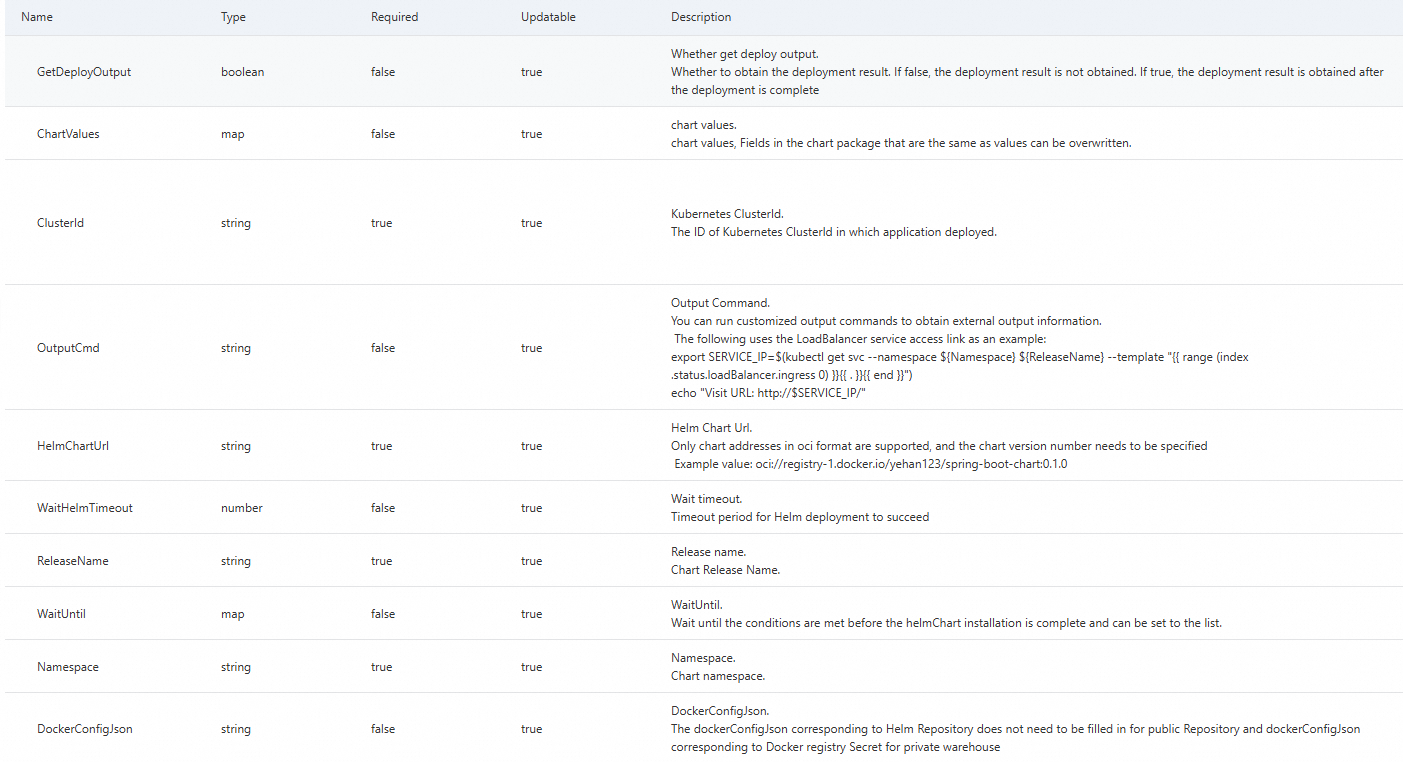
Procedure
You can set the HelmChartUrl property to the Open Container Initiative (OCI) URL of a chart repository. When you create a service, you can associate the service with a Helm chart deployment package or specify the URL of a self-managed chart repository in the service template. This section describes how to create a service by using a Helm chart deployment package or a self-managed chart repository.
Create a service by using a Helm chart deployment package
If you use this method, you must first create a Helm chart deployment package. For more information, see Manage deployment packages.
Log on to the Compute Nest console.
In the left-side navigation pane, click My Services. On the Created Services tab of the My Services page, click Create Service.
On the Create Service page, configure the service information.
This section describes only the configurations specially required for using a Helm chart deployment package to create a service. For more information, see Create a private service.
In the Template Content field, specify the identifiers for the Helm chart deployment package. For more information about the complete sample code of a template, see the Sample template section of this topic.
Compute Nest provides the following two pseudo parameters for using a Helm chart deployment package:
{{ computenest::helmchart::xx }}and{{ computenest::helm::dockerconfigjson }}. The former is associated with the Helm chart deployment package, and the latter is associated with the credential that is used to pull the Helm chart. During service instance creation, these pseudo parameters are replaced with specific values based on your service configurations.{{ computenest::helmchart::xx }}: associated with the Helm chart deployment package. During service instance creation, this pseudo parameter is replaced with the URL of the Helm chart. Example: oci://compute-nest-chart-registry.cn-hangzhou.cr.aliyuncs.com/15634578xxxxxxxx/wordpress:15.4.1.{{ computenest::helm::dockerconfigjson }}: associated with the credential that is used to pull the Helm chart.
Pseudo parameters in a sample template:
Resources:
  FluxHelmDeploy:
    Type: MODULE::ACS::ComputeNest::FluxOciHelmDeploy
    Version: v1
    Properties:
      ClusterId:
        Ref: ClusterId
      ReleaseName: wordpress
      Namespace: wordpress
      HelmChartUrl: '{{ computenest::helmchart::test }}'
      DockerConfigJson: '{{ computenest::helm::dockerconfigjson }}'
      ChartValues:
        mariadb:
          primary:
            persistence:
              enabled: true
              storageClass: alicloud-disk-essd
              size: 20Gi
        persistence:
          enabled: false
In the Deployment Package Association section, associate the Helm chart deployment package with the service.
Click Create Service.
Create a service by using a self-managed chart repository
Log on to the Compute Nest console.
In the left-side navigation pane, click My Services. On the Created Services tab of the My Services page, click Create Service.
On the Create Service page, configure the service information.
This section describes only the configurations specially required for using a self-managed chart repository to create a service. For more information, see Create a private service.
In the Template Content field, specify the URL of a self-managed chart repository.
If you have a public or private chart repository, you can directly use it.
In this example, a public chart repository is used.
WordpressComputenestHelmApplication:
  Type: MODULE::ACS::ComputeNest::FluxOciHelmDeploy
  Version: v1
  Properties:
    ClusterId: ClusterId
    HelmChartUrl: oci://registry-1.docker.io/bitnamicharts/wordpress:15.4.1
    ChartValues:
      mariadb:
        primary:
          persistence:
            enabled: true
            storageClass: alicloud-disk-essd
            size: 100Gi
      persistence:
        enabled: false
      wordpressUsername:
        Ref: WordpressUsername
      wordpressPassword:
        Ref: WordpressPassword
    Namespace:
      Ref: 'ALIYUN::StackName'
    ReleaseName: wordpress
If you specify a private chart repository, you must set the
DockerConfigJsonproperty to the credential that is used to pull the Helm chart. You can generate the credential by using the following sample code:kubectl create secret docker-registry SECRET_NAME \ --docker-server=SERVER_NAME \ --docker-username=USER_NAME \ --docker-password=Password kubectl get secret SECRET_NAME -o yaml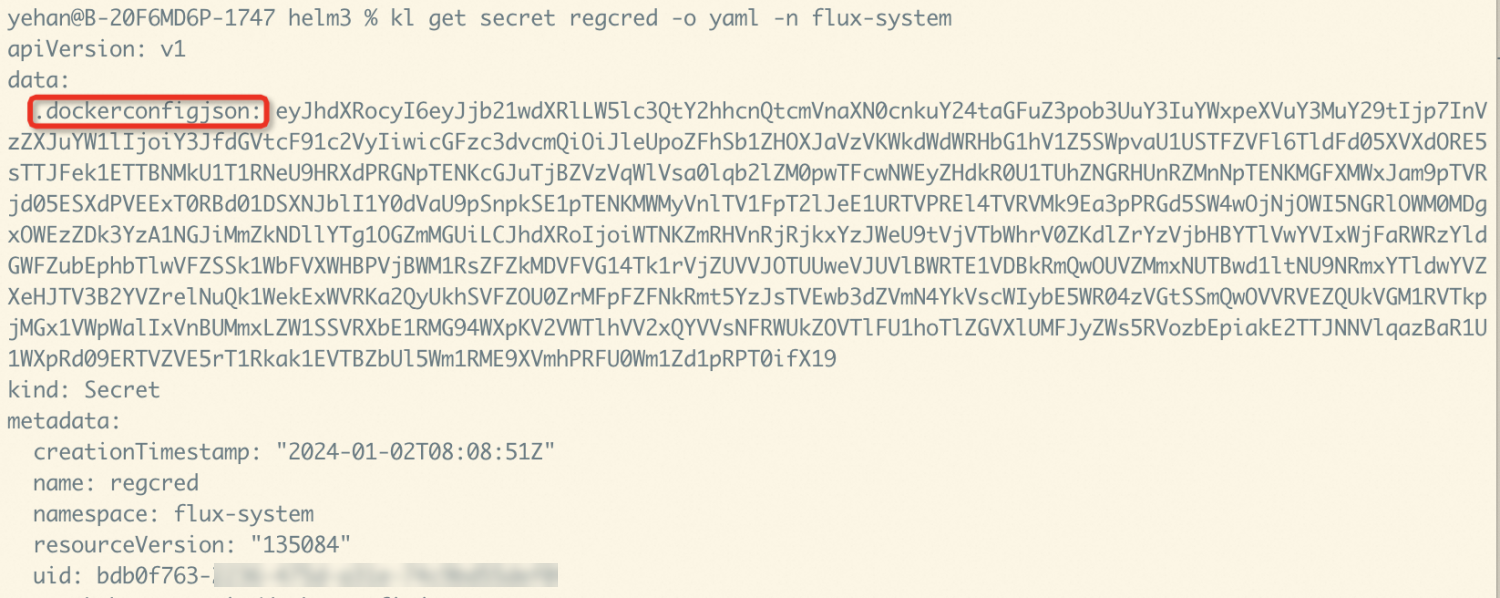
Click Create Service.
Sample template
The following sample template is used to deploy WordPress in an ACK cluster by using a Helm chart:
ROSTemplateFormatVersion: '2015-09-01'
Description:
  en: Create an ACK cluster to deploy WordPress.
  zh-cn: new ack deploy wordpress
Parameters:
  CreateAck:
    Type: Boolean
    Description:
      en: An existing ack cluster can be deployed by entering the cluster id. If there is no current cluster, create a new ack cluster before deploying
      zh-cn: the description in Chinese.
    Label:
      en: Wether create ack cluster
      zh-cn: the description in Chinese.
    Default: true
  ClusterId:
    Type: String
    Description:
      en: The ID of Kubernetes ClusterId in which application deployed.
      zh-cn: the description in Chinese.
    AllowedPattern: '[0-9a-z]+$'
    Default: null
    Required: true
    Label:
      en: Kubernetes ClusterId
      zh-cn: the description in Chinese.
    AssociationProperty: 'ALIYUN::CS::Cluster::ClusterId'
    AssociationPropertyMetadata:
      RegionId: '${RegionId}'
      Visible:
        Condition:
          Fn::Equals:
            - ${CreateAck}
            - false
  PayType:
    Type: String
    Label:
      en: ECS Instance Charge Type
      zh-cn: the description in Chinese.
    Default: PostPaid
    AllowedValues:
      - PostPaid
      - PrePaid
    AssociationProperty: ChargeType
    AssociationPropertyMetadata:
      LocaleKey: InstanceChargeType
      Visible:
        Condition:
          Fn::Equals:
            - ${CreateAck}
            - true
  PayPeriodUnit:
    Type: String
    Label:
      en: Pay Period Unit
      zh-cn: the description in Chinese.
    Default: Month
    AllowedValues:
      - Month
      - Year
    AssociationProperty: PayPeriodUnit
    AssociationPropertyMetadata:
      Visible:
        Condition:
          Fn::And:
            - Fn::Equals:
                - ${CreateAck}
                - true
            - Fn::Not:
                Fn::Equals:
                  - ${PayType}
                  - PostPaid
  PayPeriod:
    Type: Number
    Description:
      en: When the resource purchase duration is Month, the value of Period ranges from 1 to 9, 12, 24, 36, 48, or 60. <br><b><font color='red'> When ECS instance types are PrePaid valid </b></font>
      zh-cn: the description in Chinese.
    Label:
      en: Period
      zh-cn: the description in Chinese.
    Default: 1
    AllowedValues:
      - 1
      - 2
      - 3
      - 4
      - 5
      - 6
      - 7
      - 8
      - 9
    AssociationProperty: PayPeriod
    AssociationPropertyMetadata:
      Visible:
        Condition:
          Fn::And:
            - Fn::Equals:
                - ${CreateAck}
                - true
            - Fn::Not:
                Fn::Equals:
                  - ${PayType}
                  - PostPaid
  ZoneId:
    Type: String
    AssociationProperty: ALIYUN::ECS::Instance:ZoneId
    Label:
      en: Zone ID
      zh-cn: the description in Chinese.
    Default: cn-hangzhou-h
    AssociationPropertyMetadata:
      Visible:
        Condition:
          Fn::Equals:
            - ${CreateAck}
            - true
  VpcId:
    Type: String
    Label:
      en: VPC ID
      zh-cn: the description in Chinese.
    Description:
      en: >-
        Please search the ID starting with (vpc-xxx) from console-Virtual
        Private Cloud
      zh-cn: the description in Chinese.
    Default: ''
    AssociationProperty: 'ALIYUN::ECS::VPC::VPCId'
    AssociationPropertyMetadata:
      RegionId: '${RegionId}'
      Visible:
        Condition:
          Fn::Equals:
            - ${CreateAck}
            - true
  VSwitchId:
    Type: String
    Label:
      en: VSwitch ID
      zh-cn: the description in Chinese.
    Description:
      en: >-
        Instance ID of existing business network switches, console-Virtual
        Private Cloud-VSwitches under query
      zh-cn: the description in Chinese.
    Default: ''
    AssociationProperty: 'ALIYUN::ECS::VSwitch::VSwitchId'
    AssociationPropertyMetadata:
      VpcId: '${VpcId}'
      ZoneId: '${ZoneId}'
      Visible:
        Condition:
          Fn::Equals:
            - ${CreateAck}
            - true
  LoginPassword:
    NoEcho: true
    Type: String
    Description:
      en: Server login password, Length 8-30, must contain three(Capital letters, lowercase letters, numbers, ()`~!@#$%^&*_-+=|{}[]:;<>,.?/ Special symbol in)
      zh-cn: the description in Chinese.
    Label:
      en: Instance Password
      zh-cn: the description in Chinese.
    ConstraintDescription:
      en: Length 8-30, must contain three(Capital letters, lowercase letters, numbers, ()`~!@#$%^&*_-+=|{}[]:;<>,.?/ Special symbol in)
      zh-cn: the description in Chinese.
    AssociationProperty: ALIYUN::ECS::Instance::Password
    AssociationPropertyMetadata:
      Visible:
        Condition:
          Fn::Equals:
            - ${CreateAck}
            - true
    AllowedPattern: ^[a-zA-Z0-9-\(\)\`\~\!\@\#\$\%\^\&\*\_\-\+\=\|\{\}\[\]\:\;\<\>\,\.\?\/]*$
    MinLength: 8
    MaxLength: 30
    Default: computenest*12345
  WorkerInstanceType:
    Type: String
    Label:
      en: Worker Nodes Types
      zh-cn: the description in Chinese.
    AssociationProperty: ALIYUN::ECS::Instance::InstanceType
    AssociationPropertyMetadata:
      ZoneId: ${ZoneId}
      Visible:
        Condition:
          Fn::Equals:
            - ${CreateAck}
            - true
    Default: ecs.g6.large
  WorkerSystemDiskCategory:
    Type: String
    AllowedValues:
      - cloud_efficiency
      - cloud_ssd
      - cloud_essd
    AssociationPropertyMetadata:
      LocaleKey: DiskCategory
      InstanceType: ${WorkerInstanceType}
      Visible:
        Condition:
          Fn::Equals:
            - ${CreateAck}
            - true
    Label:
      en: Worker System Disk Category
      zh-cn: the description in Chinese.
    Default: cloud_essd
  WorkerSystemDiskSize:
    Type: Number
    Label:
      en: Worker System Disk Size(GB)
      zh-cn: the description in Chinese.
    MinValue: 1
    Default: 120
    AssociationPropertyMetadata:
      Visible:
        Condition:
          Fn::Equals:
            - ${CreateAck}
            - true
  AckNetworkPlugin:
    Type: String
    Label:
      en: ack plugin network
      zh-cn: the description in Chinese.
    AllowedValues:
      - Flannel
      - Terway
    AssociationPropertyMetadata:
      Visible:
        Condition:
          Fn::Equals:
            - ${CreateAck}
            - true
    Default: Flannel
  PodCidr:
    Type: String
    Description:
      zh-cn: the description in Chinese.
      en: 'Please fill in a valid private segment, i.e. the following segments and their subnets: 10.0.0.0/8, 172.16-31.0.0/12-16, 192.168.0.0/16<br> which cannot duplicate the network segments already used by clusters in VPC and VPC Kunetberes. <font color=''blue''><b>Cannot be modified after successful creation</b></font>'
    Label:
      zh-cn: the description in Chinese.
      en: Pod Network CIDR
    AssociationProperty: ALIYUN::CS::ManagedKubernetesCluster::PodCidr
    AssociationPropertyMetadata:
      Visible:
        Condition:
          Fn::And:
            - Fn::Equals:
                - ${CreateAck}
                - true
            - Fn::Equals:
                - ${AckNetworkPlugin}
                - Flannel
    Default: 10.0.0.0/16
  PodVswitchId:
    Type: String
    Label:
      en: VSwitch ID
      zh-cn: the description in Chinese.
    Description:
      en: >-
        Instance ID of existing business network switches, console-Virtual
        Private Cloud-VSwitches under query
      zh-cn: the description in Chinese.
    Default: ''
    AssociationProperty: 'ALIYUN::ECS::VSwitch::VSwitchId'
    AssociationPropertyMetadata:
      VpcId: '${VpcId}'
      ZoneId: '${ZoneId}'
      Visible:
        Condition:
          Fn::And:
            - Fn::Equals:
                - ${CreateAck}
                - true
            - Fn::Equals:
                - ${AckNetworkPlugin}
                - Terway
  ServiceCidr:
    Type: String
    Description:
      zh-cn: the description in Chinese.
      en: 'Optional range: 10.0.0.0/16-24, 172.16-31.0.0/16-24, 192.168.0.0/16-24<br> cannot duplicate segments already used by existing Kubernetes clusters in VPC and VPC.<font color=''blue''><b>Cannot be modified after successful creation</b></font>'
    Label:
      zh-cn: Service CIDR
      en: Service CIDR
    AssociationProperty: ALIYUN::CS::ManagedKubernetesCluster::ServiceCidr
    AssociationPropertyMetadata:
      Visible:
        Condition:
          Fn::Equals:
            - ${CreateAck}
            - true
    Default: 172.16.0.0/16
  WordpressUsername:
    Type: String
    Label:
      zh-cn: the description in Chinese.
      en: wordpress username
    Default: user
  WordpressPassword:
    NoEcho: true
    Type: String
    Label:
      zh-cn: the description in Chinese.
      en: wordpress password
Conditions:
  CreateAck:
    Fn::Equals:
      - true
      - Ref: CreateAck
  FlannelPluginCondition:
    Fn::Equals:
      - Ref: AckNetworkPlugin
      - Flannel
  TerwayPluginCondition:
    Fn::Equals:
      - Ref: AckNetworkPlugin
      - Terway
Resources:
  VpcsDataSource:
    Type: DATASOURCE::VPC::Vpcs
    Properties:
      VpcIds:
        - Ref: VpcId
  EcsSecurityGroup:
    Type: ALIYUN::ECS::SecurityGroup
    Condition: CreateAck
    Properties:
      SecurityGroupName:
        Ref: ALIYUN::StackName
      VpcId:
        Ref: VpcId
      SecurityGroupEgress:
        - PortRange: '-1/-1'
          Priority: 1
          IpProtocol: all
          DestCidrIp: 0.0.0.0/0
          NicType: intranet
      SecurityGroupIngress:
        Fn::If:
          - FlannelPluginCondition
          - - PortRange: '-1/-1'
              Priority: 1
              IpProtocol: all
              SourceCidrIp:
                Ref: PodCidr
              Description: Enable access over the pod CIDR block.
              NicType: intranet
            - PortRange: '-1/-1'
              Priority: 1
              IpProtocol: all
              SourceCidrIp:
                Fn::Jq:
                  - First
                  - .[].CidrBlock
                  - 'Fn::GetAtt':
                      - VpcsDataSource
                      - Vpcs
              Description: Enable access over virtual private clouds (VPCs).
              NicType: intranet
            - PortRange: '-1/-1'
              Priority: 1
              IpProtocol: icmp
              SourceCidrIp: 0.0.0.0/0
              Description: Enable Internet Control Message Protocol (ICMP) ports.
              NicType: intranet
          - - PortRange: '-1/-1'
              Priority: 1
              IpProtocol: all
              SourceCidrIp:
                Fn::Jq:
                  - First
                  - .[].CidrBlock
                  - 'Fn::GetAtt':
                      - VpcsDataSource
                      - Vpcs
              Description: Enable access over VPCs.
              NicType: intranet
            - PortRange: '-1/-1'
              Priority: 1
              IpProtocol: icmp
              SourceCidrIp: 0.0.0.0/0
              Description: Enable ICMP ports.
              NicType: intranet
  ManagedKubernetesCluster:
    Type: ALIYUN::CS::ManagedKubernetesCluster
    Condition: CreateAck
    Properties:
      Name:
        Ref: ALIYUN::StackName
      ChargeType:
        Ref: PayType
      Period:
        Ref: PayPeriod
      PeriodUnit:
        Ref: PayPeriodUnit
      VSwitchIds:
        - Ref: VSwitchId
      VpcId:
        Ref: VpcId
      WorkerInstanceTypes:
        - Ref: WorkerInstanceType
      NumOfNodes: 3
      ClusterSpec: ack.pro.small
      ContainerCidr:
        Fn::If:
          - FlannelPluginCondition
          - Ref: PodCidr
          - Ref: ALIYUN::NoValue
      ServiceCidr:
        Ref: ServiceCidr
      PodVswitchIds:
        Fn::If:
          - TerwayPluginCondition
          - - Ref: PodVswitchId
          - Ref: ALIYUN::NoValue
      ZoneIds:
        - Ref: ZoneId
      SecurityGroupId:
        Ref: EcsSecurityGroup
      WorkerSystemDiskCategory:
        Ref: WorkerSystemDiskCategory
      WorkerSystemDiskSize:
        Ref: WorkerSystemDiskSize
      LoginPassword:
        Ref: LoginPassword
      SnatEntry: true
      Addons:
        Fn::If:
          - FlannelPluginCondition
          - - Name: flannel
              Config: ''
          - - Name: terway-eniip
              Config: ''
  WordpressComputenestHelmApplication:
    Type: MODULE::ACS::ComputeNest::FluxOciHelmDeploy
    Version: v1
    Properties:
      WaitUntil:
        - Kind: Service
          Name: wordpress
          JsonPath: $.status.loadBalancer.ingress[0].ip
          Operator: NotEmpty
          FirstMatch: true
          Timeout: 300
      ClusterId:
        Fn::If:
          - CreateAck
          - Fn::GetAtt:
              - ManagedKubernetesCluster
              - ClusterId
          - Ref: ClusterId
      HelmChartUrl: '{{ computenest::helmchart::wordpress }}'
      DockerConfigJson: '{{ computenest::helm::dockerconfigjson }}'
      ChartValues:
        mariadb:
          primary:
            persistence:
              enabled: true
              storageClass: alicloud-disk-essd
              size: 100Gi
        persistence:
          enabled: false
        wordpressUsername:
          Ref: WordpressUsername
        wordpressPassword:
          Ref: WordpressPassword
      Namespace:
        Ref: 'ALIYUN::StackName'
      ReleaseName: wordpress
Outputs:
  # Display the public IP address as the endpoint returned by HTTP in the console.
  Endpoint:
    Description:
      zh-cn: the description in Chinese.
      en: Public IP Addresses
    Value:
      Fn::Sub:
        - "http://${ServerAddress} \n http://${ServerAddress}/admin"
        - ServerAddress:
            Fn::Select:
              - 0
              - Fn::GetAtt:
                - WordpressComputenestHelmApplication
                - WaitUntilData
Metadata:
  ALIYUN::ROS::Interface:
    ParameterGroups:
      - Parameters:
          - CreateAck
          - ClusterId
        Label:
          en: Whether create ack
          zh-cn: the description in Chinese.
      - Parameters:
          - PayType
          - PayPeriodUnit
          - PayPeriod
        Label:
          en: PayType Configuration
          zh-cn: the description in Chinese.
      - Parameters:
          - ZoneId
          - VpcId
          - VSwitchId
          - LoginPassword
        Label:
          en: Basic Configuration
          zh-cn: the description in Chinese.
      - Parameters:
          - WorkerInstanceType
          - WorkerSystemDiskCategory
          - WorkerSystemDiskSize
          - AckNetworkPlugin
          - PodCidr
          - PodVswitchId
          - ServiceCidr
        Label:
          en: Kubernetes
          zh-cn: the description in Chinese.
      - Parameters:
          - WordpressUsername
          - WordpressPassword
        Label:
          en: Wordpress Config
          zh-cn: the description in Chinese.