ApsaraDB RDS for MySQL provides the following data storage types: Premium Local SSD, premium performance disk, enterprise SSD (ESSD), and standard SSD. Some RDS instance types are no longer available for purchase. This topic describes the differences among these storage types and provides purchase suggestions.
Overview of storage types
|
Storage type |
Description |
|
Premium Local SSD |
High-performance Local Disk is a proprietary intelligent local disk developed by RDS that is located on the same physical server as MySQL, where data storage and read/write operations are performed locally to deliver high read/write I/O and low latency. High-performance local disks deliver up to 150,000 IOPS, microsecond-level I/O latency, up to 24,000 GB of storage space, and backup and recovery speeds 10 times faster than self-built solutions. Ideal for I/O-intensive applications and high-concurrency read/write scenarios, such as flash sales and high-frequency trading systems. |
|
Premium performance disk |
Premium performance disks are compatible with all features of ESSDs, and offer the following four features:
|
|
ESSD |
ESSDs are ultra-high performance disks developed by Alibaba Cloud. ESSDs are based on the next-generation distributed block storage architecture. They are integrated with 25 Gigabit Ethernet and remote direct memory access (RDMA) technologies. ESSDs provide lower one-way latencies than standard SSDs and can process up to 1 million random read and write requests per second. ESSDs are available in the following performance levels (PLs):
For more information about the performance of ESSDs, see ESSD. |
|
Standard SSD |
Standard SSDs are Elastic Block Storage devices that are designed based on a distributed storage architecture. You can use standard SSDs to separate computing from storage. Note
Standard SSDs are being phased out. Use ESSDs instead. For more information, see [Discontinued/End of Support] Standard SSDs are no longer available for some RDS instances from July 1, 2022. |
For a comparison of performance metrics (single disk capacity, maximum IOPS, and maximum throughput) among these storage types, see Block storage performance.
All of the preceding storage types meet the reliability, durability, and read/write performance goals specified in the Alibaba Cloud Service-Level Agreement (SLA).
-
Premium Local SSD: The associated RDS instances all have a primary-secondary (high availability) architecture. If the primary node fails, the switchover between the primary and secondary nodes completes within seconds.
-
Cloud disks (standard SSDs, ESSDs, and premium performance disks) are distributed disks that ensure data reliability through multiple replicas. If you use an RDS instance that runs RDS High-availability Edition or RDS Cluster Edition and the primary RDS instance fails, a primary/secondary switchover is performed within seconds.
View the storage type
You can view the storage type of an RDS instance on the Basic Information page of the instance.
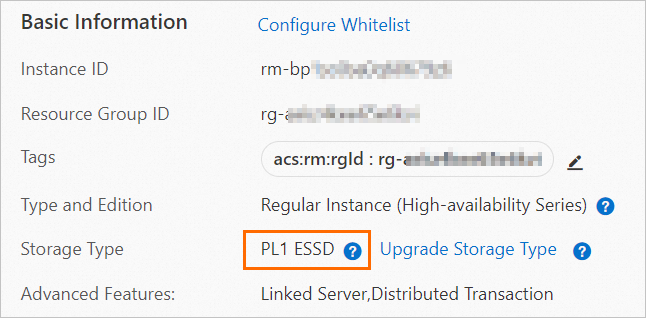
Comparison among storage types
Currently, only RDS MySQL instances that run RDS High-availability Edition support Premium Local SSDs.
|
Metric |
Premium Local SSD |
Premium performance disk |
ESSD |
|
I/O performance |
★★★★★ Delivers low I/O latency and high I/O performance:
|
★★★★★★ Provides the Buffer Pool Extension (BPE) feature, I/O performance burst feature, and data archiving feature. The following list describes the I/O performance:
|
★★★★★ Delivers higher I/O performance than standard SSDs:
|
|
Configuration flexibility |
★★★★ Provides various configuration options and lets you adjust the storage capacity separately. For some RDS instances that use Premium Local SSDs, the storage capacity is bound to the instance type and cannot be adjusted separately. |
★★★★★ Provides various configuration options and lets you scale out or scale in the storage capacity of an RDS instance. Note
Scale-in is supported only for MySQL instances that meet specific conditions. For more information, see Overview of instance changes and Change configuration. |
★★★★★ Provides various configuration options and lets you scale out or scale in the storage capacity of an RDS instance. Note
Scale-in is supported only for MySQL instances that meet specific requirements. For more information, see Overview of instance changes and Change the specifications of an ApsaraDB RDS instance. |
|
Backup method |
Physical backup using XtraBackup |
Snapshot backup |
Snapshot backup |
|
Time required for backup, read-only instance creation, and instance cloning |
★★★ Requires a few hours. The time varies based on the disk size. |
★★★★★ Requires a few seconds. |
★★★★★ Requires a few seconds. |
|
Scale-out duration |
★★★★ Requires a few hours to copy data. |
★★★★★ Supports online scale-out. You can scale out the storage capacity of an RDS instance in seconds. |
★★★★★ Supports online scale-out. You can scale out the storage capacity of an RDS instance in seconds. |
|
Scale-out impact |
Transient connection interruptions occur. |
None. |
None. |
|
Data durability |
★★★★ Hardware failures can cause data corruption. A secondary database is required. The SLA for High-availability Edition instances that use local disks is 99.995%. |
★★★★★ Provides 99.9999999% data reliability and supports RDS instances that run RDS Basic Edition to reduce costs. |
★★★★★ Provides 99.9999999% data reliability and supports RDS instances that run RDS Basic Edition to reduce costs. |
Purchase suggestions
We recommend that you prioritize premium performance disks:
-
If your I/O volume is large, we recommend that you enable the Buffer Pool Extension (BPE) feature.
-
If your I/O fluctuates significantly, we recommend that you enable the I/O performance burst feature.
-
If your database contains many infrequently accessed or modified tables, we recommend that you enable the data archiving feature.
If you require cloud disks with a high performance level (PL), you can choose ESSDs.
Product support
For more information about the storage types and features that are supported by each instance type, see Features of ApsaraDB RDS for MySQL.