Performance logs collect statistics on application startup speed, stuttering, and freezes. You can view startup speed metrics on the Basic Analysis page of the Mobile Analysis Service console and stuttering and freeze reports on the Performance Analytics page.
Log instrumentation is supported for both mPaaS frameworks and native projects.
Based on mPaaS framework
By default, stuttering monitoring is enabled for 10% of devices. You can use the following interface to set the stuttering monitoring rate.
[MPAnalysisHelper setLagMonitorPercent: 100]; // Sets monitoring to 100%. This must be set before calling startPerformanceMonitor.Stuttering monitoring is enabled only on physical devices and does not function in Xcode debug mode.
At startup, call the
[MPAnalysisHelper startPerformanceMonitor]method. Place this call inside the-(void)application:(UIApplication *)application beforeDidFinishLaunchingWithOptions:(NSDictionary *)launchOptionsmethod.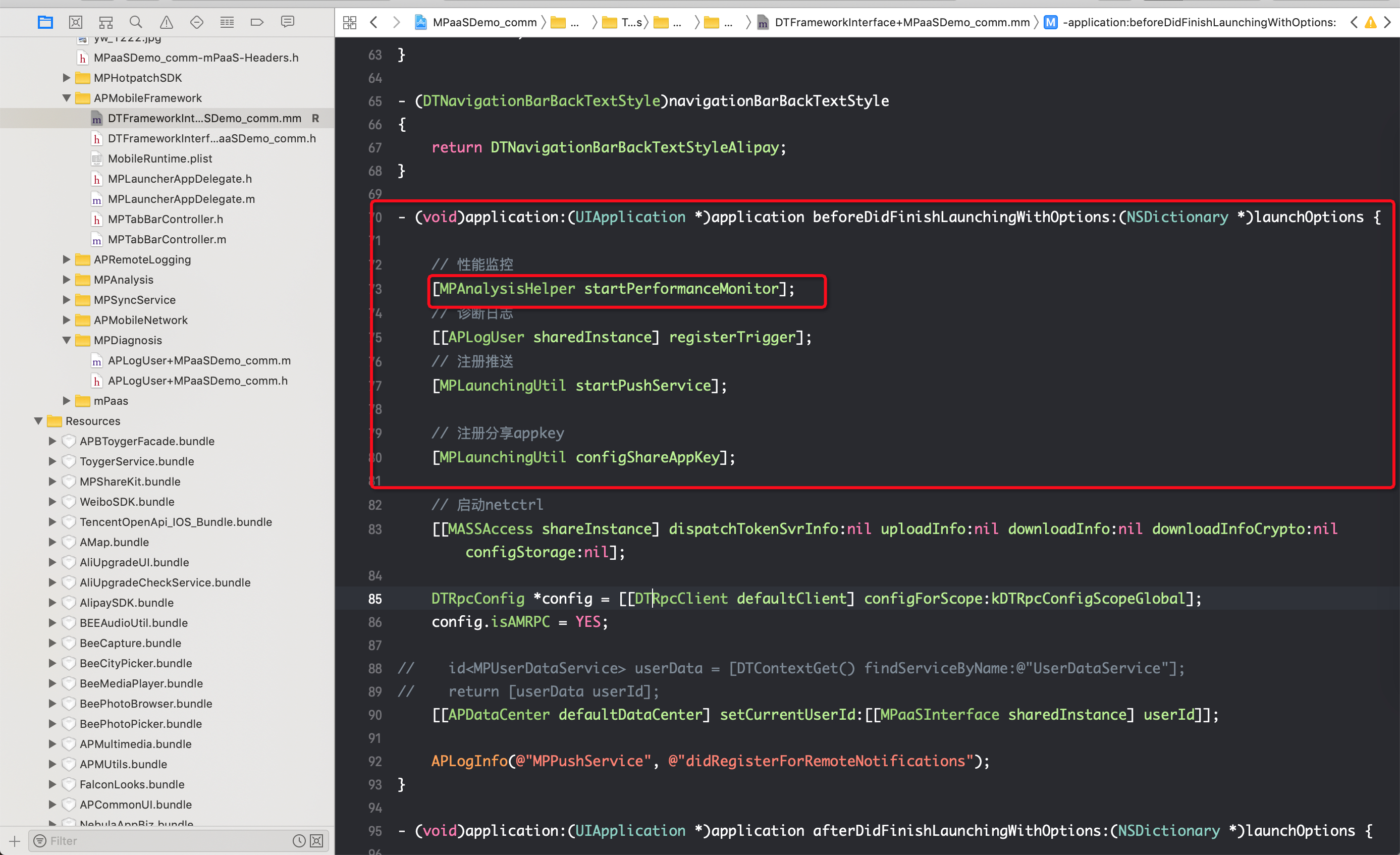
For native projects
The SDK provides performance monitoring interfaces. To use them, call [PerformanceHelper performanceMonitor] in the - (BOOL)application:(UIApplication )application didFinishLaunchingWithOptions:(NSDictionary )launchOptions method of your AppDelegate.
    #import "PerformanceHelper.h"
    #import <MPAnalysis/MPAnalysisHelper.h>

    static NSTimeInterval __start_timestamp = 0;

    @implementation PerformanceHelper

    + (void)load
    {
        __start_timestamp = CFAbsoluteTimeGetCurrent();
    }

    + (void)performanceMonitor
    {
        // Start performance monitor.

       [MPAnalysisHelper setLagMonitorPercent: 100]; // Sets monitoring to 100%. This must be set before calling startPerformanceMonitor.
        [MPAnalysisHelper startPerformanceMonitor];

        // Record the time interval used for app startup.
        NSTimeInterval time = CFAbsoluteTimeGetCurrent() - __start_timestamp;
        [[MPAnalysisHelper sharedInstance] writeLogForStartupWithTime:time];

    }

    @end
Stuttering monitoring is enabled only on physical devices and does not function in Xcode debug mode.
Customize performance monitoring thresholds
You can customize the performance monitoring thresholds if the default values do not meet your needs.
Set the stuttering threshold
#Import the header file.
#import <MPMasAdapter/MPAnalysisHelper.h>

/**
 Sets the threshold for main thread stuttering monitoring. The unit is seconds. This is optional. The default value is 2 seconds.
 */
+ (void)setLagTimeThreshold:(NSUInteger)threshold;

/**
 Sets the interval for stuttering detection. The value of lagTimeThreshold / lagCheckInterval should be an integer.
 */
+ (void)setLagCheckInterval:(NSTimeInterval)interval;
Set the freeze threshold
#import <MPMasAdapter/MPMasSettings.h>

#Create an MPMasSettings category and override the following methods to customize.


/**
 Gets the freeze duration threshold. To customize, override this in the Category. The value of anrTimeThreshold / anrCheckInterval should be an integer.
 */
- (NSUInteger)anrTimeThreshold
{
    return custom_duration;
}


/**
 Gets the freeze detection interval. To customize, override this in the Category. The value of anrTimeThreshold / anrCheckInterval should be an integer.
 */
- (NSTimeInterval)anrCheckInterval
{
    return custom_detection_interval;
}
Set the startup freeze duration threshold
#import <MPMasAdapter/MPMasSettings.h>

#Create an MPMasSettings category and override the following method to customize.


/**
 Gets the startup freeze time threshold. To customize, override this in the Category.
 */
- (NSUInteger)startupAnrTimeThreshold
{
    return custom_duration;
}