This document explains how to integrate DNS-over-HTTPS (DoH) into HarmonyOS applications.
Overview
Integrate HTTPDNS into your HarmonyOS applications using this DNS-over-HTTPS (DoH) solution to prevent domain name hijacking, improve DNS scheduling precision, accelerate DNS change propagation, and reduce DNS parsing latency.
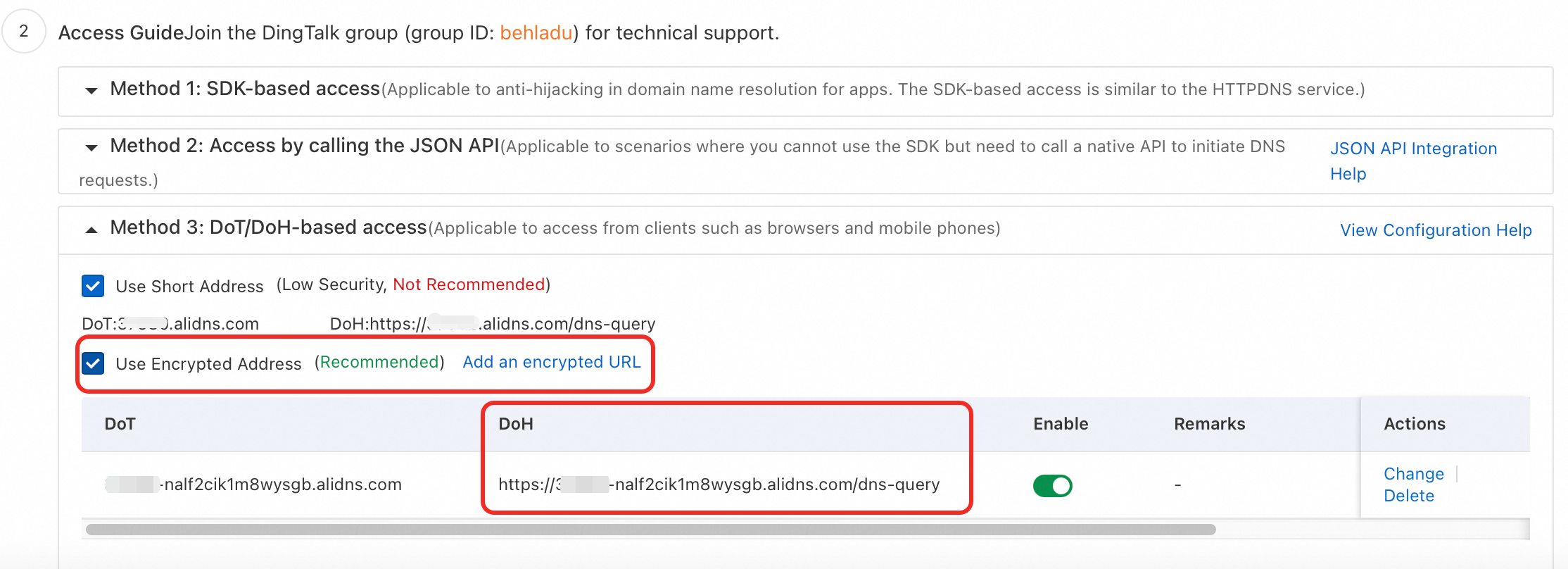
Get the DoH address
Go to the Alibaba Cloud DNS - HTTPDNS page.
Click Access Configuration and enable the encrypted address under Method 3: DoT/DoH-based access.
Integration
Usage in network requests
Obtain the encrypted DoH service URL from the console and use it as the dnsOverHttps parameter in the HTTP request configuration.
let httpRequest = http.createHttp();
httpRequest.request(
  "https://www.aliyun.com",
  {
    dnsOverHttps: "https://*****-****2cik1m8wysgb.alidns.com/dns-query",
    method: http.RequestMethod.GET,
    header: [{
      'Content-Type': 'application/json'
    }],
    expectDataType: http.HttpDataType.STRING,
    usingCache: false,
    priority: 1,
    connectTimeout: 3000,
    readTimeout: 3000,
    usingProxy: false,
  }, (err: BusinessError, data: http.HttpResponse) => {

  }
);
Usage in a webview
Use the web_webview.WebviewController.setHttpDns method to set the secure DNS mode of the Webview to automatic, and provide the DoH URL obtained from the console.
web_webview.WebviewController.setHttpDns(web_webview.SecureDnsMode.AUTO, "https://*****-****2cik1m8wysgb.alidns.com/dns-query")