Scenario
Use Global Traffic Manager (GTM) to direct users to the nearest application service when your services are deployed across multiple regions. GTM can also automatically fail over to another region if a service becomes unavailable. To do this, add your business domain name to GTM and configure intelligent DNS resolution based on regional lines.
Preparation
Your domain
cloud-example.comis hosted on Alibaba Cloud DNS. The subdomain managed by GTM iswww.cloud-example.com.NoteIf your domain uses a third-party DNS provider, add a CNAME record pointing to the GTM access zone name in that provider's console.
A GTM instance is available. If not, purchase a subscription instance.
Intelligent resolution goal:
DNS query source
Application service endpoint
Failover endpoint
South China
1.1.XX.XX
3.3.XX.XX
North China
2.2.XX.XX
3.3.XX.XX
Global
3.3.XX.XX
1.1.XX.XX, 2.2.XX.XX
Solution architecture

Procedure
Go to the Alibaba Cloud DNS - Global Traffic Manager console.
On the Access Domain tab, click Create Access Domain.
In the Select Scenario dialog box, select Custom Scenario.
On the Create Access Domain page, click the access zone name icon and select Basic Configuration.
On the Basic Configuration page, set the required parameters and click Submit. For details, see Configure an access zone name.
On the Access Domain page, click the address pool icon and create three address pools:
China south,China north, andGlobal.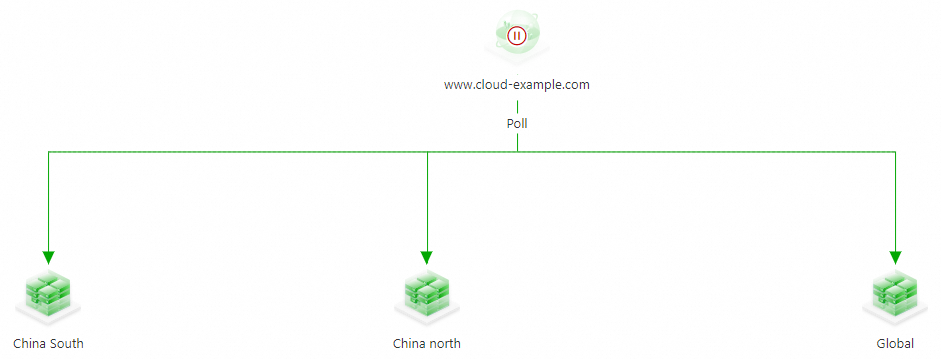
On the Access Domain page, click the address icon and select Basic Configuration. Add the endpoint IP address, configure a health check template (for this example, TCP protocol, port 80), and create the address. Repeat for all required addresses.
NoteIf no health check template exists, click Add Health Check Template. For details, see Health check templates.
ImportantIf you encounter red or orange alerts during setup, check the health status of your addresses.
Click the load balancing policy name under the website config icon and select Configure Load Balancing Policy. To implement a location-based policy, set the load balancing policy between address pools to Nearest Source. For more information, see Set load balancing policies. In the Query Source section, set Query Source to South China, North China, and Global for the three address pools.
ImportantRegional lines are available under the
Region - Chinapath and include province-specific lines.To ensure that clients from unmatched source lines are resolved to an address, configure a Default line.
If an address pool for an intelligent line is unavailable, GTM responds with an address from the global default line.
If all address pools are unavailable, GTM responds with all addresses from the global default address pool using polling. If the default line has multiple address pools, GTM selects the non-empty address pool with the smallest ordinal number. If no global default line exists, GTM uses the non-empty address pool with the smallest ordinal number.

Click the load balancing policy name under the address pool icon and select Configure Load Balancing Policy. To implement active-standby disaster recovery, select Preemptive Mode. For more information, see Address pool configuration.
ImportantThe smaller the ordinal number of an address, the higher its resolution priority. An address with a larger ordinal number is used only when addresses with smaller ordinal numbers are unavailable.
The ordinal number of an address pool serves two purposes. First, for requests from the same source, the address pool with the smaller ordinal number has higher priority. Second, if all address pools become unavailable, GTM returns all IP addresses from the non-empty address pool with the smallest ordinal number.
 Important
This example shows the configuration process. If you see red or orange alerts during configuration, promptly troubleshoot the health status of the addresses.
Configure alert rules for the instance. For details, see Configure alerts.
On the Access Domain page, click the access zone name icon and select Enable.
In the confirmation dialog box, verify the details and click OK to enable the Access Domain.
ImportantIf a DNS record with the same name and type already exists in Alibaba Cloud DNS, GTM policies take precedence over standard domain name resolution for that domain.
If the GTM instance is disabled or deleted, DNS queries fall back to Alibaba Cloud DNS Public Zone records.