Use case
Your application is deployed across two sites, each with a public IPv4 and IPv6 address. When a site is healthy, clients can reach it over either address. If an IPv4 or IPv6 address becomes unhealthy, traffic automatically fails over to a healthy address of the same IP version.
An unhealthy IPv4 address can fail over only to another healthy IPv4 address. The same rule applies to IPv6 addresses.
An unhealthy IPv4 or IPv6 address cannot fail over to an address of a different IP version. This is because the record type is already specified in the DNS query from the client.
Prerequisites
Your domain
cloud-example.comis hosted on Alibaba Cloud DNS. The subdomain managed by GTM iswww.cloud-example.com.NoteIf your domain uses a third-party DNS provider, add a CNAME record pointing to the GTM access zone name in that provider's console.
A GTM instance is available. If not, purchase a subscription instance.
Expected effect
Expected failover behavior:
Source of DNS query | Application service address | Failover address |
Global default (A record request) | 1.1.XX.XX | 2.2.XX.XX |
Global default (AAAA record request) | 240e:f7:7000:c2:3::1XX | 240e:f7:7000:c2:3::2XX |
Procedure
Configure disaster recovery for IPv4 addresses
Go to the Alibaba Cloud DNS - Global Traffic Manager console.
On the Access Domain tab, click Create Access Domain.
In the Select Scenario dialog box, select Primary/Secondary Disaster Recovery.
On the Create Access Domain page, click the access domain icon and select Basic Configuration.
On the Basic Configuration page, configure the parameters and click Submit. For more information, see Step 1. Configure an access domain.
Access Domain: The domain name of the service, such as
www.cloud-example.com.For Record Type, select A. For Bind Instance, select your purchased GTM instance. For Record Type, select A.
On the current page, click the address pool icon and select Basic Configuration.

On the canvas, click the address icon and select Basic Configuration. On the configuration page, add an address and configure its settings, such as a health check template. This example uses the TCP probe protocol to probe port 80 on the server. You can use this method to add an address and associate it with a health check template.
NoteIf no health check template exists, click Add Health Check Template. For details, see Health check templates.
ImportantIf you encounter red or orange alerts during setup, check the health status of your addresses.
You do not need to configure a load balancing policy. The scenario template automatically generates a policy.
ImportantWith one-way data synchronization (from primary to standby), data generated on the standby during a failover cannot be returned to the primary. To prevent data loss upon recovery, set the address pool's load balancing policy to Non-Preemptive Mode. For details, see Configure an address pool.
Configure disaster recovery for IPv6 addresses
Go to the Alibaba Cloud DNS - Global Traffic Manager console.
On the Access Domain tab, click Create Access Domain.
In the Select Scenario dialog box, select Primary/Secondary Disaster Recovery.
On the Create Access Domain page, click the access domain icon and select Basic Configuration.
On the Basic Configuration page, configure the parameters and click Submit. For more information, see Step 1. Configure an access domain.
Access Domain: The domain name that is used for access, such as
www.cloud-example.com. The access domain name must match the domain name in the A record.Record Type: Select AAAA.
ImportantIf the access domain name already has an attached instance, the Bind Instance drop-down list displays the The current access domain name is bound to an instance, and the instance can be reused. option. You can select this option to reuse the instance.
For a single domain name, you can enable instances if you set the Record Type to both A and AAAA. However, setting the Record Type to A and CNAME or AAAA and CNAME causes a conflict and prevents the instances from being enabled.
Set Global TTL (Seconds) to
30. The Status is disabled by default. We recommend enabling the access domain only after you have configured the address pool, addresses, and load balancing policy.Follow the procedure for configuring disaster recovery for IPv4 addresses to configure the IPv6 address pool, addresses, and health checks.
ImportantIf the monitored object is an IPv6 address, set Type to IPv6 when you create a monitoring template.
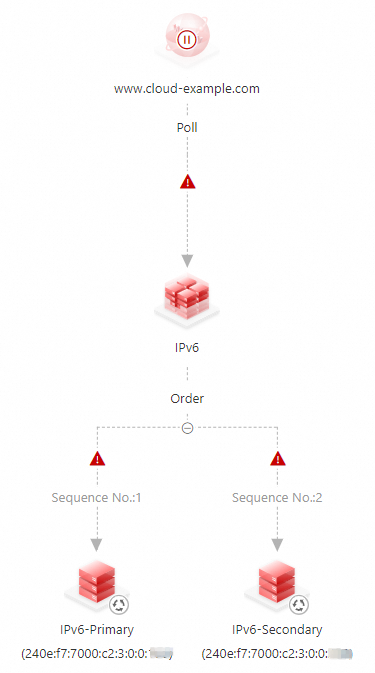
Configure monitoring and alerting for the instance. For more information, see Alert configuration.
On the Access Domain page, click the icon for the access domain and select Enable.
In the confirmation dialog box, verify the details and click OK to enable the Access Domain.
ImportantIf a DNS record with the same name and type already exists in Alibaba Cloud DNS, GTM policies take precedence over standard domain name resolution for that domain.
If the GTM instance is disabled or deleted, DNS queries fall back to Alibaba Cloud DNS Public Zone records.