Configure Global Traffic Manager (GTM) to route DNS queries to the application server on the same carrier network as the user, and automatically fail over to a healthy server when an endpoint becomes unavailable.
Scenarios
Most enterprise applications use IP addresses from multiple carriers, which can cause cross-network latency, packet loss, and service unavailability. Global Traffic Manager (GTM) returns the IP address of an application server on the same carrier network as the requesting user, enabling nearest-server access and faster connections. When a server on one carrier network fails, GTM switches traffic to a server on another carrier network, minimizing downtime and ensuring service continuity.
Prerequisites
The Access Domain relies on a domain name within an Public Zone. Ensure that at least one domain name in the Public Zone has a DNS Server IP Address with a Available status.
NoteIf your service domain name does not use Alibaba Cloud DNS, you can still use GTM. After you generate an access domain name using a different domain name, add a CNAME record for the service domain name at your DNS provider and point the record to the GTM Access Domain.
If you use the subscription billing method, you must purchase a subscription instance in advance.
Solution overview
This solution provides the following intelligent DNS resolution:
Source of DNS resolution request | Address Pool | Application server endpoint | Failover address |
Shift | Mobile | 1.1.XX.XX | 2.2.XX.XX, 3.3.XX.XX |
China Telecom | Telecom | 2.2.XX.XX | 1.1.XX.XX, 3.3.XX.XX |
China Unicom | Unicom | 3.3.XX.XX | 1.1.XX.XX, 2.2.XX.XX |
Global Default | Global | 1.1.XX.XX, 2.2.XX.XX, 3.3.XX.XX | If all addresses become unhealthy, a fallback policy is triggered to return all IP addresses. |
Architecture

Procedure
1. Configure Access Domain
On the Access Domain tab, click the Create Access Domain button.
In the dialog box, select Single Data Center for Multiple ISPs.
Click the Access Domain icon > Basic Configuration.
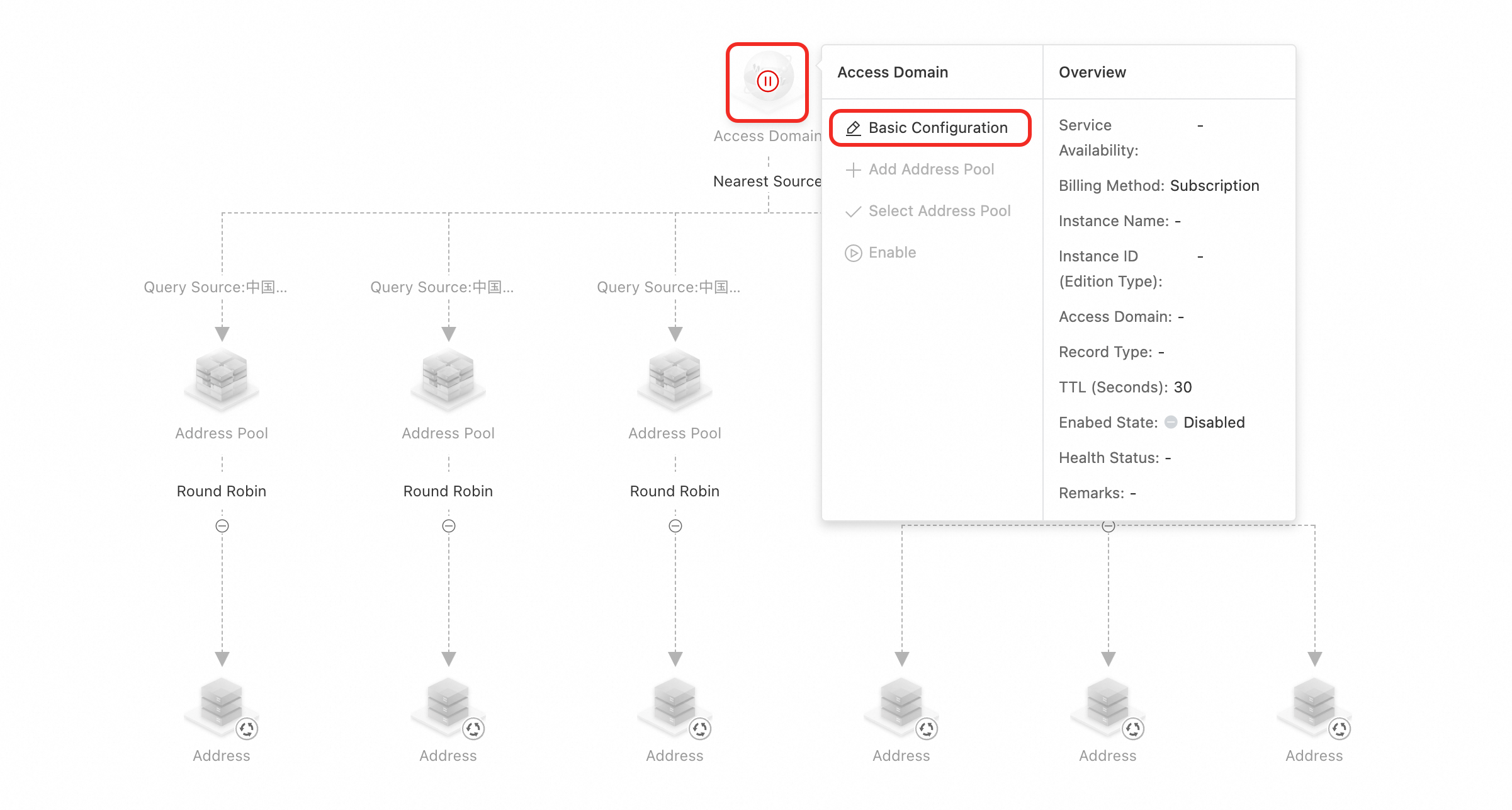
Complete the basic information and keep Enabed State set to Disabled. For more information, see Add Domain Name Configuration.
2. Configure address pools and addresses
On the Access Domain page, click the address pool icon > Basic Configuration.
Name the four address pools Mobile, Telecom, Unicom, and Global. For more information, see Address Pool Configuration.
In the address pool basic configuration dialog box, set address pool type to IPv4, set address pool health check condition to At least 1 available address in the address pool, and turn on Enable Status to enable the address pool.
Click the address icon > Basic Configuration and add
1.1.XX.XXfor Mobile,2.2.XX.XXfor Telecom, and3.3.X.Xfor Unicom.Click Global address pool > Select Address to add the three addresses that you previously created.
3. Configure load balancing policies
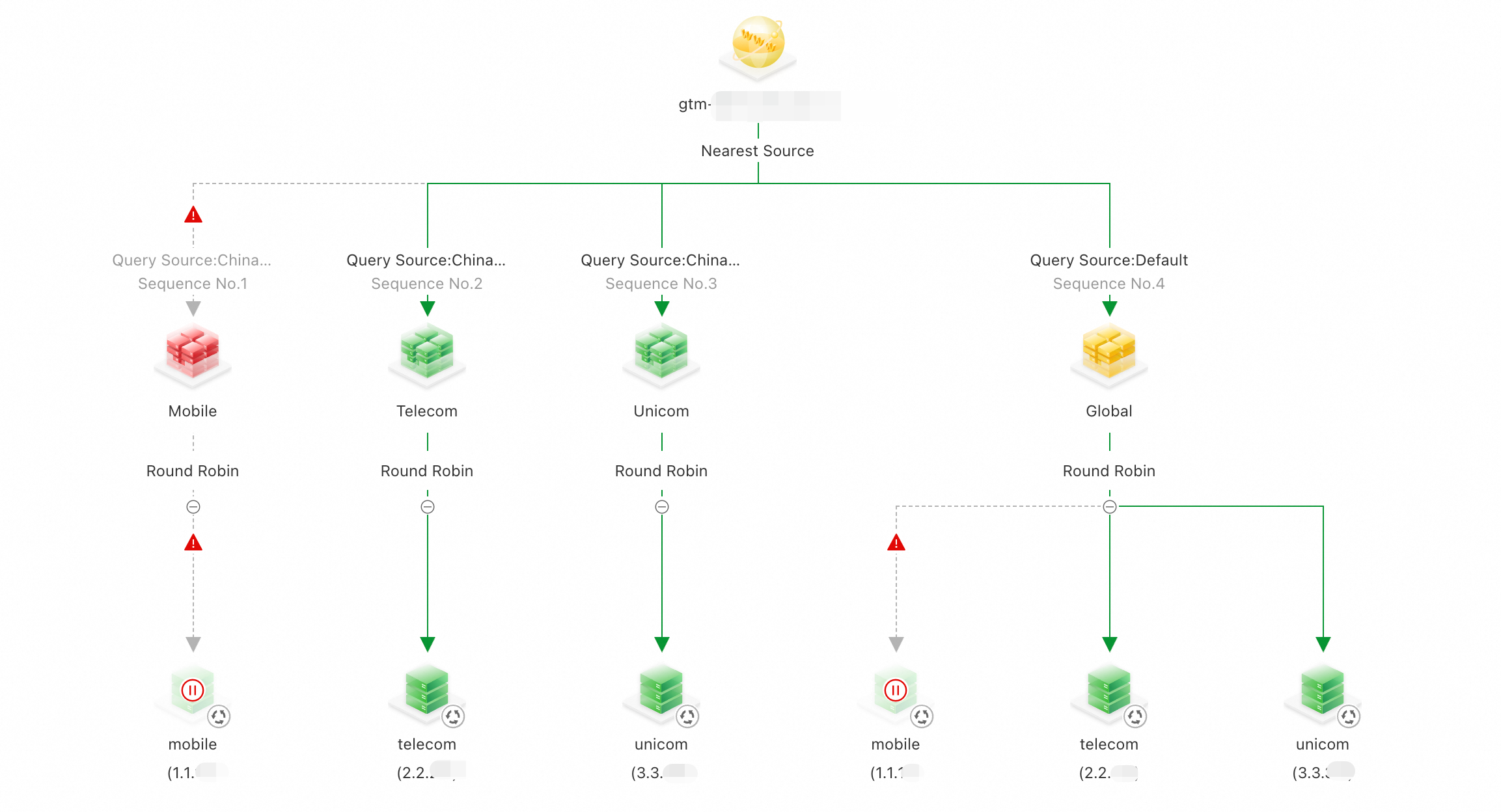
Because you selected a preset scenario, the Load Balancing Policy is already set to Nearest Source. If this is not the case, you can click the load balancing policy under Access Domain to configure it.
Because you selected a preset scenario, the Load Balancing Policy is selected by default. If this policy is not set, you can click Query Source above the address pool to complete the Query Source.
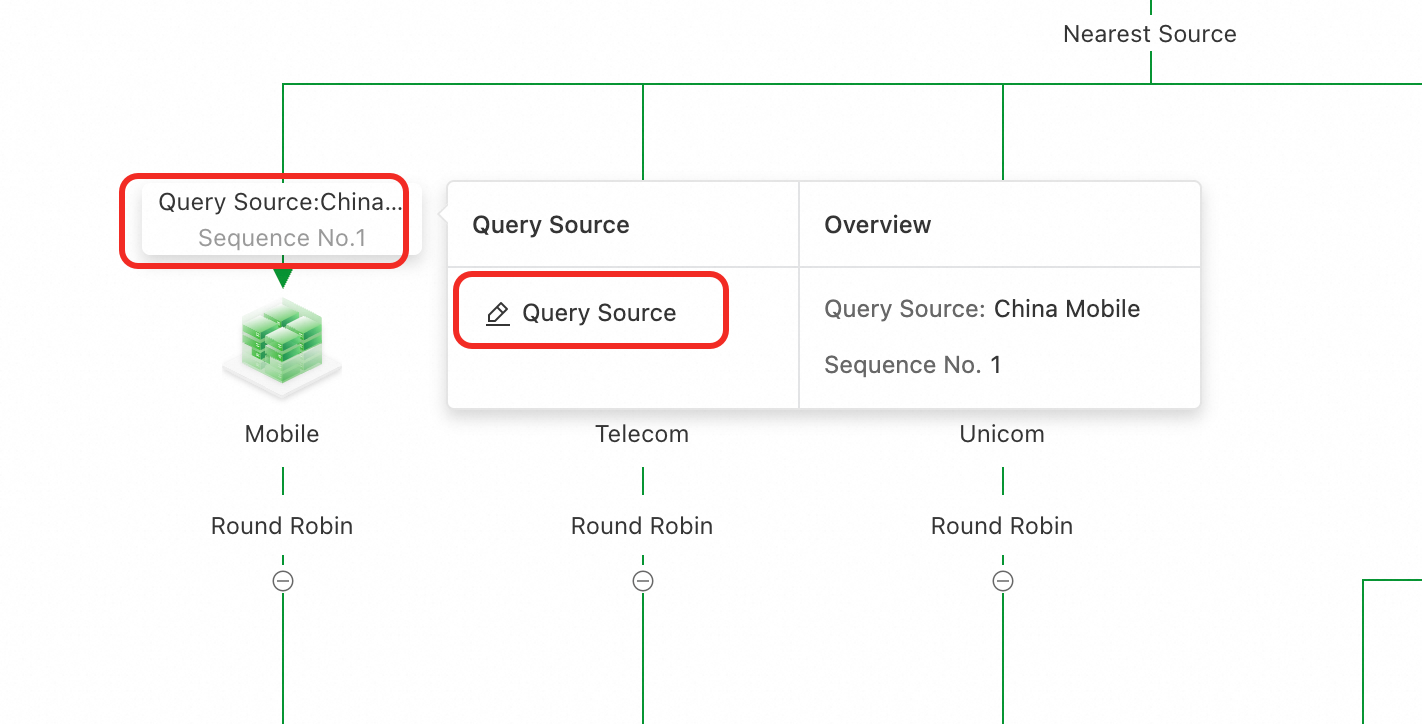
In the Request Source Configuration dialog box, configure the following mappings in order:
Sequence 1: request source China Mobile, address pool name Mobile
Sequence 2: request source China Telecom, address pool name Telecom
Sequence 3: request source China Unicom, address pool name Unicom
Sequence 4: request source Default, address pool name Global
Load balancing behavior: available address pools are matched based on the granularity of the source line first. If one source matches multiple available address pools, the available address pool with the smallest sequence number is returned.
The complete configuration:
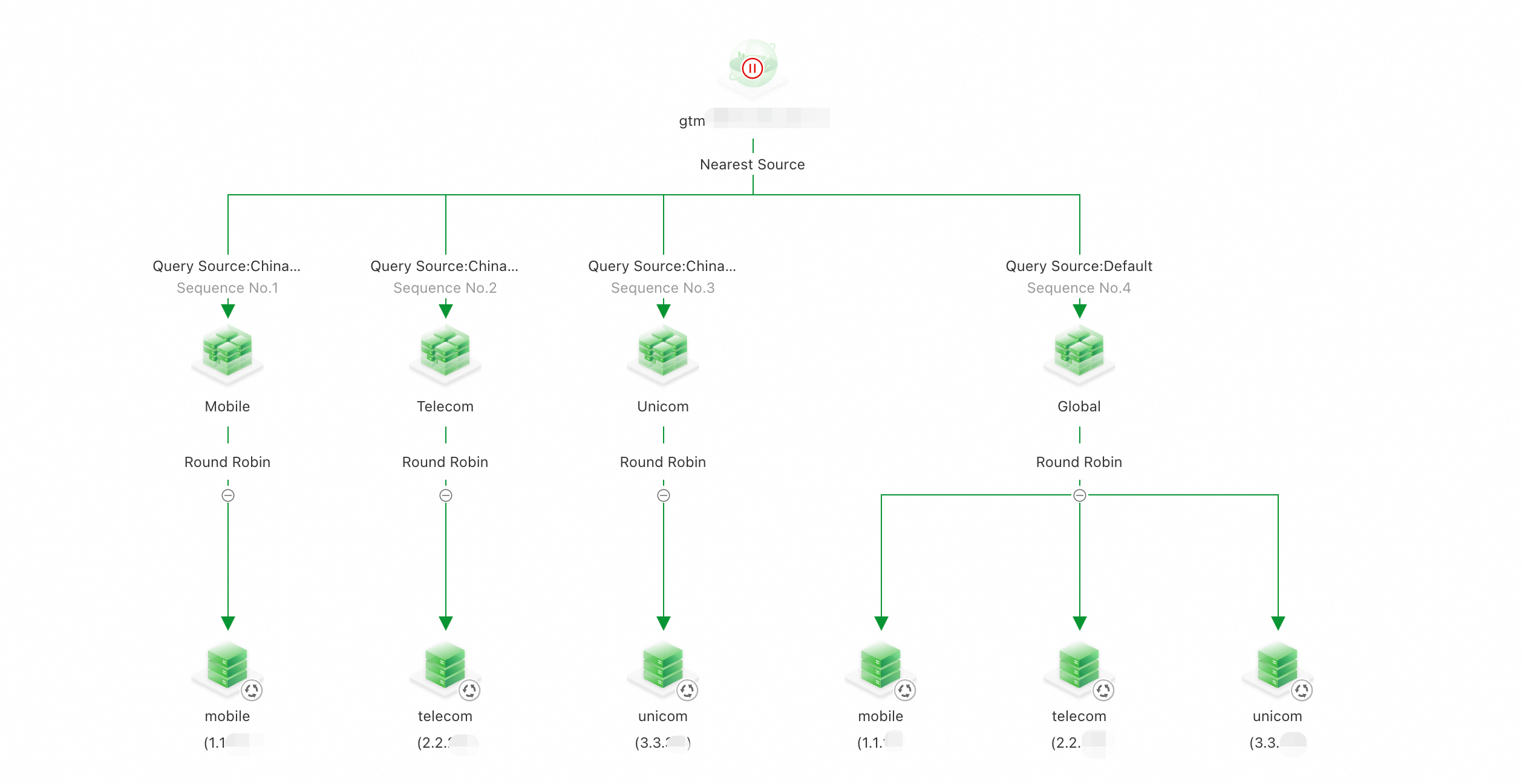
4. Enable Access Domain and ingest the stream
Click the Access Domain icon, and then click Enable for the Access Domain.
ImportantIf a domain name record with the same name and type exists in the Public Zone, the system first uses the Global Traffic Manager (GTM) policy to intelligently schedule and resolve queries, enabling advanced features such as traffic load balancing or failover.
If you disable or delete a Access Domain, it will be resolved by the Public Zone.
You can use dig/nslookup command to verify that the results from different carriers follow the Nearest Source principle.
GTM uses the Nearest Source policy to return IP addresses.
After you verify the configuration of the Access Domain, go to the DNS provider for your business domain name and add a CNAME record that points to the Service Domain Name.
5. Verify failover
Scenario 1: The service address for the China Mobile line is abnormal
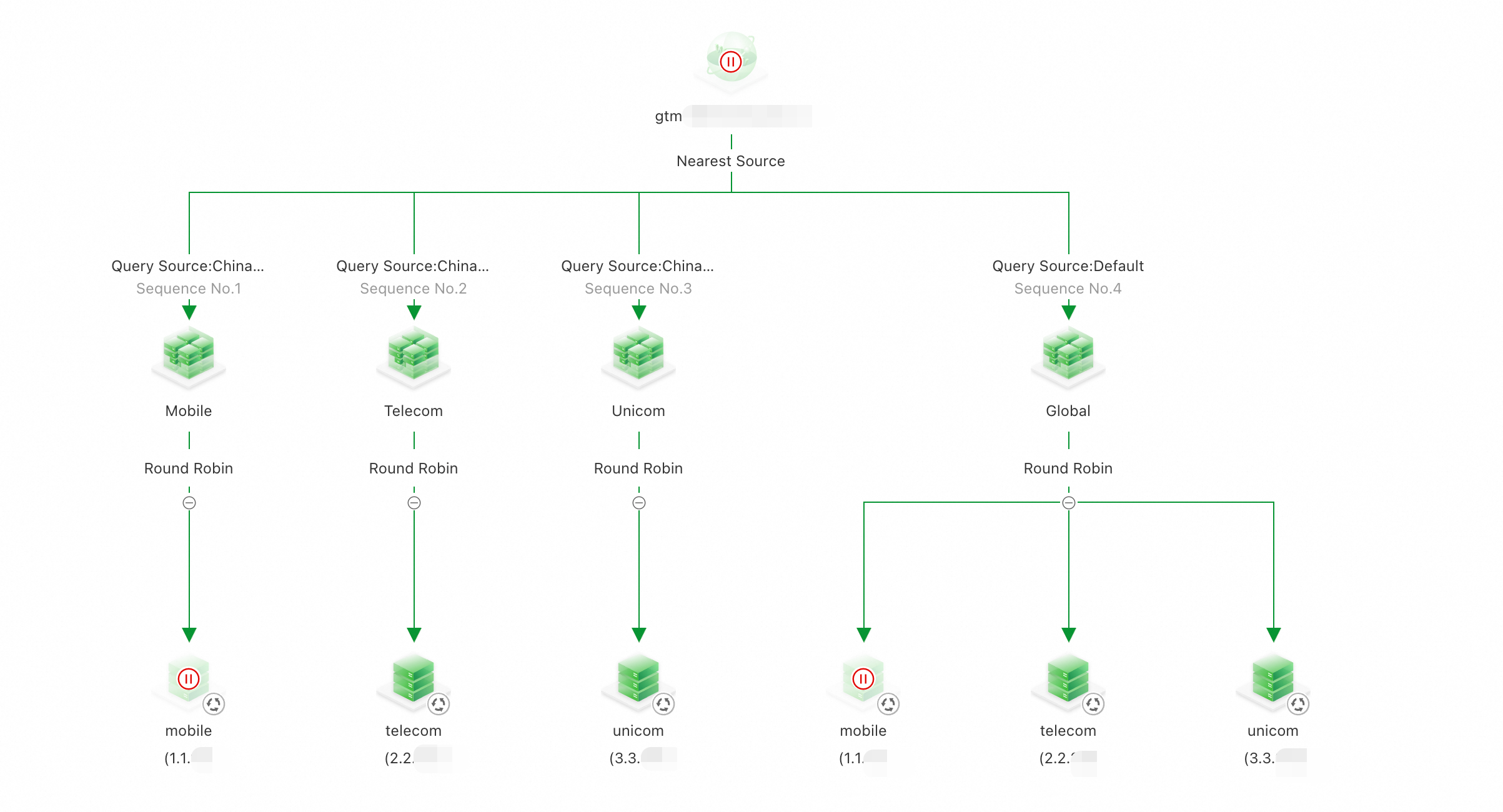
Probe results:
Because the China Mobile endpoint is unhealthy, resolution switches to the first available IP address on the default line: telecom (2.2.XX.XX). The failover succeeds, and other lines continue using the Nearest Source policy.
Scenario 2: The service addresses for both the China Mobile and China Telecom lines are abnormal
Probe results: resolution requests from the China Mobile, China Telecom, and China Unicom probe lines in Shanghai all return status code 610, and the resolution results are IP addresses that start with 3.3.
Because the China Mobile and China Telecom endpoints are unhealthy, GTM routes all traffic to the first available IP address on the default line: unicom (3.3.XX.XX). The failover succeeds using the Nearest Source policy.