Data Management (DMS) allows you to manage security rules for relational and non-relational databases on the SQL Console tab. The definition and classification of security rules vary for relational and non-relational databases. This topic describes the checkpoints, factors, and actions available on the SQL Console tab for Redis databases.
How security rules work
Security rules on the SQL Console tab are evaluated through checkpoints. Each checkpoint intercepts a specific category of Redis commands before execution and evaluates the applicable rules.
Each rule follows an IF/THEN structure:
IF: A condition built from factors — system variables that describe the current command and the user running it (for example, whether the command is a write operation, or whether the environment is production).
THEN: An action — what DMS does when the condition is met (for example, reject the command or run it without a permission check).
The following diagram shows the evaluation flow:
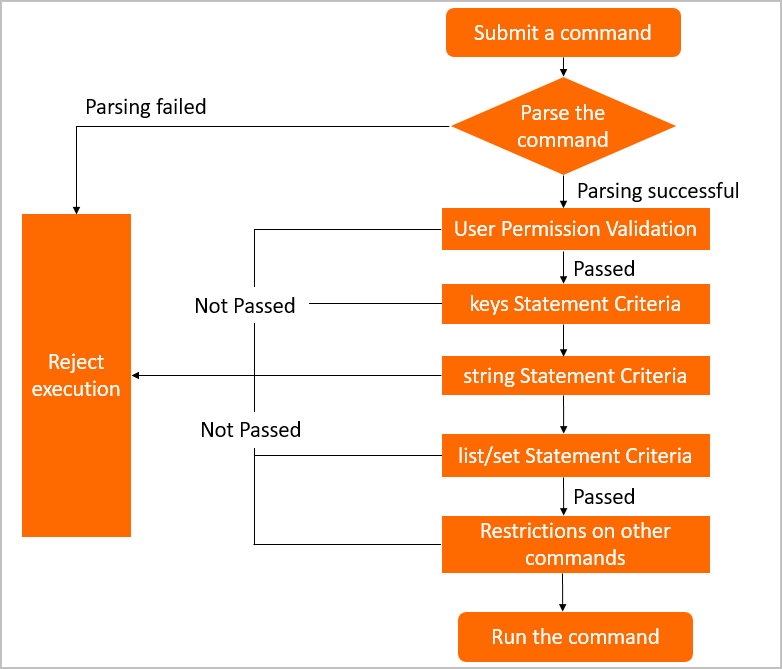
DMS provides predefined configurations and rules for each checkpoint. Modify configurations, change rule states, or create custom rules to match your access control requirements. For more information, see Configure security rules.
Checkpoints
Each checkpoint targets a specific group of Redis commands. Rules configured under a checkpoint apply only to commands in that group.
Standard Redis checkpoints
| Checkpoint | Commands controlled |
|---|---|
| Permission Execution Statement Criteria | Allows you to set constraints on the permissions for command execution. For example, you can configure this checkpoint so that DMS checks whether a user has required permissions on a database, table, or column when the user submits a command. |
| Statement Criteria: Keys | Key-related commands |
| Statement Criteria: String | String-related commands |
| Statement Criteria: List | List-related commands |
| Statement Criteria: SET | Set-related commands |
| Statement Criteria: SortedSet | Sorted set-related commands |
| Statement Criteria: Hash | Hash table-related commands |
| Statement Criteria: Other | Commands that do not belong to any of the above types |
Tair-specific checkpoints
These checkpoints apply only to instances using Tair extensions. If your Redis instance does not use Tair modules, these checkpoints are not relevant to your setup.
| Checkpoint | Commands controlled |
|---|---|
| Statement Criteria: Cpc | TairCpc commands |
| Statement Criteria: Ts | TairTS commands |
| Statement Criteria: Roaring | TairRoaring commands |
| Statement Criteria: Search | TairSearch commands |
Factors
A factor is a system built-in variable that provides context for rule evaluation. Use factors to write the IF condition of a security rule.
Factor names use the prefix @fac. followed by the factor's display name. Each checkpoint tab on the security rule set Details page shows the factors available for that checkpoint.
| Factor | Description |
|---|---|
@fac.cmd_type | The type of the command. For valid values, see Syntax support for Redis. |
@fac.env_type | The environment type. The value is the display name of the environment, such as DEV or PRODUCT. For more information, see Change the environment type of an instance. |
@fac.is_read | Whether the command is a read command. Valid values: true, false. |
@fac.is_write | Whether the command is a write command. Valid values: true, false. |
@fac.current_sql | The current command. |
@fac.user_is_admin | Whether the current user is a DMS administrator. Valid values: true, false. |
@fac.user_is_dba | Whether the current user is a database administrator (DBA). Valid values: true, false. |
@fac.user_is_inst_dba | Whether the current user is a DBA of the current database instance. Valid values: true, false. |
Actions
An action defines what DMS does when a rule's IF condition is met. Action names use the prefix @act. followed by the action's display name. Each checkpoint tab on the Details page shows the actions available for that checkpoint.
| Action | Description |
|---|---|
@act.reject_execute | Rejects the request to run the current command. |
@act.allow_execute | Allows the current command to run. |
@act.check_redis_permission | Checks whether the current user has permission to run the command. Runs the command if the user has permission. |
@act.query_without_permission_check | Runs the current command without checking the current user's permissions. |
What's next
Configure security rules — modify predefined rules, change rule states, or create custom rules
Syntax support for Redis — view all Redis commands supported by DMS and the valid values for
@fac.cmd_type