Data Management (DMS) enforces security rules on MongoDB commands submitted through the SQL Console tab. This topic describes the checkpoints, factors, and actions available for MongoDB rule sets.
How it works
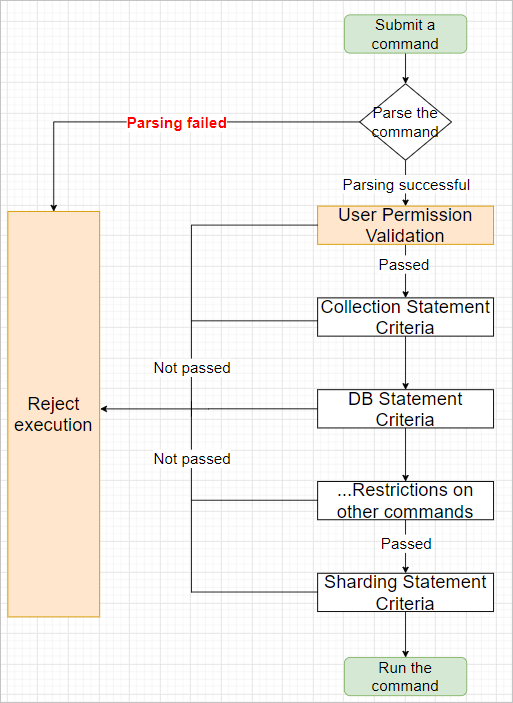
The following diagram shows how checkpoints work when a command is submitted through the SQL Console.
Checkpoints
Checkpoints define the categories of MongoDB commands that DMS evaluates. Each checkpoint corresponds to a command category and can have its own rule logic.
| Checkpoint | Scope |
|---|---|
| Basic Configuration Item | Basic rule set settings: maximum number returned per query and whether the result set is editable |
| User Permission Validation | Whether DMS checks the permissions of specific users (for example, regular users) when they submit commands |
| Collection Statement Criteria | Constraints on collection commands |
| DB Statement Criteria | Constraints on database commands |
| Cache Query Statement Criteria | Constraints on query plan cache commands |
| User Management Statement Criteria | Constraints on user management commands |
| Role Management Statement Criteria | Constraints on role management commands |
| Replication Set Statement Criteria | Constraints on replica set commands |
| Sharding Statement Criteria | Constraints on sharding commands |
Factors and actions
Factors and actions are the building blocks of security rules. Factors supply the context DMS evaluates; actions define what DMS does when a rule's IF condition is met.
Factors
A factor is a system built-in variable that provides context for rule evaluation, such as the command subcategory or the current user's role. Factor names use the prefix @fac. followed by the factor's display name. Different checkpoints expose different factors on the Details page of a rule set.
| Factor | Description |
|---|---|
@fac.sql_sub_type | The subcategory of the command. For valid values, see Supported MongoDB commands. |
@fac.env_type | The environment type, represented as a display name such as DEV or PRODUCT. For details, see Change the environment type of an instance. |
@fac.current_sql | The current command. |
@fac.user_is_admin | Whether the current user is a DMS administrator. Valid values: true, false. |
@fac.user_is_dba | Whether the current user is a database administrator (DBA). Valid values: true, false. |
@fac.user_is_inst_dba | Whether the current user is a DBA of the current database instance. Valid values: true, false. |
@fac.user_is_sec_admin | Whether the current user is a security administrator. Valid values: true, false. |
Actions
An action defines what DMS does when the conditions in the IF statement are satisfied. Action names use the prefix @act. followed by the action's display name. Different checkpoints expose different actions on the Details page of a rule set.
| Action | Description |
|---|---|
@act.reject_execute | Rejects the request to run the current command. |
@act.allow_execute | Allows the current command to run. |
@act.reject_sql_type_execute | Rejects the request to run a specific command subcategory. Specify the subcategory after the action name. Example: @act.reject_sql_type_execute 'UPDATE'. |
@act.allow_sql_type_execute | Allows a specific command subcategory to run. Specify the subcategory after the action name. |
What's next
Supported MongoDB commands — full list of command subcategories and valid values for
@fac.sql_sub_typeConfigure security rules — create or modify rule sets for your MongoDB instances