This guide shows developers how to integrate with the Data Agent service using OpenAPI. It covers the core architecture of Data Agent, explains the API call workflow, and provides complete code implementations for two core use cases.
Architecture overview
Resource model
The Data Agent service relies on three core abstraction layers. Understanding their relationship is essential for a successful integration:
Layer | Description | Lifecycle management |
Agent Resource | A logical record of the resources required for a Data Agent to run, which provides tenant isolation at the RAM user level. All operations must specify an | Managed automatically. Follows the runtime lifecycle; destroyed after the last session becomes inactive (typically after a 1-hour idle period). |
Agent Runtime | The execution environment instantiated from an Agent resource when a session starts. It is responsible for inference and tool calls. OpenAPI callers do not need to interact directly with this layer. | Managed automatically. Destroyed to release resources when the last associated session becomes inactive (typically after a 1-hour idle period). |
Session Resource | The context of a specific conversation, including custom configurations. A session is automatically routed to the most recently active Agent runtime. | Temporary. After a task is completed, the session enters an idle period of about 6 hours. If there are no further interactions, it is automatically reclaimed. |
Interaction flow
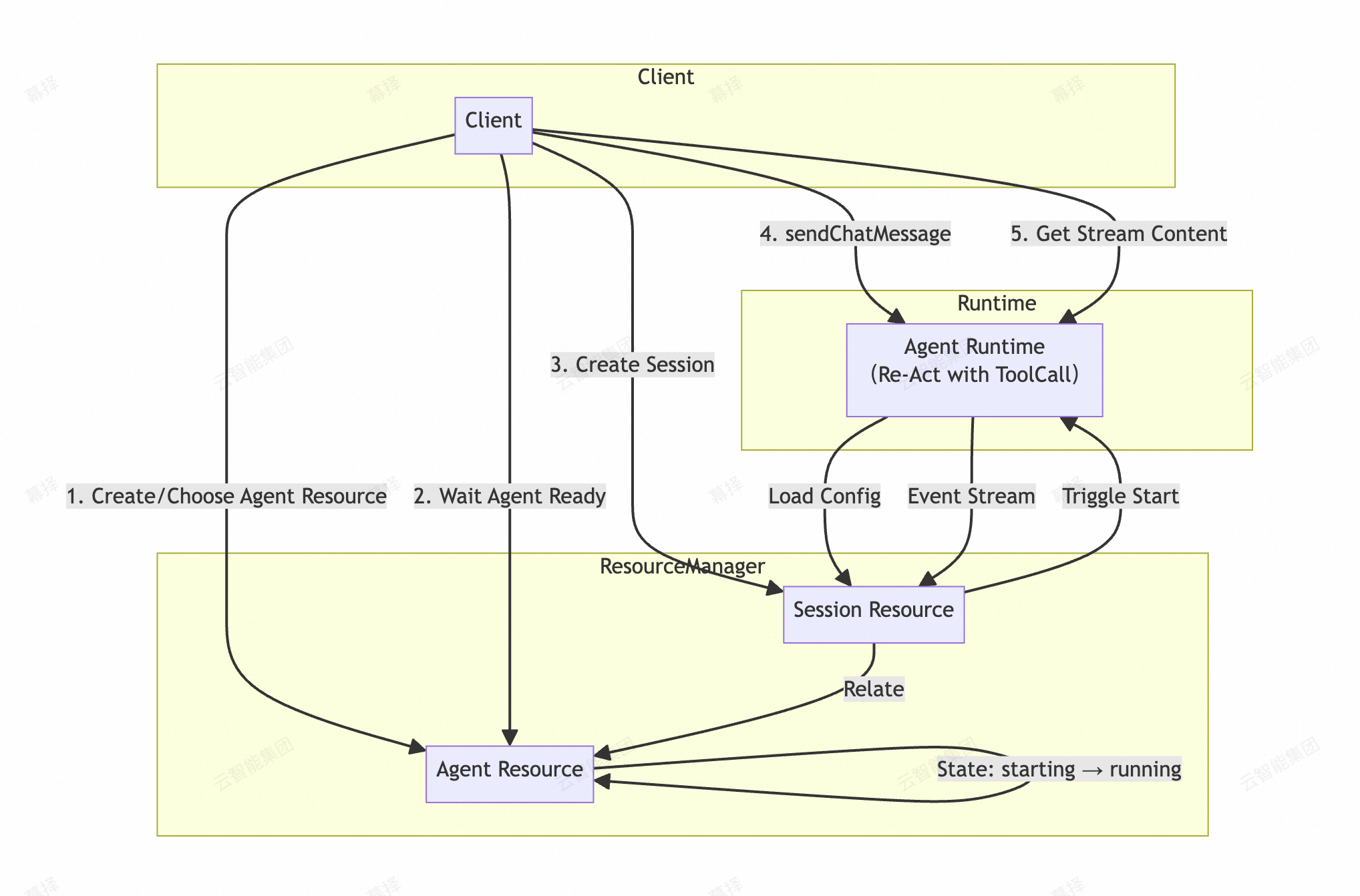
Flow
Agent isolation: Agent resources enforce strict tenant isolation at the RAM user level. Requests with an
AgentIdthat does not match the target resource are rejected.Decoupled session and runtime: The
CreateDataAgentSessionoperation creates a logical session resource and starts the Agent runtime if it is not already running. The actual computation is triggered bySendChatMessage.Asynchronous processing:
SendChatMessageis an asynchronous operation. A successful API call only confirms that the message has been queued for processing. The Data Agent processes the message in the background.
Call flow and state management
Complete call flow
The following flow covers both starting a new conversation and sending follow-up messages in an existing session:
Check whether you have a valid SessionId. If not, call
CreateDataAgentSessionto obtain a SessionId and AgentId.Call
DescribeDataAgentSessionto check the current status.Branch based on AgentStatus:
STARTING: The Agent is starting up. Wait 2 to 3 seconds and retry step 2.RUNNING: The Agent is ready. Proceed to check the SessionStatus in step 4.STOPPED: The Agent has been reclaimed. Return to step 1 and create a new session.
Branch based on SessionStatus:
INITorIDLE: The session is idle and ready to accept messages. Proceed to step 5.RUNNING: The previous message is still being processed. Wait or callGetChatContentto retrieve the current result.
Call
SendChatMessageto send a message and obtain a MessageId.Poll
GetChatContentuntil the complete response is received.
Core principle: Always check the status before sending a message. If the status is abnormal, recreate the session. If the status is normal, proceed with sending.
Send follow-up messages in an existing session
To send follow-up messages in an existing session, you do not need to create a new session. However, you must check the session status first:
Call
DescribeDataAgentSessionto verify that AgentStatus isRUNNINGand SessionStatus isIDLE.Call
SendChatMessageto send the message.Poll
GetChatContentto retrieve the response.
Follow-up interactions fall into two categories:
User-initiated follow-up: After the Agent completes its analysis, you ask a new question.
Responding to Agent prompts: Data Agent may proactively ask questions, such as requesting you to upload a data source or provide additional information. Send your answer through
SendChatMessage.
When responding to a Data Agent prompt, set the MessageType parameter of SendChatMessage to additional, and set the Question parameter to the original text of the Agent's prompt. The Agent's prompts appear in the SSE stream. For parsing details, see the GetChatContent API documentation.
Quick reference
Scenario | API | Prerequisites |
Start a new conversation |
| None |
Check session status |
| None |
Send a message |
| AgentStatus = RUNNING and SessionStatus = INIT or IDLE |
Get the response |
| SessionStatus is not UNAVAILABLE |
GetChatContent supports resumable retrieval. If a call is interrupted, use the same SessionId with the Checkpoint parameter to resume from where you left off.
Polling strategy
Wait for the Agent to become ready (poll DescribeDataAgentSession)
Wait 1 to 2 seconds before starting to poll.
Use a polling interval of 2 to 3 seconds.
The Agent typically starts within a few seconds.
If the Agent is not ready after 2 minutes, log an alert and investigate.
Get the response (poll GetChatContent)
Adjust the polling interval based on your use case. A 1 to 2 second interval works well for most scenarios.
Before you begin
Configure permissions
To ensure your OpenAPI calls succeed, grant the following minimum set of permissions to your RAM user or role.
{
  "Version": "1",
  "Statement": [
    {
      "Effect": "Allow",
      "Action": [
        "dms:CreateDataAgentSession",
        "dms:DescribeDataAgentSession",
        "dms:SendChatMessage",
        "dms:GetChatContent",
        "dms:DescribeFileUploadSignature",
        "dms:FileUploadCallback",
        "dms:DeleteFileUpload",
        "dms:ListFileUpload"
      ],
      "Resource": "*"
    }
  ]
}
Get the DMSUnit parameter
The DMSUnit parameter of the CreateDataAgentSession API specifies the data processing region for DMS metadata management. This is not the same as the Alibaba Cloud region (RegionCode). Each Alibaba Cloud account is associated with a single DMSUnit, and the metadata of database instances managed by DMS is stored in the corresponding metadata database.
To find your data processing region, log on to DMS 5.0 and check the data processing region in the upper-right corner of the page. If this field is not displayed, the default value is cn-hangzhou.
An incorrect DMSUnit value may cause database analysis to fail. Make sure to verify your data processing region before passing this parameter.
Configure SDK dependencies
This guide provides examples using the Java SDK, which is available in both asynchronous and synchronous versions for different use cases.
Asynchronous SDK (recommended for conversational interactions): Suitable for streaming data processing.
<dependency>
    <groupId>com.aliyun</groupId>
    <artifactId>alibabacloud-dms20250414</artifactId>
    <version>1.0.4</version> <!-- Use the latest version -->
</dependency>
Synchronous SDK (recommended for file management): Suitable for standard request-response operations, such as getting an upload signature.
<dependency>
  <groupId>com.aliyun</groupId>
  <artifactId>dms20250414</artifactId>
  <version>1.8.2</version> <!-- Use the latest version -->
</dependency>
Core use cases
Multi-turn dialogue
This section shows you how to use the asynchronous SDK to implement a complete conversational interaction.
Initialize the client:
import com.aliyun.auth.credentials.Credential;
import com.aliyun.auth.credentials.provider.StaticCredentialProvider;
import com.aliyun.dms20250414.AsyncClient;
import darabonba.core.client.ClientOverrideConfiguration;
import darabonba.core.enums.SignatureVersion;
import darabonba.core.srv.Configuration;

// ...

StaticCredentialProvider provider = StaticCredentialProvider.create(
    Credential.builder()
        .accessKeyId("YOUR_ACCESS_KEY_ID")
        .accessKeySecret("YOUR_ACCESS_KEY_SECRET")
        .build()
);

AsyncClient client = AsyncClient.builder()
        .region("cn-hangzhou") // Region ID
        .credentialsProvider(provider)
        .serviceConfiguration(Configuration.create()
                .setSignatureVersion(SignatureVersion.V3)
        )
        .overrideConfiguration(
                ClientOverrideConfiguration.create()
                        .setProtocol("HTTPS")
                        .setEndpointOverride("dms.cn-hangzhou.aliyuncs.com")
        )
        .build();
Code example: The following code shows the complete workflow: creating a session, polling its status, sending a message, and receiving a streaming response.
import com.aliyun.dms20250414.models.*;
import com.aliyun.common.utils.StringUtils;
import com.google.gson.Gson;
import java.util.concurrent.CompletableFuture;

// ... Assume the client is initialized

// Step 1: Create a session
CreateDataAgentSessionRequest request = CreateDataAgentSessionRequest.builder()
    .DMSUnit("cn-hangzhou") // DMS unit identifier, usually the same as the region
    .title("test-session")  // The session title
    .build();

CompletableFuture<CreateDataAgentSessionResponse> future = client.createDataAgentSession(request);
CreateDataAgentSessionResponseBody.Data data = future.get().getBody().getData();

String agentId = data.getAgentId();
String sessionId = data.getSessionId();
String agentStatus = data.getAgentStatus();

System.out.println("Session created. SessionId: " + sessionId + ", AgentId: " + agentId);

// Step 2: Poll until the Agent runtime is ready
// Note: The initial startup may take some time. Set a reasonable timeout and polling interval (at least 1s is recommended).
while (!StringUtils.equalsIgnoreCase(agentStatus, "running")) {
    DescribeDataAgentSessionRequest req = DescribeDataAgentSessionRequest.builder()
        .DMSUnit("cn-hangzhou")
        .sessionId(sessionId)
        .build();

    DescribeDataAgentSessionResponse resp = client.describeDataAgentSession(req).get();
    agentStatus = resp.getBody().getData().getAgentStatus();
    System.out.println("Current status: " + agentStatus);
    Thread.sleep(1000);
}

System.out.println("Agent is RUNNING. Ready to send message.");

// Step 3: Send the user message
SendChatMessageRequest msgReq = SendChatMessageRequest.builder()
    .DMSUnit("cn-hangzhou")
    .agentId(agentId)
    .sessionId(sessionId)
    .messageType("primary") // This is a fixed value.
    .message("Can you dance?")   // User input
    .build();

client.sendChatMessage(msgReq).get(); // You only need to confirm that the message was sent successfully.

System.out.println("Message sent. Waiting for response stream...");

// Step 4: Receive the streaming response (SSE)
GetChatContentRequest contentReq = GetChatContentRequest.builder()
    .DMSUnit("cn-hangzhou")
    .agentId(agentId)
    .sessionId(sessionId)
    .build();

// Use ResponseIterable to support streaming reads over Server-Sent Events (SSE).
ResponseIterable<GetChatContentResponseBody> stream =
    client.getChatContentWithResponseIterable(contentReq);

for (GetChatContentResponseBody event : stream) {
    System.out.println("Received chunk: " + new Gson().toJson(event));
    // Process fields such as event.getData().getContent().
}

System.out.println("\n--- End of Stream ---");
System.out.println("Full response: " + fullResponse.toString());

// (Optional) Step 5: Get Agent-generated artifacts (such as reports)

ListFileUploadRequest listFileUploadRequest = ListFileUploadRequest.builder()
        .sessionId(sessionId)
        .fileCategory("WebReport")
        .build();

CompletableFuture<ListFileUploadResponse> response = client.listFileUpload(listFileUploadRequest);
ListFileUploadResponse listFileUploadResponse = response.get();
System.out.println((listFileUploadResponse.getBody().getData().get(0).getDownloadLink()));

client.close();
File upload and management
This section shows you how to use the synchronous SDK to upload, confirm, and delete files to provide data for the Data Agent to analyze.
Process overview
Get a signature: Call
DescribeFileUploadSignatureto obtain the temporary credentials and configuration required for a direct upload to OSS.Upload the file: Use an HTTP client to construct a
multipart/form-dataPOST request to upload the file directly to the OSS address specified in the signature.Confirm the upload: After the file uploads successfully, call
FileUploadCallbackto notify the DMS service and obtain aFileId.(Optional) Delete the file: Call
DeleteFileUploadwith theFileIdto delete the uploaded file.
Detailed process
Call DescribeFileUploadSignature to get a signature
Config config = new Config()
  .setAccessKeyId("**********")
  .setAccessKeySecret("**********")
  .setEndpoint("dms.cn-hangzhou.aliyuncs.com")
  .setRegionId("cn-hangzhou");

// Create a DMS client instance.
com.aliyun.dms20250414.Client client = new com.aliyun.dms20250414.Client(config);

// Step 1: Get the file upload signature information.
// Call the describeFileUploadSignature method to get the signature and configuration information required for the OSS upload.
DescribeFileUploadSignatureRequest request = new DescribeFileUploadSignatureRequest();
DescribeFileUploadSignatureResponse response = client.describeFileUploadSignature(request);

// response.getBody().getData() returns the following information, which is required for the subsequent file upload.
// ossCredential
// ossDate
// ossSecurityToken
// ossSignature
// ossSignatureVersion
// policy
// uploadDir
// uploadHost
Upload the file using the signature information
Code example:
import okhttp3.*;
import java.io.File;
import java.io.IOException;

/**
  * <dependency>
  *     <groupId>com.squareup.okhttp3</groupId>
  *     <artifactId>okhttp</artifactId>
  *     <version>4.12.0</version>
  * </dependency>
  */
public class Main {

    public static void main(String[] args) throws IOException {
        OkHttpClient client = new OkHttpClient();

        // The following variables are placeholders for the values returned by the DescribeFileUploadSignature API.
        String policy = "eyJjb25kaXRpb25zIjpbeyJ4LW9zcy1jcmVkZW50aWFsIjoiU1RTLk5aZXdMdlN5SFRzdURFRGprSlh4VFF3YjgvMjAyNjAxMDMvY24taGFuZ3pob3Uvb3NzL2FsaXl1bl92NF9yZXF1ZXN0In0seyJ4LW9zcy1kYXRlIjoiMjAyNjAxMDNUMDYzN**********************************";
        String signature = "623e53b1d07431d17cd60389329de2906882d8c4eb****************";
        String signatureVersion = "OSS4-HMAC-SHA256";
        String credential = "STS.NZewLvSy**********/20260103/cn-hangzhou/oss/aliyun_v4_request";
        String date = "20260103T063703Z";
        String securityToken = "CAIS4gJ1q6Ft5B2yfSjIr5nQPPbCvqZp47GeRmP1jmsfVPd4vrLJ2jz2IHhMdXlrCOgYt/8xnG1V6f8flrJ/ToQAX0HfatZq5ZkS9AqnaoXM/te496IFg5D9r6Jc9c6gjqHoeOzcYI73WJXEMiLp9EJaxb/9ak/RPTiMOoGIjphKd8keWhLCAxNNGNZRIHkJyqZYTwyzU8ygKRn3mGHdIVN1sw5n8wNF5L+439eX52i17jS46JdM/9ysesH5NpQxbMwkDYnk5oEsKPqdihw3wgNR6aJ7gJZD/Tr6pdyHCzFTmU7ea7uEqYw3clYiOPBnRvEd8eKPnPl5q/HVm4Hs0wxKNuxOSCXZS4yp3MLeH+ekJgOGwWFHz9qnOLmtQXqV22tMCRpzXIiaZEa91greI6iNW+Ory74mxSFbrz3ZP4yv+o+Yv3QbMVumcySkKVbBbVvnv0R8GNsIC2lMUbp+hsgbbvFuG2QagAFh1H7d9Oe4VqNEu9A77lsl40KWoyVULPdbT+3fFlpd4s/gDL2lRdm1pTK60pwHPCp8LEI9sYOuUupKxVeNuCb0xRNOK**************************************************************";
        String key = "data_agent/file_upload/16738266********/20260103T063703Z/b8zokydg5bxg1d*********/date.csv";
        String uploadHost = "https://******.oss-cn-hangzhou.aliyuncs.com";

        RequestBody requestBody = new MultipartBody.Builder()
                .setType(MultipartBody.FORM)
                .addFormDataPart("success_action_status", "200")
                .addFormDataPart("policy", policy)
                .addFormDataPart("x-oss-signature", signature)
                .addFormDataPart("x-oss-signature-version", signatureVersion)
                .addFormDataPart("x-oss-credential", credential)
                .addFormDataPart("x-oss-date", date)
                .addFormDataPart("key", key)
                .addFormDataPart("x-oss-security-token", securityToken)
                .addFormDataPart("file", "date.csv",
                        RequestBody.create(new File("/Downloads/date.csv"), MediaType.parse("text/csv")))
                .build();

        Request request = new Request.Builder()
                .url(uploadHost)
                .post(requestBody)
                .build();

        try (Response response = client.newCall(request).execute()) {
            System.out.println("Response Code: " + response.code());
            System.out.println("Response Body: " + response.body().string());
        }
    }
}
Parameter description:
Parameter
Type
Example
Description
success_action_statusint
200
Required.
policystring
eyJjb25kaXRpb25zIjpbeyJ4***********************
Required. Returned by the DescribeFileUploadSignature API.
x-oss-signaturestring
78dc0f211df15e21e********
Required. Returned by the DescribeFileUploadSignature API.
x-oss-signature-versionstring
OSS4-HMAC-SHA256
Required. Returned by the DescribeFileUploadSignature API.
x-oss-credentialstring
STS.NZdn3cJ1UX************/20260101/cn-hangzhou/oss/aliyun_v4_request
Required. Returned by the DescribeFileUploadSignature API.
x-oss-datestring
20260101T161427Z
Required. Returned by the DescribeFileUploadSignature API.
x-oss-security-tokenstring
CAIS4gJ1q6Ft5B2yfSjIr5nRJYnXp+5075etelGD3HQjYsoUj****************************
Required. Returned by the DescribeFileUploadSignature API.
keystring
data_agent/file_upload/16738266************/20260101T161427Z/80z0lplhacu4***************/date.csv
Required. The full upload path for the file. This path combines the UploadDir from the DescribeFileUploadSignature response with the filename: ${UploadDir}/${filename}
UploadDir=data_agent/file_upload/16738266************/20260101T161427Z/80z0lplhacu4***************/
filename=date.csv
filebinary
@date.csv;type=text/csv
Required. The filename, binary data, and MediaType of the file.
The file field must be the last part of the multipart/form-data request.
The maximum file size is 200 MB.
Supported formats and their MediaType values:
csv: text/csv
xlsx: application/vnd.openxmlformats-officedocument.spreadsheetml.sheet
xls: application/vnd.ms-excel
Implementation example (cURL):
curl -v \
  -F "success_action_status=200" \
  -F "policy=eyJjb25kaXRpb25zIjpbeyJ4LW9zcy1jcmVkZW50aWFsIjoiU1RTLk5aZG4zY0oxVVhVRnh3Mjh0dm5FOGJ3V3ovMjAyNjAxMDEvY24taGFuZ3pob3Uvb3NzL2FsaXl1bl92NF9yZXF1ZXN0In0seyJ4LW9zcy1kYXRlIjoiMjAyNjAxMDFUMTYxNDI3WiJ9LHsieC1vc3Mtc2VjdXJpdHktdG9rZW4iOiJDQUlTNGdKMXE2RnQ1QjJ5ZlNqSXI1blJKWW5YcCs1MDc1ZXRlbEdEM0hRallzb1VqYkw4bUR6MklIaE1kWGxyQ09nWXQvOHhuRzFWNmY4ZmxySi9Ub1FBWDBIZmF0WnE1WmtTOUFxbmFvWE0vdGU0OTZJRmc1RDlvL2xOdDhHZ2pxSG9lT3pjWUk3M1dKWEVNaUxwOUVKYXhiLzlhay9SUFRpTU9vR****************************************************************************" \
  -F "x-oss-signature=78dc0f211df15e21e675ad3835a0f18f*******************" \
  -F "x-oss-signature-version=OSS4-HMAC-SHA256" \
  -F "x-oss-credential=STS.NZdn3cJ1UXU**************************************/20260101/cn-hangzhou/oss/aliyun_v4_request" \
  -F "x-oss-date=20260101T161427Z" \
  -F "key=data_agent/file_upload/16738266********/20260101T161427Z/80z0lplhacu40***********/date.csv" \
  -F "x-oss-security-token=CAIS4gJ1q6Ft5B2yfSjIr5nRJYnXp+5075etelGD3HQjYsoUjbL8mDz2IHhMdXlrCOgYt/8xnG1V6f8flrJ/ToQAX0HfatZq5ZkS9AqnaoXM/te496IFg5D9o/lNt8GgjqHoeOzcYI73WJXEMiLp9EJaxb/9ak/RPTiMOoGIjphKd8keWhLCAxNNGNZRIHkJyqZYTwyzU8ygKRn3mGHdIVN1sw5n8wNF5L+439eX52i17jS46JdM/9ysesH5NpQxbMwkDYnk5oEsKPqdihw3wgNR6aJ7gJZD/Tr6pdyHCzFTmU7ea7uEqYw3clYiOPBnRvEd8eKPnPl5q/HVm4Hs0wxKNuxOSCXZS4yp3MLeH+ekJgOGwWFHz9qnOLmtQXqV22tMCRpzXIiaJ1W/5/reI6iNW+Ory74mxSFbrz3ZP4yv+o+Yv3QbMVumcySkKVbBbVvnv0R8GNsIC2lMUbp+oQx4pPFuG2QagAFUp8U5qf8WDmpuc7ztSzLSLizgMnGPNbJGjU1dYCd2P0omHZaZyeuTj7QGpX0IW6DuKpvvHS9i/8R8M0dL2ssMsWTeK4wYE6sWXp7SbqM0mZY**************************************" \
  -F "file=@date.csv;type=text/csv" \
  "https://*******.oss-cn-hangzhou.aliyuncs.com"
Confirm the upload after it succeeds
DescribeFileUploadSignatureResponseBody.DescribeFileUploadSignatureResponseBodyData data = response.getBody().getData();
String filename = "data.csv";
String uploadLocation = data.getUploadDir() + "/" +  filename;

// Notify the DMS service that the file has been successfully uploaded to get the file ID.
FileUploadCallbackRequest callbackRequest = new FileUploadCallbackRequest();
callbackRequest.setFilename(filename);              // Set the filename.
callbackRequest.setUploadLocation(uploadLocation);  // Set the upload location.

// Send the callback request to get the file ID.
FileUploadCallbackResponse callbackResponse = client.fileUploadCallback(callbackRequest);
System.out.println("Upload successful. File ID: " + callbackResponse.getBody().getData().getFileId());
Delete the uploaded file
// Delete the uploaded file using its file ID.
DeleteFileUploadRequest request = new DeleteFileUploadRequest();
request.setFileId(callbackResponse.getBody().getData().getFileId());

DeleteFileUploadResponse response = client.deleteFileUpload(request);
The following is a complete Java example that integrates all the preceding steps.
import com.aliyun.dms20250414.models.*; import com.aliyun.teaopenapi.models.Config; import okhttp3.*; import java.io.File; import java.io.IOException; /** * Demonstrates the complete process of uploading a file to OSS by using the DMS service. * The process includes: * 1. Getting upload signature information. * 2. Uploading the file to OSS. * 3. Sending an upload callback for confirmation. */ public class FileUploadExample { // Define the local file path and upload configurations. private static final String localFilePath = "/Users/******/Downloads/date.csv"; // Local file path private static final String filename = "date.csv"; // Filename public static void main(String[] args) throws Exception { // Configure DMS client parameters. Config config = new Config() .setAccessKeyId("********") .setAccessKeySecret("********") .setEndpoint("dms.cn-hangzhou.aliyuncs.com") .setRegionId("cn-hangzhou"); // Create a DMS client instance. com.aliyun.dms20250414.Client client = new com.aliyun.dms20250414.Client(config); // Step 1: Get the file upload signature information. // Call the describeFileUploadSignature method to get the signature and configuration information required for the OSS upload. DescribeFileUploadSignatureRequest request = new DescribeFileUploadSignatureRequest(); DescribeFileUploadSignatureResponse response = client.describeFileUploadSignature(request); System.out.println(response.getBody().getData()); // Parse the response data to get the required upload configuration information. DescribeFileUploadSignatureResponseBody.DescribeFileUploadSignatureResponseBodyData data = response.getBody().getData(); String uploadLocation = data.getUploadDir() + "/" + filename; // The upload path in OSS // Step 2: Upload the file to OSS. // Use the obtained signature information to upload the file to OSS. int code = doUploadFile(data, filename, localFilePath, uploadLocation); // After a successful upload, send a callback for confirmation. if (code == 200) { // Step 3: Send a callback for confirmation after a successful upload. // Notify the DMS service that the file has been successfully uploaded to get the file ID. FileUploadCallbackRequest callbackRequest = new FileUploadCallbackRequest(); callbackRequest.setFilename(filename); // Set the filename. callbackRequest.setUploadLocation(uploadLocation); // Set the upload path. // Send the callback request to get the file ID. FileUploadCallbackResponse callbackResponse = client.fileUploadCallback(callbackRequest); // Print the file ID after a successful upload. System.out.println("Upload successful. File ID: " + callbackResponse.getBody().getData().getFileId()); } else { System.out.println("File upload failed. Status code: " + code); } } /** * Uploads the file to OSS. * * This method uses an OkHttp client to upload a file to OSS. It requires parameters such as OSS signature information and file details. * * @param data The signature data obtained from the describeFileUploadSignature API. * @param filename The name of the file. * @param fileLocalPath The local path of the file. * @param uploadLocation The upload path in OSS. * @return The HTTP response code of the upload. 200 indicates success. * @throws IOException If a network or file operation error occurs. */ private static int doUploadFile(DescribeFileUploadSignatureResponseBody.DescribeFileUploadSignatureResponseBodyData data, String filename, String fileLocalPath, String uploadLocation) throws IOException { OkHttpClient client = new OkHttpClient(); // Build the multipart form request body, including all parameters required for the OSS upload. RequestBody requestBody = new MultipartBody.Builder() .setType(MultipartBody.FORM) .addFormDataPart("success_action_status", "200") // You must set success_action_status to 200. .addFormDataPart("policy", data.getPolicy()) // Signature policy .addFormDataPart("x-oss-signature", data.getOssSignature()) // OSS signature .addFormDataPart("x-oss-signature-version", data.getOssSignatureVersion()) // Signature version .addFormDataPart("x-oss-credential", data.getOssCredential()) // Credential .addFormDataPart("x-oss-date", data.getOssDate()) // Date .addFormDataPart("key", uploadLocation) // Upload path .addFormDataPart("x-oss-security-token", data.getOssSecurityToken()) // Security token .addFormDataPart("file", filename, // File part RequestBody.create(new File(fileLocalPath), MediaType.parse("text/csv"))) // Create the file request body. Set the media type according to the file type. .build(); // Build the POST request. Request request = new Request.Builder() .url(data.getUploadHost()) // Use the returned upload host address. .post(requestBody) // Set the request body. .build(); // Execute the request and handle the response. try (Response response = client.newCall(request).execute()) { System.out.println("Upload response code: " + response.code()); System.out.println("Upload response body: " + response.body().string()); return response.code(); } } }ImportantWhen you construct the upload request, make sure to include all form fields obtained from
DescribeFileUploadSignature. Thefilefield must be the last part of themultipart/form-datarequest.Maximum file size: 200 MB.
Supported formats: CSV, XLSX, and XLS. Set the correct
MediaTypebased on the file type.
API reference
API name | Description |
Creates a dialogue session and starts the Agent runtime. | |
Queries the status and metadata of a session. | |
Sends a user message to a session. | |
Streams Agent-generated content (SSE). | |
Lists Agent-generated artifacts, including reports. | |
Gets signature information for file uploads. | |
Confirms a successful file upload. | |
Deletes an uploaded file. | |
Creates a Data Agent knowledge base. | |
Deletes a Data Agent knowledge base. | |
Gets the statistics of a knowledge base. | |
Lists knowledge bases. | |
Gets the signature for uploading documents to a knowledge base. | |
Updates a knowledge base. | |
Deletes a document from a knowledge base. | |
Views the details of a document in a knowledge base. | |
Lists documents in a knowledge base. | |
Updates a document in a knowledge base. | |
Uploads a document to a knowledge base. | |
Deletes document chunks. | |
Lists document chunks. | |
Updates or inserts document chunks. | |
Lists custom agents. | |
Queries custom agent details. | |
Creates a custom agent. | |
Deletes a custom agent. | |
Modifies custom agent configurations. | |
Enables or disables a custom agent. |
FAQ
Q: How do I specify a data source for the dialogue?
A: Pass the data source information as a parameter when you callSendChatMessage. You can pass data sources multiple times within the same session to perform incremental analysis.Q: How do I use a custom Agent?
A: Pass your customAgentIdwhen callingCreateDataAgentSession. ThisAgentIdcannot be changed during the session's lifecycle. You must create and retrieve custom Agents from the console.Q: What should I do if the
agentStatusremainsSTARTINGfor a long time?
A: The initial startup of the Agent runtime can take from several seconds to a few minutes. If the status does not change toRUNNINGafter an extended period, contact Alibaba Cloud technical support.Q: How do I implement a multi-turn dialogue?
A: Reuse the samesessionId. CallSendChatMessagefor each user query, and then useGetChatContentto retrieve the response for that turn.Q: If the streaming response is interrupted or I ask a follow-up question, how can I resume the stream?
A: Record the last received
checkpointand pass it as a parameter in your next request. For specific parameters, see theSendChatMessageOpenAPI documentation.Q: How do I get the text report?
A: Use the
ListFileUploadAPI to retrieve all related artifacts. These include intermediate files generated by the Agent runtime and the final text report.Q: What value should I pass for the DMSUnit parameter?
A: DMSUnit is the data processing region for DMS, not the Alibaba Cloud region (RegionCode). Check your data processing region in the upper-right corner of the DMS console. If it is not displayed, the default value is
cn-hangzhou. An incorrect DMSUnit value may cause database analysis to fail.Q: Can I send multiple messages to a single session at the same time?
A: No. Each session processes only one message at a time. To process multiple tasks in parallel, create separate sessions.
Q: How do I respond to a Data Agent prompt?
A: Send your response through
SendChatMessage. SetMessageTypetoadditionaland setQuestionto the original text of the Agent's prompt.