Migrate metadata—databases, tables, partitions, and functions—from Amazon Web Services (AWS) Glue Data Catalog to Alibaba Cloud Data Lake Formation (DLF) using a Spark-based migration tool. The tool compares source and destination on each run and applies only the differences, so you can schedule it as a recurring job without duplicating data.
How it works
The migration tool runs a three-phase Spark job:
-
Extract — Connects to the AWS Glue API and reads metadata for databases, tables, partitions, and functions.
-
Transform — Converts the extracted metadata to match DLF's data format and structure. The migration logic can be incremental update or full synchronization.
-
Load — Uploads the processed metadata to DLF via the DLF API.
On each run, the tool compares the source (AWS Glue) against the destination (DLF) and applies only the differences:
-
Metadata that exists in AWS Glue but not in DLF is created in DLF.
-
Metadata that exists in both but differs is updated in DLF.
-
Metadata that no longer exists in AWS Glue is deleted from DLF.

Performance considerations
| Scenario | Estimated duration |
|---|---|
| First migration (~5,000,000 partitions) | Approximately 2 to 3 hours (based on customer experience) |
| Subsequent incremental runs | Within 20 minutes |
To speed up large migrations, increase the value of spark.executor.instances in the spark-submit command.
Prerequisites
Before you begin, ensure that you have:
-
An Alibaba Cloud E-MapReduce (EMR) cluster with Spark 2 and internet access, or access to a Spark 2 environment in AWS EMR
-
An Alibaba Cloud account with permissions to access DLF
-
An AWS account with access to AWS Glue Data Catalog
-
An Object Storage Service (OSS) bucket to store the configuration file and (optionally) migration logs
Migrate metadata
Step 1: Download the JAR package
Download glue-1.0-SNAPSHOT-jar-with-dependencies.jar using one of the following methods:
-
Browser download: Click glue-1.0-SNAPSHOT-jar-with-dependencies.jar.
-
CLI download: Run the following command:
wget http://dlf-lib.oss-cn-hangzhou.aliyuncs.com/jars/glue-1.0-SNAPSHOT-jar-with-dependencies.jar
Step 2: Prepare the configuration file
Create a file named application.properties on your local machine.
Required settings
## AWS credentials
## Leave blank if submitting the job from an AWS EMR cluster; otherwise, specify your AccessKey pair.
aws.accessKeyId=<your-aws-access-key-id>
aws.secretAccessKey=<your-aws-access-key-secret>

## AWS region
aws.region=eu-central-1

## ID of the AWS Glue Data Catalog. Defaults to your AWS account ID.
aws.catalogId=<your-aws-catalog-id>

## Migration mode. Use fixed values.
mode=increment
comparePartition=true

## Alibaba Cloud credentials. The account must have DLF access permissions.
aliyun.accessKeyId=<your-aliyun-access-key-id>
aliyun.secretAccessKey=<your-aliyun-access-key-secret>
aliyun.region=eu-central-1
aliyun.endpoint=dlf.eu-central-1.aliyuncs.com

## DLF catalog ID. Defaults to your Alibaba Cloud account UID.
aliyun.catalogId=<your-dlf-catalog-id>

## Table location mapping: maps S3 paths to OSS paths.
## Format: {"<source-s3-path>":"<destination-oss-path>"}
location.convertMap={"s3://xxx-eu-central-1/glue-migrate/":"oss://xxx-eu-central-1/glue-migrate/"}
Optional settings
| Parameter | Description | Example |
|---|---|---|
aws.databases |
Databases to migrate. If not set, all databases are migrated. Comma-separated. | db1,db2 |
aws.table.filter.prefix |
Migrate only tables whose names start with the specified prefix. Comma-separated, no spaces. | ods_,adm_ |
aws.partition.filter.<db>.<table> |
Partition filter condition for a specific table. If not set, all partitions are migrated. | dt>=20220101 |
result.output.path |
OSS path for storing detailed migration logs. | oss://<bucket>/path1/ |
After creating the file, upload it to an accessible location—such as an OSS bucket, Hadoop Distributed File System (HDFS), or Amazon S3.
For example: oss://<bucket>/path/application.properties
Step 3: Submit the Spark job
Submit the Spark job on the master node of your Alibaba Cloud EMR cluster. For instructions on creating and logging in to an EMR cluster, see Create a cluster and Log on to a cluster.
You can also submit the job from an AWS EMR cluster, as long as the Spark environment has internet access.
Run the following command on the master node:
spark-submit \
  --name migrate \
  --class com.aliyun.dlf.migrator.glue.GlueToDLFApplication \
  --deploy-mode cluster \
  --conf spark.executor.instances=10 \
  glue-1.0-SNAPSHOT-jar-with-dependencies.jar \
  oss://<bucket>/path/application.properties
Replace oss://<bucket>/path/application.properties with the path where you uploaded the configuration file in Step 2.
Parameter reference:
| Parameter | Description |
|---|---|
--name |
Job name. Set to any value. |
--class |
Entry point class. Always set to com.aliyun.dlf.migrator.glue.GlueToDLFApplication. |
--deploy-mode |
Deployment mode. Valid values: cluster, client. |
spark.executor.instances |
Number of executors. Increase this value to speed up the job. |
Step 4: Verify the migration results
Open the YARN web UI and view the stdout log of the job driver. For instructions on accessing the YARN web UI, see Access the web UIs of open source components in the EMR console.

The log contains the following information.
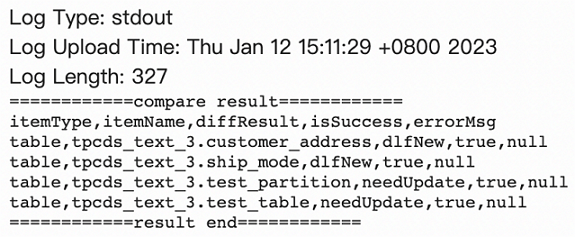
| Field | Description |
|---|---|
itemType |
Metadata type. Valid values: database, table, function, partition. |
itemName |
Name of the database, table, or partition. |
diffResult |
Difference detected between AWS Glue and DLF. Valid values: dlfNew (exists in DLF but not in AWS Glue — you must call the delete operation in DLF), glueNew (exists in AWS Glue but not in DLF — you must call the create operation in DLF), needUpdate (exists in both but content differs — you must call the update operation to synchronize the metadata). |
isSuccess |
Whether the operation succeeded. |
errorMsg |
Error details if the operation failed. |