Configure unsubscribe links and dedicated IP settings for Direct Mail by setting the X-AliDM-Settings SMTP message header.
Incorrect settings cause email delivery errors. Always test your settings before deploying to production.
The X-AliDM-Settings message header controls unsubscribe and dedicated IP features.
X-AliDM-Settings is case-sensitive. Copy and paste the header to avoid errors.
The following example generates an unsubscribe link filtered at the email domain level for batch sender addresses.
-
Create a JSON string in the following format.
{"Version":"1.0","Unsubscribe":{"FilterLevel":"mailfrom_domain","LinkType":"zh-cn"},"OutboundIp":{"IpPoolId":"xxx"}}-
Base64-encode the JSON string.
eyJWZXJzaW9uIjoiMS4wIiwiVW5zdWJzY3JpYmUiOnsiRmlsdGVyTGV2ZWwiOiJtYWlsZnJvbV9kb21haW4iLCJMaW5rVHlwZSI6InpoLWNuIn0sIk91dGJvdW5kSXAiOnsiSXBQb29sSWQiOiJ4eHgifX0=-
Set the encoded string as the X-AliDM-Settings header value. Verify the header in the received message after sending.
X-AliDM-Settings: eyJWZXJzaW9uIjoiMS4wIiwiVW5zdWJzY3JpYmUiOnsiRmlsdGVyTGV2ZWwiOiJtYWlsZnJvbV9kb21haW4iLCJMaW5rVHlwZSI6InpoLWNuIn0sIk91dGJvdW5kSXAiOnsiSXBQb29sSWQiOiJ4eHgifX0=Python example: msg.add_header("X-AliDM-Settings", Create_base64Trace)
Generate the X-AliDM-Settings value in other languages:
import json
import base64

# Unsubscribe logic
Create_json = {
    "Version" : "1.0",
    "Unsubscribe" : {
    # Select parameters as needed.
        # "LinkType": "disabled",  # Do not generate an unsubscribe message header.
        "LinkType": "default", # Default policy, which enables instrumentation for en-us unsubscribe links.

        # "FilterLevel": "disabled", # Do not filter.
        # "FilterLevel": "default", # Default policy, which filters batch addresses at the sender address level.
        # "FilterLevel": "mailfrom", # Filter at the sender address level.
        "FilterLevel": "mailfrom_domain" # Filter at the email domain level.
        # "FilterLevel": "edm_id" # Filter at the account level.
    },
    "OutboundIp" : {
        "IpPoolId" : "exxxxxxe-4xx0-4xx3-8xxa-7xxxxxxxxxxxxf"  # If needed, purchase a dedicated IP address in the Direct Mail console and obtain the IP pool ID.
    }
}
Create_jsonTrace = json.dumps(Create_json)
Create_base64Trace = str(base64.b64encode(Create_jsonTrace.encode('utf-8')), 'utf-8')
# print(base64Trace)
msg.add_header("X-AliDM-Settings", Create_base64Trace)
# Unsubscribe logicimport java.util.Base64;
import com.google.gson.Gson;
import com.google.gson.JsonElement;
import com.google.gson.JsonParser;
import java.nio.charset.StandardCharsets;
private static String generateDmSettingsHeader() {
String jsonContent = """
{
"Version": "1.0",
"Unsubscribe": {
"LinkType": "default", // Default policy, which enables instrumentation for en-us unsubscribe links.
"FilterLevel": "mailfrom_domain" // Filter at the email domain level.
},
"OutboundIp": {
"IpPoolId": "exxxxxxe-4xx0-4xx3-8xxa-7xxxxxxxxxxxxf" // If needed, purchase a dedicated IP address in the Direct Mail console and obtain the IP pool ID.
}
}
""";
JsonElement jsonElement = JsonParser.parseString(jsonContent);
String compactJson = new Gson().toJson(jsonElement);
return Base64.getEncoder()
.encodeToString(compactJson.getBytes(StandardCharsets.UTF_8));
}// Build the JSON.
$createJson = [
"Version" => "1.0",
"Unsubscribe" => [
"LinkType" => "default", // Default policy.
"FilterLevel" => "mailfrom_domain" // Filter at the email domain level.
],
"OutboundIp" => [
"IpPoolId" => "exxxxxxe-4xx0-4xx3-8xxa-7xxxxxxxxxxxxf" // Replace with your IP pool ID.
]
];
// Convert to a JSON string.
$jsonString = json_encode($createJson, JSON_UNESCAPED_SLASHES | JSON_UNESCAPED_UNICODE);
// Base64 encode.
$base64Trace = base64_encode($jsonString);
// Add a custom message header.
$mail->addCustomHeader('X-AliDM-Settings', $base64Trace);Java example 2:
package ut_dm;

import com.alibaba.fastjson.JSON;
import org.apache.commons.codec.binary.Base64;
import org.apache.commons.lang3.StringUtils;

import javax.mail.MessagingException;
import javax.mail.internet.MimeMessage;
import java.util.HashMap;
import java.util.Map;


public class AliDMSetting {
    static public enum UnsubFilterLevel {
        DISABLED("disabled"),
        DEFAULT("default"),
        MAILFROM("mailfrom"),
        MAILFROM_DOMAIN("mailfrom_domain"),
        EDM_ID("edm_id");

        private final String value;

        UnsubFilterLevel(String value) {
            this.value = value;
        }

        public String getValue() {
            return value;
        }
    }
    static public enum UnsubLinkType {
        DISABLED("disabled"), // Do not add an unsubscribe link.
        DEFAULT("default"),   // Default policy. For marketing emails sent to Google and Yahoo addresses, enable instrumentation for en_US unsubscribe links.
        ZH_CN("zh-cn"),       // Chinese (Simplified)
        EN_US("en-us");       // English (US), default

        private final String value;

        UnsubLinkType(String value) {
            this.value = value;
        }

        public String getValue() {
            return value;
        }
    }

    public static String X_ALIDM_SETTING_HEADER_KEY = "X-AliDM-Settings";
    public static String X_ALIDM_SETTING_VERSION = "1.0";
    private UnsubLinkType unsubLinkType;
    private UnsubFilterLevel unsubFilterLevel;
    private String ipPoolId;
    public AliDMSetting(UnsubLinkType unsubLinkType, UnsubFilterLevel unsubFilterLevel, String ipPoolId) {
        this.unsubLinkType = unsubLinkType;
        this.unsubFilterLevel = unsubFilterLevel;
        this.ipPoolId = ipPoolId;
    }

    private String generateHeaderValue() {
        HashMap<String,String> unsubSetting = new HashMap<String,String>();
        unsubSetting.put("LinkType", unsubLinkType.getValue());
        unsubSetting.put("FilterLevel", unsubFilterLevel.getValue());

        HashMap<String,Object> setting = new HashMap<>();
        setting.put("Version", X_ALIDM_SETTING_VERSION);
        setting.put("Unsubscribe", unsubSetting);
        if(StringUtils.isNotBlank(ipPoolId)) {
            Map<String, String> outboundIpsMap = new HashMap<>();
            outboundIpsMap.put("IpPoolId", ipPoolId);
            setting.put("OutboundIp", outboundIpsMap);
        }

        return new String( Base64.encodeBase64(JSON.toJSONString(setting).getBytes()) );
    }

    public void generateHeader(MimeMessage message) throws MessagingException {
        message.addHeader(X_ALIDM_SETTING_HEADER_KEY, generateHeaderValue());
    }
}
Supported features:
|
Feature |
First-level key |
Second-level key |
Description |
|
Unsubscribe feature |
Unsubscribe |
LinkType |
The type of unsubscribe link to generate.
|
|
FilterLevel |
The filter level.
|
||
|
Dedicated IP feature |
OutboundIp |
IpPoolId |
The dedicated IP pool ID. Routes outbound emails through your purchased dedicated IP address. |
Example header received by the recipient:
The example below is redacted. Download or view the .eml file to see the actual unsubscribe link.
List-Unsubscribe-Post: List-Unsubscribe=One-Click
List-Unsubscribe: <http://dm-cn.aliyuncs.com/trace/v1/unsubscribe?lang=zh-cn&sign=cd03d4d252bxxxxxxxx0d99c&token=eyJjYW1wYWlnbl90aW1lIjoxNzA2MjU3NjxxxxxxxxxxxxxxxxjAzNTUxNDMiLCJtYWlsX2Zyb20iOiJ6azFAdDEuemtkbS54eXoiLCJtYWlsX3RvIjoiemsxQHprZG0ueHl6In0%3D&version=1.0>The List-Unsubscribe-Post: List-Unsubscribe=One-Click header enables one-click unsubscribe:
-
With this header, the unsubscribe action completes via HTTP POST without user confirmation.
-
Without this header or with a non-standard value, the unsubscribe process may fall back to
mailto:or link redirection, requiring manual confirmation. -
Whether the button appears depends on the recipient's email provider. Some providers require a good sender address or domain reputation. Log in to the recipient's mailbox to verify.
-
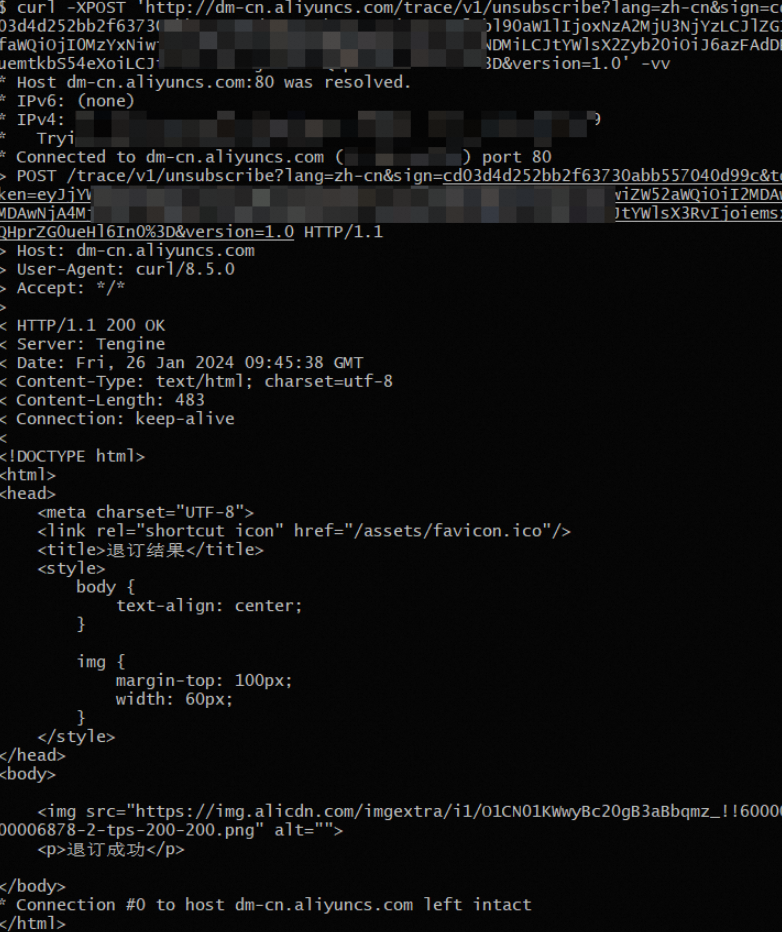
If the button does not appear, test the generated link with the following command.
Linux test command:
The example below is redacted. Download or view the .eml file to see the actual unsubscribe link.
curl -X POST "http://dm-cn.aliyuncs.com/trace/v1/unsubscribe?lang=zh-cn&sign=cd03d4d252bxxxxxxxx0d99c&token=eyJjYW1wYWlnbl90aW1lIjoxNzA2MjU3NjxxxxxxxxxxxxxxxxjAzNTUxNDMiLCJtYWlsX2Zyb20iOiJ6azFAdDEuemtkbS54eXoiLCJtYWlsX3RvIjoiemsxQHprZG0ueHl6In0%3D&version=1.0"
or
curl -X POST -d "lang=zh-cn&sign=cd03d4d252bxxxxxxxx0d99c&token=eyJjYW1wYWlnbl90aW1lIjoxNzA2MjU3NjxxxxxxxxxxxxxxxxjAzNTUxNDMiLCJtYWlsX2Zyb20iOiJ6azFAdDEuemtkbS54eXoiLCJtYWlsX3RvIjoiemsxQHprZG0ueHl6In0%3D&version=1.0" "http://dm-cn.aliyuncs.com/trace/v1/unsubscribe"
Example result: