The total size of an email with attachments cannot exceed 15 MB. An email can contain a maximum of 100 attachments.
The 15 MB limit applies to the total size of the sent email, which includes the message header, body, and attachments. Because Base64 encoding increases the file size, the final email can be more than 1.5 times the size of the original attachments. Therefore, we recommend that you limit the total size of your attachments to 8 MB or less. To send larger files, add hyperlinks to them in the email body.
# -*- coding: utf-8 -*-
import sys
from typing import List
from typing import BinaryIO
from alibabacloud_dm20151123.client import Client as Dm20151123Client
from alibabacloud_tea_openapi import models as open_api_models
from alibabacloud_dm20151123 import models as dm_20151123_models
from alibabacloud_tea_util import models as util_models
from alibabacloud_dm20151123 import models as main_models

attachments = []


class Sample:
    def __init__(self) -> None:
        pass

    @staticmethod
    def create_client() -> Dm20151123Client:
        """
        Initializes the account client using credentials.
        @return: Client
        @throws Exception
        """
        # For production code, we recommend using a more secure method that does not require an AccessKey pair. For more information about how to configure credentials, see https://www.alibabacloud.com/help/en/sdk/developer-reference/v2-manage-python-access-credentials.
        config = open_api_models.Config(
            access_key_id='xxxxxx',
            access_key_secret='xxxxxx'
        )
        # For more information about endpoints, see https://api.alibabacloud.com/product/Dm
        config.endpoint = f'dm.ap-southeast-1.aliyuncs.com'
        config.region_id = f'ap-southeast-1'
        return Dm20151123Client(config)

    @staticmethod
    def main(
            args: List[str],
    ) -> None:
        client = Sample.create_client()
        single_sendmail_request = dm_20151123_models.SingleSendMailAdvanceRequest(
            account_name='sender@example.com',
            address_type='1',
            reply_to_address='true',
            to_address='recipient@example.com',
            subject='Subject',
            html_body='Email Body',
            attachments=getAttachments()
        )
        try:
            # When you copy the code to run, print the API return value.
            response = client.single_send_mail_advance(single_sendmail_request, util_models.RuntimeOptions())
            print(response)
        except Exception as error:
            # This is for demonstration purposes only. Handle exceptions with care. Do not ignore exceptions in your project.
            # Error message
            print(error.data)
            # # Diagnosis address
            # print(error.data.get("Recommend"))
            # UtilClient.assert_as_string(error.message)

def getAttachments() -> List[main_models.SingleSendMailAdvanceRequestAttachments]:
    attach = main_models.SingleSendMailAdvanceRequestAttachments("test1.txt", getFile(r"C:\Users\Downloads\111.txt"))
    attach1 = main_models.SingleSendMailAdvanceRequestAttachments("test2.txt", getFile(r"C:\Users\Downloads\222.txt"))
    attachments.append(attach)
    attachments.append(attach1)
    return attachments


def getFile(v_file) -> BinaryIO:
    f = open(v_file, 'rb')
    return f


if __name__ == '__main__':
Sample.main(sys.argv[1:])package org.example;
import com.aliyun.dm20151123.models.SingleSendMailAdvanceRequest;
import com.aliyun.dm20151123.models.SingleSendMailResponse;
import com.aliyun.tea.TeaException;
import com.google.gson.Gson;
import java.io.File;
import java.io.FileInputStream;
import java.util.ArrayList;
import java.util.List;
public class Sample {
/**
* description<?php
// This file is auto-generated, don't edit it. Thanks.
namespace AlibabaCloud\SDK\Sample;
use AlibabaCloud\SDK\Dm\V20151123\Dm;
// use AlibabaCloud\Credentials\Credential;
use \Exception;
use AlibabaCloud\Tea\Exception\TeaError;
use AlibabaCloud\Tea\Utils\Utils;
use Darabonba\OpenApi\Models\Config;
use AlibabaCloud\SDK\Dm\V20151123\Models\SingleSendMailAdvanceRequest;
use AlibabaCloud\SDK\Dm\V20151123\Models\SingleSendMailAdvanceRequest\attachments;
use GuzzleHttp\Psr7\Stream;
use AlibabaCloud\Tea\Utils\Utils\RuntimeOptions;
require_once __DIR__ . '\\..\\..\\vendor\\autoload.php';
class Sample {
/**
* Initializes the account client using credentials.
* @return Dm Client
*/
public static function createClient(){
// For production code, we recommend using a more secure method that does not require an AccessKey pair. For more information about how to configure credentials, see https://www.alibabacloud.com/help/en/sdk/developer-reference/v2-manage-php-access-credentials.
$config = new Config([
"accessKeyId" => "xxxxxx",
"accessKeySecret" => "xxxxxxx"
]);
// For more information about endpoints, see https://api.alibabacloud.com/product/Dm
$config->endpoint = "dm.ap-southeast-1.aliyuncs.com";
$config->regionId = "ap-southeast-1";
return new Dm($config);
}
// public static function createClient(){
// // For production code, we recommend using a more secure method that does not require an AccessKey pair. For more information about how to configure credentials, see https://www.alibabacloud.com/help/document_detail/311677.html.
// $credential = new Credential();
// $config = new Config([
// "credential" => $credential
// ]);
// // For more information about endpoints, see https://api.aliyun.com/product/Dm
// $config->endpoint = "dm.aliyuncs.com";
// $config->regionId = "cn-hangzhou";
// return new Dm($config);
// }
/**
* Gets the file stream.
* @param string $filePath The file path.
* @return Stream
*/
public static function getFile($filePath) {
$fileResource = fopen($filePath, 'rb');
$fileSize = filesize($filePath); // Get the file size.
var_dump("File size:");
var_dump($fileSize);
return new Stream($fileResource);
}
/**
* Gets the attachment list.
* @return array
*/
public static function getAttachments() {
$attachments = [];
// Create the first attachment.
$attachment1 = new attachments();
$attachment1->attachmentName = "test1.txt";
$attachment1->attachmentUrlObject = self::getFile("C:\\Users\\Downloads\\111.txt");
$attachments[] = $attachment1;
// Create the second attachment.
$attachment2 = new attachments();
$attachment2->attachmentName = "test2.txt";
$attachment2->attachmentUrlObject = self::getFile("C:\\Users\\Downloads\\222.txt");
$attachments[] = $attachment2;
// Print $attachments;
var_dump($attachments);
return $attachments;
}
/**
* @param string[] $args
* @return void
*/
public static function main($args){
$client = self::createClient();
// Create the email request.
$singleSendMailRequest = new SingleSendMailAdvanceRequest([
"accountName" => "sender@example.com",
"addressType" => 1,
"replyToAddress" => true,
"subject" => "Subject",
"toAddress" => "recipient@example.com",
"attachments" => self::getAttachments(),
"htmlBody" => "<h1>Body</h1>",
"textBody" => "Body"
]);
// // Create runtime options.
// $runtime = new RuntimeOptions([
// "ca" => "C:\\Users\\cacert.pem" // Specify the local CA certification path.
// ]);
$runtime = new RuntimeOptions();
try {
// Send the email.
$client->singleSendMailAdvance($singleSendMailRequest, $runtime);
var_dump("Sent successfully");
}
catch (Exception $error) {
if (!($error instanceof TeaError)) {
$error = new TeaError([], $error->getMessage(), $error->getCode(), $error);
}
// This is for demonstration purposes only. Handle exceptions with care. Do not ignore exceptions in your project.
// Error message
var_dump($error->message);
// Diagnosis address
var_dump($error->data["Recommend"]);
Utils::assertAsString($error->message);
}
}
}
$path = __DIR__ . \DIRECTORY_SEPARATOR . '..' . \DIRECTORY_SEPARATOR . 'vendor' . \DIRECTORY_SEPARATOR . 'autoload.php';
if (file_exists($path)) {
require_once $path;
}
Sample::main(array_slice($argv, 1));package main
import (
"fmt"
"os"
openapiutil "github.com/alibabacloud-go/darabonba-openapi/v2/utils"
dm "github.com/alibabacloud-go/dm-20151123/v2/client"
"github.com/alibabacloud-go/tea/dara"
"github.com/aliyun/credentials-go/credentials"
)
// Description:
//
// Initializes the account client using credentials.
//
// @return Client
//
// @throws Exception
func CreateClient() (_result *dm.Client, _err error) {
config := new(credentials.Config).
SetType("access_key").
SetAccessKeyId("xxxxxx").
SetAccessKeySecret("xxxxxx")
akCredential, err := credentials.NewCredential(config)
if err != nil {
return _result, err
}
openapiConfig := &openapiutil.Config{
Credential: akCredential,
}
// For more information about endpoints, see https://api.alibabacloud.com/product/Dm
openapiConfig.Endpoint = dara.String("dm.ap-southeast-1.aliyuncs.com")
_result, _err = dm.NewClient(openapiConfig)
return _result, _err
}
func main() {
err := _main(dara.StringSlice(os.Args[1:]))
if err != nil {
panic(err)
}
}
func _main(args []*string) (_err error) {
client, _err := CreateClient()
if _err != nil {
return _err
}
// Create attachments.
attachments, _err := getAttachments()
if _err != nil {
return _err
}
// Use SingleSendMailAdvanceRequest instead of SingleSendMailRequest.
singleSendMailRequest := &dm.SingleSendMailAdvanceRequest{
AccountName: dara.String("sender@example.com"),
AddressType: dara.Int32(1),
ReplyToAddress: dara.Bool(true),
ToAddress: dara.String("recipient@example.com"),
Subject: dara.String("Subject"),
HtmlBody: dara.String("Email Body"),
Attachments: attachments,
}
runtime := &dara.RuntimeOptions{}
// Use the SingleSendMailAdvance method instead of SingleSendMailWithOptions.
resp, _err := client.SingleSendMailAdvance(singleSendMailRequest, runtime)
if _err != nil {
fmt.Printf("[ERROR] %s\n", _err.Error())
return _err
}
fmt.Printf("[LOG] %s\n", dara.Stringify(resp))
return _err
}
// getAttachments gets the attachment list.
func getAttachments() ([]*dm.SingleSendMailAdvanceRequestAttachments, error) {
// Note: You must change the file path to your actual file path.
attach1, err := createAttachmentFromFile("test1.txt", `C:\Users\Downloads\111.txt`)
if err != nil {
return nil, fmt.Errorf("Failed to create attachment test1.txt: %v", err)
}
attach2, err := createAttachmentFromFile("test2.txt", `C:\Users\Downloads\222.txt`)
if err != nil {
return nil, fmt.Errorf("Failed to create attachment test2.txt: %v", err)
}
return []*dm.SingleSendMailAdvanceRequestAttachments{attach1, attach2}, nil
}
// createAttachmentFromFile creates an attachment from a file.
func createAttachmentFromFile(name, filePath string) (*dm.SingleSendMailAdvanceRequestAttachments, error) {
// Open the file.
file, err := os.Open(filePath)
if err != nil {
return nil, fmt.Errorf("Cannot open file %s: %v", filePath, err)
}
// Get file information.
fileInfo, err := file.Stat()
if err != nil {
file.Close()
return nil, fmt.Errorf("Cannot get file information %s: %v", filePath, err)
}
// Check the file size.
// if fileInfo.Size() > 15*1024*1024 {
// file.Close()
// return nil, fmt.Errorf("File %s exceeds the size limit", filePath)
// }
// Create an attachment object and use the file as an io.Reader.
attachment := &dm.SingleSendMailAdvanceRequestAttachments{
AttachmentName: dara.String(name),
AttachmentUrlObject: file, // Use the file directly as an io.Reader.
}
fmt.Printf("Attachment %s created. Size: %d bytes\n", name, fileInfo.Size())
// Note: In a real application, you may need to keep the file open until the sending is complete
// or read the file content into memory to avoid file handle issues.
return attachment, nil
}
Go to OpenAPI Explorer to download the latest software development kit (SDK) package that contains the methods for handling attachments.
If you use an ECS instance in a VPC and require an internal network connection, set the config.setEndpointType("internal"); parameter.
API call description
The following example uses Python:
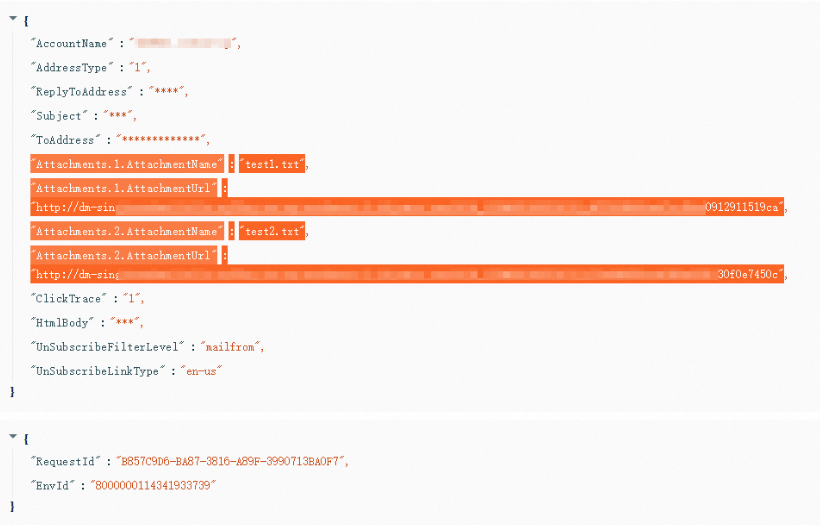
The basic logic is to read the binary stream of the files, encapsulate multiple attachments into a list, and pass the list to the attachment field. Then, you call the single_send_mail_advance operation to send the email. Note that this method is different from the singleSendMailWithOptions operation.
SingleSendMailAdvanceRequestAttachments
This class defines an email attachment, including its file name and content (binary stream).
SingleSendMailAdvanceRequest
This class encapsulates all parameters required to send an email, such as the sender, recipient, subject, body, and attachments.
single_send_mail_advancesends a single email.
You can call this method from a Dm20151123Client instance to send an email with attachments.
Result
You can use the Troubleshooting Center to query the request ID and verify that the parameters were passed correctly.