Symptoms
When you view data in Data Map, you may find that data for the current day is not generated. Alternatively, in the Operation Center, the status of a task node in a recurring instance may be gray. A gray status indicates that the node has not run, as shown in the following figure.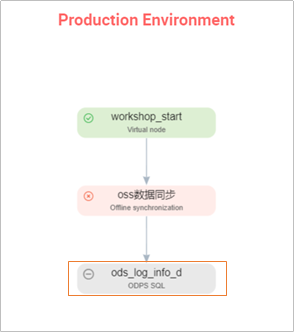
Possible causes
This issue can occur if an ancestor node of the affected node did not run successfully. The instance of the ancestor node may be frozen or waiting to run. If an ancestor node does not run successfully, its descendant nodes do not start.
Solution
Open the task's Directed Acyclic Graph (DAG). Select the instance, right-click it, and view the parent node to check its instance status.
Ancestor node instance status: Purple
This status indicates that the ancestor node instance is frozen. The ancestor task will not run and blocks descendant tasks. In this case, you can view the operation records in the instance details to find information about the freeze operation.
Ancestor node instance status: Yellow
This status indicates that the ancestor node is waiting to run:
The ancestor node may be waiting for its scheduled runtime. In this case, click View Instance Details in the lower-right corner to check the scheduled time of the ancestor node. The ancestor node starts at the scheduled time, and the descendant node starts after the ancestor node finishes running.
The ancestor node may be waiting for a schedule resource. You can check the operational log to determine if the node is waiting for a resource. If so, this indicates that the number of schedule resources used by running tasks in the current project has reached the upper limit. To resolve this, you can reschedule the tasks to run at different times or purchase an exclusive resource group for scheduling. For more information about exclusive resource groups for scheduling, see Exclusive resource groups for scheduling.
Ancestor node instance status: Gray
This status indicates that the ancestor node has also not run. Continue to check the status of its parent node.