Use the Operation History page in DataStudio to review workspace-scoped operation records, filtered by operation type, operator, or time.
Tracked operation types
Operation History records the following types of changes in DataStudio:
Changes of node owners
Modifications to scheduling properties of nodes
Commits of nodes and tables
Addition of nodes to favorites
Deletion of workflows
Data downloads
Operation History vs. ActionTrail
DataWorks also integrates with ActionTrail for account-level audit logging. The two tools serve different audiences:
| Operation History | ActionTrail | |
|---|---|---|
| Purpose | Development-side audit — trace who changed a node, committed code, or downloaded data | Compliance-level audit — track all Alibaba Cloud account activity |
| Target audience | Data engineers, workspace admins | Security and compliance teams |
| Retention | Not specified in product documentation | Last 90 days |
| Scope | Current workspace | Entire Alibaba Cloud account |
If other engines are integrated with ActionTrail, all operation records of those engines within your Alibaba Cloud account are also queryable.
Go to the DataStudio page
Log on to the DataWorks console. In the top navigation bar, select the desired region. In the left-side navigation pane, choose Data Development and Governance > Data Development. On the page that appears, select the desired workspace from the drop-down list and click Go to Data Development.
View operation history
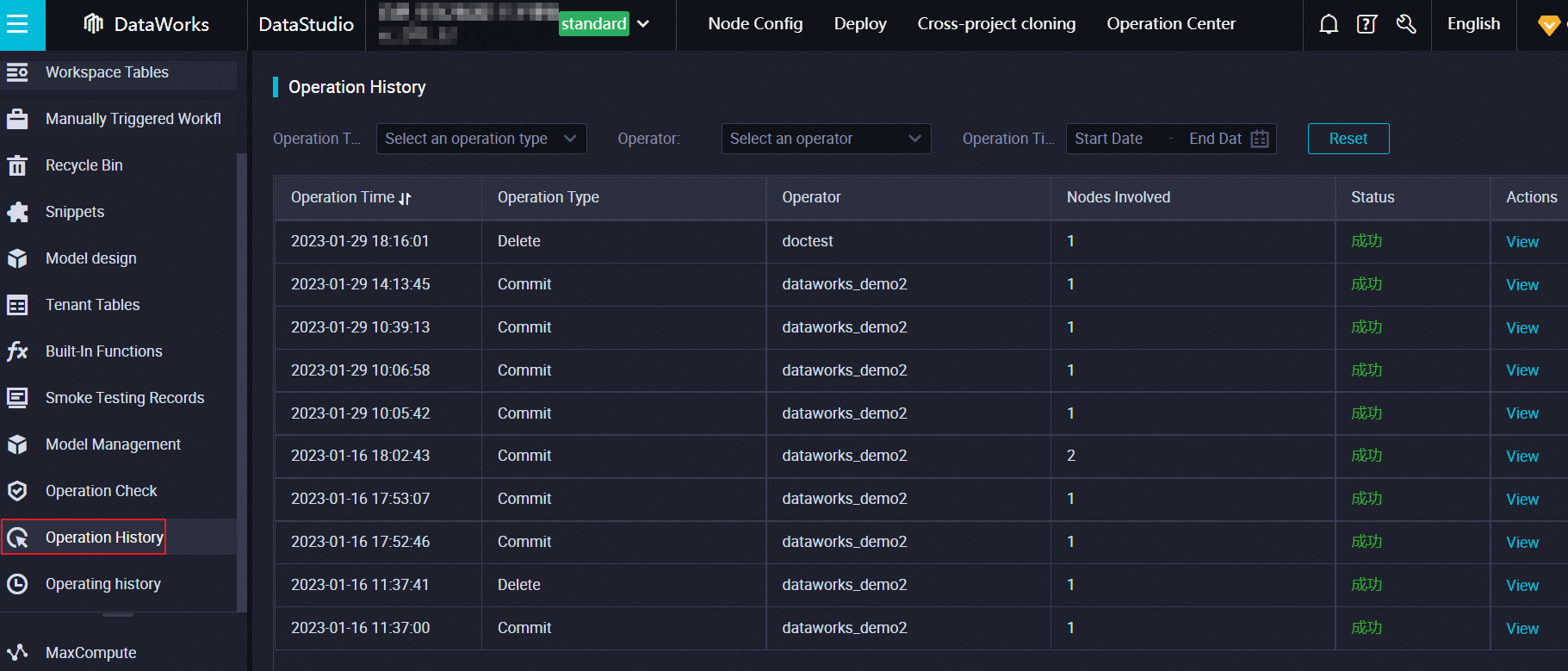
In the left-side navigation pane of the DataStudio page, click the  icon to open the Operation History page. Filter records by operation type, operator, or operation time.
Related operations
Compare and roll back node versions
On the configuration tab of a node, click Versions in the right-side navigation pane to open the Versions tab. Compare versions and roll back to a previous version as needed. For more information, see View the version information about a node.
Restore deleted nodes
Restore recently deleted nodes using the Recycle bin feature. New node IDs are generated after restoration. For more information, see Recycle bin.
Restore MaxCompute table data
DataWorks backs up and retains historical data — including deleted or updated records — for a specific period. For more information, see Backup and restoration.
Audit permissions on a MaxCompute table
Go to Security Center > Data access control > Permission Audit to view which users have permissions on a table, the permission details, and validity periods. Revoke permissions directly from this page.