DataWorks no longer recommends legacy resource groups (exclusive and shared). Serverless resource groups offer more features and better resource efficiency. We recommend that you use serverless resource groups.
Key concepts
DataWorks legacy resource groups include exclusive resource groups and shared resource groups, categorized by scenario: scheduling, Data Integration, and Data Service. Scheduling resource groups handle task scheduling and execution. Data Integration resource groups handle data transmission. Data Service resource groups process API calls.
|
Resource group type |
Billing method |
Resource group description |
Scheduling resource group |
Data Integration resource group |
Data Service resource group |
|
Exclusive resource group |
Subscription |
|
Exclusive resource groups for DataService Studio Note
Exclusive resource groups for Data Service are available only in the China (Shanghai) region. |
||
|
Shared resource group |
Pay-as-you-go |
Automatically provided when you activate DataWorks, including shared resource groups for Data Service and shared resource groups for scheduling. These are shared within a tenant, so tasks may need to wait for resources during peak periods. |
- |
Comparison between shared and exclusive resource groups
Scheduling resource groups
|
Category |
Shared resource group for scheduling |
Exclusive resource group for scheduling |
|
Machine ownership |
Maintained by DataWorks. Shared across all tenants. |
Maintained by DataWorks. Dedicated compute resources for each tenant. |
|
Network connectivity |
Network connectivity is not guaranteed. Examples:
|
Supports network configurations for complex network environments. For more information, see Billing of exclusive resource groups for scheduling. |
|
Task timeliness |
Shared among DataWorks users. Timeliness cannot be guaranteed. |
Dedicated to the tenant. You can control concurrency and ensure timely task execution. |
|
Applicable scenarios |
Shared resources may cause task blocking under heavy load. Suitable only for low-concurrency, low-frequency scenarios. |
Tenants can control concurrency and perform scaling or specification changes. Suitable for large task volumes with high timeliness requirements. |
|
Billing method |
Pay-as-you-go. For more information, see Scheduling instance fees. |
Subscription. For more information, see Billing of exclusive resource groups for scheduling (subscription). |
|
Other comparisons |
|
|
Data Integration resource groups
|
Category |
Exclusive resource group for Data Integration |
|
Machine ownership |
Maintained by DataWorks. Dedicated compute resources for each tenant. |
|
Network |
|
|
Supported data sources |
All data sources. |
|
Task execution timeliness |
Dedicated to the tenant. You can control concurrency and ensure timely task execution. |
|
Applicable scenarios |
Large-volume, important production tasks. |
|
Billing |
Subscription. For more information, see Billing of exclusive resource groups for Data Integration (subscription). |
|
Selection guide |
|
Data Service resource groups
Shared Data Service resource groups are shared among tenants. For high-concurrency, high-frequency API calls that require prompt responses, use exclusive resource groups for Data Service to ensure availability and stability. For billing details, see Billing of exclusive resource groups for DataService Studio (subscription) and Data Service.
Billing
For billing details of each resource group, see Billing for legacy resource groups.
Notes
-
When you activate DataWorks, pay-as-you-go shared resource groups are provided by default. You can also purchase subscription-based exclusive resource groups, or upgrade to DataWorks Standard Edition, Professional Edition, or Enterprise Edition to use your IDC machines as resource groups.
-
Different legacy resource group types are used at different task execution stages. For an overview of batch task dispatching and resource group usage, see Task dispatching mechanism for legacy resource groups.
-
At the same execution stage, tasks can use different resource group types. For example, batch scheduling supports both subscription-based exclusive and pay-as-you-go shared resource groups. For more information, see Comparison between shared and exclusive resource groups.
-
Both shared and exclusive resource groups are integrated with Security Center Free Edition by default, which provides basic security hardening such as abnormal login detection, DDoS attack detection, and vulnerability scanning. For more information, see Security Center Free Edition.
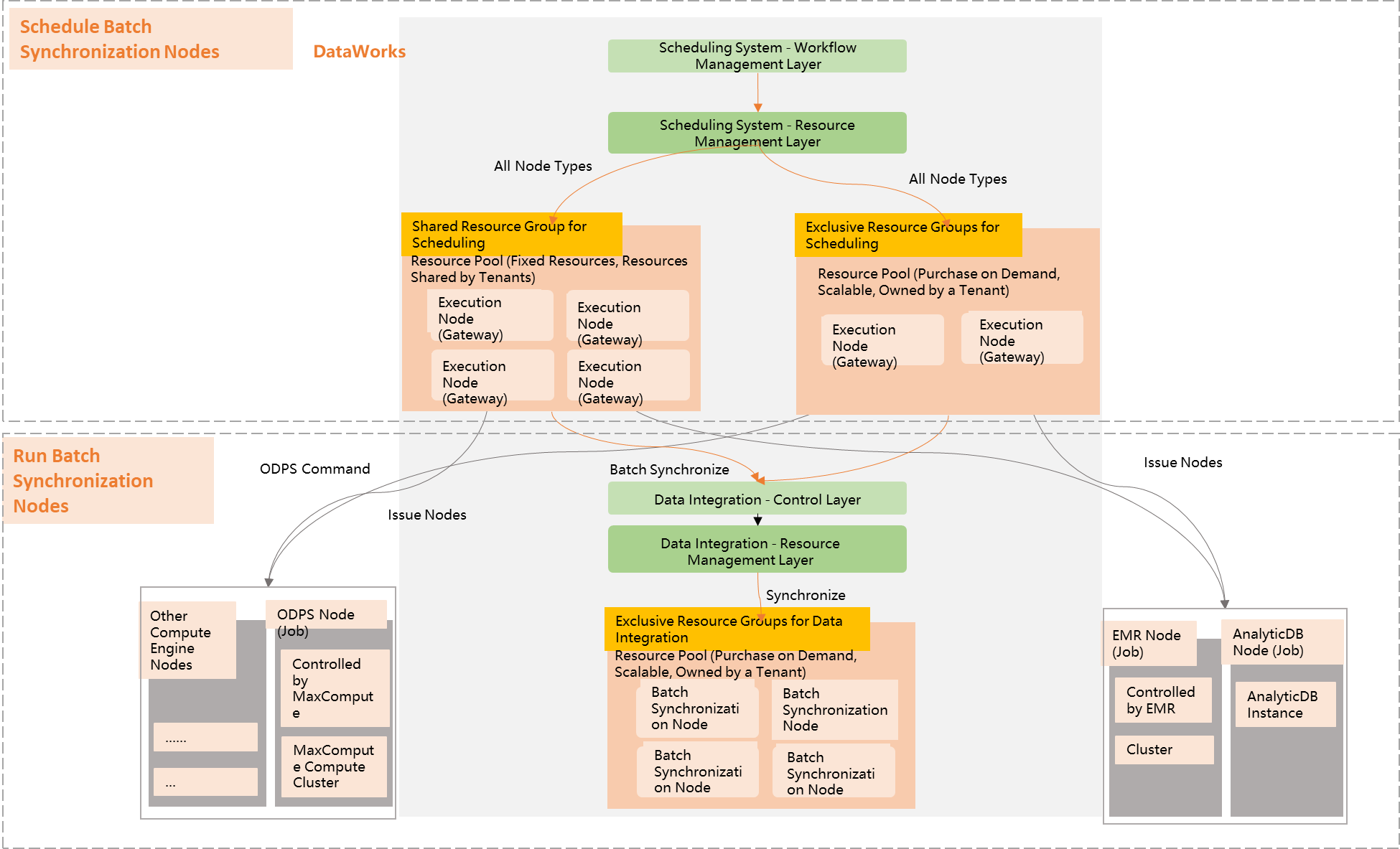
Task dispatching mechanism for legacy resource groups
Scheduling resource groups dispatch batch tasks to engines or servers for execution. For example, scheduling resource groups dispatch tasks to MaxCompute for execution. Batch Data Integration tasks are dispatched through scheduling resource groups to Data Integration execution resources.