The data synchronization feature of DataWorks supports third-party authentication mechanisms. You must upload authentication files to the Authentication File Management page in DataWorks and enable the third-party authentication feature when you configure a data source. This ensures that only trusted applications and services can access your data resources. This topic describes how to upload and reference authentication files.
Background information
Third-party authentication provides strong identity verification for users and services. This practice prevents untrusted applications or services from accessing data and enhances data security during data synchronization. DataWorks provides the Authentication File Management page to centrally manage your authentication files. From this page, you can upload files and view their references.
Limits
Currently, only Kerberos authentication is supported. For more information, see Appendix: Configure Kerberos authentication.
Notes
Certificates have their own validity periods. Note the expiration date of any certificate you upload. If a certificate expires, the corresponding data synchronization tasks fail due to authorization errors. To prevent such failures, you must promptly replace the certificate with a new, valid one.
Upload an authentication file
Before you use the authentication feature, you must prepare the required authentication files and upload them to the Authentication File Management page.
Log on to the DataWorks console. In the target region, click in the left-side navigation pane. Select a workspace from the drop-down list and click Go to Management Center.
On the Workspace Management page, click Data Sources in the left-side navigation pane to open the data source page.
-
Click the Authentication Files tab.
-
In the upper-right corner of the page, click Upload authentication file. In the Upload authentication file dialog box, click Upload File, select the file you want to upload, enter a Description, and then click Determine.
Reference an authentication file
To use a third-party authentication feature, you must enable a special authentication method, configure the related parameters, and reference the required authentication files on the data source configuration page. Currently, DataWorks supports only Kerberos authentication. For more information, see Appendix: Configure Kerberos authentication.
The following section uses an HDFS data source as an example to describe the key parameters for Kerberos authentication. For more information about how to configure a data source, see Configure data sources.
|
Parameter |
Description |
|
Special authentication method |
Set Special authentication method to Kerberos Authentication. |
|
keytab file |
Specifies the .keytab file registered in the Kerberos environment. This file stores authentication credentials. To upload a new authentication file, click Add authentication document. |
|
conf file |
Specifies the Kerberos configuration file, krb5.conf. To upload a new authentication file, click Add authentication document. |
|
principal |
Specifies the Kerberos principal from the keytab file. A principal is a unique identity for a user or service and has a unique name and an associated encryption key.
|
Other operations
On the Authentication Files page, you can also perform operations on authentication files, such as Batch Delete, Re-Upload, and View references.
Appendix: Configure Kerberos authentication
The data synchronization feature of DataWorks currently supports only Kerberos authentication. After you configure Kerberos authentication, only trusted and authenticated applications and services can access data.
The Kerberos protocol is primarily used for authentication on computer networks. Its key feature is single sign-on (SSO). With SSO, a user authenticates once to obtain a Ticket-Granting Ticket (TGT). The user can then use this ticket to access multiple services. Kerberos establishes a shared key between each client and service. Services use the key to communicate to prevent untrusted services or applications from accessing data resources. This design makes the protocol highly secure.
Limits
-
Kerberos authentication is supported only for CDH 6.X clusters. Authentication may fail for other versions or for untested self-managed clusters.
-
Kerberos authentication is supported only for HBase, HDFS, and Hive data sources.
-
Kerberos authentication is supported only on an exclusive resource group for Data Integration or a Serverless resource group.
How Kerberos authentication works
Kerberos is a third-party authentication protocol based on symmetric keys. Both clients and servers rely on the Key Distribution Center (KDC) to perform identity authentication. For more information about Kerberos, see Overview.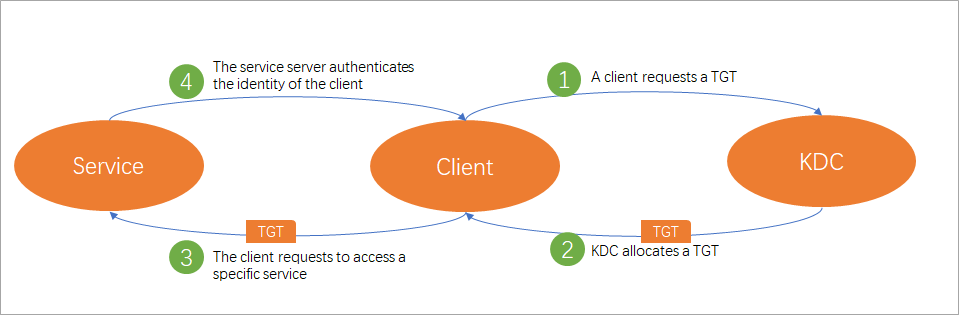
As shown in the preceding figure, Kerberos authentication in DataWorks consists of the following four stages:
-
The client requests a TGT: When a client user (principal) accesses a Kerberos-enabled data source, the client requests a Ticket-Granting Ticket (TGT) from the KDC. This TGT serves as proof of identity for requesting specific services from the KDC.
-
The KDC issues a TGT: After the KDC receives the request, it authenticates the client. If authentication is successful, the KDC issues an encrypted TGT with a specific validity period to the client.
-
The client requests server access: After the client obtains the TGT, it requests access to specific service resources from the server based on the name of the requested service.
-
The server authenticates the client: After the server receives the request, it authenticates the client. If authentication succeeds, the server grants the client access to the service resources.
The Kerberos authentication process uses a keytab file and a krb5.conf file. The krb5.conf file stores the KDC server configuration, and the keytab file stores the authentication credentials of resource principals, including principals and encrypted principal keys. Before you use Kerberos authentication, you must upload these two files to the Authentication File Management page, and then reference and configure them on the data source configuration page. For more information about how to upload authentication files, see Upload an authentication file.
Supported data sources
The following table lists the data source types that support Kerberos authentication and provides links to their configuration guides.
|
Data source type |
Guide |
|
HBase |
|
|
HDFS |
|
|
Hive |