Large language model (LLM) nodes let you process unstructured text data, such as user reviews, product descriptions, and customer service logs, directly in DataWorks pipelines. With natural language instructions, you can perform text summarization, sentiment analysis, content classification, and information extraction without writing complex algorithms, seamlessly integrating AI into your existing ETL workflows.
Prerequisites
Deploy a model service in DataWorks. For more information, see Deploy a model.
The choice of models and resource specifications directly affects the performance and response speed of the model service. In addition, the model service incurs resource group fees.
LLM node configuration
Configure an LLM node with the following settings.
|
Parameter |
Description |
|
Model service |
The model service that you deployed in the prerequisites. |
|
Model name |
The model from the model service. A default model is preselected. |
|
System prompt |
Defines the model's behavior, including its role, capabilities, and rules. Use the ${param} format to reference parameters. |
|
User prompt |
A specific question or instruction for the model. DataWorks provides four built-in templates for quick selection. Use the ${param} format to reference parameters. For example, a prompt can be: Select the items that match |
Example
The following example demonstrates how to use an LLM node in a pipeline and pass parameters between nodes.
-
Log in to the DataWorks LLM service and create a model service based on Qwen3-1.7B. For Resource Group, select the resource group that is bound to the current workspace.
-
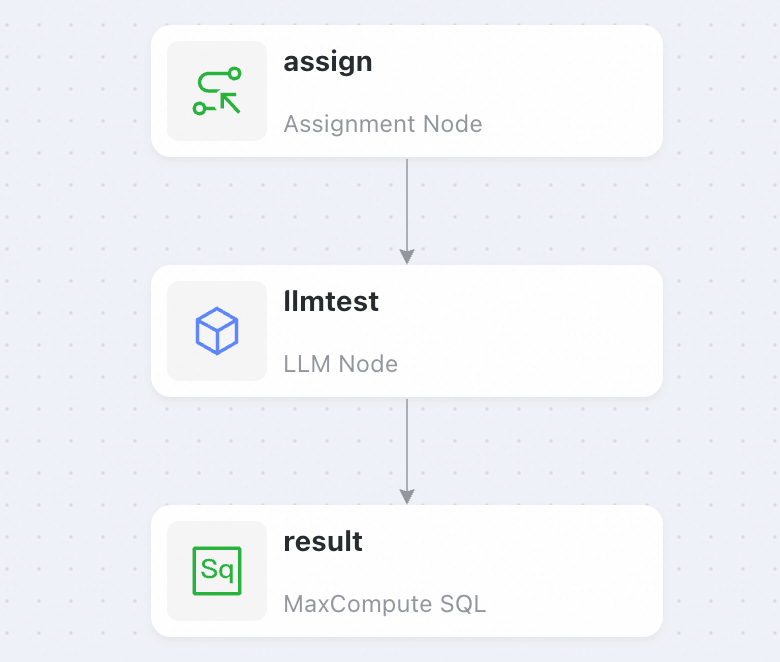
Go to Data Studio and create a pipeline that contains the following nodes.
-
Configure the assignment node . In the toolbar at the lower right, set the language to Shell and then enter the following code.
For more information about this node, see Assignment node.
echo 'DataWorks'; -
Configure the large language model node.
-
Select the model service and model name you configured previously.
-
Set the user prompt to the following:
Write an introduction about ${title} with a word limit of ${length}. -
In the configuration panel on the right, select , and change the resource group to the one that you selected when you created the large model service.
-
In the configuration panel on the right, under , add the parameter title with the value output of the upstream node and the parameter length with a fixed value of 300.
To bind the output of an upstream node, click the
 icon to the right of the value input field.
-
-
Configure the MaxCompute SQL node to retrieve the result from the large language model.
ImportantYou must bind the MaxCompute SQL node to a MaxCompute resource. If you do not have a resource, you can use a Shell node to display the output instead.
-
Enter the following code:
select '${content}'; -
In the configuration panel on the right, select , and change the resource group to the one that you selected when you created the large model service.
-
On the right, under , add the parameter content and set its value to output of the upstream node .
To bind the output of an upstream node, click the
icon to the right of the value input field. Once bound, the parameter value is displayed as The outputs parameter of the llmtest node is bound.
-
-
Return to the pipeline, click Run at the top, and in the pop-up window, enter the run parameters.
-
After a successful run, the MaxCompute SQL node returns a result from the large language model similar to the following:
DataWorks is an enterprise data development and management platform from Alibaba Cloud. It supports data collection, cleansing, integration, scheduling, and visualization for large-scale data processing.
It provides a visual interface, connects to various data sources, and features powerful task scheduling and data quality monitoring.
DataWorks handles both real-time and batch processing, helping enterprises manage data as assets and improve efficiency.
Its unified process helps build reliable data pipelines for data governance and intelligent analysis.