ChatBI uses a simple, dual-role permission model to help enterprises with data governance and collaboration. This model divides users into two roles: administrators and members. Administrators handle complex configurations for datasets and knowledge bases, which allows members to focus on daily conversational analysis.
Core concepts
Familiarize yourself with these core concepts before you work with ChatBI permissions.
Term | Definition |
Administrator | This role has the highest administrative permissions in ChatBI. Administrators are responsible for managing members and for configuring and granting access to public resources, such as team datasets and knowledge bases. The owner of an Alibaba Cloud account or a DataWorks tenant administrator automatically becomes the initial administrator on their first logon. They can then appoint other users as administrators. |
Member | The standard user role in a workspace. By default, all users of ChatBI are members. Members can perform data analysis within their granted permissions and manage their own personal resources. |
Team dataset | A dataset created by an administrator. It can be granted to all Alibaba Cloud accounts, specific Alibaba Cloud accounts, or specific roles within a DataWorks workspace in the same tenant. All administrators share management permissions for all team datasets. |
Personal dataset | A dataset created by an individual member for their own use only. By default, administrators cannot view or manage the personal datasets of members. |
Permission quick reference
Feature module | Operation permission | Administrator | Member | Notes |
Member management | Appoint/Remove administrator |
| Only administrators can change the roles of other users. | |
Team dataset | Create, edit, delete |
| Administrators can manage all team datasets, regardless of who created them. | |
Grant to members |
| - | ||
Personal dataset | Create, edit, delete |
| For personal use only and not visible to others. If an administrator needs to create a personal dataset, they must switch their role to member. | |
Knowledge base | View and configure |
| Knowledge bases are maintained exclusively by administrators. | |
System settings | Configuration of resource groups and other settings |
| - |
Appoint or remove an administrator
Administrators can appoint new administrators or remove existing ones as needed.
In the ChatBI interface, click the
 Settings icon at the bottom of the left navigation pane.
Go to the Members tab. In the member list, find the target user and click the drop-down menu in the Team Role column.
From the drop-down menu, select Administrator or Member to change the role.
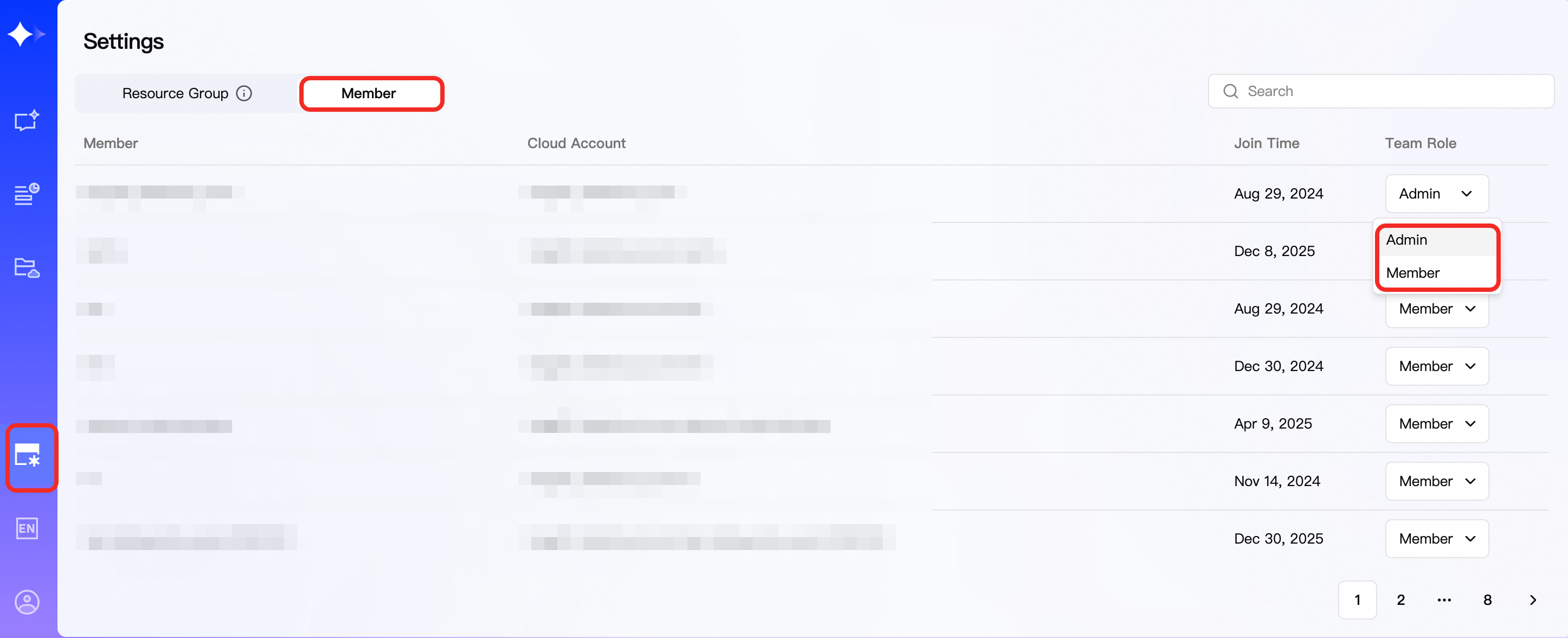
The role change takes effect immediately. The user's interface and permissions are updated automatically on their next visit. For example, a new administrator can see the management options for Settings and Knowledge Base.
Grant Team Datasets
Administrators can grant members access to team datasets for conversational analysis.
In the left navigation pane, click Datasets and go to the Datasets I Manage tab. This tab displays all team datasets that can be managed by any administrator.
Find the dataset card that you want to grant access to and click the
 More Actions button in the upper-right corner of the card.
In the menu that appears, click Grant.
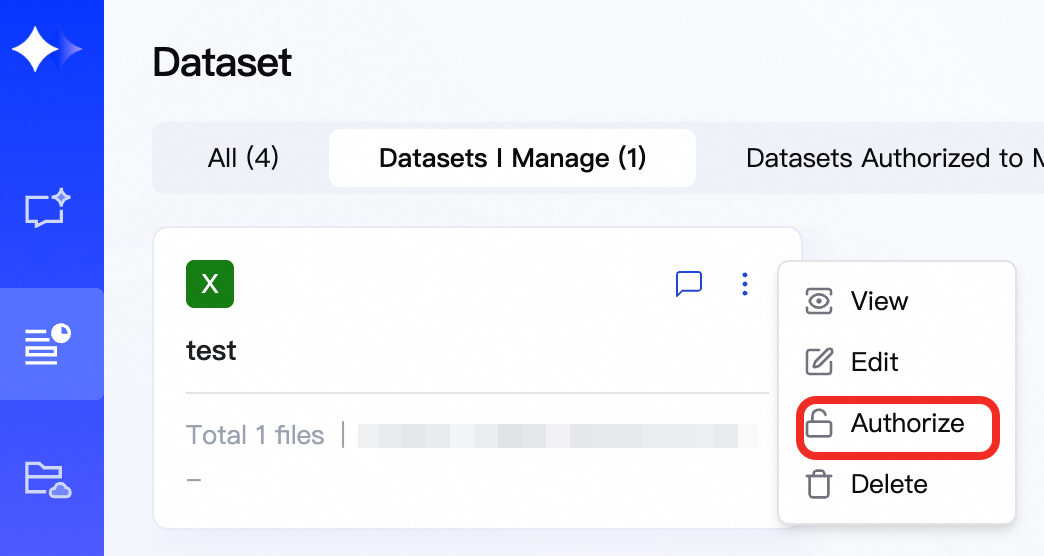
In the authorization dialog box, select the objects to grant access to:
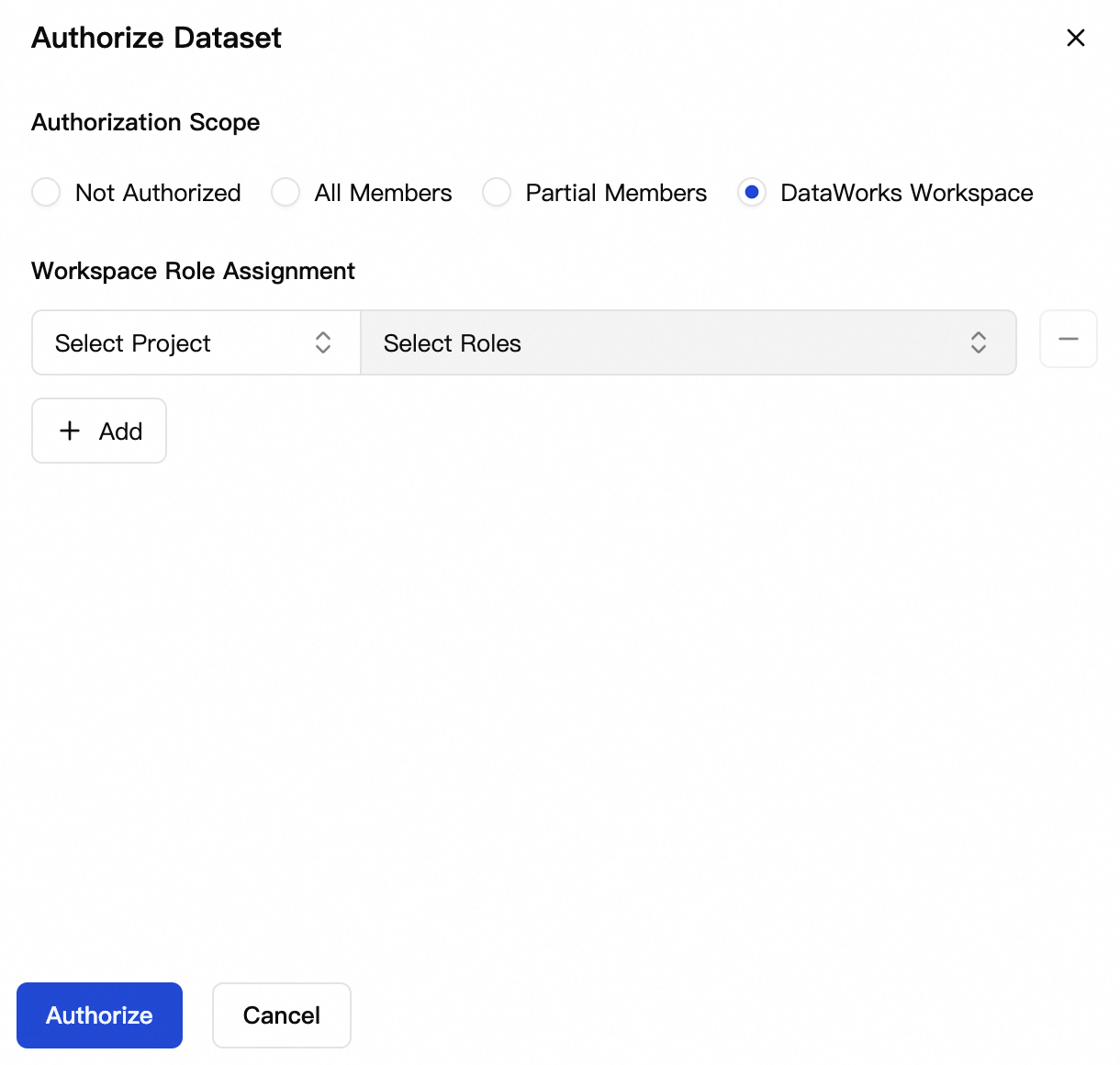
Not Granted: The default state. The dataset is visible only to administrators.
All Members: Grants access to all users in the tenant.
Specific Members: Grants access to specified users in the same tenant.
DataWorks Workspace: Grants access to specific roles in a specified workspace. If no role is specified, access is granted to all roles.
Click Grant to complete the operation.
After access is granted, authorized members can view and use the dataset for conversational analysis on the Datasets Granted to Me tab.
Management recommendations
When using the ChatBI permission management feature in an enterprise environment, consider the following recommendations:
Security consideration: Shared administrative permissions
ChatBI is designed on the principle that "one person creates, all administrators manage." This means any administrator can edit or delete team datasets created by other administrators. This is a high-risk permission. Note the following:Principle of least privilege: Grant the administrator role only to core personnel who need to manage public resources and user permissions.
Establish a communication mechanism: Before performing critical operations such as modifying or deleting a team dataset, administrators should establish a clear communication process within the team to prevent operational errors that could impact business operations.
Management practice: Administrator handover
When an administrator leaves the company or changes position, another administrator must promptly change their role to Member. This revokes their administrative permissions and ensures the security of data assets.