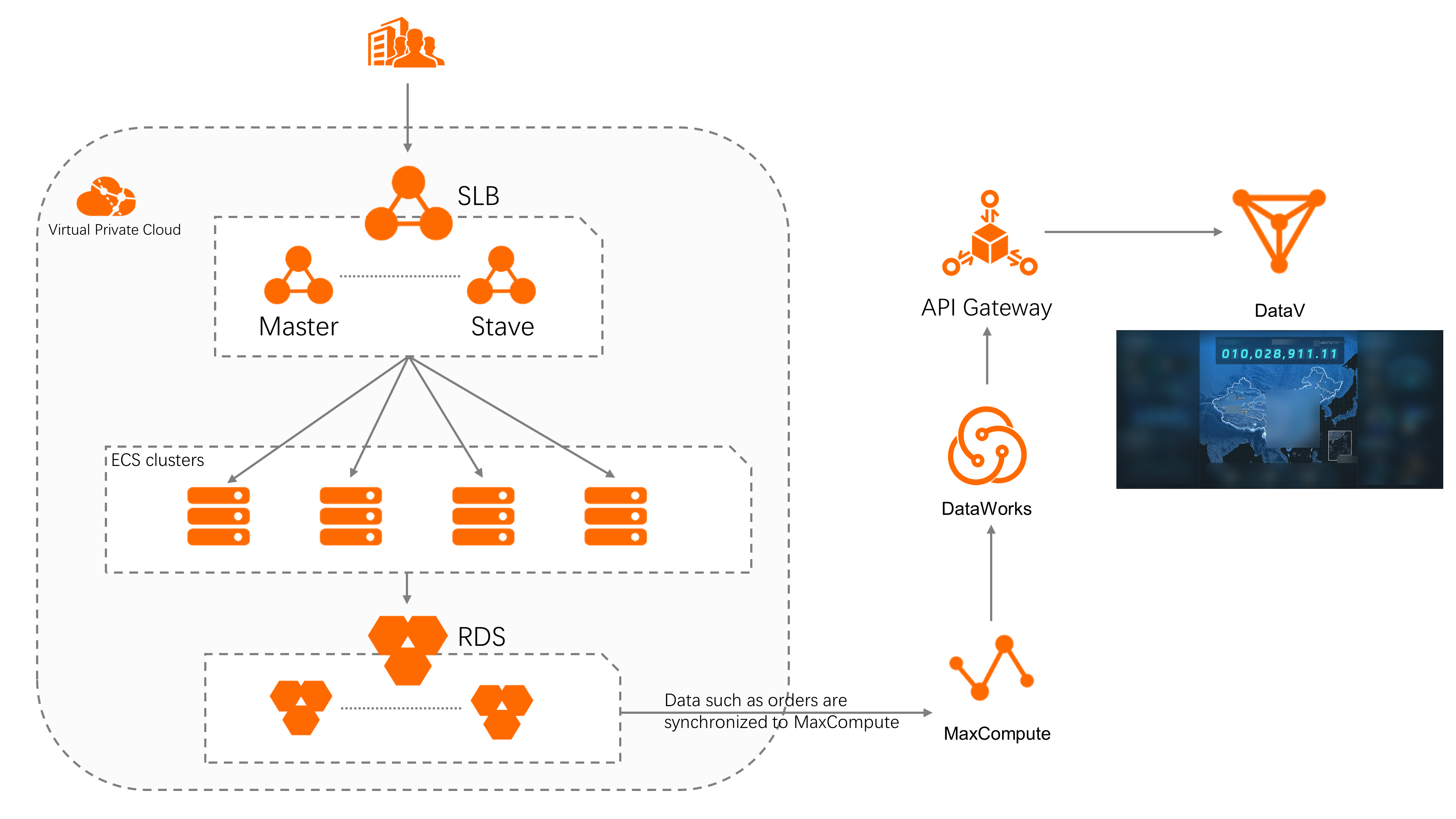
This tutorial shows you how to build an end-to-end offline data analysis pipeline using MaxCompute, ApsaraDB RDS for MySQL, DataWorks, and DataV. You will synchronize order data from a relational database to a data warehouse, process it with DataWorks, and display the results on a DataV dashboard.
In this tutorial, you will:
-
Synchronize user orders and other data from ApsaraDB RDS for MySQL to MaxCompute.
-
Process the raw data and expose an API using DataWorks.
-
Display the result data on a DataV dashboard.
Use cases
-
Display e-commerce website data on dashboards.
-
Analyze business trends in and outside China.
-
Monitor data risks in the Internet and financial industries.
Prerequisites
Before you begin, make sure you have:
-
An ApsaraDB RDS for MySQL instance with order data loaded
-
A MaxCompute workspace created and activated
-
DataWorks enabled and linked to your MaxCompute workspace
-
A DataV project created
How it works
The pipeline moves data through four services in sequence:
-
Synchronize user orders and other data from ApsaraDB RDS for MySQL to MaxCompute.
-
Use DataWorks to process the raw data and expose an API for accessing the processed data.
-
Call the API to display the result data on a dashboard in DataV.
Benefits
| Benefit | Description |
|---|---|
| Large-scale storage | Stores exabytes of data with ultra-large storage capacity. |
| High performance | Delivers efficient and stable performance across the pipeline. |
| Low cost | Costs less than running a self-managed database. |
| High security | Isolates tenant data between workspaces and runs all computing tasks in sandboxes. |
| Visualized editing | Drag items on the graphical editing page to visualize big data professionally. |