This topic describes how to pass dynamic parameters when you request a data interface. This way, you can use the tab list and the regional heating layer of the basic flat map.
Procedure
Log on DataV console.
Select a visualization application and click Edit to go to the Canvas Editor page.
Add the Tab List widget and the Basic Flat Map widget to the canvas.
Click the tab list widget and select a data panel to modify static data.
[
  {
    "id": 1,
    "content": "610000"
  },
  {
    "id": 2,
    "content": "330000"
  },
  {
    "id": 3,
    "content": "320000"
  }
]
In the left-side navigation pane of the Basic Flat Map component, click the Regional Thermal Layer sub-component. In the Data panel, select Geo Boundary GeoJSON Data Interface, set Data Source to API, and enter a URL.
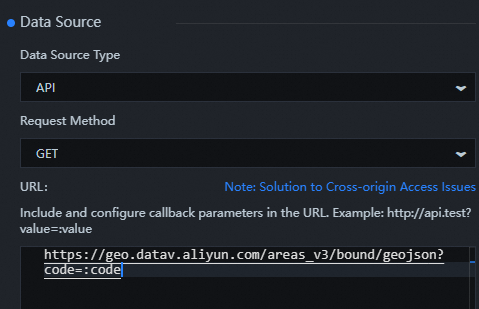
https://geo.datav.aliyun.com/areas_v3/bound/geojson?code=:codeIn the Layer panel, right-click all widget sets and select Export to Blueprint Editor.
Connect components.
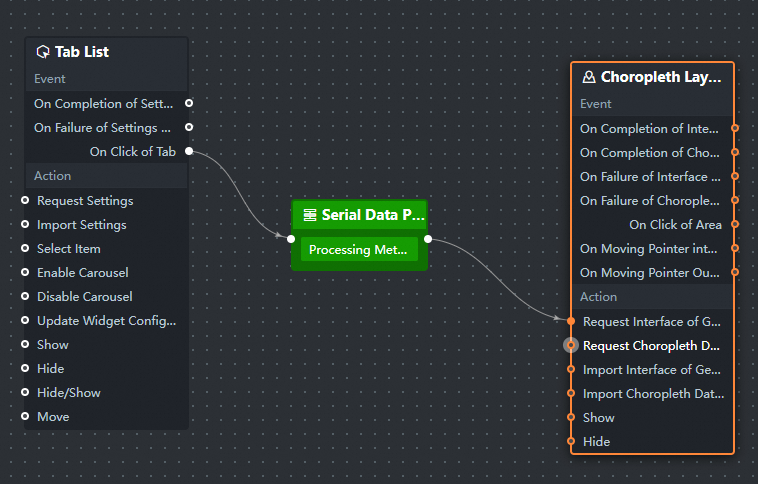
Configure the processing method of the Serial Data Processing node.
return { code: data.content };Click the
 icon in the upper-right corner to preview the results.