Add an ApsaraDB RDS for PostgreSQL instance as a data source in DataV to visualize your PostgreSQL data.
Prerequisites
An ApsaraDB RDS for PostgreSQL instance is available.Add a data source over an internal network
Log on to the DataV console.
On the My Data tab, select Data Source Management and click Add Data.
- Select RDS for PostgreSQL from the Type drop-down list.
- Select Intranet for the network type and select the region of your RDS for PostgreSQL instance.
- Select a network type: VPC or classic network.
- VPC
- Turn on VPC to enter the VPC mode.
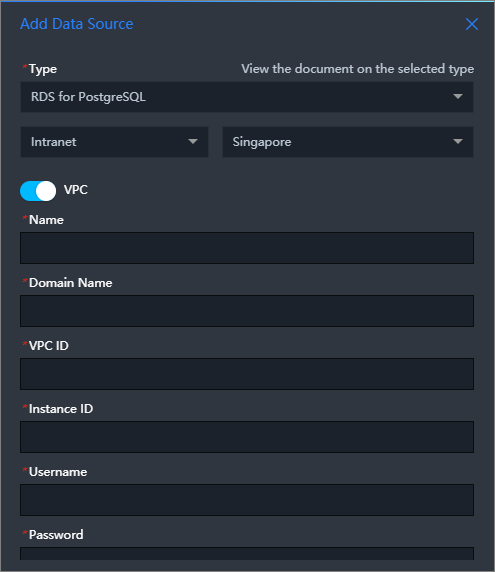
- Enter database information. Note If you need to create a database, see Manage databases.
Parameter Description Name Custom name for the data source. VPC ID The VPC ID of your RDS for PostgreSQL instance. In the ApsaraDB for RDS console, go to and find the VPC ID in the Network Type column. 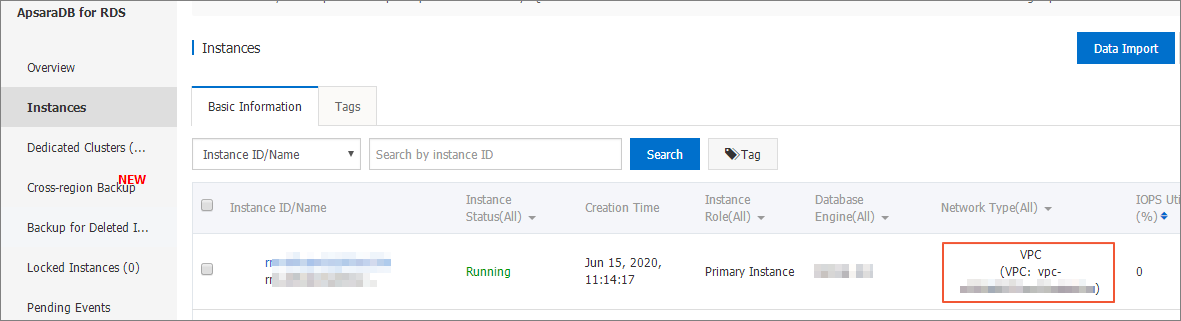
Instance ID The database instance ID in the VPC. In the ApsaraDB for RDS console, find the instance ID on the Instances page. Note The instance ID displayed in the console may differ from the ID required for DataV VPC data source configuration. Call the database product API to obtain the correct ID. The required value is typically VpcCloudInstanceId or VpcInstanceId in the instance details. DescribeDBInstanceAttribute.Domain The endpoint (domain name or IP address) for the database connection. Important Use the endpoint that the DataV server can access over the Internet or an internal network in some Alibaba Cloud regions.Example: pgm-bpxxxxxxxxxxxxxx15970.pg.rds.aliyuncs.com. Obtain this on the Basic Information page of the RDS console.
Port Number Port for the database connection. User Name Username for the database connection. Password Password for the database connection. Database Name of the target database. - DataV automatically tests the database connection.
- Turn on VPC to enter the VPC mode.
- Classic Network
- Turn off VPC to enter the classic network mode.
- Enter database information.
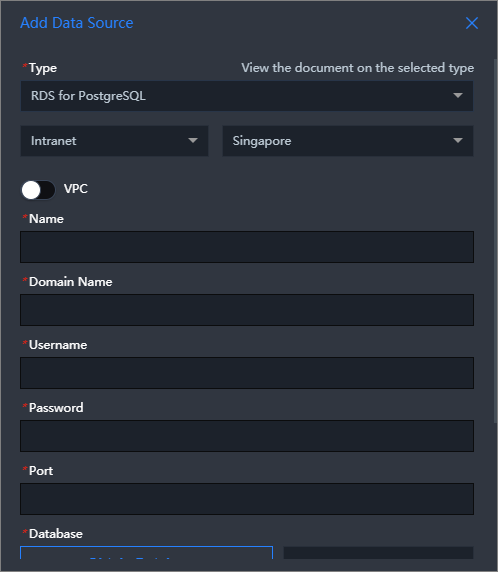 Note If you need to create a database, see Manage databases.
Parameter Description Name Custom name for the data source. Domain The endpoint (domain name or IP address) for the database connection. Important Use the endpoint that the DataV server can access over the Internet or an internal network in some Alibaba Cloud regions.Example: pgm-bpxxxxxxxxxxxxxx15970.pg.rds.aliyuncs.com. Obtain this on the Basic Information page of the ApsaraDB RDS console.
Port Number Port for the database connection. User Name Username for the database connection. Password Password for the database connection. Database Name of the target database. - DataV automatically tests the database connection.
- VPC
- After the connectivity test passes, click OK.
The data source appears in the data source list.
Add a data source over the Internet
Log on to the DataV console.
On the My Data tab, select Data Source Management and click Add Data.
- Select RDS for PostgreSQL from the Type drop-down list.
- Select Public Network as the network type.
- Enter database information.
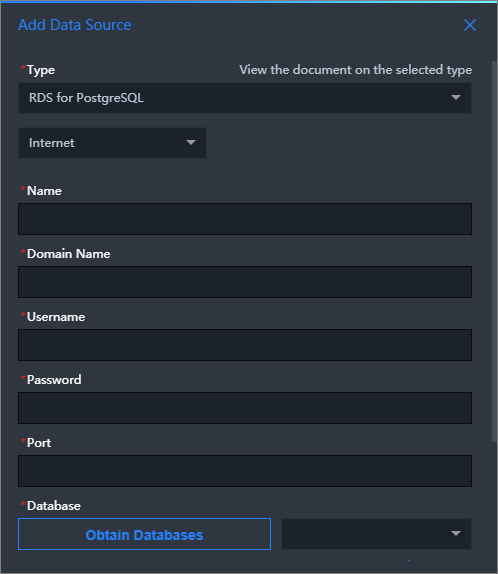
Parameter Description Name Custom name for the data source. Domain The endpoint (domain name or IP address) for the database connection. Important Use the endpoint that the DataV server can access over the Internet or an internal network in some Alibaba Cloud regions.Example: pgm-bpxxxxxxxxxxxxxxqo.pg.rds.aliyuncs.com. Obtain this on the Basic Information page of the RDS console.
Port Number Port for the database connection. User Name Username for the database connection. Password Password for the database connection. Database Name of the target database. DataV automatically tests the database connection.
- After the connectivity test passes, click OK.
The data source appears in the data source list.