Analysis platform tables are tables that you create in a dedicated computing source by running create table statements. You can view and manage these tables on the My Analysis Platform Tables page.
Permissions
An analysis platform table created with a create table statement can be accessed only by the account that created it.
Access the page
-
On the Dataphin homepage, click Analyze in the top menu bar.
-
In the navigation pane on the left, click My Analysis Platform Tables to open the My Analysis Platform Tables page.
My analysis platform tables page
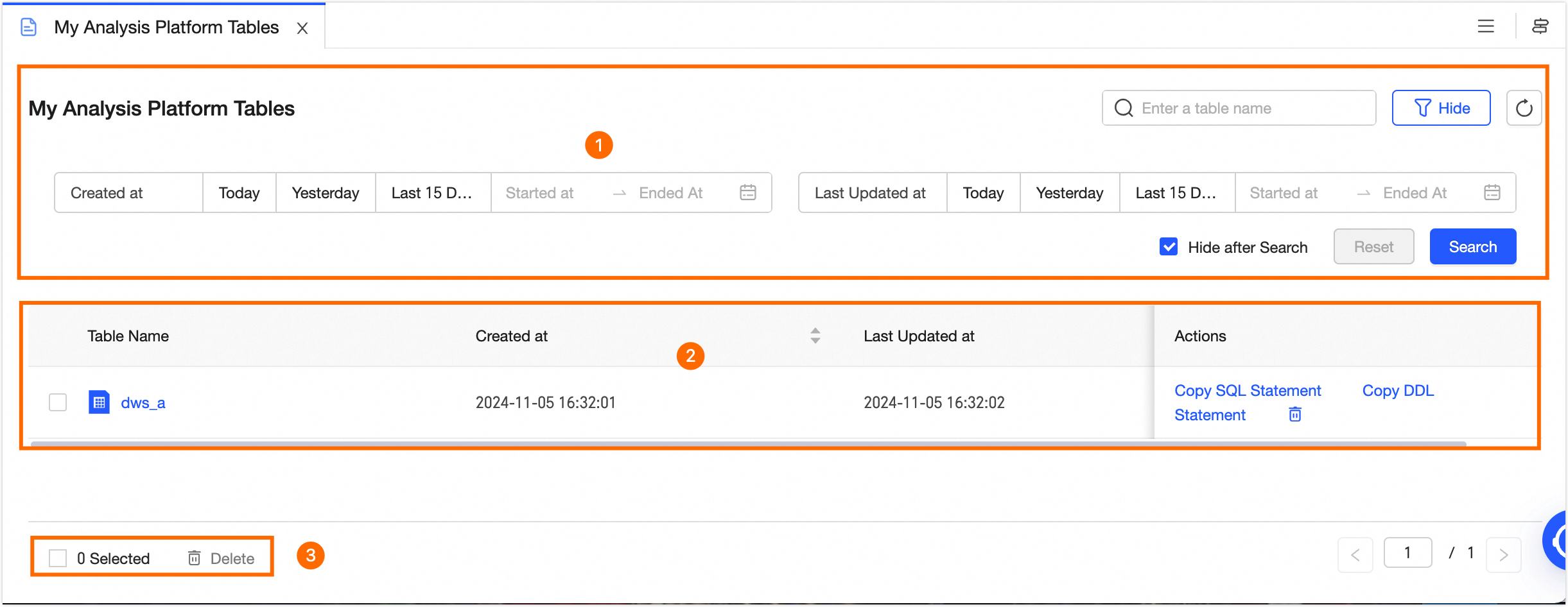
The page consists of three areas: a search and filter area, a table list, and a batch operations area.
|
Area |
Description |
|
① Search and filter area |
Search for tables by entering a table name, or filter them by creation time and last update time. Click Filter to expand the filter area. The filter options include:
Click Reset to clear all filter conditions. |
|
② Analysis platform table list |
The table list shows all tables you have created, including their Table Name, Creation Time, and Last Update Time. You can perform the following operations:
|
|
③ Batch operations |
To delete multiple tables at once, select them and then click Batch Delete at the bottom of the list. |
 icon next to Creation Time or Last Update Time to sort the list by that column.
Single-tenant, multi-engine
The analysis platform table list includes a Project Name column. You can also filter tables by project name in the filter area.