The Dataphin metawarehouse centrally manages business and compute engine metadata within the metawarehouse tenant (OPS tenant). Initialize it by selecting Hadoop as the compute engine type and configuring the required cluster and Hive parameters.
Prerequisites
When you use Hadoop for the metawarehouse, you must either make the metadatabase directly accessible or provide a Hive Metastore service for metadata acquisition.
Background
Dataphin acquires metadata either by connecting directly to a metadatabase or by using the Hive Metastore service. The following table compares the advantages and disadvantages of each method.
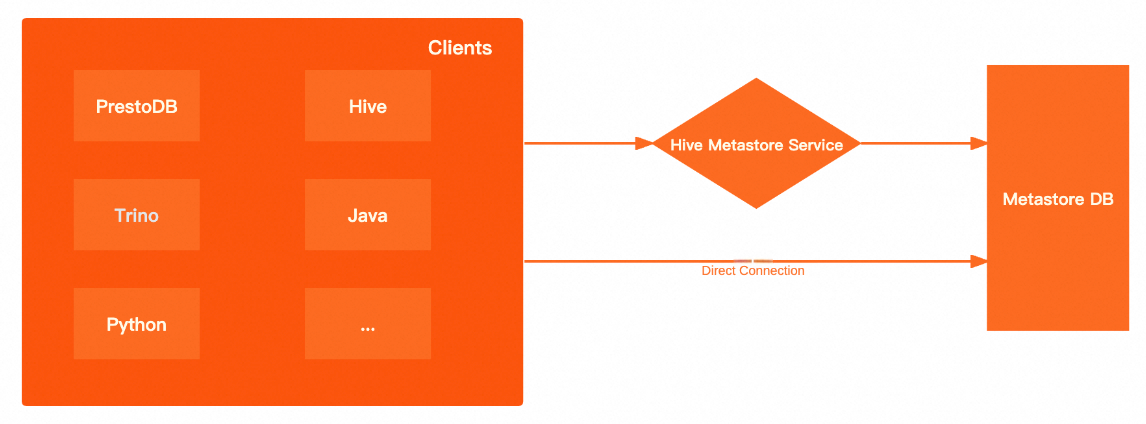
|
Acquisition method |
Advantages and disadvantages |
|
Direct connection to metadatabase |
High performance: Directly connecting to the underlying metadatabase bypasses the Hive Metastore service. This improves client performance when fetching metadata and reduces network latency. Greater flexibility: When you query the metastore through the Hive Metastore service, you are limited to the methods provided by the metastore client. A direct database connection allows you to use any SQL query. |
|
Hive Metastore service |
Enhanced security: You can enable Kerberos authentication for the metastore. Clients must pass Kerberos authentication to read data from the metastore. Improved flexibility: The client interacts only with the Hive Metastore service and is unaware of the back-end metadatabase. This allows you to switch the underlying database at any time without changing the client configuration. |
The performance of acquiring metadata through DLF is similar to that of the Hive Metastore service.
Limitations
Only accounts with the super administrator of the metawarehouse tenant or system administrator role can initialize the system.
Keep the credentials for the super administrator of the metawarehouse tenant or system administrator secure. Exercise caution when logged in with the super administrator of the metawarehouse tenant account.
Procedure
-
In the top navigation bar of the Dataphin homepage, choose management center > system settings.
-
In the left-side navigation pane, choose system O&M > warehouse settings. On the metadata deployment configuration wizard page, carefully read the installation instructions and click Start.
-
On the initialization engine selection page, select the Hadoop engine type.
ImportantIf the metawarehouse has already been initialized, the engine type used in the last successful initialization is selected by default. Switching to an incompatible compute engine can make governance features unavailable.
Hadoop-type engines include Aliyun E-MapReduce 3.X, Aliyun E-MapReduce 5.x, CDH 5.X, CDH 6.X, FusionInsight 8.X, AsiaInfo DP 5.3 Hadoop, and Cloudera Data Platform 7.x. The configuration parameters are the same across all Hadoop-type engines. The following example uses Aliyun E-MapReduce 3.X.
-
Cluster configuration
NoteOSS-HDFS cluster storage is supported only for the Aliyun E-MapReduce 5.x Hadoop engine type.
HDFS cluster storage
Parameter
Description
NameNode
The NameNode manages the file system namespace in HDFS and controls access from external clients.
-
Click Add.
-
In the Add NameNode dialog box, enter the hostname and port number of the NameNode, and click OK.
The information is automatically formatted. Example:
host=hostname,webUiPort=50070,ipcPort=8020.
Configuration file
-
Upload cluster configuration files, such as core-site.xml and hdfs-site.xml, to configure cluster parameters.
-
If you use the Hive Metastore service to acquire metadata, you must upload the
hdfs-site.xml,hive-site.xml,core-site.xml, andhivemetastore-site.xmlfiles. For the FusionInsight 8.X and Aliyun E-MapReduce 5.x Hadoop compute engines, you must also upload thehivemetastore-site.xmlfile.
History Log
Configure the log path for the cluster. Example:
tmp/hadoop-yarn/staging/history/done.Authentication method
Select no authentication or Kerberos. Kerberos uses symmetric key cryptography for authentication between cluster components and improves cluster security.
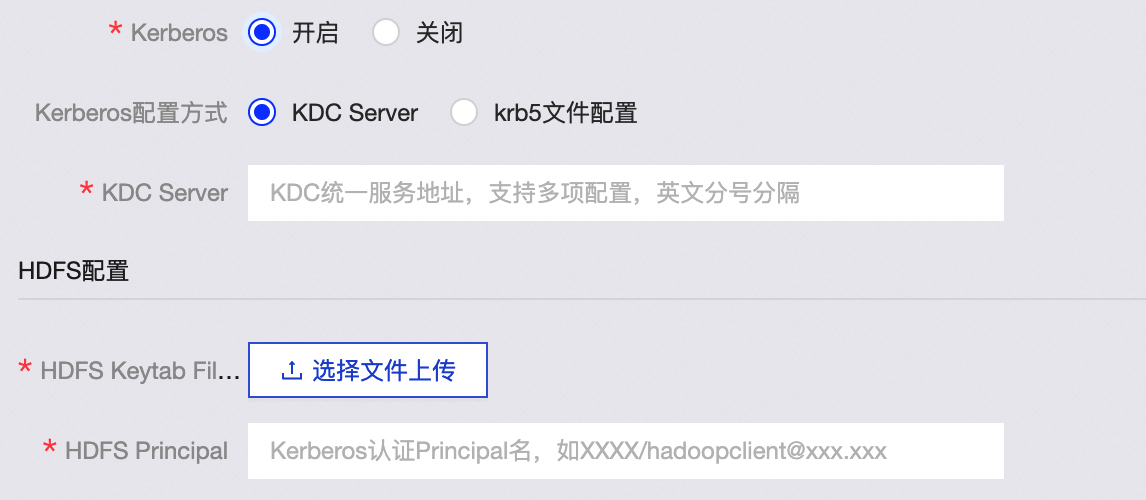
If you select Kerberos authentication, configure the following parameters:
-
Kerberos configuration method
-
KDC Server: Enter the unified KDC service address to assist with Kerberos authentication.
-
krb5 file configuration: Upload the krb5 file for Kerberos authentication.
-
-
HDFS configuration
-
HDFS Keytab File: Upload the HDFS keytab file.
-
HDFS Principal: Enter the principal name for Kerberos authentication. Example:
XXXX/hadoopclient@xxx.xxx.
-
OSS-HDFS cluster storage
When you select Aliyun E-MapReduce 5.x Hadoop as the initialization engine, you can configure the cluster storage type as OSS-HDFS.
Parameter
Description
Cluster storage
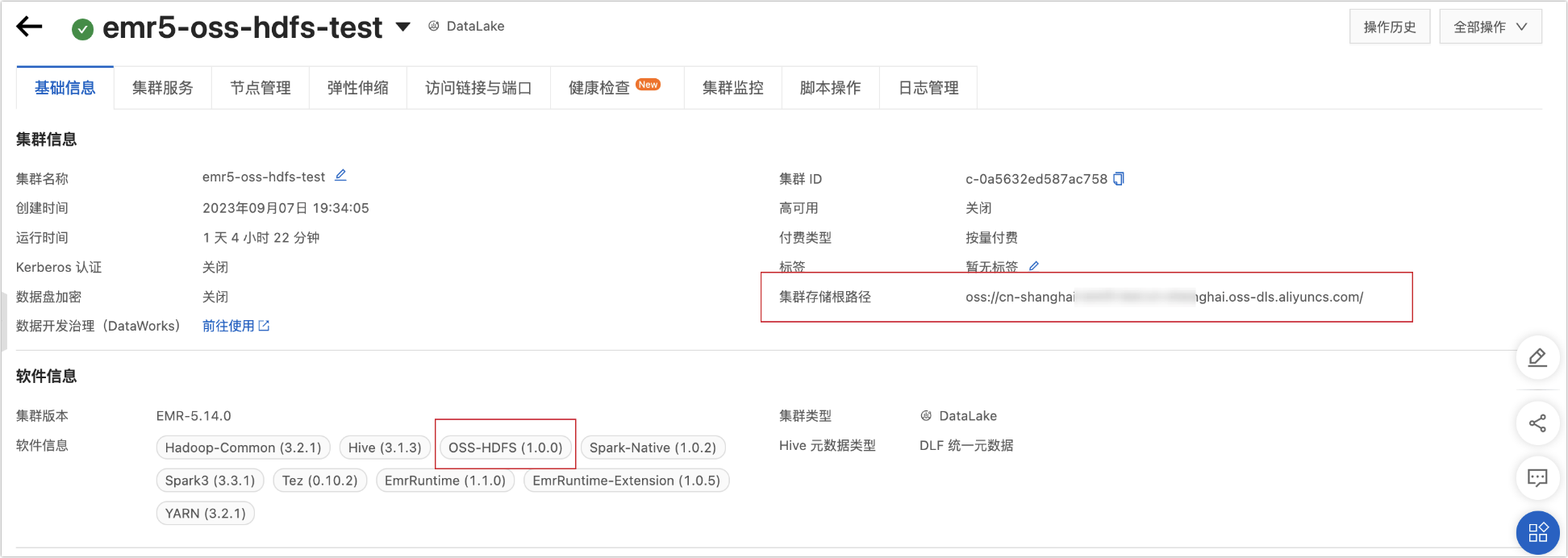
You can find the cluster storage type in the following ways:
-
If the cluster is not created: You can view the storage type on the Aliyun E-MapReduce 5.x Hadoop cluster creation page, as shown in the following figure.

-
For an existing cluster: You can view the storage type on the details page of the Aliyun E-MapReduce 5.x Hadoop cluster, as shown in the following figure.
Cluster storage root directory
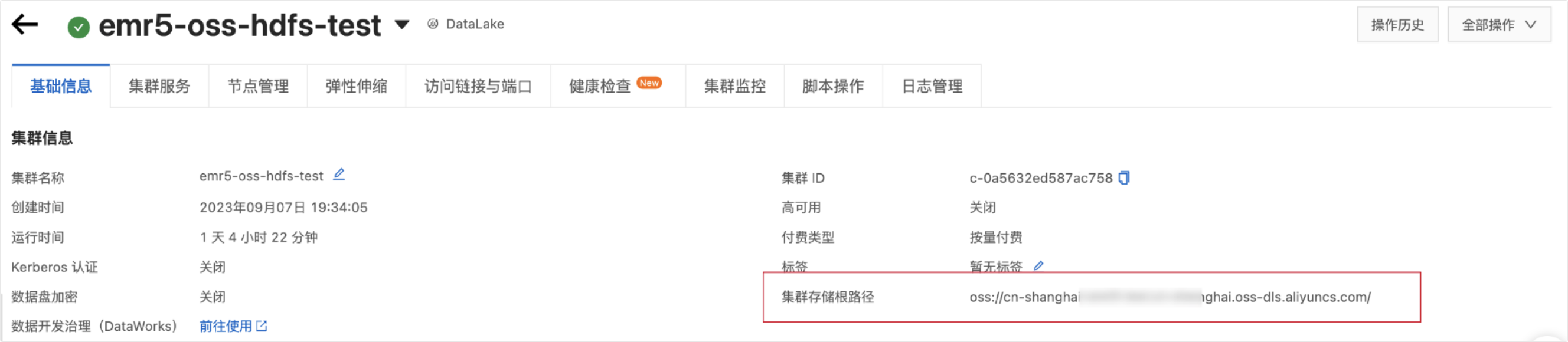
Enter the root directory for cluster storage. You can find this information on the Aliyun E-MapReduce 5.x Hadoop cluster details page, as shown in the following figure.
 Important
If the path you enter includes an endpoint, Dataphin uses that endpoint by default. If not, Dataphin uses the bucket-level endpoint configured in the core-site.xml file. If a bucket-level endpoint is not configured, Dataphin uses the global endpoint from the core-site.xml file. For more information, see Configure an endpoint to access OSS-HDFS.
Configuration file
Upload cluster configuration files, such as core-site.xml and hive-site.xml, to configure cluster parameters. To acquire metadata using the Hive Metastore service, you must upload the
hive-site.xml,core-site.xml, andhivemetastore-site.xmlfiles.History Log
Configure the log path for the cluster. Example:
tmp/hadoop-yarn/staging/history/done.AccessKey ID, AccessKey Secret
Enter the AccessKey ID and AccessKey Secret for accessing the cluster's OSS. You can use an existing AccessKey or create a new one. For more information, see Create an AccessKey pair. To mitigate the risk of leaks, the AccessKey Secret is displayed only once upon creation and cannot be retrieved later. Store it securely.
ImportantThe credentials entered here take precedence over the AccessKey configured in the core-site.xml file.
Authentication method
Select no authentication or Kerberos. Kerberos uses symmetric key cryptography for authentication between cluster components and improves cluster security. If you select Kerberos, upload the krb5 file.
-
-
Hive configuration
Parameter
Description
JDBC URL
Enter the JDBC URL for connecting to Hive.
Authentication method
When cluster authentication is set to no authentication, the supported Hive authentication methods are no authentication and LDAP.
When cluster authentication is set to Kerberos, the supported Hive authentication methods are no authentication, LDAP, and Kerberos.
NoteThis authentication method is supported only for Aliyun E-MapReduce 3.x, Aliyun E-MapReduce 5.x, Cloudera Data Platform 7.x, AsiaInfo DP 5.3, and Huawei FusionInsight 8.x.
Username, Password
The username and password for accessing Hive.
-
No authentication: You must enter a username.
-
LDAP authentication: You must enter a username and password.
-
Kerberos authentication: No entry is required.
Hive Keytab File
This parameter is required if Kerberos authentication is enabled.
Upload the keytab file. You can obtain this file from the Hive server.
Hive Principal
This parameter is required if Kerberos authentication is enabled.
Enter the Kerberos principal name that corresponds to the Hive Keytab File. Example:
XXXX/hadoopclient@xxx.xxx.Execution engine
Select an execution engine based on your requirements. The supported engines for each compute engine are as follows:
-
Aliyun E-MapReduce 3.X: MapReduce, Spark.
-
Aliyun E-MapReduce 5.X: MapReduce, Tez.
-
CDH 5.X: MapReduce.
-
CDH 6.X: MapReduce, Spark, Tez.
-
FusionInsight 8.X: MapReduce.
-
AsiaInfo DP 5.3 Hadoop: MapReduce.
-
Cloudera Data Platform 7.x: Tez.
NoteAfter you set the execution engine, the compute settings, compute sources, and tasks in the metawarehouse tenant will use the specified Hive execution engine. If you re-initialize, these components will be reset to the newly configured execution engine.
-
-
Metadata acquisition method
Acquire metadata by using one of three methods: metadatabase, HMS (Hive Metastore service), and DLF.
-
Acquire via metadatabase
Parameter
Description
Database type
Select the database type for the Hive metadatabase. Dataphin supports MySQL.
Supported MySQL versions include MySQL 5.1.43, MYSQL 5.6/5.7, and MySQL 8.
JDBC URL
Enter the JDBC connection URL for the target database. Example:
The connection URL format for a MySQL database is
jdbc:mysql://host:port/dbname.Username, Password
The username and password for the target database.
-
Acquire via HMS
When acquiring metadata via HMS with Kerberos enabled, you must upload a keytab file and enter a principal.
Parameter
Description
Keytab File
The Kerberos authentication keytab file for the Hive metastore.
Principal
The Kerberos authentication principal for the Hive metastore.
-
Acquire via DLF
ImportantDLF metadata acquisition is supported only for Aliyun E-MapReduce 5.x with Hive 3.1.x.
Parameter
Description
Endpoint
Enter the endpoint for the region where the cluster's DLF data catalog is located. For information about how to obtain the endpoint, see DLF regions and endpoints.
AccessKey ID, AccessKey Secret
Enter the AccessKey ID and AccessKey Secret for the account that owns the cluster. You can use an existing AccessKey or create a new one. For more information, see Create an AccessKey pair. To mitigate the risk of leaks, the AccessKey Secret is displayed only once upon creation and cannot be retrieved later. Store it securely.
-
-
Metadata production project
meta project: The logical project for metadata production and processing. The recommended value is
dataphin_meta. To prevent initialization failures, do not change this name during re-initialization.
-
-
Click test connection. After the connection test is successful, click Next.
-
On the initialization page, click Start.
NoteThe initialization process takes about 15 minutes to complete.
-
After a success message appears, click Finish to complete the configuration.
Next steps
After you initialize the metadata, you can configure the compute engine for Dataphin instances. When the metawarehouse engine is set to Hadoop, the compute engine for a business tenant can be any engine type except MaxCompute. For instructions, see Compute settings.