Dependency cycle | Dependency policy |
Current cycle (today) | When the current cycle (today) is the dependency cycle, the details of the instances that different dependency policies depend on are as follows: All instances When all instances are required, all instances of the dependency task in the current cycle (today) must run successfully for the dependent subsequent nodes to run normally. For example, if the business date of the day is 2024-03-02, the dependency task for the current cycle (today) is 2024-03-02. The running of the current task instance node depends on all instances of the dependency node 2024-03-02. If all dependency instances of 2024-03-02 run successfully, all instance nodes of the current task 2024-03-02 can run normally. If there is one instance of the dependency node 2024-03-02 that does not run successfully, none of the instance nodes of the current task 2024-03-02 can run normally. When configuring scheduling dependencies, the node dependency cycle preview example is as follows. 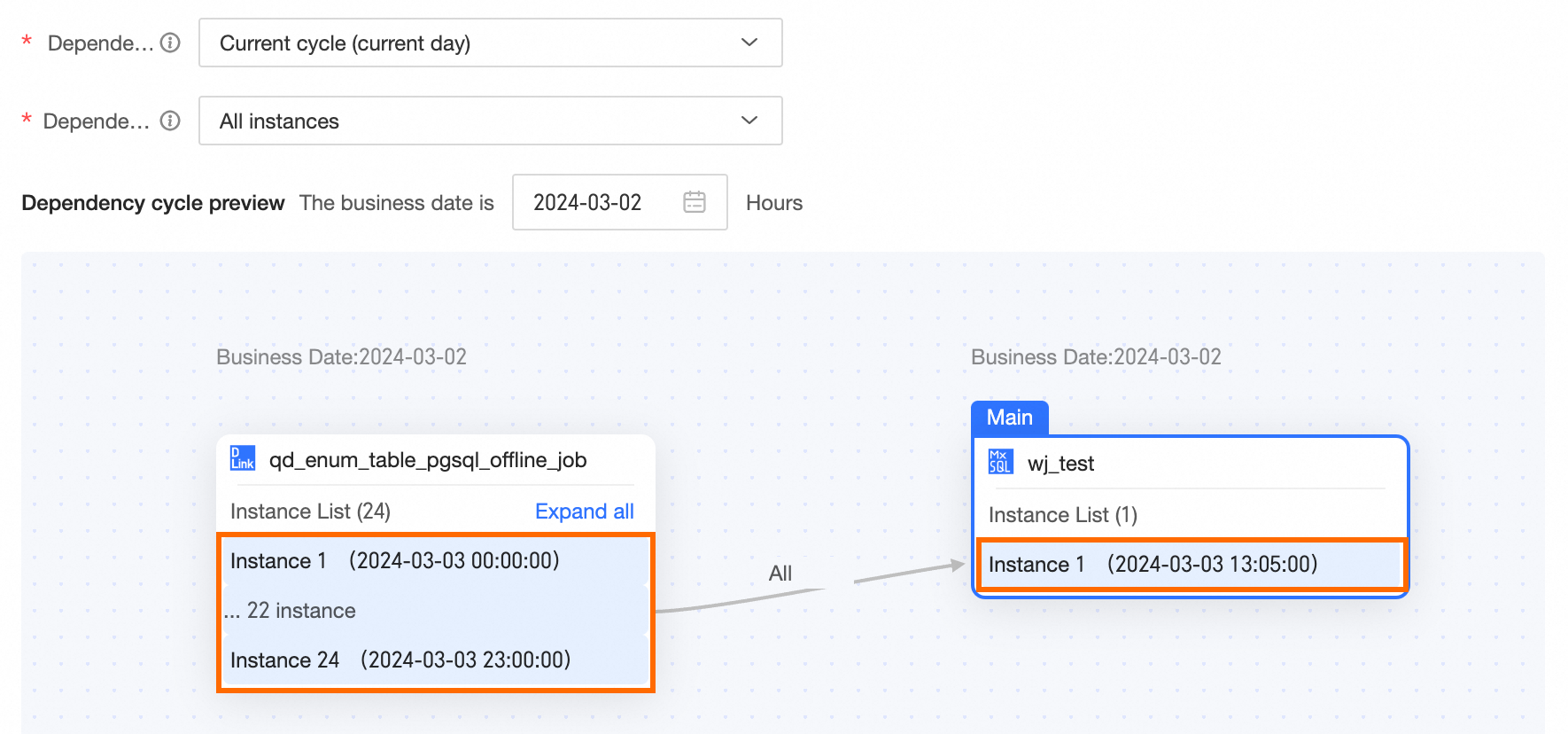 First instance When the first instance is required, as long as the first instance of the dependency task in the current cycle (today) runs successfully, the dependent subsequent nodes can run normally. For example, if the business date of the day is 2024-03-02, the current cycle (today) is 2024-03-02. The running of the instance node of the current task 2024-03-02 depends on the first instance of the dependency node 2024-03-02. If the first instance of the dependency node 2024-03-02 runs successfully, all instance nodes of the current task 2024-03-02 can run normally. If the first instance of the dependency node 2024-03-02 does not run successfully, none of the instance nodes of the current task 2024-03-02 can run normally. When configuring scheduling dependencies, the node dependency cycle preview example is as follows. 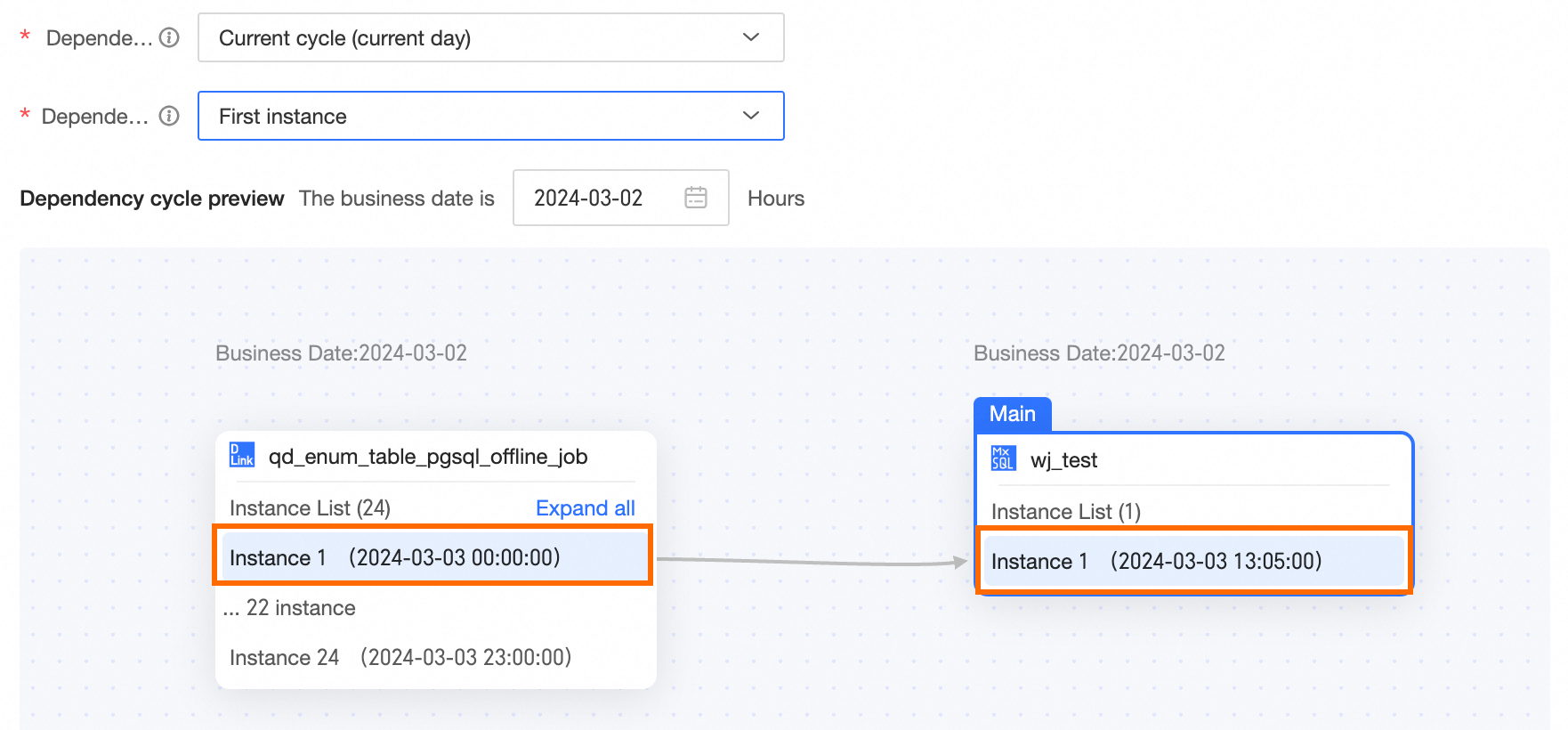
Last instance When the last instance is required, as long as the last instance of the dependency task in the current cycle (today) runs successfully, the dependent subsequent nodes can run normally. For example, if the business date of the day is 2024-03-02, the current cycle (today) is 2024-03-02. The running of the instance node of the current task 2024-03-02 depends on the last instance of the dependency node 2024-03-02. If the last instance of the dependency node 2024-03-02 runs successfully, all instance nodes of the current task 2024-03-02 can run normally. If the last instance of the dependency node 2024-03-02 does not run successfully, none of the instance nodes of the current task 2024-03-02 can run normally. When configuring scheduling dependencies, the node dependency cycle preview example is as follows. 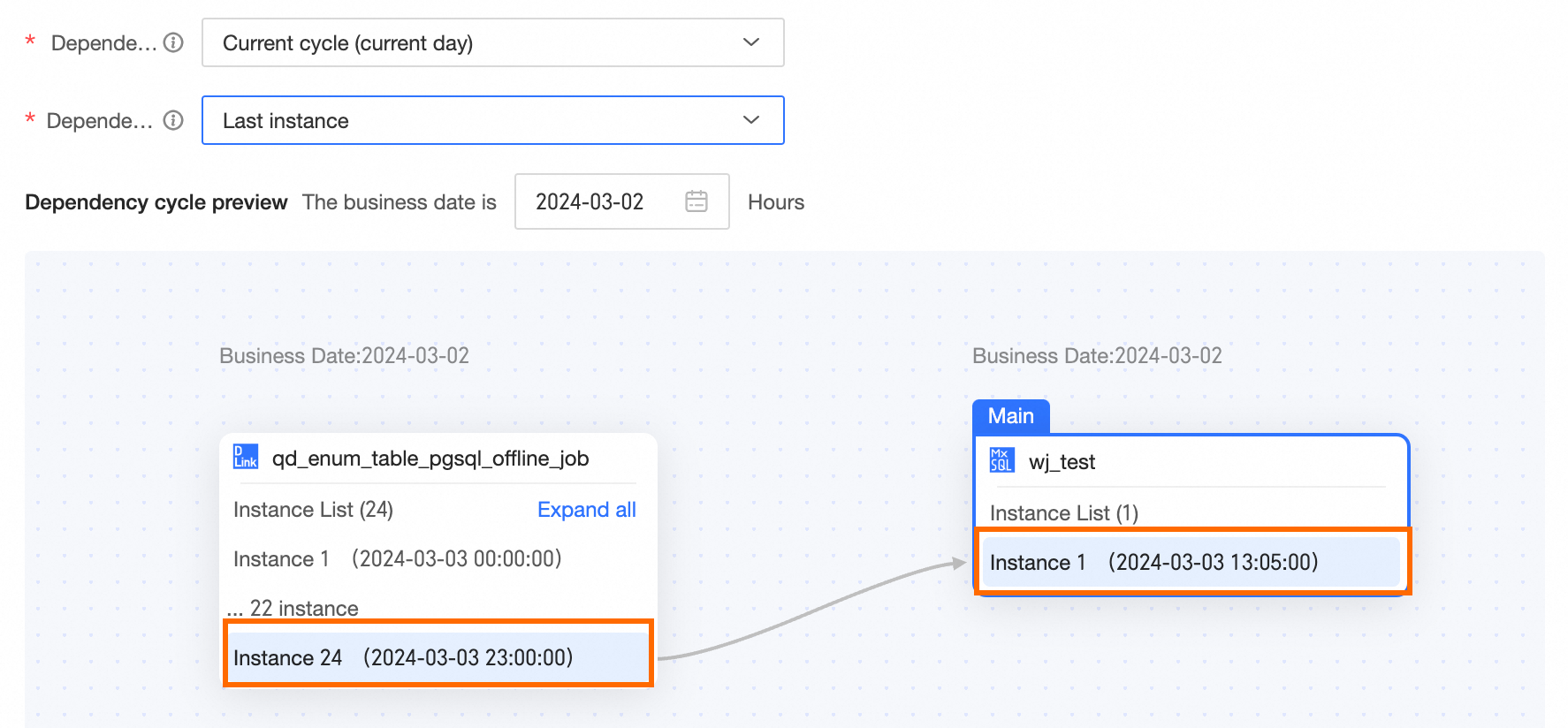 Next closest instance Within the selected interval, the first instance A that is later than the current instance running time. If A does not exist, the last instance is selected. For example, if the business date of the day is 2024-03-02, the current cycle (today) is 2024-03-02. For the task instance node with a business date of 2024-03-02 and a scheduling time of 13:05:00, the next closest instance is the instance with a scheduling time of 14:00:00 on 2024-03-02. This means the 13:05:00 instance node of the current task 2024-03-02 depends on the instance of the dependency node 14:00:00 in the current cycle (today). For the task instance node with a business date of 2024-03-02 and a scheduling time of 13:00:00, the next closest instance is the instance with a scheduling time of 13:00:00 on 2024-03-02. This means the 13:00:00 instance node of the current task 2024-03-02 depends on the instance of the dependency node 13:00:00 in the current cycle (today). Other nodes follow the same logic. When configuring scheduling dependencies, the node dependency cycle preview example is as follows. 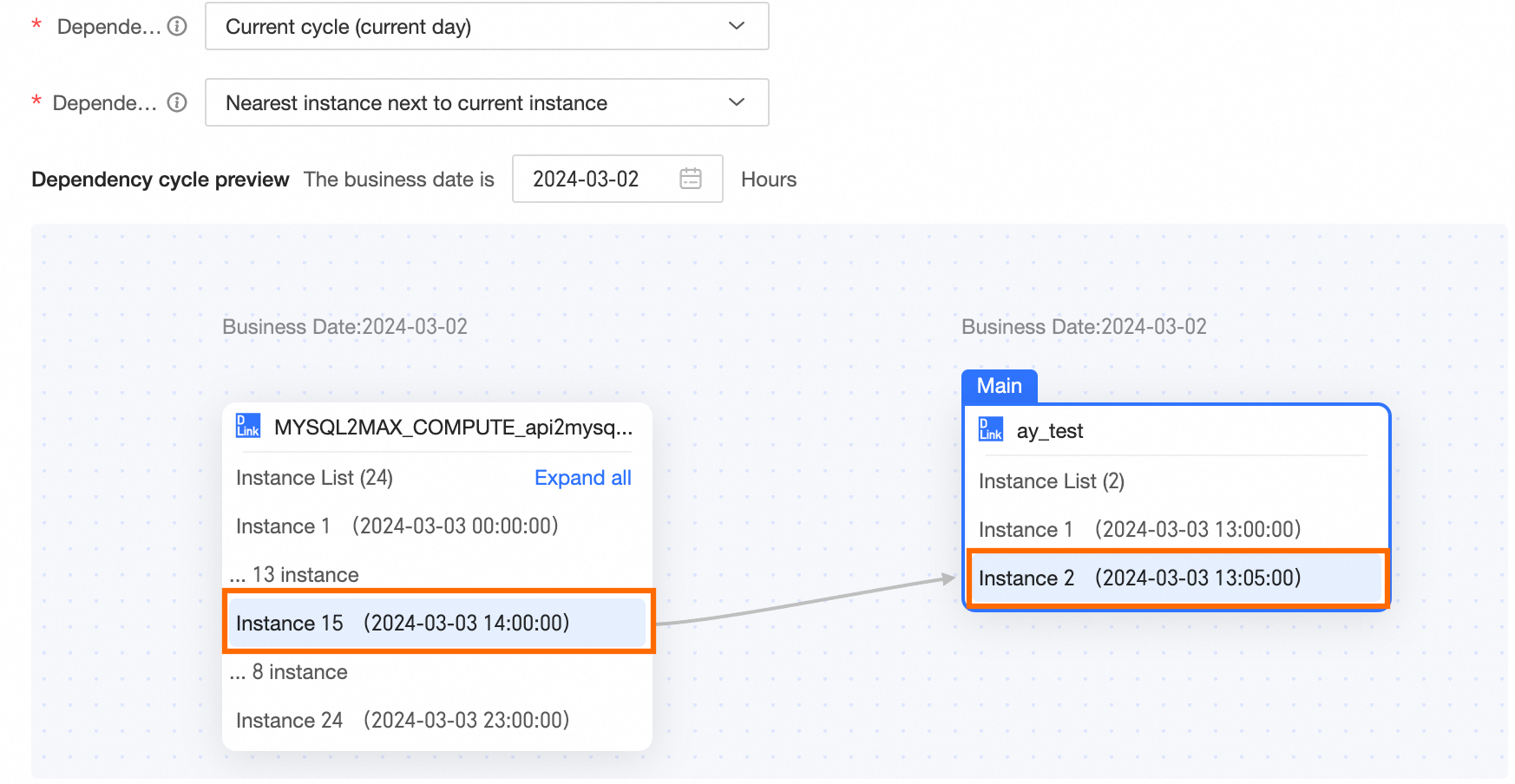 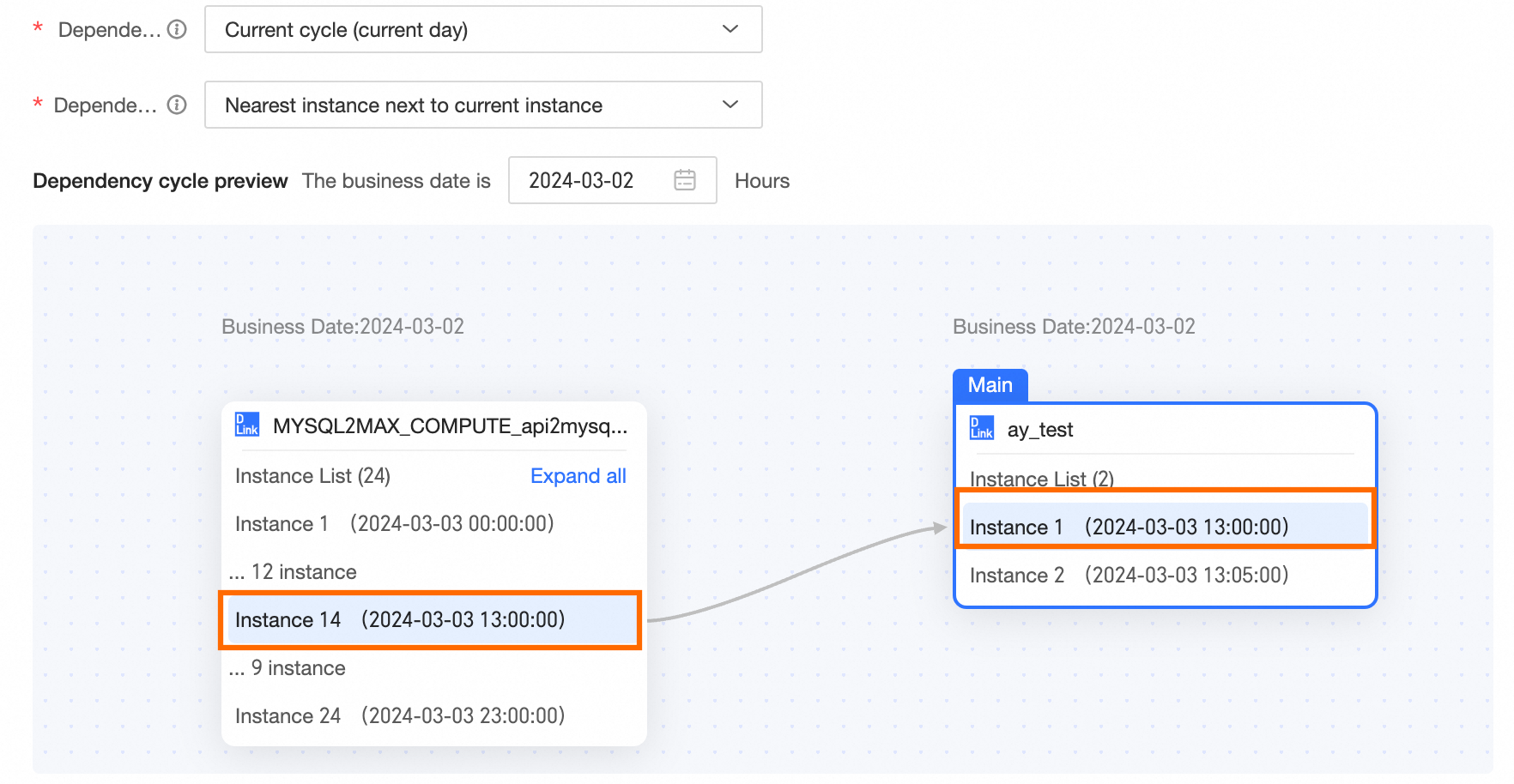
Previous closest instance Within the selected interval, the instance with the scheduled running time closest to the current task's scheduled running time. The last instance that is earlier than the current task's scheduled running time is prioritized. For example, if the business date of the day is 2024-03-02, the current cycle (today) is 2024-03-02. For the task instance node with a business date of 2024-03-02 and a scheduling time of 13:05:00, the previous closest instance is the instance with a scheduling time of 13:00:00 on 2024-03-02. This means the 13:05:00 instance node of the current task 2024-03-02 depends on the instance of the dependency node 13:00:00 in the current cycle (today). For the task instance node with a business date of 2024-03-02 and a scheduling time of 13:00:00, the previous closest instance is the instance with a scheduling time of 13:00:00 on 2024-03-02. This means the 13:00:00 instance node of the current task 2024-03-02 depends on the instance of the dependency node 13:00:00 in the current cycle (today). Other nodes follow the same logic. When configuring scheduling dependencies, the node dependency cycle preview example is as follows. 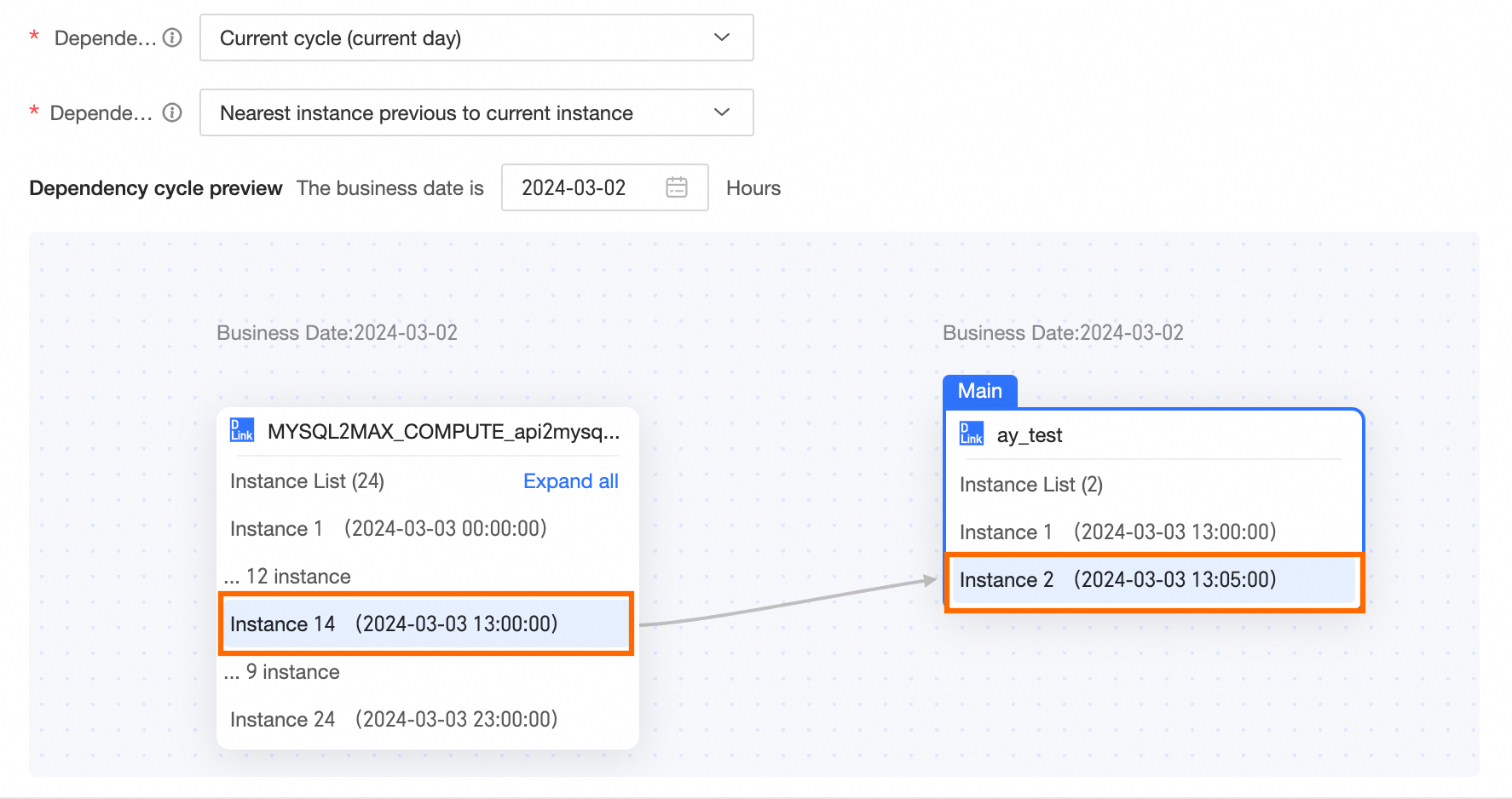 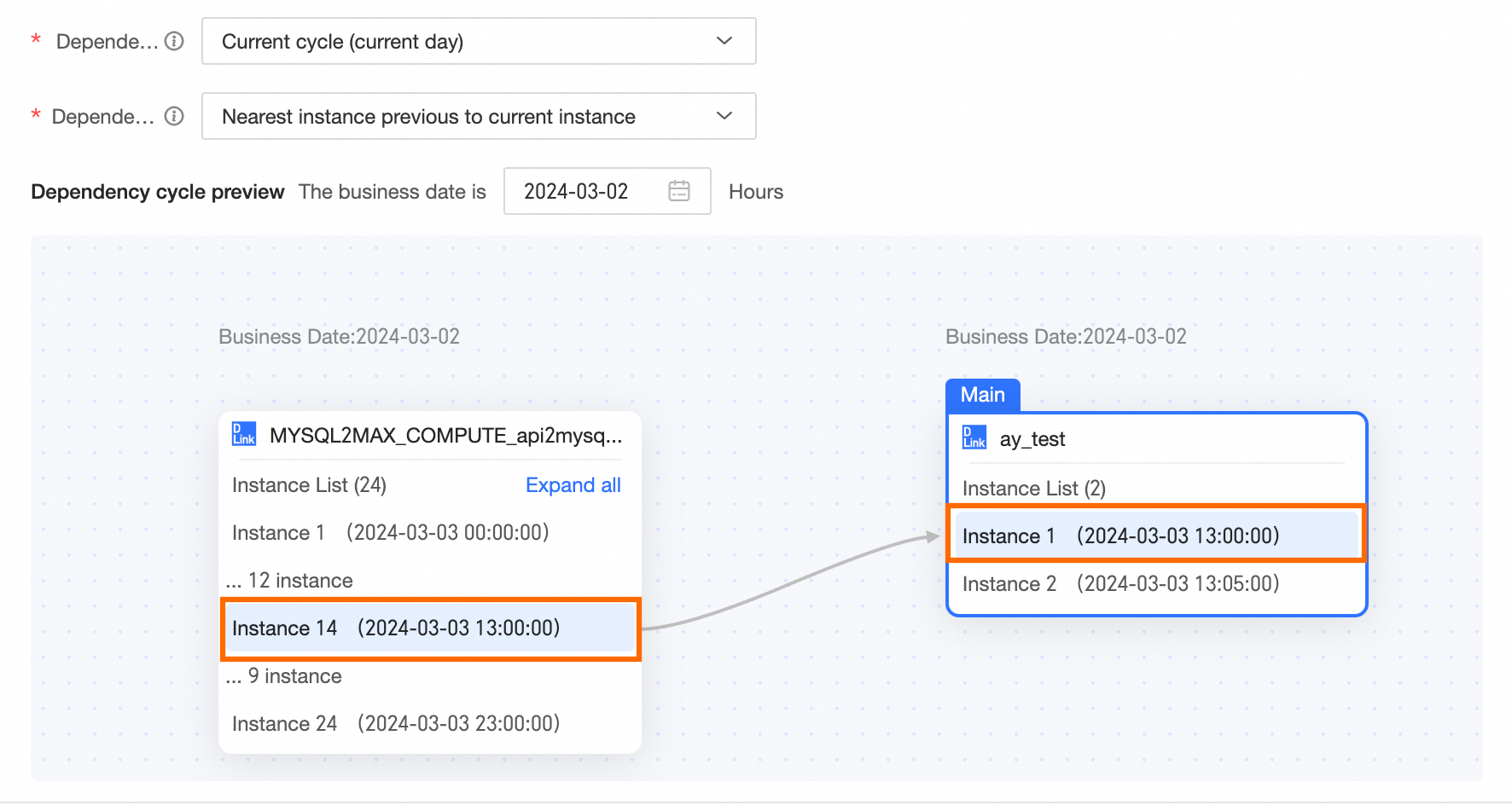
|
Previous cycle (yesterday) | When the previous cycle (yesterday) is the dependency cycle, the details of the instances that different dependency policies depend on are as follows: All instances When all instances are required, all instances of the previous cycle (yesterday) must run successfully for the dependent subsequent nodes to run normally. For example, if the business date of the day is 2024-03-02, the previous cycle (yesterday) is 2024-03-01. The running of the instance node of 2024-03-02 depends on all instances of 2024-03-01. If all instances of 2024-03-01 run successfully, all instance nodes of 2024-03-02 can run normally. If there is one instance of 2024-03-01 that does not run successfully, none of the instance nodes of 2024-03-02 can run normally. When configuring scheduling dependencies, the node dependency cycle preview example is as follows. 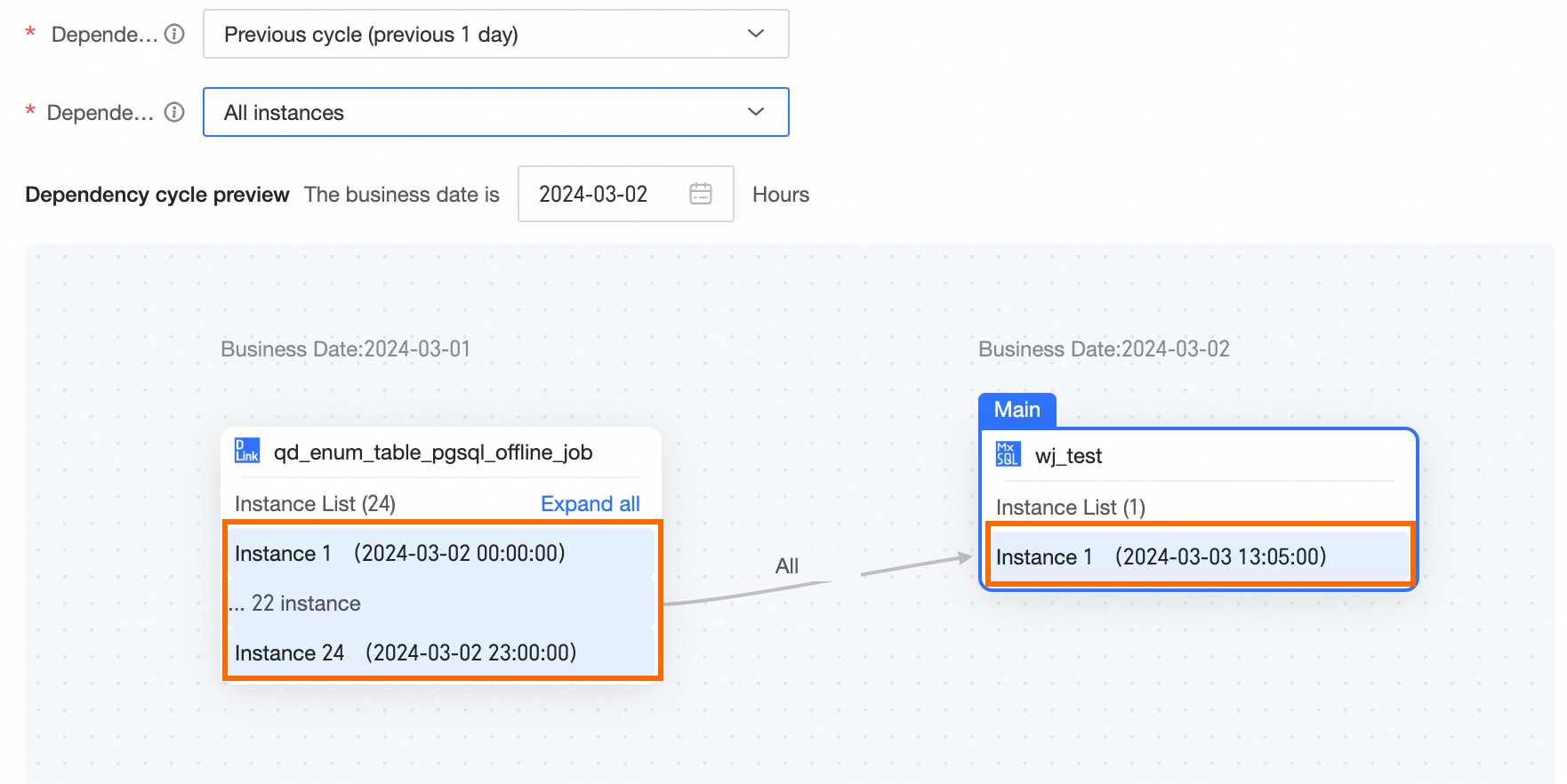
First instance When the first instance is required, as long as the first instance of the previous cycle (yesterday) runs successfully, the dependent subsequent nodes can run normally. For example, if the business date of the day is 2024-03-02, the previous cycle (yesterday) is 2024-03-01. The running of the instance node of 2024-03-02 depends on the first instance of 2024-03-01. If the first instance of 2024-03-01 runs successfully, all instance nodes of 2024-03-02 can run normally. If the first instance of 2024-03-01 does not run successfully, none of the instance nodes of 2024-03-02 can run normally. When configuring scheduling dependencies, the node dependency cycle preview example is as follows. 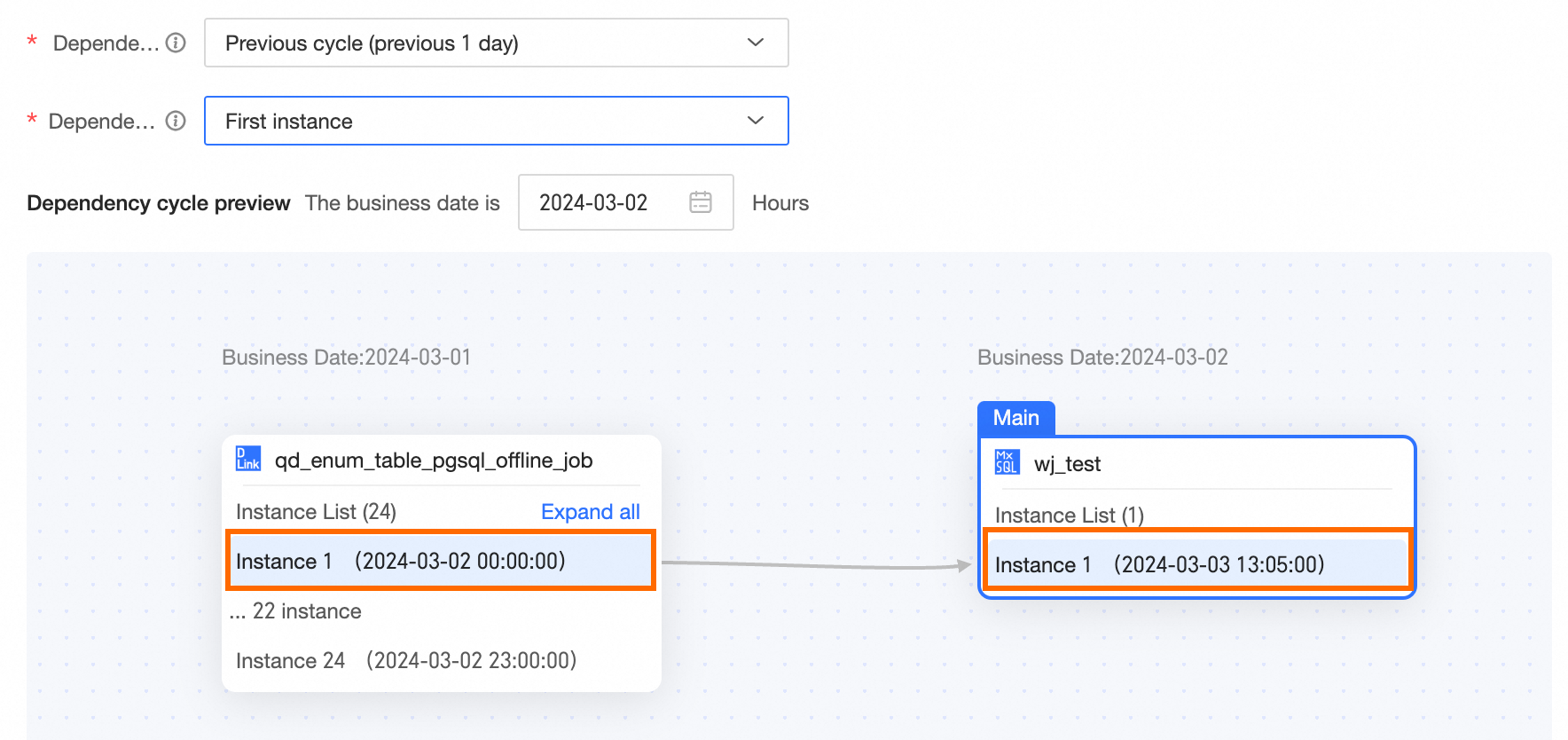
Last instance When the last instance is required, as long as the last instance of the previous cycle (yesterday) runs successfully, the dependent subsequent nodes can run normally. For example, if the business date of the day is 2024-03-02, the previous cycle (yesterday) is 2024-03-01. The running of the instance node of 2024-03-02 depends on the last instance of 2024-03-01. If the last instance of 2024-03-01 runs successfully, all instance nodes of 2024-03-02 can run normally. If the last instance of 2024-03-01 does not run successfully, none of the instance nodes of 2024-03-02 can run normally. When configuring scheduling dependencies, the node dependency cycle preview example is as follows. 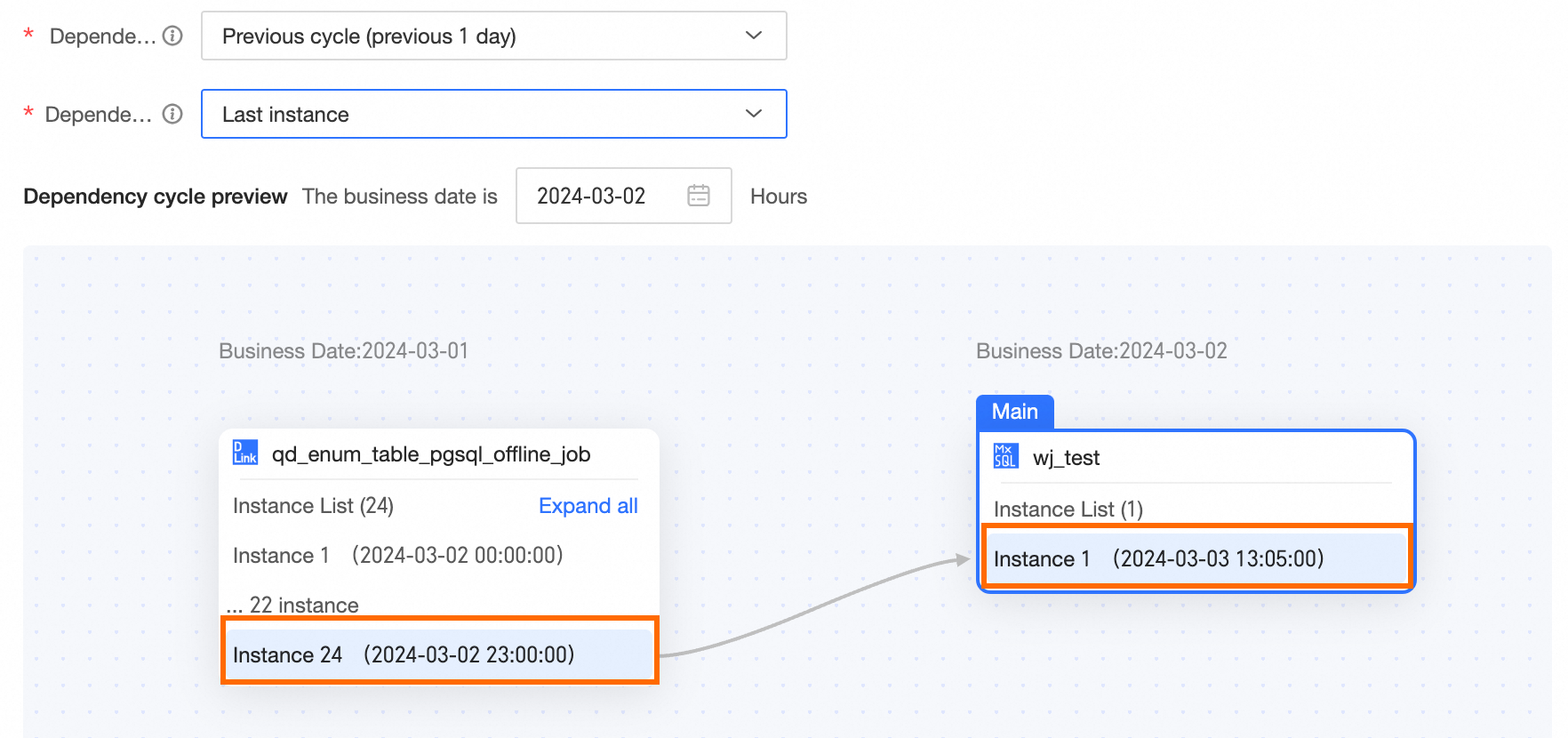 Next closest instance Within the selected interval, the first instance A that is later than the current instance running time. If A does not exist, the last instance is selected. For example, if the business date of the day is 2024-03-02, the previous cycle (yesterday) is 2024-03-01. For the task instance node with a business date of 2024-03-02 and a scheduling time of 13:00:00, the next closest instance is the instance with a business date of 2024-03-01 and a scheduling time of 13:00:00. This means the 13:00:00 instance node of the current task 2024-03-02 depends on the instance of the dependency node 23:00:00 in the previous cycle (yesterday). Other nodes follow the same logic. When configuring scheduling dependencies, the node dependency cycle preview example is as follows. 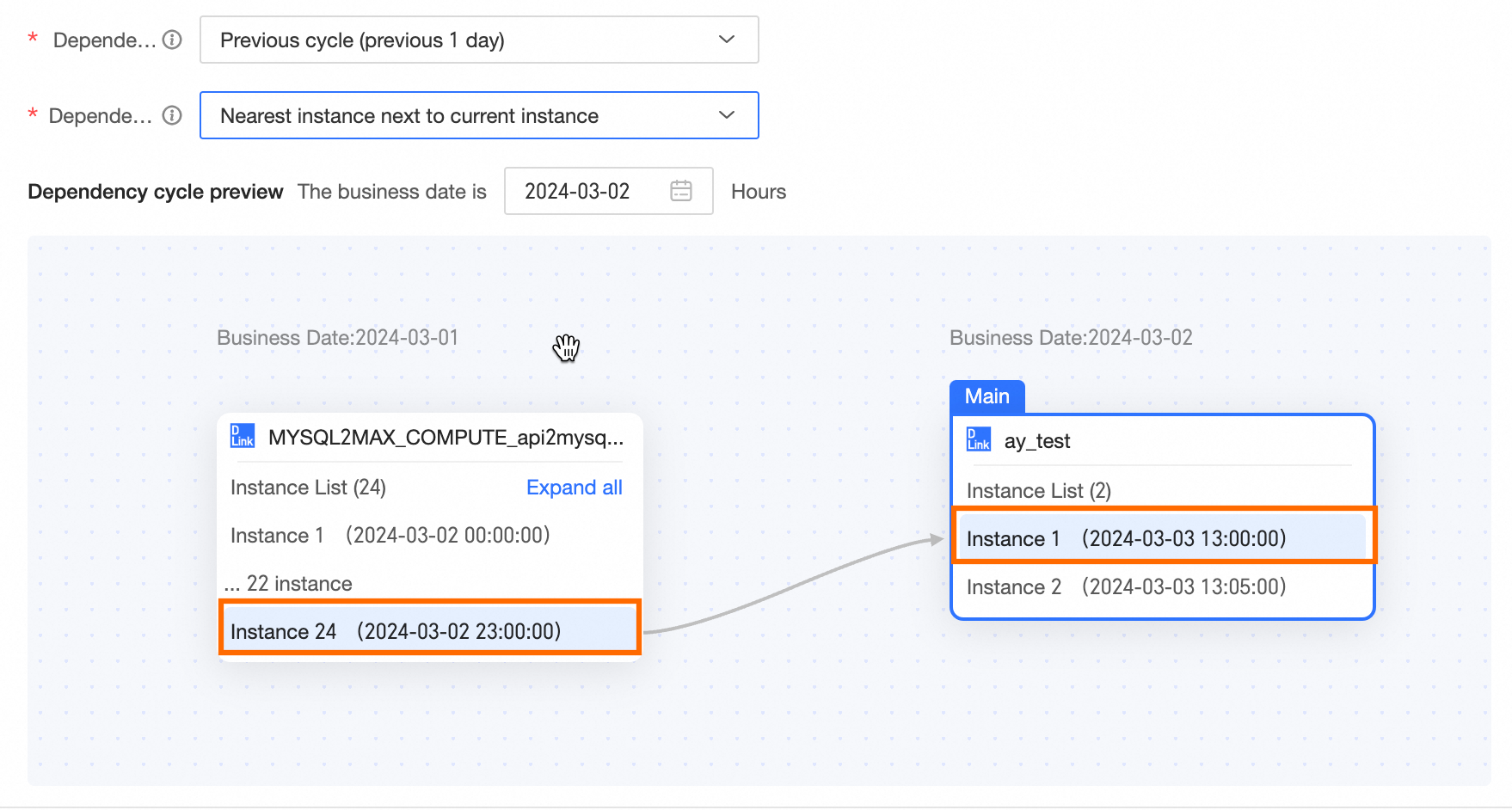 Previous closest instance Within the selected interval, the instance with the scheduled running time closest to the current task's scheduled running time. The last instance that is earlier than the current task's scheduled running time is prioritized. For example, if the business date of the day is 2024-03-02, the previous cycle (yesterday) is 2024-03-01. For the task instance node with a business date of 2024-03-02 and a scheduling time of 13:00:00, the previous closest instance is the instance with a business date of 2024-03-01 and a scheduling time of 13:00:00. This means the 13:00:00 instance node of the current task 2024-03-02 depends on the instance of the dependency node 23:00:00 in the previous cycle (yesterday). Other nodes follow the same logic. When configuring scheduling dependencies, the node dependency cycle preview example is as follows. 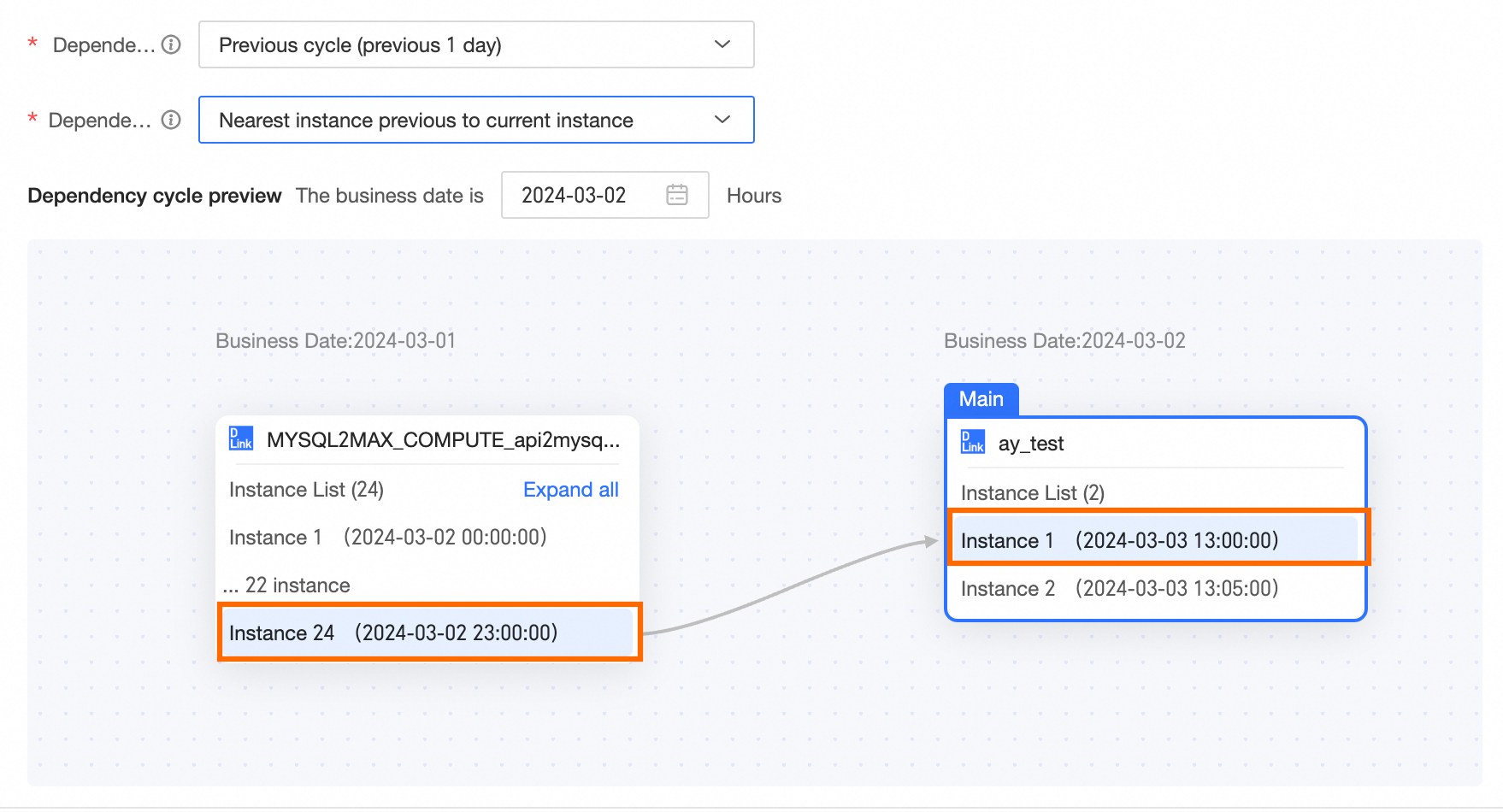
|
Previous N days | When the previous N days is the dependency cycle, the execution logic of different dependency policies varies. The following examples use the easily understandable previous 2 days to explain the instances that different dependency policies depend on, as follows: All instances When all instances are required, all instances of the previous 2 days must run successfully for the dependent subsequent nodes to run normally. For example, if the business date of the day is 2024-03-04, the previous 2 days are 2024-03-02. The running of the instance node of 2024-03-04 depends on all instances of 2024-03-02. If all instances of 2024-03-02 run successfully, all instance nodes of 2024-03-04 can run normally. If there is one instance of 2024-03-02 that does not run successfully, none of the instance nodes of 2024-03-04 can run normally. Other nodes follow the same logic. When configuring scheduling dependencies, the node dependency cycle preview example is as follows. 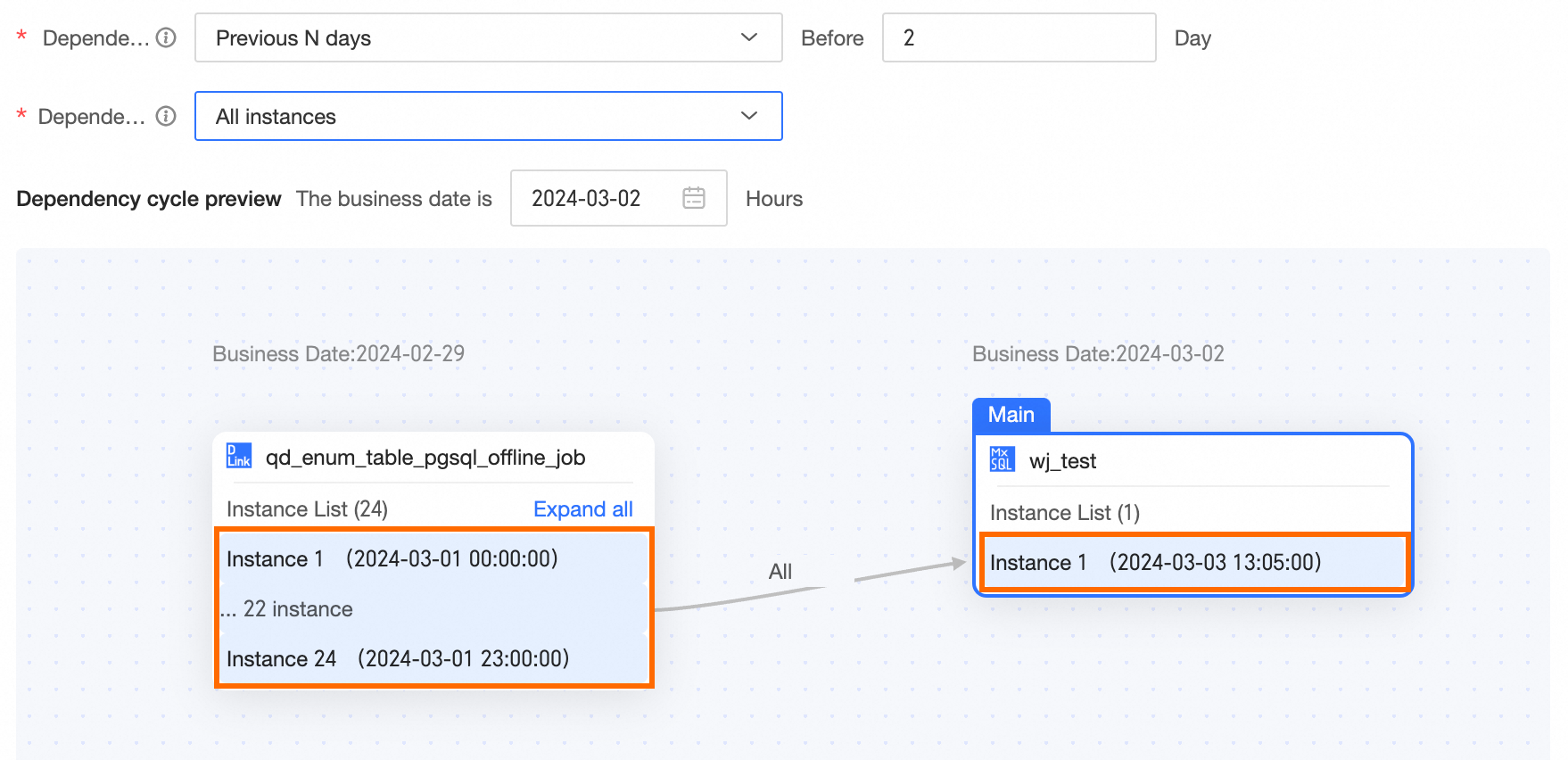
First instance When the first instance is required, as long as the first instance of the previous 2 days runs successfully, the dependent subsequent nodes can run normally. For example, if the business date of the day is 2024-03-04, the previous 2 days are 2024-03-02. The running of the instance node of 2024-03-04 depends on the first instance of 2024-03-02. If the first instance of 2024-03-02 runs successfully, all instance nodes of 2024-03-04 can run normally. If the first instance of 2024-03-02 does not run successfully, none of the instance nodes of 2024-03-04 can run normally. When configuring scheduling dependencies, the node dependency cycle preview example is as follows. 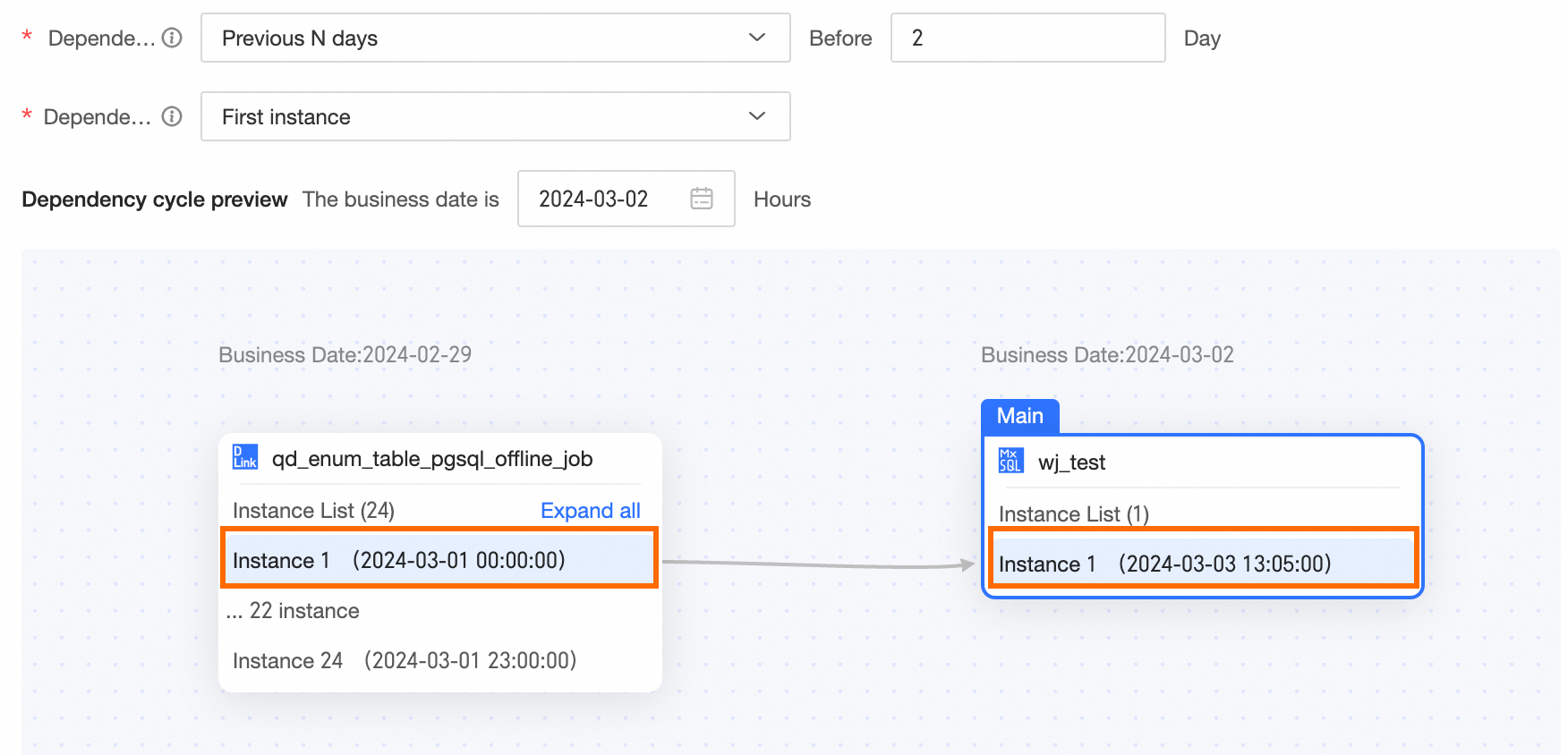 Last instance When the last instance is required, as long as the last instance of the previous 2 days runs successfully, the dependent subsequent nodes can run normally. For example, if the business date of the day is 2024-03-04, the previous 2 days are 2024-03-02. The running of the instance node of 2024-03-04 depends on the last instance of 2024-03-02. If the last instance of 2024-03-02 runs successfully, all instance nodes of 2024-03-04 can run normally. If the last instance of 2024-03-02 does not run successfully, none of the instance nodes of 2024-03-04 can run normally. When configuring scheduling dependencies, the node dependency cycle preview example is as follows. 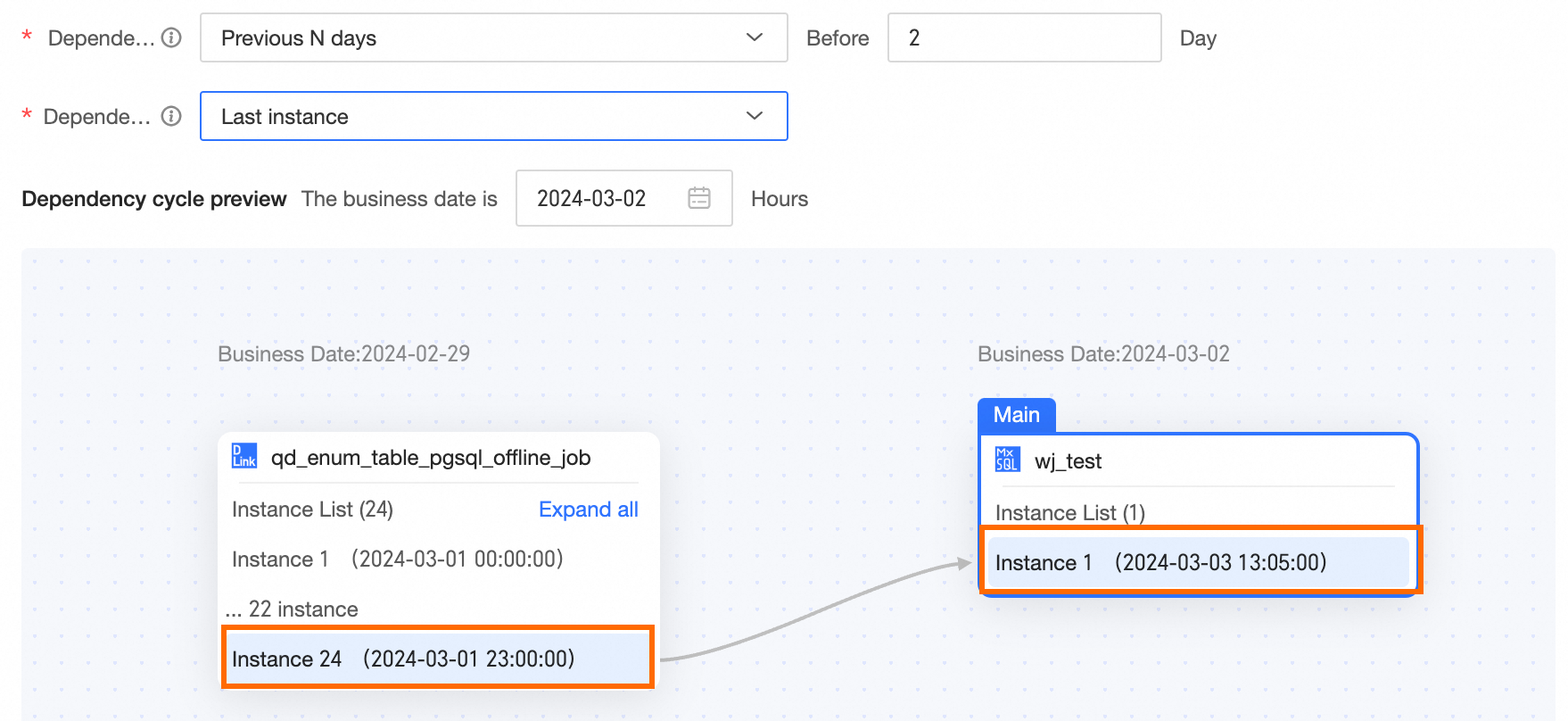
Next closest instance Within the selected interval, the first instance A that is later than the current instance running time. If A does not exist, the last instance is selected. For example, if the business date of the day is 2024-03-04, the previous 2 days are 2024-03-02. For the task instance node with a business date of 2024-03-04 and a scheduling time of 13:00:00, the next closest instance is the instance with a business date of 2024-03-02 and a scheduling time of 13:00:00. This means the 13:00:00 instance node of the current task 2024-03-04 depends on the instance of the dependency node 13:00:00 in the previous 2 days. Other nodes follow the same logic. When configuring scheduling dependencies, the node dependency cycle preview example is as follows. 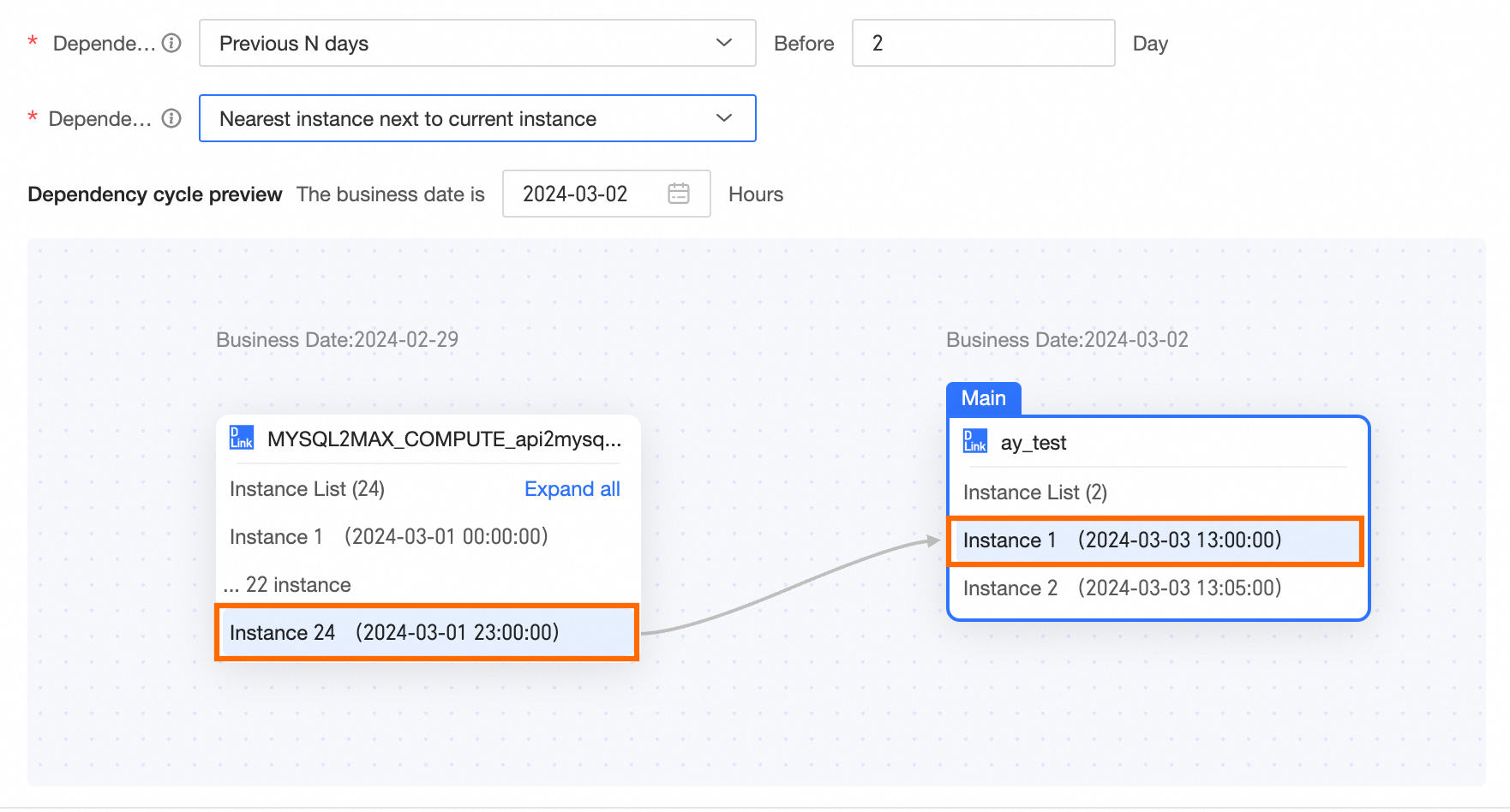
Previous closest instance Within the selected interval, the instance with the scheduled running time closest to the current task's scheduled running time. The last instance that is earlier than the current task's scheduled running time is prioritized. For example, if the business date of the day is 2024-03-04, the previous 2 days are 2024-03-02. For the task instance node with a business date of 2024-03-04 and a scheduling time of 13:00:00, the previous closest instance is the instance with a business date of 2024-03-02 and a scheduling time of 13:00:00. This means the 13:00:00 instance node of the current task 2024-03-04 depends on the instance of the dependency node 13:00:00 in the previous 2 days. Other nodes follow the same logic. When configuring scheduling dependencies, the node dependency cycle preview example is as follows. 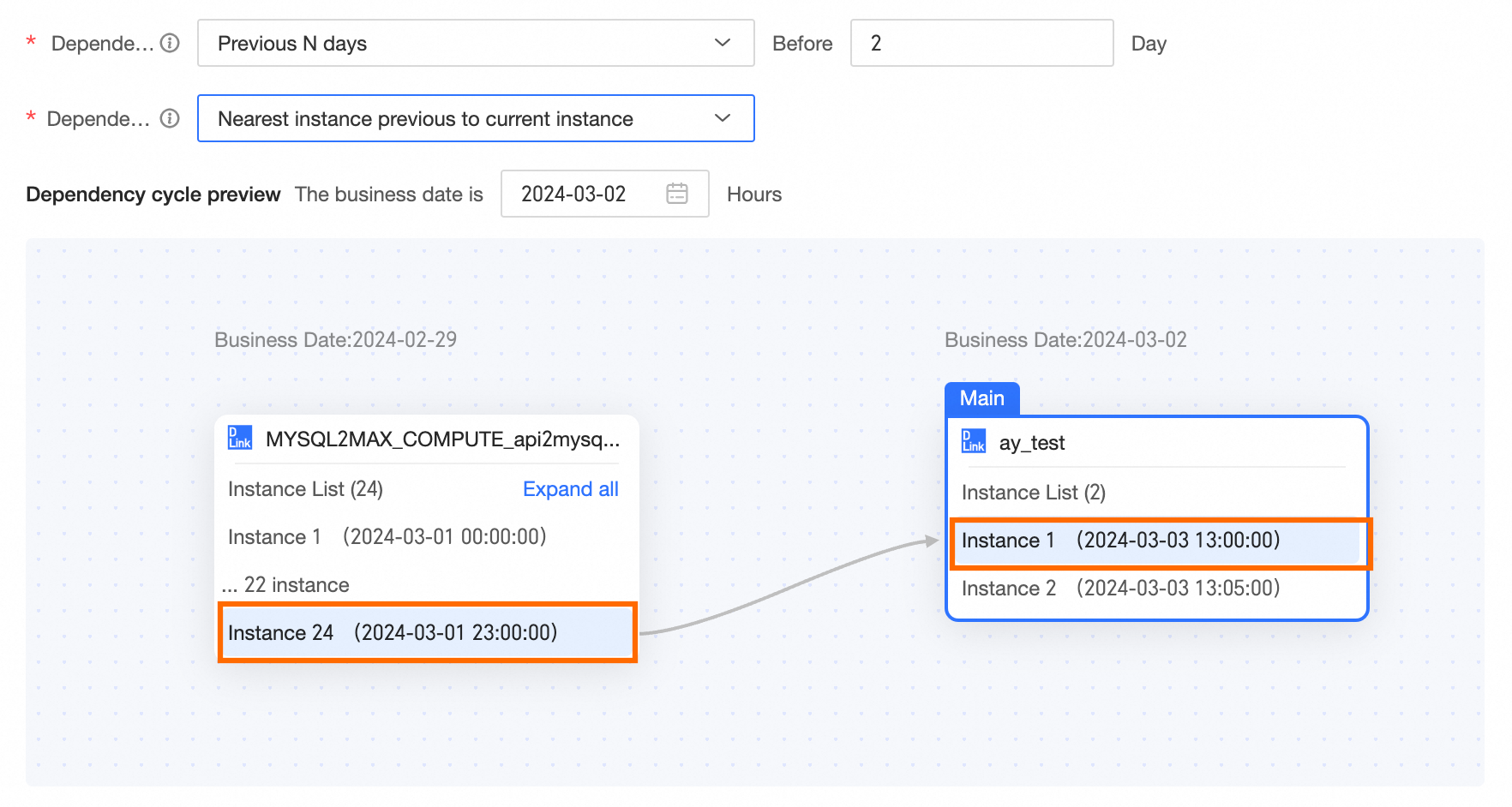
|
Last 24 hours | When the last 24 hours is the dependency cycle, the details of the instances that different dependency policies depend on are as follows: All instances When all instances are required, all dependency instances within 24 hours (last 24 hours) of the current running node must run successfully for the current running node to run normally. For example, if the business date of the day is 2024-03-04, the dependency instances within 24 hours of the 13:00:00 instance include 2024-03-03 at 13:00:00, 14:00:00, 15:00:00. The dependency instances within 24 hours of the 14:00:00 instance include 2024-03-03 at 14:00:00, 15:00:00. When configuring scheduling dependencies, the node dependency cycle preview example is as follows. 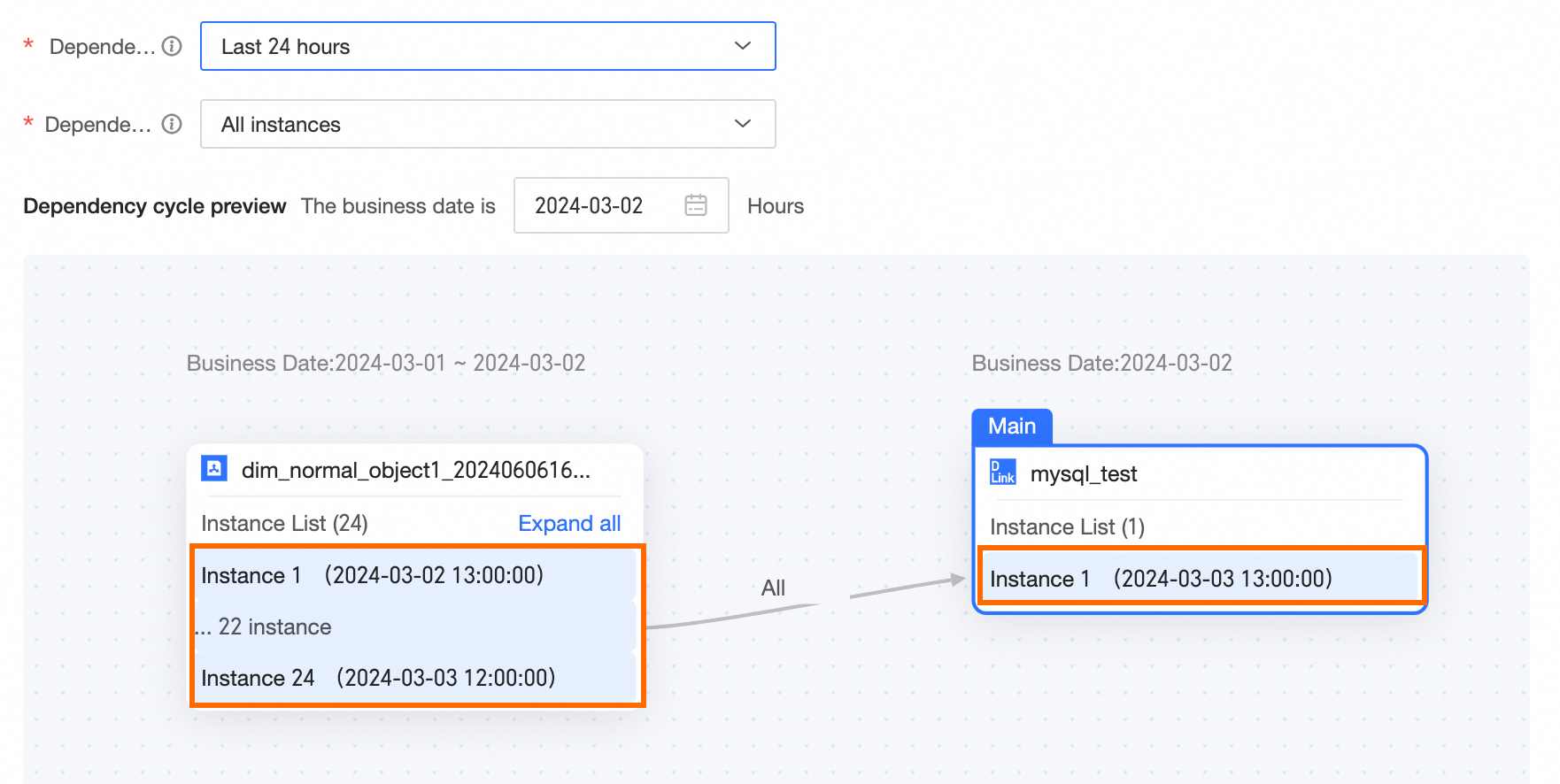
First instance When the first instance is required, the first dependency instance within 24 hours (last 24 hours) of the current running node must run successfully for the current running node to run normally. For example, if the business date of the day is 2024-03-04, the dependency instances within 24 hours of the 13:00:00 instance include 2024-03-03 at 13:00:00, 14:00:00, 15:00:00. The first instance within this range is 13:00:00. The dependency instances within 24 hours of the 14:00:00 instance include 2024-03-03 at 14:00:00, 15:00:00. The first instance within this range is 14:00:00. When configuring scheduling dependencies, the node dependency cycle preview example is as follows. 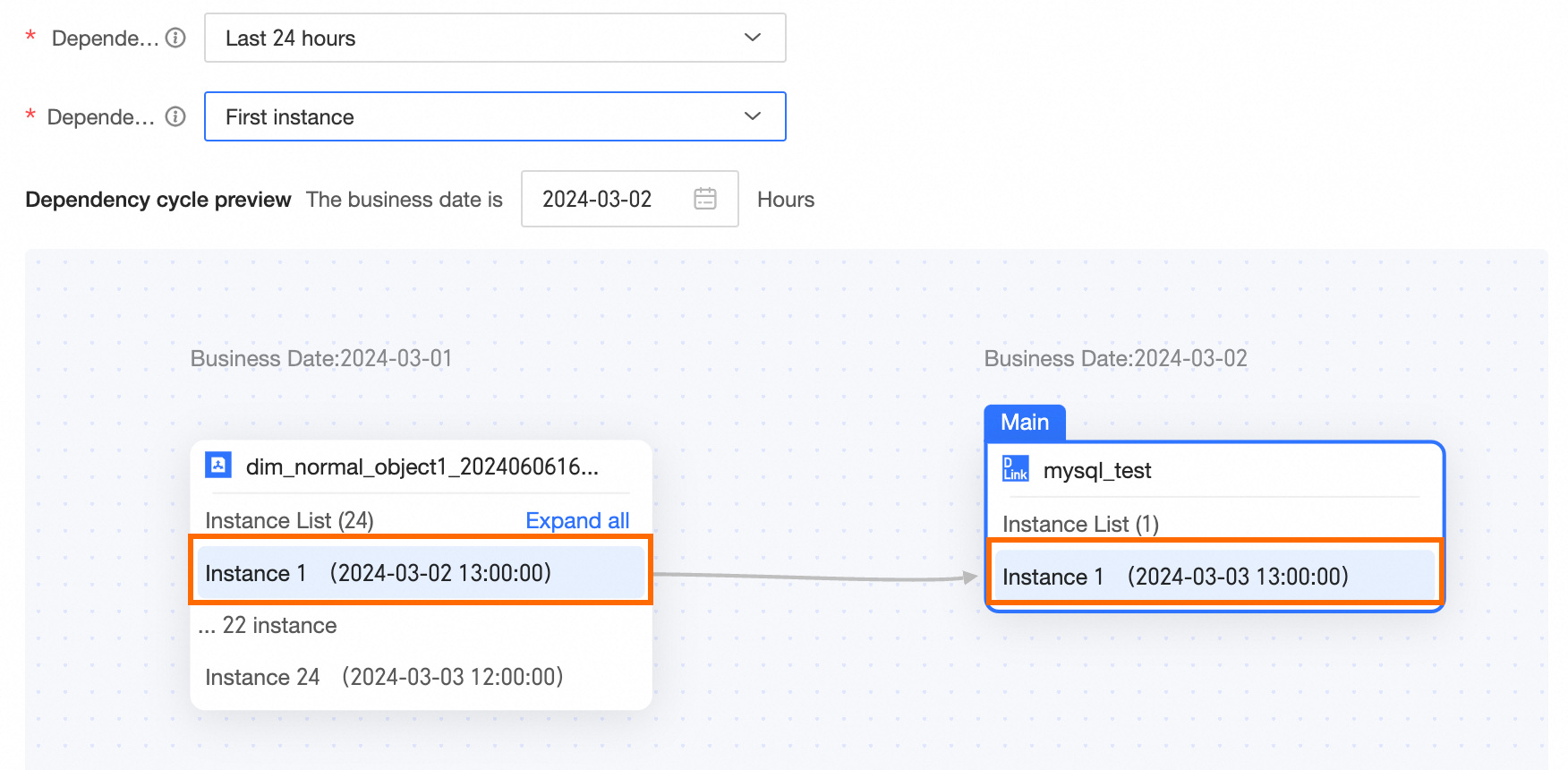 Last instance When the last instance is required, the last dependency instance within 24 hours (last 24 hours) of the current running node must run successfully for the current running node to run normally. For example, if the business date of the day is 2024-03-04, the current scheduling instance time is 13:00:00, then the range of dependency instances within 24 hours is [2024-03-03 13:00 ~ 2024-03-04 13:00 ). When configuring scheduling dependencies, the node dependency cycle preview example is as follows. 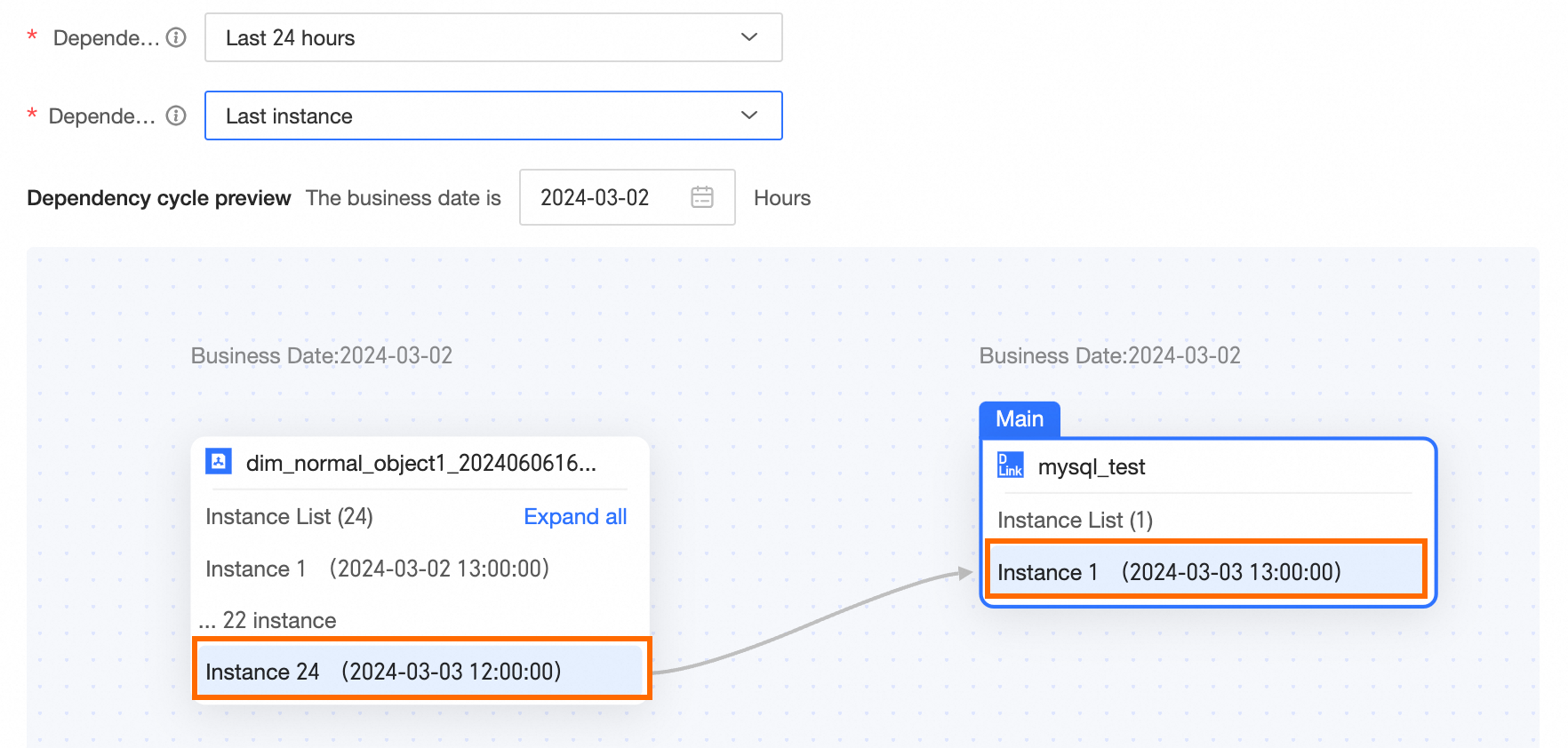 Next closest instance Within the selected interval, the first instance A that is later than the current instance running time. If A does not exist, the last instance is selected. For example, if the business date of the day is 2024-03-04, the current instance scheduling time is 2024-03-04 13:00, then the range of the next closest instance is [2024-03-03 13:00 ~ 2024-03-04 13:00 ). The actual dependency instance node is 2024-03-04 12:00. If the current instance scheduling time is 2024-03-04 13:05, then the range of the next closest instance is [2024-03-03 13:05 ~ 2024-03-04 13:05 ). The actual dependency instance node is 2024-03-04 13:00. When configuring scheduling dependencies, the node dependency cycle preview example is as follows. 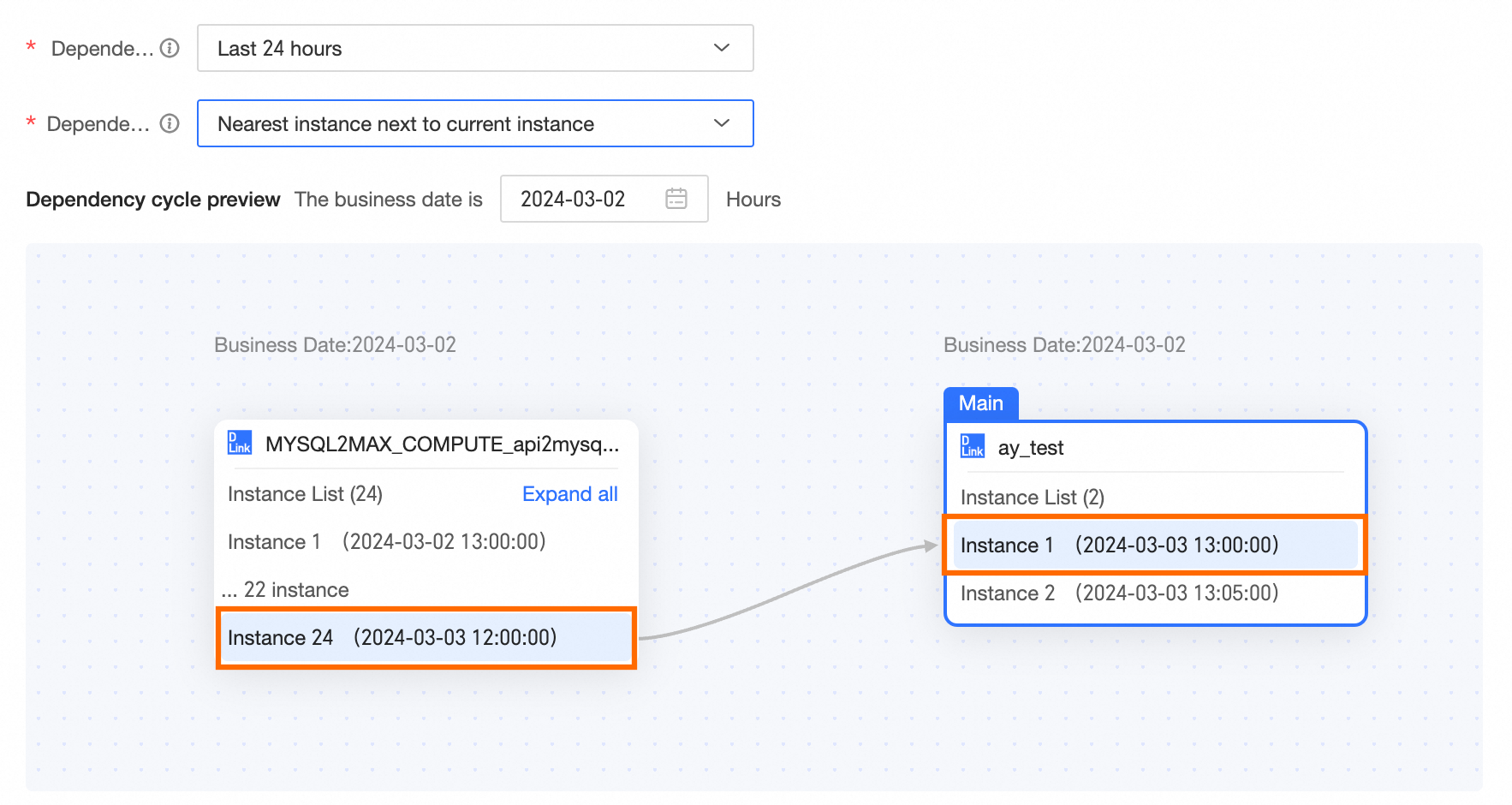 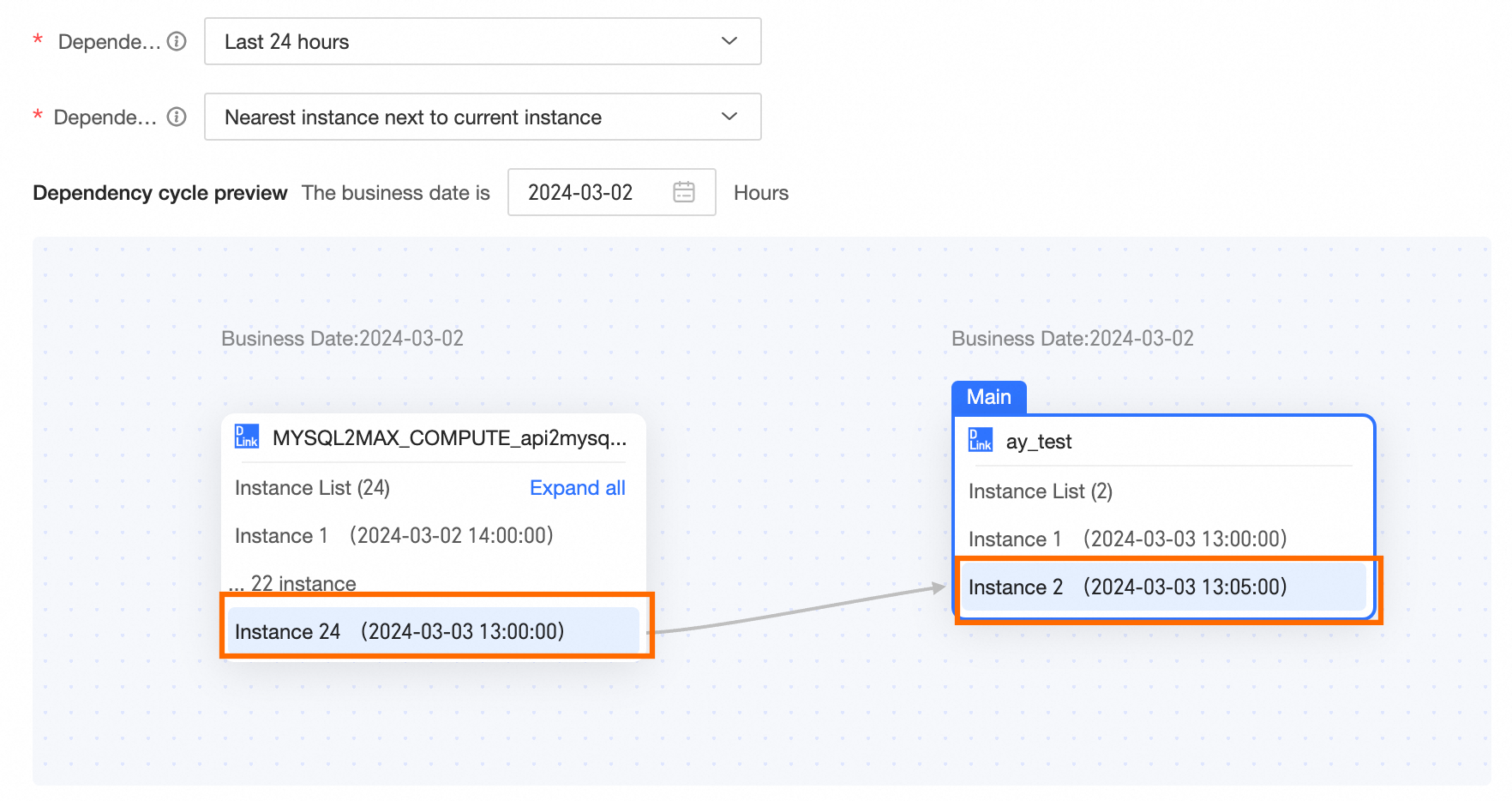
Previous closest instance Within the selected interval, the instance with the scheduled running time closest to the current task's scheduled running time. The last instance that is earlier than the current task's scheduled running time is prioritized. For example, if the business date of the day is 2024-03-04, the current instance scheduling time is 2024-03-04 13:00, then the range of the previous closest instance is [2024-03-03 13:00 ~ 2024-03-04 13:00 ). The actual dependency instance node is 2024-03-04 12:00. If the current instance scheduling time is 2024-03-04 13:05, then the range of the previous closest instance is [2024-03-03 13:05 ~ 2024-03-04 13:05 ). The actual dependency instance node is 2024-03-04 13:00. 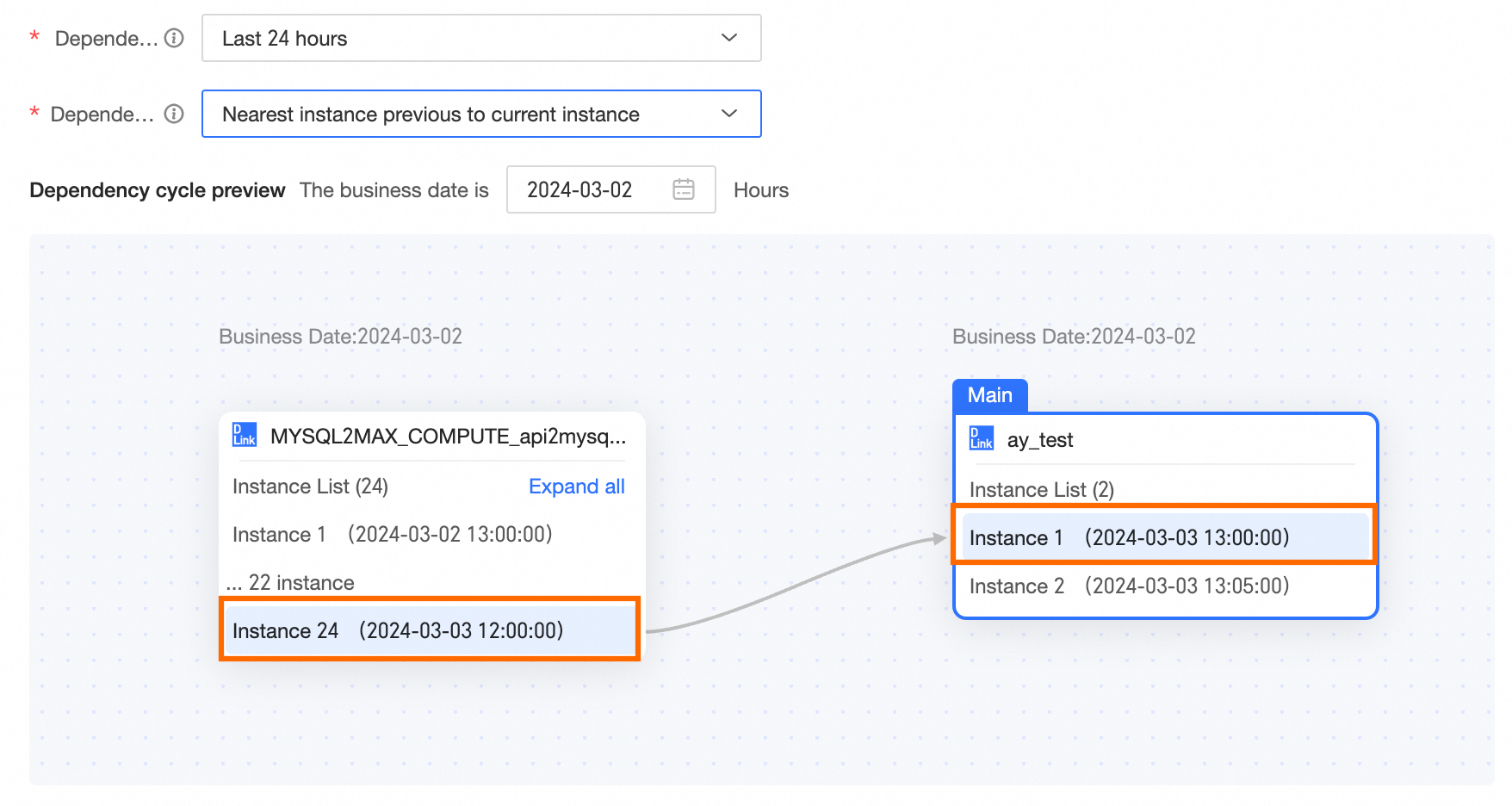 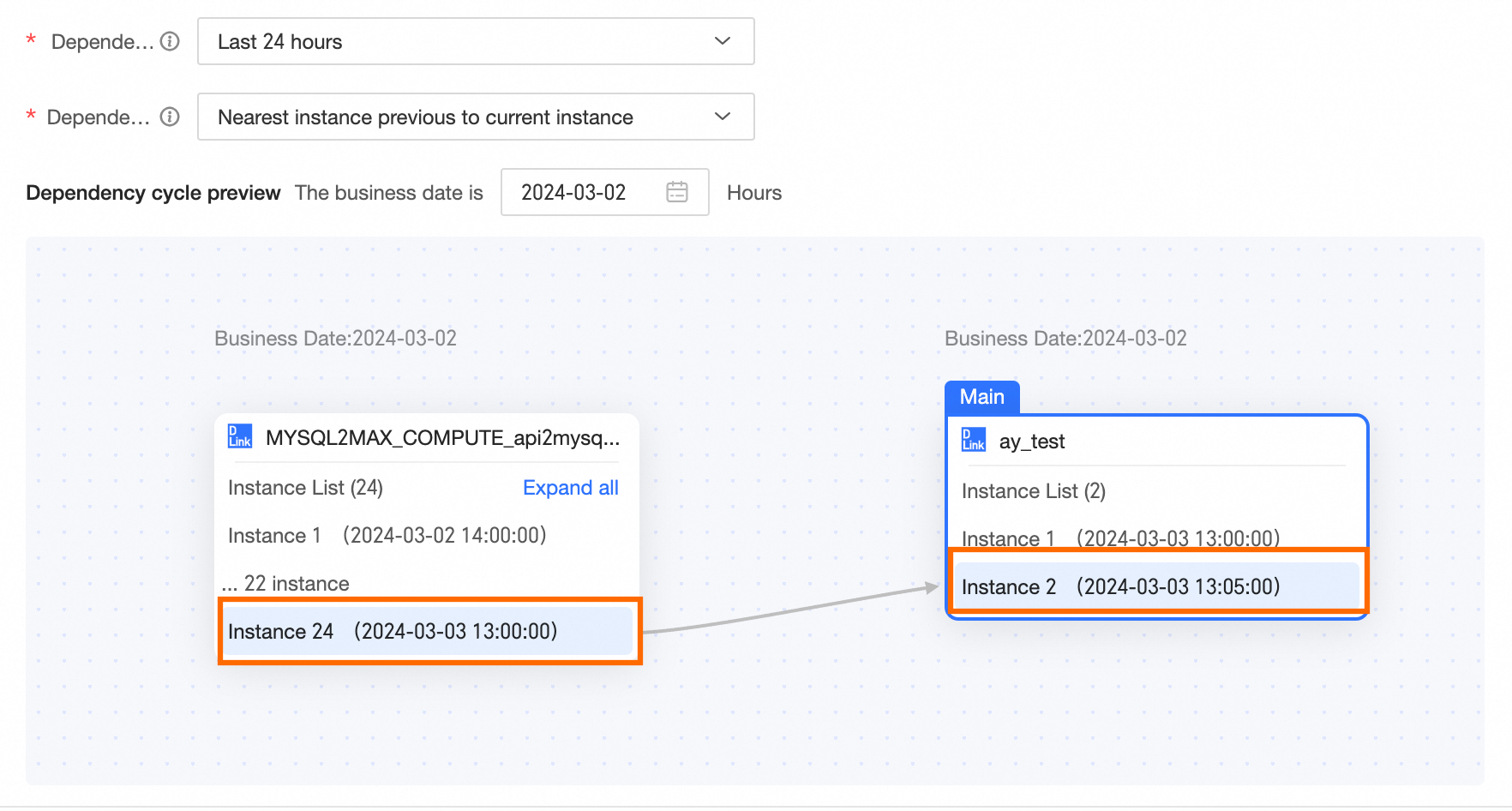
|
