View and manage historical submitted versions of real-time computing tables.
Real-time computing table historical versions entry
-
Navigate to the Dataphin home page, click the top menu bar Development -> Data Development.
-
Access the Historical Information drawer for the real-time computing table. The process is identical for real-time image and meta tables. The following figure uses a real-time meta table as an example.
Select Real-time Project -> click Table Management -> click Real-time Computing Table -> click History.
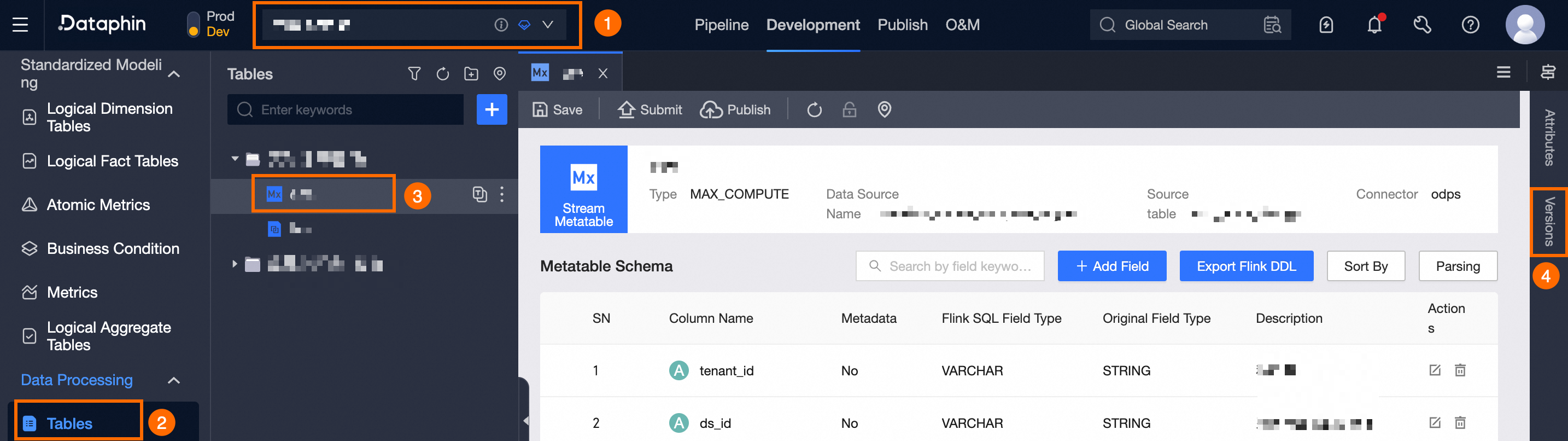
Real-time computing table historical versions introduction
The historical versions page displays the version number, submitter, production status, remarks, and available management actions for each version.
Available management actions include:
-
Version comparison: Select
 to compare the current version with the edited version and view the differences.
 -
View code: Click
 to examine the code for the version.