Materialized configuration lets you set the lifecycle, partition fields, and custom parameters for logical dimension tables and logical fact tables. You can also specify the number of materialized tables and field distribution to improve query performance and resource efficiency in auto-generated models.
Prerequisites
A logical dimension table or a logical fact table with a primary key must be in place.
Procedure
-
For more information, see the referenced document, and navigate to the Data Development page.
-
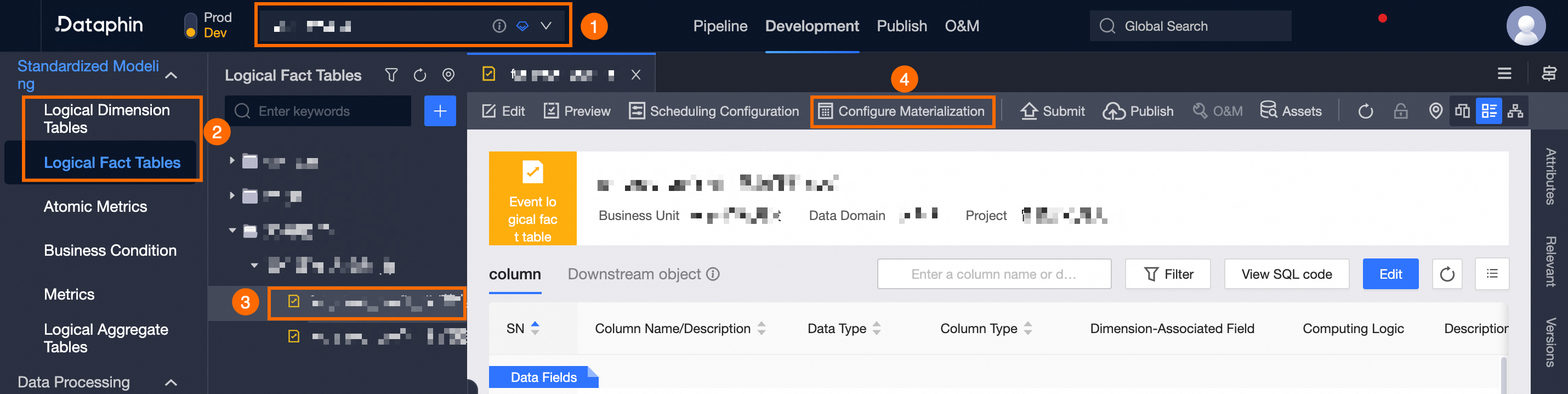
On the Data Development page, follow the instructions in the figure below to open the Materialization Configuration panel.
If you are in the Dev or Basic (non-Data_distill) project and it is your own data development space, you do not need to select the project space.
-
In the Materialization Configuration panel, set the parameters as follows:
Area
Description
Partition And Lifecycle
-
Derived Metric Partition: Applicable only to periodic snapshot fact tables, accumulating snapshot fact tables, and standard logical dimension tables.
-
Maximum Partition (MAX_PT): Keeps the most recent full snapshot data. Using the maximum partition for derived metric calculations reduces lifecycle requirements and conserves storage.
-
Data Timestamp (bizdate): Ensures strong data consistency for derived metric calculations, but requires keeping historical partitions.
-
Lifecycle: Define the storage lifecycle, with a maximum of 36500 days. Values at or above this threshold are automatically converted to permanent storage (shown as 36500 days).
The system offers quick selections for storage lifecycles, including 7, 14, 30, and 365 days.
Distribution Key
For StarRocks compute engines, configure the distribution key. Select fields with high cardinality that are frequently used in query conditions, ideally no more than three. The order of distribution keys affects storage and query efficiency.
NoteIf the logical table has a primary key, it automatically serves as the default distribution key (Duplicate Key).
Custom Materialization
Enable this to customize the materialization configuration, including the number of materialized tables and field distribution.
NoteNote: With custom materialization enabled, you must manually assign any new fields to a materialized table.
After you enable custom materialization, follow these steps to define the materialization policy:
-
(Optional) In the materialization configuration dialog, select the Initialization Policy for quick setup.
The following initialization policies are available. You can also adjust them manually:
-
Single Materialized Table: Consolidate all fields into one materialized table.
-
Balanced Row Policy: Balances production time and query performance by segmenting the materialized table based on production intervals.
-
Production Line Policy: Uses the system's default initialization policy.
ImportantCaution: Changing the initialization policy resets the configurations below. Proceed carefully.
-
-
Click the
 icon to add the fields to be assigned to the expanded materialized table, then click OK.
-
Use the Filter to quickly locate the desired materialized table.
-
To add to a new materialized table, click Add Materialized Table.
After the configuration is complete:
-
The Materialization Results display the Assigned Fields, Number Of Materialized Tables, and Fields To Be Assigned.
-
Click View Materialization Configuration to view the configuration details.
-
Click Production Environment Materialization Comparison to compare the production environment materialization with the current editing policy.
-
The Materialization Cost comparison shows the differences in the Number Of Materialized Tables, Number Of Redundant Storage Fields, and Number Of Downstream Query Associations as the absolute change between the Current Policy and the Production Line Policy.
NoteRedundant Storage Fields refers to the number of fields stored in more than one materialized table. Downstream Query Associations indicates the number of associations based on the logical table's direct downstream references.
-
The Field Production Time comparison shows the absolute change in each field's production time under the Current Policy versus the Production Line Policy.
NoteThe production line's field production time is the average over the last 7 days. The current policy's time is a calculated value.
-
-
Advanced Materialization Configuration
Define custom parameters that match the attributes of the compute engine linked to Dataphin. For details, see the referenced document.
-
-
Click OK.