All Products
Search
Document Center

Dataphin:Manage modeling task fields

Last Updated:May 28, 2025

This topic describes the operations and maintenance (O&M) operations supported for fields in modeling tasks (logical dimension tables, logical fact tables, and logical aggregate tables).

Field and batch operations page access

  1. In the top menu bar of the Dataphin homepage, choose Development > Task O&M.

  2. In the left-side navigation pane, choose Task O&M > Recurring Task.

  3. In the top menu bar, select the production or development environment.

  4. On the Recurring Task page, click the Modelling Task tab.

  5. On the Modelling Task page, click the image icon in the Actions column of the target task, select Fields And Batch Operations to access the modeling task field management page.

Field and batch operations page introduction

The Field and batch operations page consists of basic information, search and filter, metric (field) task list, and batch operation areas. You can perform O&M operations on the submitted logical table task fields on this page.

The page areas for logical dimension tables, logical fact tables, and logical aggregate tables are the same. The following figure shows the logical aggregate table as an example.
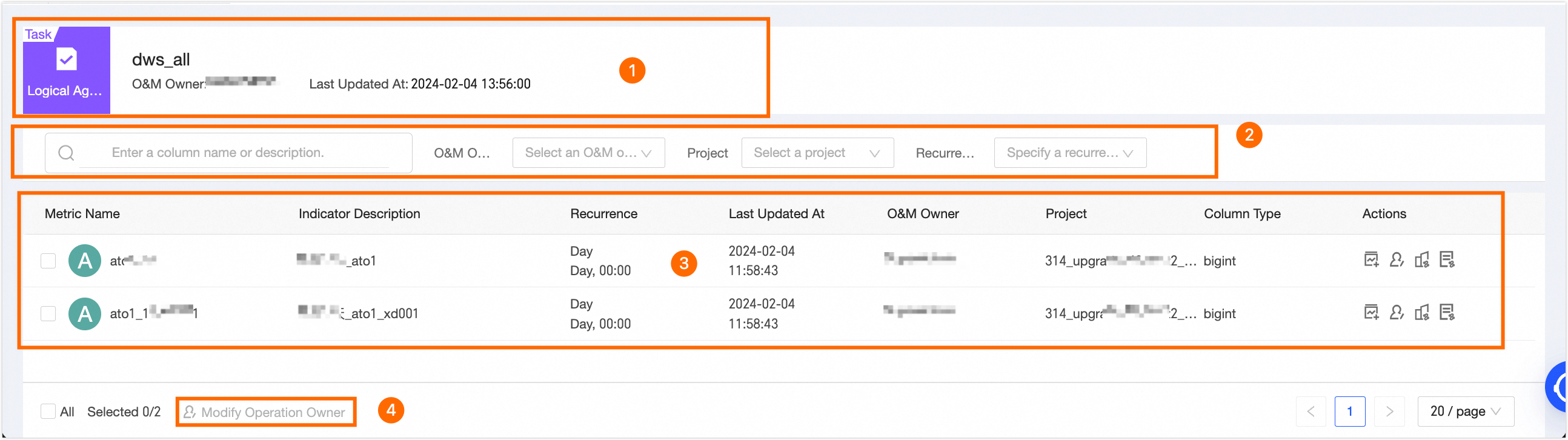
image.png

Parameter

Description

Basic information

Basic information of the logical table.

  • Dimension and fact logical tables: Include logical table type, logical table name, O&M owner, last update time, and project.

  • Logical aggregate table: Include logical table type, logical table name, and last update time.

Search and filter

  • Search: Supports searching by entering field name or metric description (field description).

  • Filter: Logical aggregate tables support filtering metrics (fields) by O&M owner, project, and scheduling cycle.

Metric list (field list)

List of metrics (fields) included in the logical table.

  • Dimension/fact logical tables: Include field name, field description, and field type. Supported operations include data backfill, view production lineage, and view consumption lineage.

  • Logical aggregate tables: Include metric name, metric description, scheduling cycle, last update time, O&M owner, project, and field type. Supported operations include single field data backfill, data backfill, modify O&M owner, view production lineage, and view consumption lineage.

The operations supported by logical tables are as follows:

  • Single field data backfill: Metrics in logical aggregate tables support single field data backfill. When performing single field data backfill, you need to configure the following parameters.

    • Instance name: Automatically generated by the Dataphin system in the format Custom (logical table name)_field English name_logical table model ID_run date_timestamp. You can modify the Custom part of the generated format.

    • Data timestamp: Configure the data timestamp range for single field data backfill.

    • Concurrent running groups: The number of concurrent running groups controls how many data backfill processes run simultaneously. The default value is 1, and it supports integers between 1 and 12.

    Important

    In single field data backfill mode, the Dataphin system does not automatically identify and select related fields under data consistency or the same materialization node principle for operation, which may affect the correctness of output data.

  • Data backfill: Refreshes data for fields (metrics) within specified historical data timestamps. For more information, see Appendix: Recurring task data backfill.

  • Modify O&M owner: Logical aggregate tables support modifying the O&M owner of the current metric.

  • View production lineage: View the production lineage of a single logical table field.

    When a field is redundantly stored in multiple materialization nodes, you can view different production lineages in the Select Production Lineage dropdown list.

    You can also click a logical table task node to view node information. After clicking View Node Details, you can view node details, operation logs, and node code.

  • View consumption lineage: View how a single field of a logical table is depended upon, allowing you to analyze the impact on descendant nodes when maintaining the field.

    You can also click a descendant node to view node information, including Task overview, Operation log, Node code, etc. Different node types support viewing different node information. The specific information depends on the actual page.

Batch operations

Logical aggregate tables support batch modification of the O&M owner for selected metrics.