Dataphin allows you to configure running parameters in real-time templates. Tasks created from these templates inherit the configured parameters.
Procedure
-
Navigate to the Dataphin home page, and single click on the top menu bar Development > Data Development.
-
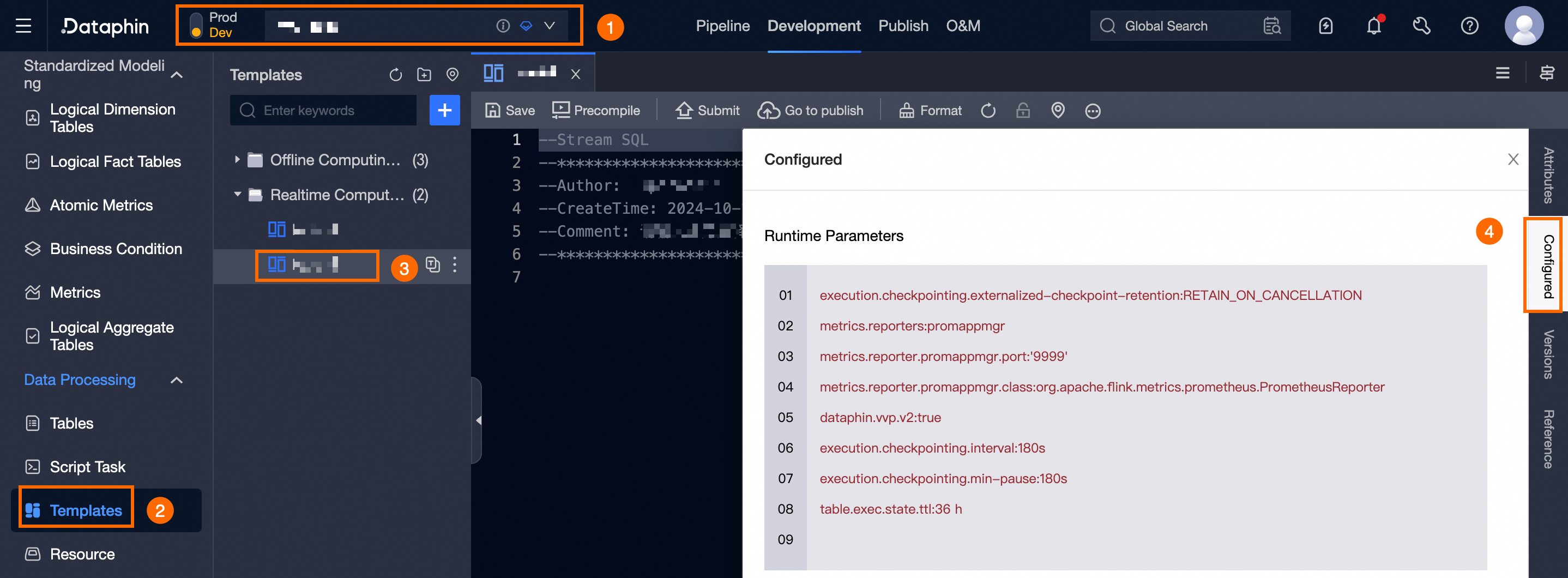
On the Data Development page, use the operation guide shown in the figure below to select the desired real-time template, manage historical versions, and access the template version management page.
-
In the Configuration dialog box, set the running parameters.
Default running parameters for real-time templates:
Flink real-time computing engine
execution.checkpointing.interval: '180s'
execution.checkpointing.min-pause: '180s'
table.exec.state.ttl: 36 h
Ververica Flink real-time computing engine
execution.checkpointing.externalized-checkpoint-retention: RETAIN_ON_CANCELLATION
metrics.reporters: promappmgr
metrics.reporter.promappmgr.port: '9999'
metrics.reporter.promappmgr.class: org.apache.flink.metrics.prometheus.PrometheusReporter
dataphin.vvp.v2: true
execution.checkpointing.interval: '180s'
execution.checkpointing.min-pause: '180s'
table.exec.state.ttl: 36 h
Running parameter merge and precedence:
-
By default, tasks derived from the template adopt the template's running configuration.
-
For a new job, the parameters combine: Default Task Running Parameters + Project Task Running Parameters.
-
For a new template, the parameters combine: Default Task Running Parameters + Project Task Running Parameters.
-
If the default and project running parameters share a common parameter, the project parameter value takes precedence.
-
A new template task uses the template's running parameters. If the template parameters are unchanged, the task parameters match those of non-template tasks. Any changes to the template parameters apply to the new task.
-
When you modify template parameters, existing parameter values in template tasks remain unchanged, and new parameters are added.
-
-
To finalize the configuration of running parameters, single click OK.