Configure fault tolerance, concurrency, JVM resources, database settings, and traffic monitoring for offline integration pipeline tasks.
Procedure
-
On the Dataphin home page, choose Development > Data Development.
-
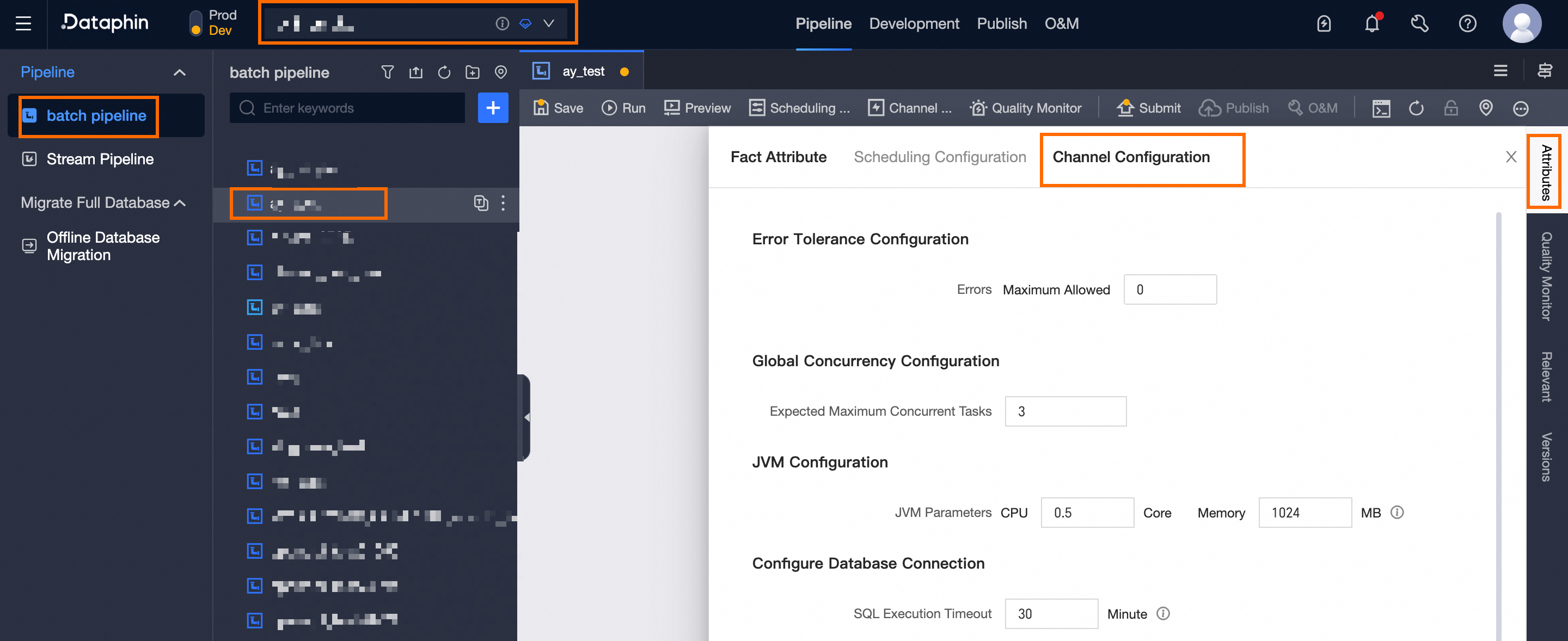
Open the Runtime Configuration drawer:
Choose Project (Dev-Prod mode requires environment selection) > Offline Integration > target Offline Pipeline > Properties > Channel Configuration.
-
In the Runtime Configuration drawer, set the following parameters:
Parameter
Description
Fault Tolerance Configuration
Number of Errors
Maximum errors allowed per pipeline task run. Default: 0 (no errors allowed).
Behavior when a fault threshold is set:
-
If cumulative errors across nodes exceed the threshold, the pipeline task fails.
-
If cumulative errors stay within the threshold, errors are skipped and the task continues.
Common cause: type mismatch between source and target columns (for example, writing VARCHAR data into an INT column), which produces dirty data.
Concurrency Configuration
Expected Maximum Concurrency
Maximum threads for parallel reads from the source or parallel writes to the target.
JVM Configuration
JVM Parameters
CPU and memory resources allocated to the pipeline script.
-
Maximum CPU: 4.0 cores. Negative values are not supported.
-
Maximum memory: 16,384 MB (16 GB). Decimals and negative values are not supported.
Database Configuration
SQL Execution Timeout
Timeout for executing prepared and completion SQL statements. The task fails if execution exceeds this limit. Default: 30 minutes. Range: 1–2,880 minutes (48 hours).
ImportantThe query timeout set for the output component takes precedence over the pipeline's query timeout.
Database Connection Retry Count
Number of retries for database connections on timeout. Default: 1. Range: 0–10. The task fails if all retries are exhausted.
Important-
Only available for data source instances that support retry configuration.
-
The task inherits the retry count from the data source by default. Task-level settings take precedence: task-level configuration > data source configuration.
-
If not configured in the data source, the default retry count is 1.
-
For tasks with multiple relational data sources, you can set the retry count per data source instance. Pipeline-level settings take precedence after submission.
Traffic Monitoring
No Traffic Time Threshold
Maximum idle time during data reading and transmission. The task fails if no data flows beyond this threshold (for example, due to long queries or high database load). Default: 30 minutes. Range: 5–2,880 minutes (48 hours).
Time Zone Configuration
Time Zone
Select a time zone matching your database. Default for data integration in China:
GMT+8(no daylight saving time). If the database observes DST (for example,Asia/Shanghai), select the corresponding DST-aware time zone to avoid a one-hour offset.Supported time zones include: GMT+1, GMT+2, GMT+3, GMT+5:30, GMT+8, GMT+9, GMT+10, GMT-5, GMT-6, GMT-8, Africa/Cairo, America/Chicago, America/Denver, America/Los_Angeles, America/New York, America/Sao Paulo, Asia/Bangkok, Asia/Dubai, Asia/Kolkata, Asia/Shanghai, Asia/Tokyo, Atlantic/Azores, Australia/Sydney, Europe/Berlin, Europe/London, Europe/Moscow, Europe/Paris, Pacific/Auckland, Pacific/Honolulu.
-
-
Click OK to save the channel configuration.
What to do next
After configuration, click Submit to send the task to the publishing center or operation center.
-
In Dev-Prod mode, you must publish your task and then manage published tasks or .
-
In Basic mode, submitted tasks run in production. To view published tasks, visit the Operation Center.