Validate your data model by running ad hoc queries to verify that the derived metric accurately computes the total order amount for the West Lake Longjing category over the past day.
Procedure
-
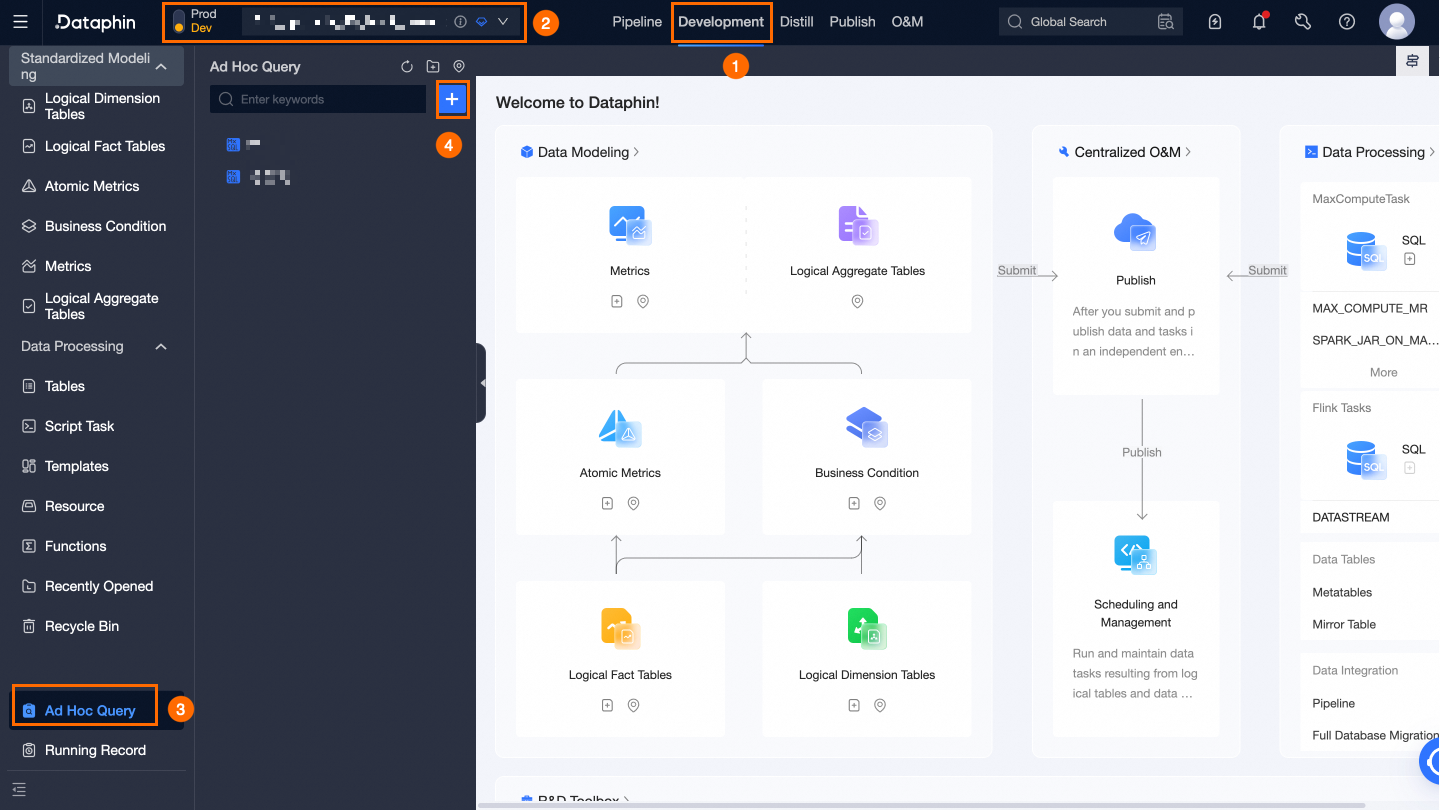
Navigate to the Dataphin home page and select Development from the top menu bar.
-
Open the New Ad Hoc Query dialog box as shown below.
-
In the New Ad Hoc Query dialog box, set the following parameters:
Parameter
Description
Name
Set to Data Validation.
Description
Enter a brief description, such as Getting Started Data Validation.
Select Directory
Use the Default Configuration.
-
Click OK.
-
On the Code Writing page, run the following queries to verify the data.
-
Enter the following command and click Run to verify the Product Table Data Integration data.
SELECT * FROM dataphin_tutorial.product WHERE product_id IS NOT NULL; -
Enter the following command and click Run to validate the Product Logical Dimension Table data.
SELECT * FROM LD_dataphin_tutorial.dim_products WHERE ds IS NOT NULL; -
Enter the following command and click Run to verify the Order Purchase Logical Fact Table data.
SELECT * FROM LD_dataphin_tutorial.fct_order_buy_di WHERE ds IS NOT NULL; -
Enter the following command and click Run to verify the Logical Aggregate Table data.
SELECT * FROM LD_dataphin_tutorial.dws_all WHERE ds IS NOT NULL ;
-