When migrating data from third-party cloud services such as AWS S3 and Tencent Cloud COS, or from on-premises data centers to Alibaba Cloud OSS, traditional methods often involve complex development and lengthy transfer times. Data Online Migration offers a visual, unified platform that eliminates the need for development. It enables efficient and secure migration of large volumes of data from various sources to OSS with simple configurations.
How it works
Before you dive into this service, first understand what Object Storage Service (OSS) is.
Data Online Migration is a Data Transmission Service. Its core function is to create and execute a migration task. This task defines the data source, destination, and migration rules. Data Online Migration reads data from the source, transmits the data over the network, and writes the data to the specified OSS bucket.
Depending on the location of your source data and your network environment, Data Online Migration provides two migration modes: standard mode and agent mode.
Mode | Use cases | How it works |
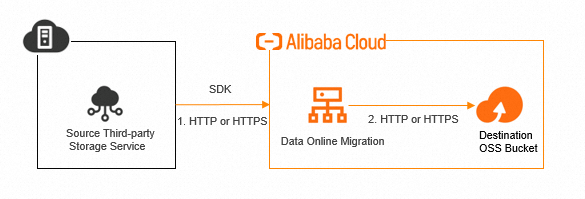
Standard mode | The source data is located in a third-party cloud storage service that can be accessed over the Internet, such as AWS S3, Tencent Cloud COS, or Huawei Cloud OBS. | Data Online Migration directly accesses and pulls data from the data address over the Internet and then writes the data to the destination OSS. |
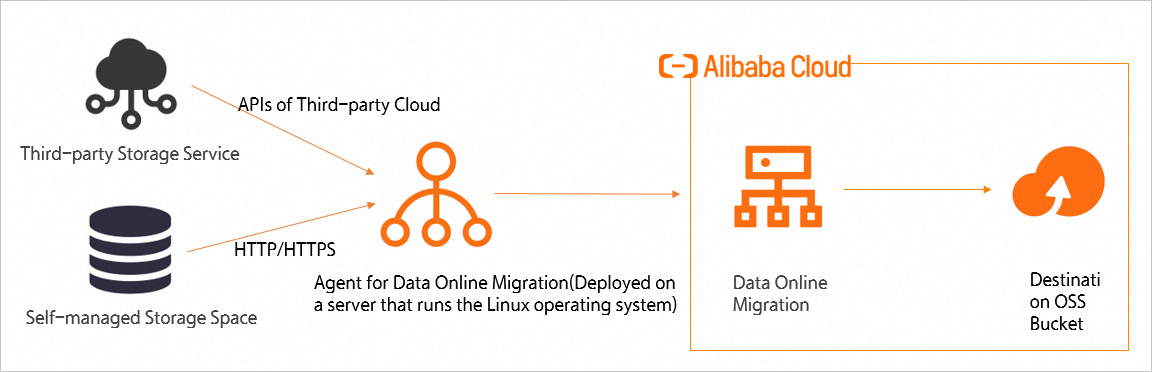
Agent mode | The source data is located in an environment that cannot be directly accessed over the Internet, such as an on-premises IDC, a local file system, or a scenario where a leased line or VPN is required for cloud migration. | Data Online Migration pulls data through an agent program deployed on the user side and then transmits the data to the destination OSS. |
Before configuring a migration task, understand the following core concepts:
Data address: Specifies the access information for a data source, which can be the source or destination of a migration. A data address includes key information such as the data source type (for example, AWS S3), bucket, endpoint, and AccessKey pair. Data Online Migration uses the data address to access the corresponding data source.
Migration task: The core operational unit of Data Online Migration. By executing a migration task, migrate data from the source to the destination storage. When creating a task, you must specify the source and destination data addresses. You can also configure parameters such as rate limiting, overwrite policies for files with the same name, auditing, and filters.
Agent: A data bridge that connects your data source to Data Online Migration. It is an application that you deploy in your environment. A data address can be associated with multiple proxies within a tunnel. If a data address is associated with an agent, Data Online Migration accesses the data source through that agent.
Tunnel: In agent mode, a tunnel is a logical concept that represents the data link between an agent and Data Online Migration. A tunnel can contain multiple proxies, and each agent belongs to a tunnel.
Important features
Supported data sources
Object Storage Service: Alibaba Cloud OSS, Amazon AWS S3, Tencent Cloud COS, Huawei Cloud OBS, Google Cloud GCS, Microsoft Azure BLOB, and more.
Local file system: Local disks, NAS/CPFS mounted on servers, and more.
HTTP manifest file: A checklist file that contains multiple URLs. Data Online Migration downloads these files in batches to migrate them.
Migration methods
Standard mode and agent mode support different network scenarios such as the Internet and leased lines. You do not need to specify standard mode or agent mode. If your data address is associated with an agent, agent mode is used. Otherwise, standard mode is used.
Standard mode
In standard mode, Data Online Migration pulls data directly from the source storage over the Internet and writes it to the destination Alibaba Cloud OSS. You do not need to deploy any components in your environment during this procedure.
The following figure shows how to use standard mode to migrate data from a third-party data source to Alibaba Cloud OSS:
Agent mode
You must deploy an agent in the same network environment as your source data. The agent serves as a tunnel. Data Online Migration reads the source data through the agent and writes it to Alibaba Cloud OSS.
The following figure shows how to use agent mode to migrate data from a third-party data source to Alibaba Cloud OSS:
Migration configuration options
Configuration | Description |
Rate limiting | Limits the maximum bandwidth (Mbit/s) and the number of files migrated per second (QPS) for a task to prevent the migration from affecting your business. |
Handling of files with the same name | Configure this to Do not overwrite, Overwrite all, or Overwrite based on last modified time.
|
File filter | Filters files to be migrated based on conditions such as file name and last modification time. |
Automatic scheduling | Supports scheduled or periodic execution to implement incremental migration or regular backups. |
Migration reports
After each task is executed, a detailed report is generated. The report includes a migration overview, such as the number and total size of migrated files, and the migration result for each file. This information facilitates auditing and verification.
Usage
Manage Data Online Migration through the console. Log on to the Data Online Migration console. The console provides an intuitive and convenient GUI for all operations.
For batch and automated task management, such as creating multiple data addresses or migration tasks, use the SDKs provided by Alibaba Cloud. This lets you create data addresses and migration tasks and integrate Data Online Migration into your own management platform.
Service agreement
For more information, see Data Transport Service Agreement.
The Data Transport Service Agreement includes terms related to Data Online Migration.
Related services
In addition to Data Online Migration, Alibaba Cloud also provides an offline migration service. The offline migration service lets you use customized migration devices (Data Transport) to migrate terabytes or even petabytes of on-premises data to the cloud. This service is designed to address challenges related to the efficiency and security of large-scale data transmission. For more information, see Offline migration (Data Transport).