Automatic SQL throttling detects abnormal SQL statements during database overload events and limits their concurrency—so most services keep running while a small set of problematic queries is contained.
The feature automates the full response cycle: detecting the anomaly, identifying the responsible SQL statements, applying throttling with precise feature extraction, and rolling back if the workload does not recover as expected.
How it works
Entire process: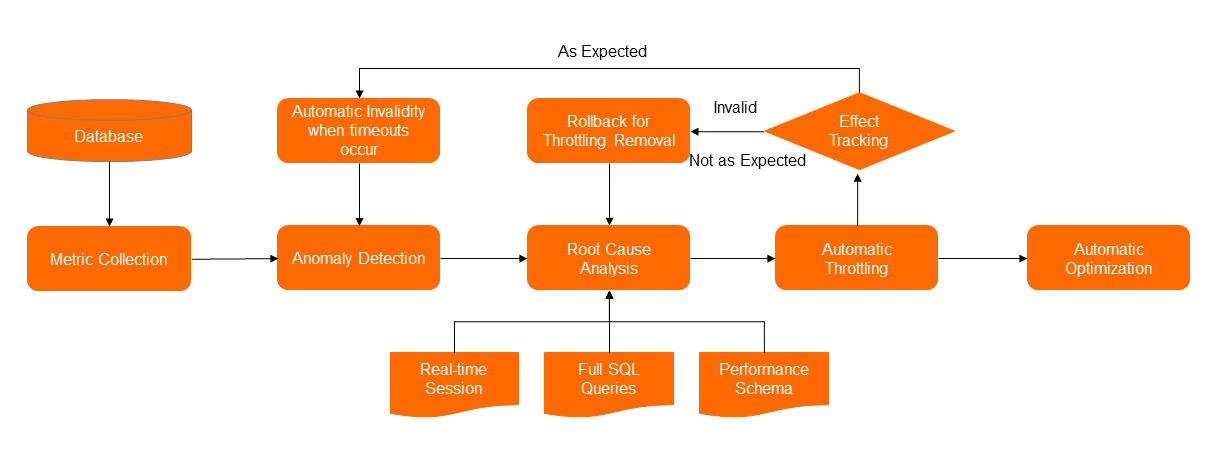
Monitoring metrics collection
By default, DAS collects host and engine performance metrics for ApsaraDB RDS instances deployed on Alibaba Cloud, including:
CPU utilization
Input/output operations per second (IOPS)
Queries per second (QPS)
Active sessions
This real-time data feeds the anomaly detection and root cause analysis stages.
Anomaly detection
DAS uses machine learning algorithms to train a model offline on historical performance data. The model evaluates real-time metrics to detect exceptions as they occur, triggering alerts based on actual system behavior rather than fixed thresholds.
Root cause analysis
When DAS detects an exception, it subscribes to the event, collects current session data, and uses the SQL audit full request analysis feature together with performance_schema statistics to identify the responsible SQL statements.
DAS classifies abnormal SQL statements into four types:
| Type | Description | DAS response |
|---|---|---|
| Blocking SQL | Statements causing DDL changes, lock waits, or large transactions | Closes sessions if a large number of sessions are affected or execution time is too long—does not throttle |
| Resource-intensive SQL | Statements that consume large amounts of CPU, I/O, or network resources and are continuously submitted, even at low concurrency | Throttled automatically |
| Traffic-intensive SQL | Normal statements that cause performance bottlenecks when their concurrency spikes (for example, simple key-value queries slowing down under load) | Throttled automatically |
| Other SQL | Statements that cause database exceptions but do not fit the above categories | — |
Feature extraction
For resource-intensive and traffic-intensive SQL statements, DAS extracts identifying features to apply precise throttling. Two throttling strategies are supported:
| Strategy | When to use | How it works |
|---|---|---|
| SQL template-based throttling | A specific SQL pattern causes exceptions regardless of parameter values | DAS extracts the SQL template (parameters replaced with ?) and throttles all statements matching that template |
| SQL statement-based throttling | Data skew causes exceptions—specific parameter values on a shared template consume disproportionate resources | DAS extracts features from both the SQL template and the specific parameter values |
SQL template-based throttling example
DAS generates SQL templates by replacing literal values with ?:
/* SQL Statement 1 */
select id,name,age from students where name='Bob';

/* SQL Template 1 */
select id,name,age from students where name=?

/* SQL Statement 2 */
select id,name,age from students where name='Bob' and sid='Unique ID';

/* SQL Template 2 */
select id,name,age from students where name=? and sid=?
If DAS throttles based on SQL Template 1, it targets statements whose features match select id, name, age from students where name. Because SQL Template 2 contains all the features of SQL Template 1, SQL Statement 2 is also throttled—which may not be the intended behavior.
Where a template ID is available—either an SQL ID generated by the database middleware or an SQL hint added by developers—DAS uses it to scope throttling precisely. Statements without the template ID (for example, those submitted directly from the command line) are not affected and continue to run.
Automatic optimization
After DAS detects an abnormal SQL statement that can be optimized during root cause analysis, DAS implements throttling as an emergency response and simultaneously triggers automatic optimization. DAS automatically creates indexes on the affected tables to address the root cause.
Tracking and rollback
After applying throttling, DAS continues monitoring database performance. If the workload does not decrease or traffic is not reduced as expected, DAS rolls back the throttling operation and restarts root cause analysis.
What triggers overload events
Database overload events typically fall into three categories:
Traffic spikes: Cache penetration, abnormal call patterns, or promotional events cause a sharp increase in SQL concurrency.
Data skew: A small number of requests—such as queries for a single large-order user—consume a disproportionate share of database resources, slowing responses for all users.
Resource-intensive queries: Queries against unindexed tables or other resource-heavy patterns consume enough CPU, I/O, or memory to degrade the entire system.
Prerequisites
Before automatic SQL throttling can apply throttling on your behalf, grant the required permissions to DAS.
What's next
Learn about anomaly detection in DAS
Learn about automatic SQL optimization in DAS