Configure IPv6 Internet bandwidth for a pod
Configure IPv6 public network bandwidth for pods
By default, IPv6 addresses work only over internal networks. To expose a pod over the internet using its IPv6 address, you must allocate IPv6 Internet bandwidth through an IPv6 gateway and optionally configure egress-only rules. This topic describes how to install the required component, configure pod annotations, and verify the result.
Prerequisites
Before you begin, ensure that you have:
-
An ACS cluster with IPv6 dual-stack enabled. See Create an ACS cluster.
-
An IPv6 gateway in the cluster VPC with the ipv6gw controller enabled. See Create and manage an IPv6 gateway.
Limitations
The maximum bandwidth and the maximum number of egress-only rules depend on your IPv6 gateway specifications. For details, see Limits.
Install ack-extend-network-controller
The ack-extend-network-controller component calls Alibaba Cloud OpenAPI to provision resources and associate an IPv6 gateway with a pod using annotations.
Before installing, check whether ack-extend-network-controller is already installed via Helm or ACK Marketplace. If it is, uninstall it first.
-
Log on to the ACS console and click Clusters in the left-side navigation pane.
-
On the Clusters page, click the ID of your cluster. In the left-side navigation pane, choose Operations > Add-ons.
-
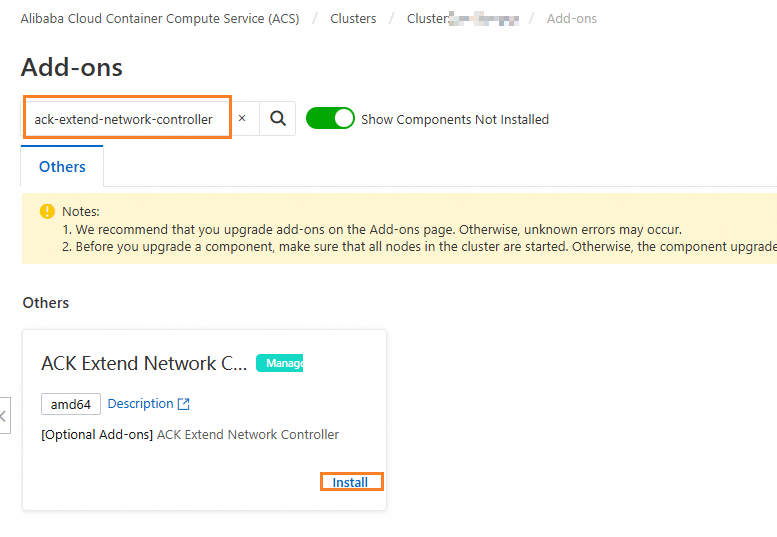
Search for ACK Extend Network Controller and click Install in the lower-right corner of the component card.
-
Click OK.
The ipv6gw feature is selected by default. No RAM permissions need to be configured.
Configure pod annotations
Add the following annotations to a pod to allocate IPv6 Internet bandwidth, set the billing method, and optionally create egress-only rules.
| Annotation | Description |
|---|---|
network.alibabacloud.com/ipv6-bandwidth |
IPv6 Internet bandwidth in Mbit/s. Valid values: 1–5000. For details, see AllocateIpv6InternetBandwidth. |
network.alibabacloud.com/ipv6-egress-only |
Set to an empty string ("") to create egress-only rules. |
network.alibabacloud.com/ipv6-internet-charge-type |
Billing method for IPv6 Internet bandwidth. Valid values: PayByBandwidth (default, pay-by-bandwidth) and PayByTraffic (pay-by-data-transfer). For details, see AllocateIpv6InternetBandwidth. |
Deploy a pod with IPv6 Internet bandwidth
The following example deploys a pod with 10 Mbit/s IPv6 Internet bandwidth and egress-only rules enabled. Choose either the ACS console or kubectl.
Use the ACS console
-
Log on to the ACS console and click Clusters in the left-side navigation pane.
-
On the Clusters page, click the ID of your cluster. In the left-side navigation pane, choose Workloads > Deployments.
-
In the upper-left corner of the Deployments page, click Create from YAML. Replace the content in the Templates editor with the following and click Create.
apiVersion: apps/v1 kind: Deployment metadata: name: example labels: app: example spec: replicas: 1 selector: matchLabels: app: example template: metadata: labels: app: example annotations: network.alibabacloud.com/ipv6-bandwidth: "10" # IPv6 Internet bandwidth: 10 Mbit/s network.alibabacloud.com/ipv6-egress-only: "" # Enable egress-only rules network.alibabacloud.com/ipv6-internet-charge-type: "PayByTraffic" # Billing: pay-by-data-transfer spec: containers: - name: example image: nginx -
On the Deployments page, click the name of the
exampleDeployment to view the pod names. -
Verify the configuration by running the following command with the pod name:
kubectl get podipv6gws.alibabacloud.com -oyaml <pod-name>
Use kubectl
-
Create a file named
example.yamlwith the following content.apiVersion: apps/v1 kind: Deployment metadata: name: example labels: app: example spec: replicas: 1 selector: matchLabels: app: example template: metadata: labels: app: example annotations: network.alibabacloud.com/ipv6-bandwidth: "10" # IPv6 Internet bandwidth: 10 Mbit/s network.alibabacloud.com/ipv6-egress-only: "" # Enable egress-only rules network.alibabacloud.com/ipv6-internet-charge-type: "PayByTraffic" # Billing: pay-by-data-transfer spec: containers: - name: example image: nginx -
Apply the manifest.
kubectl apply -f example.yamlExpected output:
deployment.apps/example created -
List the
PodIPv6GWresources in the Deployment namespace to get the pod name.kubectl get podipv6gws -n <namespace> -
Check the
PodIPv6GWresource for a specific pod.kubectl get podipv6gws.alibabacloud.com -oyaml <pod-name>
Verify the configuration
After the pod is running, check the PodIPv6GW resource to confirm that the IPv6 gateway and bandwidth were provisioned correctly.
kubectl get podipv6gws.alibabacloud.com -oyaml example-674b897446-q****Expected output:
apiVersion: alibabacloud.com/v1beta1
kind: PodIPv6GW
metadata:
  creationTimestamp: "2024-02-07T06:00:48Z"
  finalizers:
  - ipv6gw-controller.alibabacloud.com/finalizer
  generation: 1
  name: example-674b897446-q****
  namespace: default
  ownerReferences:
  - apiVersion: v1
    kind: Pod
    name: example-674b897446-q****
    uid: bdf86c45-7**5-4**4-b**3-9b****
  resourceVersion: "11488"
  uid: 78747d60-9**8-4**e-b**8-f7f7c****
spec:
  bandwidth: 10
  egressOnlyRule: true
  internetChargeType: PayByTraffic
  ipv6Address: 2408:4006:1115:xxxx:xxxx:xxxx:xxxx:xxxx
status:
  ipv6AddressID: ipv6-xxx
  ipv6EgressOnlyRuleID: ipv6py-xxx
  ipv6GatewayID: ipv6gw-xxx
  ipv6InternetBandwidthID: ipv6bw-xxx
The configuration is successful when:
-
`spec.bandwidth` matches the value you set (10 in this example).
-
`spec.egressOnlyRule: true` confirms egress-only rules are active.
-
`status.ipv6GatewayID` is non-empty, confirming the IPv6 gateway was associated.
-
`status.ipv6InternetBandwidthID` is non-empty, confirming the bandwidth plan was created.