Local phone number authentication verifies whether a user's phone number matches the current cellular network connection.
Step 1: Request an authentication URL by calling a POP API operation
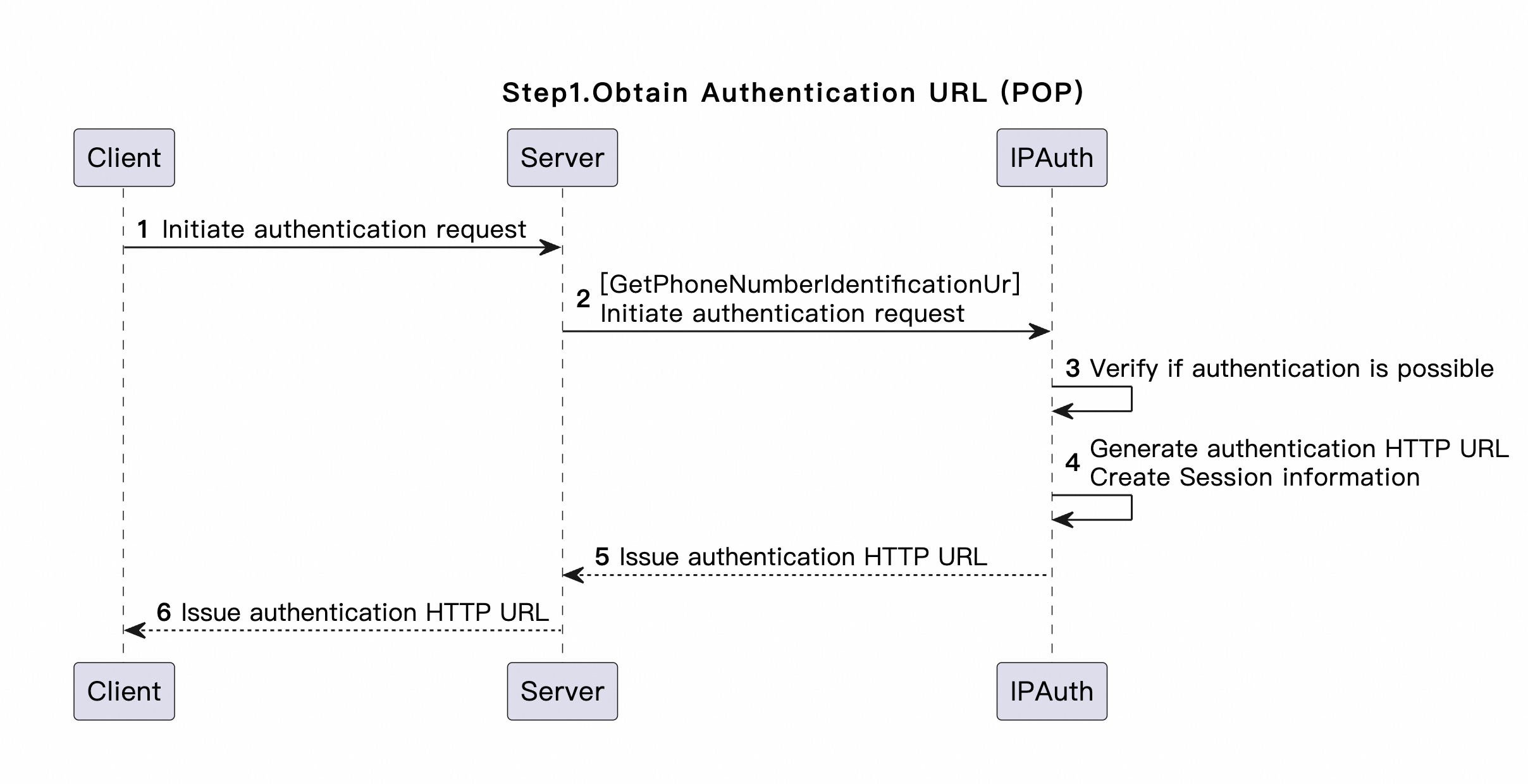
Call the GetPhoneNumberIdentificationUrl operation to obtain the authentication URL. This operation performs the following steps: Perform an authentication precheck -> Create an authentication session -> Return an authentication URL.
-
Request parameters
-
Ip: Required. The outbound public IP address of the user on the cellular network. -
PhoneNumber: Required. The phone number to be authenticated. -
OutId: Required. The external system ID. Note that the value of the OutId parameter must be consistent in the same authentication process. -
AuthCode: Required. The authorization code. -
RememberPhoneNumber: Specifies whether to record the phone number. Default value: true.
-
-
Response parameters:
-
SessionId: The session ID. -
IdentificationUrl: The authentication URL.
-
-
Error codes:
IdentificationNotAvailable: The phone number or IP address does not support authentication. You are not charged.
-
Sample success responses:
{
  "RequestId": "E62823DB-749B-16DD-8BBA-A5EEC1DE7C7C",
  "Message": "OK",
  "Data": {
    "IdentificationUrl": "https://global-ip-auth.dycpaas.com/global/biz/ip_auth/start?ipa_s_c_c=IPF0000000000000000001&ipa_s_i=f80623095e9aa807151032af385a7173.66344ead-9fd0-4f66-80d2-c86fc22d9178.c9be5054d7e9428590da0afd712ef17c.1685504264240&ipa_o_i=66344ead-9fd0-4f66-80d2-c86fc22d9178&ipa_p_n=62088991133003&ipa_r_u=https%3A%2F%2Fglobal-ip-auth.dycpaas.com%2Fglobal%2Fbiz%2Fip_auth%2Ffinish%3Fipa_s_i%3Df80623095e9aa807151032af385a7173.66344ead-9fd0-4f66-80d2-c86fc22d9178.c9be5054d7e9428590da0afd712ef17c.1685504264240%26ipa_o_i%3D66344ead-9fd0-4f66-80d2-c86fc22d9178",
    "SessionId": "f80623095e9aa807151032af385a7173.66344ead-9fd0-4f66-80d2-c86fc22d9178.c9be5054d7e9428590da0afd712ef17c.1685504264240"
  },
  "Code": "OK"
}
Step 2: Initiate authentication over HTTP
The user terminal must send a request over the cellular network to access the authentication URL returned in Step 1: Request an authentication URL by calling a POP API operation.
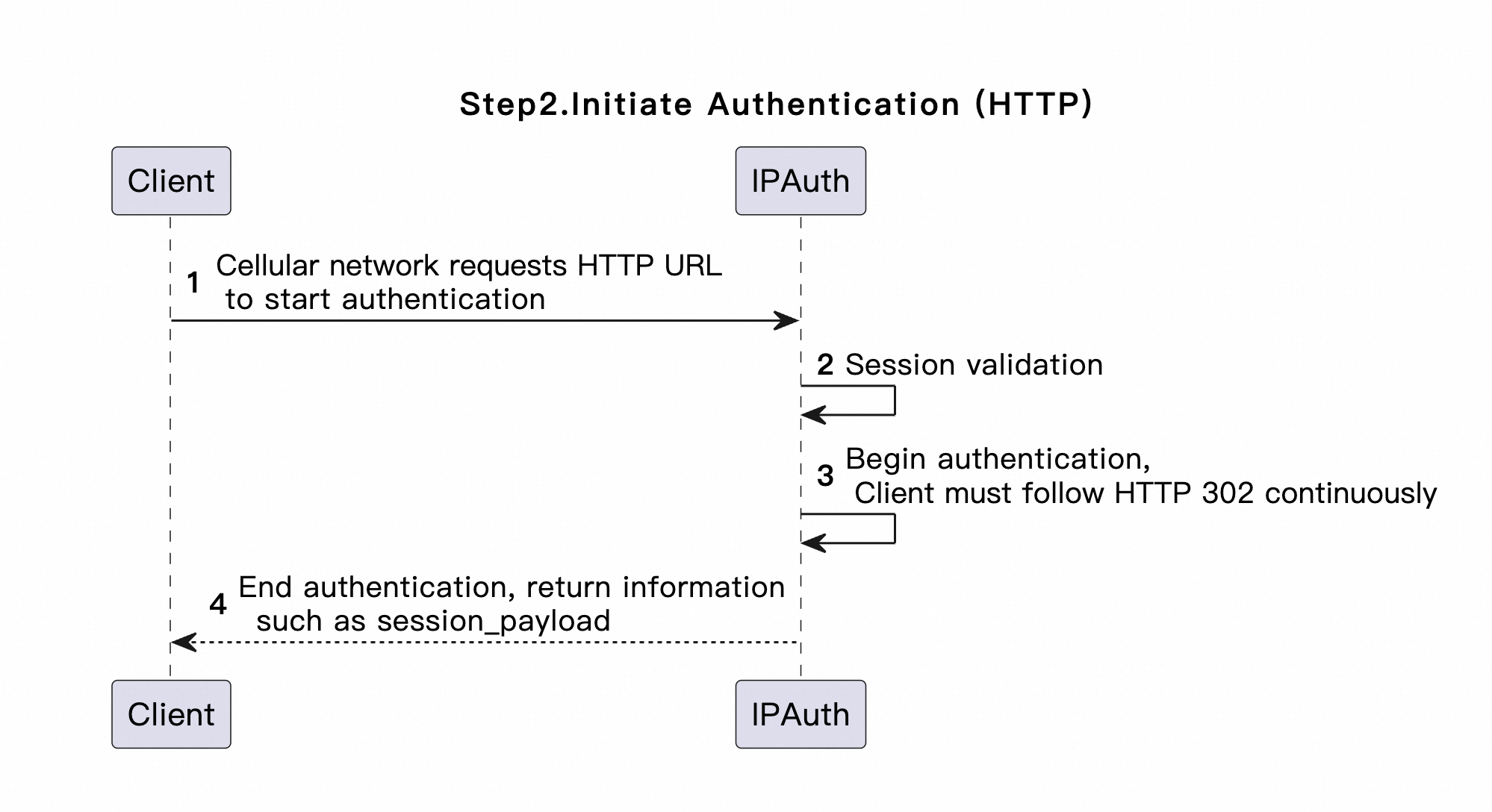
This API operation initiates requests over HTTP. The response parameters are case-sensitive and differ from those of the POP API operation in Step 1. The response parameters include session_id, session_payload, out_id, success, and message.
Sample success responses
{
  "session_payload": "EPj1vz1a3K51dvIolwRIuNwxrHuUsuaM/pl7PqGMnFblAzKIqJEagGTV5JsNB/3LkLuOl53NV63TUUsIDJ6G68W39bF39q/VGlszVboQnitFoV+kfZ1B/nydwrWhk7peSsKm1SaFDGmyUyyW27vx7cKW67vLB4LfWVZErDEngHteoxKqCQT6+hCFCw/MboqrfNOsWK0MnUx++xL4sH7421J9FcBXtEwDt6j9qmEcGWwOXYL9M4IkpMIsGOzakJqEAIoHX2DWDtOV8xTTvTDsergdEmKEYjvutqdZmwrkomHdb/6OeZM7wrexls2GdhMxxgmSpib7q7zMBUEbMUz+T+pTCYK0duLeRYD8ePG34oF/bq8jQi7hR4K2okfxAc36gL7ntrgSrdeUkNgPqEJ0/q6e3FioCxz4lyqxi0zjFz5Tyn9k5WIYV7GjDt5Mv4oW0ZPXW4QUUur7fp73ydhq7oFBK5webPwMdrqVPH10UzvuRH5P3Y8buV8WK75vaRXOIvgWBLEyypeuwGCVcGJ3X84iP+RKN2wCB0ggnlAm5kG+tlZ88Ly9lg==",
  "success": true,
  "session_id": "fb6cf28b819808b8437b37c1d77c73e4.out.1233.d6655b6c055f44cc8d897bc3583806e8.1683880287678",
  "out_id": "hwding",
  "message": "ok"
}
Sample failure responses
{
  "success": false,
  "session_id": "fb6cf28b819808b8437b37c1d77c734.out.1233.d6655b6c055f44cc8d897bc3583806e8.1683880287678",
  "out_id": "hwding",
  "message": "Invalid or expired session.",
  "code": "SessionNotValid"
}
Step 3: Obtain the authentication result by calling a POP API operation
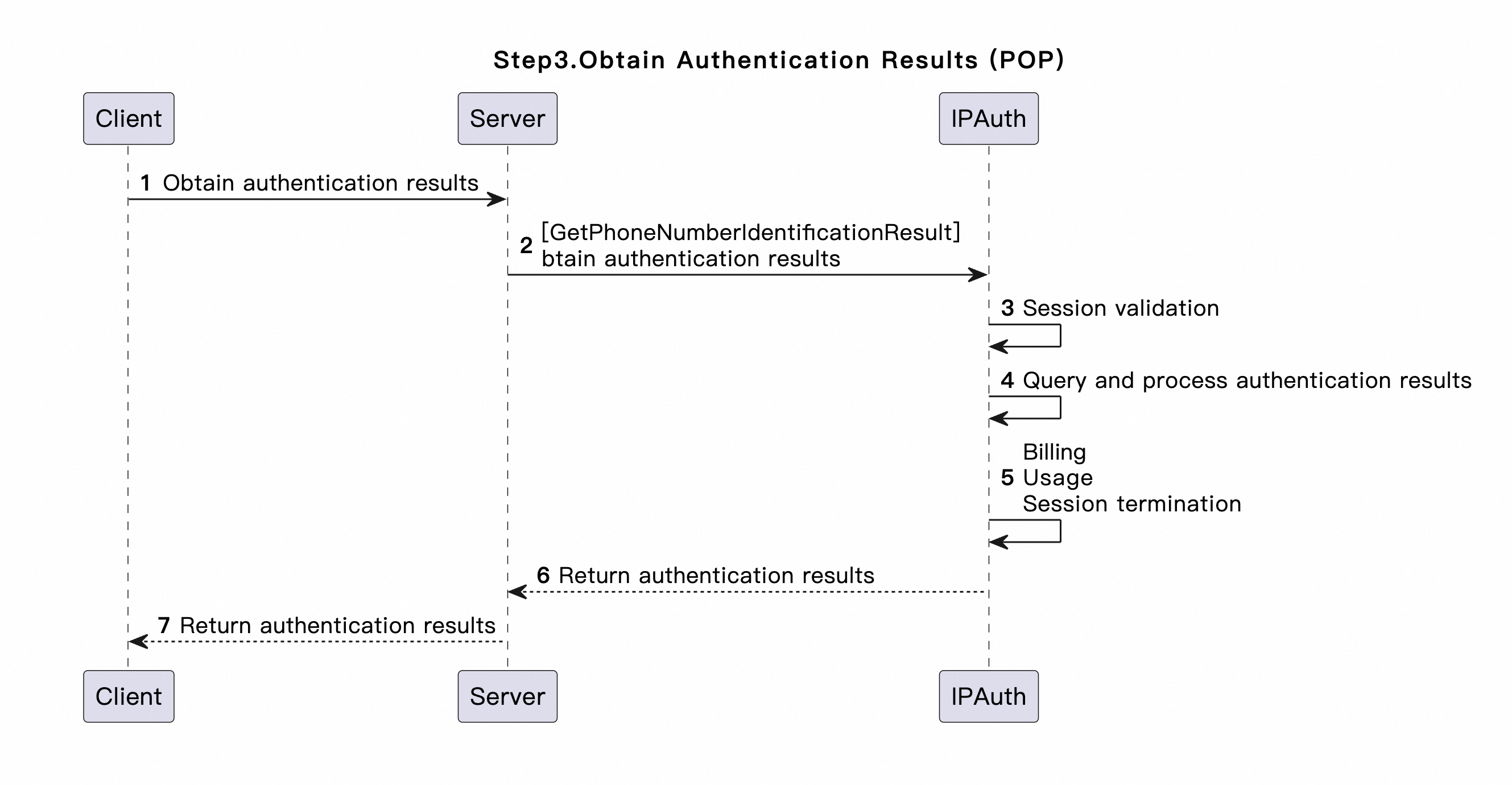
Call the GetPhoneNumberIdentificationResult operation to obtain the authentication result.
The authentication result can only be queried once per session. Save the result after it is returned.
-
Request parameters
-
SessionId: Required. The session ID. -
SessionPayload: Required. Set this parameter to the value of session_payload returned in Step 2: Initiate authentication over HTTP. -
PhoneNumber: Required. The phone number to be authenticated. -
OutId: Required. The external system ID. Note that the value of the OutId parameter must be consistent in the same authentication process. -
AuthCode: Required. The authorization code.
-
-
Response parameters:
IsIdentified: Indicates whether the authentication passed. -
Error codes:
-
NoIdentificationResult: No authentication result is returned.
-
SessionNotValid: The session is invalid or expired.
-
-
Sample success responses:
{
  "RequestId": "5C1DE9E0-8EA9-171B-9893-3E2881D981C9",
  "Message": "OK",
  "Data": {
    "IsIdentified": true
  },
  "Code": "OK"
}