This topic describes how to attach a policy to a Resource Access Management (RAM) role assumed by Container Registry to access custom Object Storage Service (OSS) buckets.
Background information
Default OSS bucket
Before you can use the default OSS bucket of Container Registry, you must grant Container Registry the permissions to access cloud resources. This way, Container Registry can create the default OSS bucket, and the Container Registry instance can be initialized.
Custom OSS bucket
If you want to use a custom OSS bucket, you must create a RAM role and grant the role the permissions on OSS buckets. Container Registry can access the custom OSS bucket after it assumes the RAM role.
Step 1: Create a RAM role
If you want Container Registry to access custom OSS buckets, you must create a role named AliyunContainerRegistryCustomizedOSSBucketRole for the Alibaba Cloud account to which your Container Registry instance belongs.
Procedure
Log on to the RAM console as a RAM user who has administrative rights.
In the left-side navigation pane, choose .
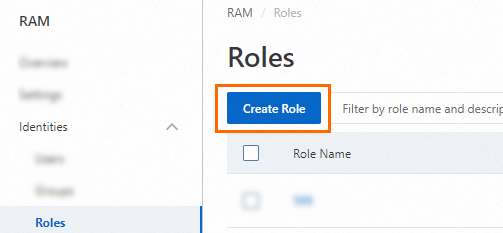
On the Roles page, click Create Role.
On the Create Role page, set the Principal Type parameter to Cloud Account, specify an Alibaba Cloud account, and then click OK.

Current Account: If you want a RAM user or RAM role that belongs to your Alibaba Cloud account to assume the RAM role, select Current Account.
Other Account: If you want a RAM user or RAM role that belongs to a different Alibaba Cloud account to assume the RAM role, select Other Account and enter the ID of the Alibaba Cloud account. This option is provided to grant permissions on resources that belong to different Alibaba Cloud accounts. For more information, see Use a RAM role to grant permissions across Alibaba Cloud accounts. You can view the ID of your Alibaba Cloud account on the Security Settings page.
Optional. If you want the RAM role to be assumed only by a specific RAM user or RAM role that belongs to the trusted Alibaba Cloud account, click Switch to Policy Editor and modify the trust policy of the RAM role in the editor.
The editor supports the Visual editor and JSON modes. In the following example, only the RAM user
Alicewithin the Alibaba Cloud account whose ID is 100******0719 can assume the RAM role.Visual editor
Specify a RAM user for the Principal element.


JSON
Specify a RAM user for the
RAMfield of thePrincipalparameter.{ "Version": "1", "Statement": [ { "Effect": "Allow", "Principal": { "RAM": "acs:ram::100******0719:user/Alice" }, "Action": "sts:AssumeRole" } ] }
In the Create Role dialog box, configure the Role Name parameter and click OK.
Step 2: Attach a policy to the RAM role
Attach the AliyunContainerRegistryCustomizedOSSBucketRolePolicy policy to the RAM role. This policy contains the permissions to read information about Container Registry repositories from OSS buckets. To read repository information from multiple custom OSS buckets, you can specify multiple OSS buckets for the Resource parameter.
{
    "Version": "1",
    "Statement": [
        {
            "Action": [
                "oss:GetObject",
                "oss:PutObject",
                "oss:DeleteObject",
                "oss:ListParts",
                "oss:AbortMultipartUpload",
                "oss:InitiateMultipartUpload",
                "oss:CompleteMultipartUpload",
                "oss:DeleteMultipleObjects",
                "oss:ListMultipartUploads",
                "oss:ListObjects",
                "oss:DeleteObjectVersion",
                "oss:GetObjectVersion",
                "oss:ListObjectVersions",
                "oss:PutObjectTagging",
                "oss:GetObjectTagging",
                "oss:DeleteObjectTagging"
            ],
            "Resource": [
                "acs:oss:*:*:cri-*",
                "acs:oss:*:*:cri-*/*",
                "acs:oss:*:*:<YOUR_BUCKET_NAME>",  # Replace <YOUR_BUCKET_NAME> with the name of the bucket that you want to access.
                "acs:oss:*:*:<YOUR_BUCKET_NAME>/*" # Replace <YOUR_BUCKET_NAME> with the name of the bucket that you want to access.
            ],
            "Effect": "Allow",
            "Condition": {

            }
        },
        {
            "Action": [
                "oss:PutBucket",
                "oss:GetBucket",
                "oss:GetBucketLocation",
                "oss:PutBucketEncryption",
                "oss:GetBucketEncryption",
                "oss:PutBucketAcl",
                "oss:GetBucketAcl",
                "oss:PutBucketLogging",
                "oss:GetBucketReferer",
                "oss:PutBucketReferer",
                "oss:GetBucketLogging",
                "oss:PutBucketVersioning",
                "oss:GetBucketVersioning",
                "oss:GetBucketLifecycle",
                "oss:PutBucketLifecycle",
                "oss:DeleteBucketLifecycle",
                "oss:GetBucketTransferAcceleration"
            ],
            "Resource": [
                "acs:oss:*:*:cri-*",
                "acs:oss:*:*:cri-*/*",
                "acs:oss:*:*:<YOUR_BUCKET_NAME>",  # Replace <YOUR_BUCKET_NAME> with the name of the bucket that you want to access.
                "acs:oss:*:*:<YOUR_BUCKET_NAME>/*" # Replace <YOUR_BUCKET_NAME> with the name of the bucket that you want to access.
            ],
            "Effect": "Allow",
            "Condition": {

            }
        },
        {
            "Effect": "Allow",
            "Action": "oss:ListBuckets",
            "Resource": [
                "acs:oss:*:*:*",
                "acs:oss:*:*:*/*"
            ],
            "Condition": {

            }
        },
        {
            "Action": [
                "vpc:DescribeVpcs"
            ],
            "Resource": "acs:vpc:*:*:vpc/*",
            "Effect": "Allow",
            "Condition": {

            }
        },
        {
            "Action": [
                "cms:QueryMetricLast",
                "cms:QueryMetricList"
            ],
            "Resource": "*",
            "Effect": "Allow"
        }
    ]
}