This guide shows you how to use the ComputeNest CLI to quickly create a Compute Nest service from a built-in template.
Prerequisites
Make sure that you have Python 3.7 or later installed. If not, see Install Python.

Create an AccessKey for ComputeNest CLI access. See Create an AccessKey for a RAM user.
Install ComputeNest CLI
pip install computenest-cli
Create a service from an official template
List the officially maintained projects.
computenest-cli list-projects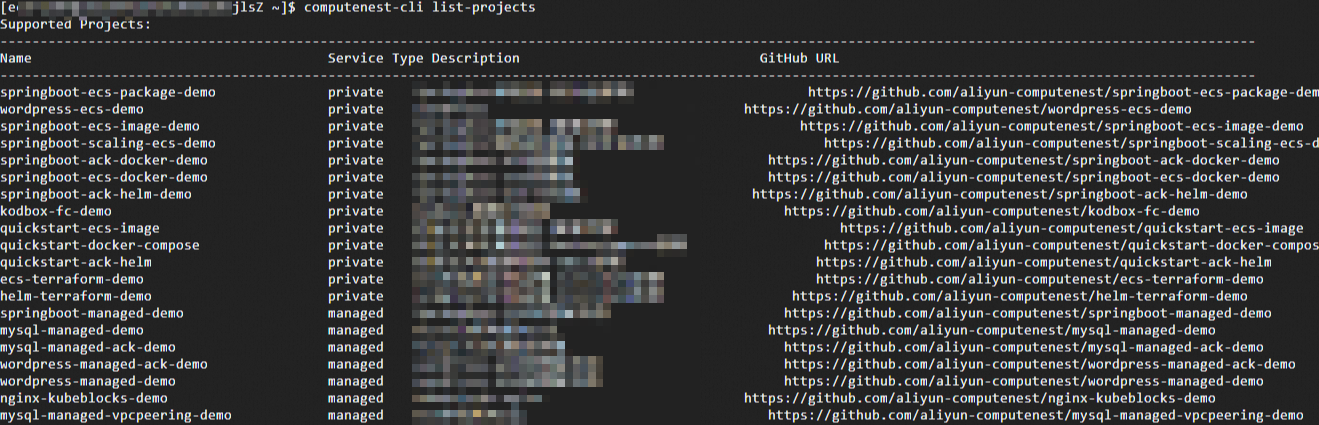
Navigate to your project directory and initialize the project. This example uses the SpringBoot Basic Edition-Package Deployment template.
cd project  # Change to your project directory
computenest-cli init-project --project_name=springboot-ecs-package-demo
cd springboot-ecs-package-demo
Log in to Compute Nest with your AccessKey.
computenest-cli login --access_key_id=<yourAccessKeyID> --access_key_secret=<yourAccessKeySecret>
Create the service.
computenest-cli import --service_name=springboot-ecs-package-demo-test01
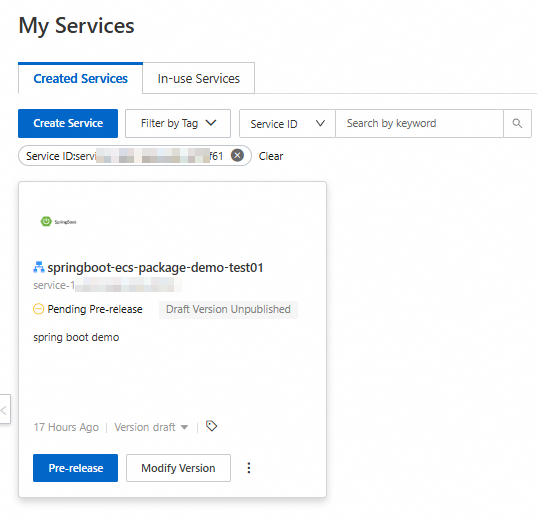
After you create the service, you can view its details on the My Services page in the Compute Nest console.
How it works
To create a service using ComputeNest CLI, your project must contain the required Compute Nest service configuration files. For the SpringBoot demo used in this guide, the directory structure is as follows:
.
└── .computenest                    - Contains the build configuration for the Compute Nest service
    ├── README.md                   - service description and build instructions
    ├── docs                        - Files for the service documentation
    │   └── index.md
    ├── service_test                - Directory for the service test
    ├── resources                   - Service resource files
    │   ├── icons
    │   │   └── service_logo.png    - service logo
    │   └── artifact_resources      - Resource files for the deployment artifact
    │       └── file                - Directory for file-based deployment artifacts
    │           └── package.tgz     - SpringBoot installation package
    ├── ros_templates               - ROS templates for the service. You can have multiple templates.
    │   └── template.yaml           - Example ROS template
├── config.yaml - service configuration fileconfig.yamldefines the configuration for the Compute Nest service.The
ros_templatesdirectory containsROStemplates. ROS, an official Alibaba Cloud IaC language, allows you to define resource architecture.The
resourcesdirectory defines service resources, such as the service logo and deployment artifacts. For example, packages can be stored in this directory.The
service_testdirectory is used to define service tests and can include items such as test cases.