After you integrate ARMS Application Monitoring, the agent automatically instruments common AI frameworks, collecting trace data without any code changes. To capture specific business methods in your traces, add custom instrumentation using the loongsuite-util-genai package and the OpenTelemetry SDK. This topic describes how to use loongsuite-util-genai and the OpenTelemetry Python SDK to create custom spans and add custom attributes.
For a list of AI components and frameworks supported by the ARMS agent, see the following topics:
Java components and frameworks supported by ARMS Application Monitoring.
Go components and frameworks supported by ARMS Application Monitoring.
Python components and frameworks supported by ARMS Application Monitoring.
Prerequisites
You have successfully integrated ARMS Application Monitoring.
Install dependencies
pip install loongsuite-util-genaiThe installation provides the opentelemetry.util.genai package and extended interfaces such as ExtendedTelemetryHandler. For more information, see loongsuite-util-genai detailed documentation.
Use loongsuite-util-genai and the OpenTelemetry SDK
With loongsuite-util-genai and the OpenTelemetry SDK, you can:
Create spans with GenAI semantics (such as Entry, Agent, Tool, and ReAct Step).
Create custom spans by using the OpenTelemetry SDK.
Add custom attributes to a span.
Get the current trace context and print the traceId.
Key concepts
span: A single operation within a request, such as a large language model (LLM) call or a tool execution.
SpanContext: The context of a request trace, which contains information such as traceId and spanId.
attribute: An additional field on a span used to record key information, such as a model name or token usage.
Handler: The
ExtendedTelemetryHandlerprovided by loongsuite-util-genai, used to create Spans that conform to GenAI semantic conventions.
The following table lists all span types supported by loongsuite-util-genai. This topic focuses on how to use Entry, Agent, Tool, and ReAct Step spans. For detailed information about other types such as Embedding, Retrieval, Rerank, and Memory, see the complete loongsuite-util-genai documentation.
Span type | Operation name | Description |
Entry |
| The application entry point, containing the session ID, user ID, and full application interaction details. |
Agent |
| An Agent invocation, aggregating token usage. |
Tool |
| A tool or function execution. |
Step |
| A marker for a single ReAct iteration. |
LLM |
| An LLM chat, typically captured automatically by the agent. |
Embedding |
| A vector embedding operation. |
Retriever |
| A retrieval operation (for RAG). |
Reranker |
| A rerank operation. |
Memory |
| A memory read/write operation. |
The following sections provide step-by-step instructions and code snippets for instrumenting each type of span. A complete, runnable code example is available in the Appendix at the end of this document.
You must obtain the handler instance by using get_extended_telemetry_handler() instead of directly instantiating TelemetryHandler. The ARMS agent is compatible only with get_extended_telemetry_handler(). Directly instantiating TelemetryHandler may cause environment variable compatibility issues.
When adding custom instrumentation, you must follow the semantic conventions defined in LLM Trace Field Definitions. AI Application Observability features, such as token statistics and session analysis, rely on these conventions for data rendering. If span attributes do not follow these conventions, the related data may not display correctly in the console.
1. Get the handler and tracer
Use get_extended_telemetry_handler() to obtain the singleton Handler from loongsuite-util-genai, and get_tracer(__name__) to obtain the Tracer from the OpenTelemetry SDK. They are used to create GenAI semantic Spans and custom business Spans, respectively.
from opentelemetry.util.genai.extended_handler import get_extended_telemetry_handler
from opentelemetry.util.genai.extended_types import (
    ExecuteToolInvocation,
    InvokeAgentInvocation,
)
from opentelemetry.util.genai._extended_common import EntryInvocation, ReactStepInvocation
from opentelemetry.util.genai.types import Error, InputMessage, OutputMessage, Text
from opentelemetry.trace import get_tracer

handler = get_extended_telemetry_handler()
tracer = get_tracer(__name__)
The handler supports two usage patterns:
Context manager (
with handler.entry(inv), etc.): This is the recommended method. It automatically manages the span lifecycle.start/stop/fail API (
handler.start_entry(inv)/handler.stop_entry(inv)/handler.fail_entry(inv, error)): Suitable for scenarios such as asynchronous, callback, or streaming where you cannot usewithstatements.
2. Create an Entry span
At the request entry point, create an Entry Span. Include the session_id and user_id, and record the user input by using input_messages. After the streaming response is complete, concatenate the output, set it to output_messages, and then call stop_entry to end the Span. This allows you to directly see the full input and final output of the request in the console.
entry_inv = EntryInvocation(
    session_id=req.session_id or str(uuid.uuid4()),
    user_id=req.user_id or "anonymous",
    input_messages=[
        InputMessage(role="user", parts=[Text(content=req.topic)]),
    ],
)

def event_generator():
    handler.start_entry(entry_inv)
    output_chunks: list[str] = [ ]

    try:
        for chunk in run_agent_stream(topic=req.topic):
            output_chunks.append(chunk)
            yield f"data: {json.dumps({'content': chunk}, ensure_ascii=False)}\n\n"
        yield "data: [DONE]\n\n"
    except Exception as exc:
        handler.fail_entry(entry_inv, Error(message=str(exc), type=type(exc)))
        yield f"data: {json.dumps({'error': str(exc)}, ensure_ascii=False)}\n\n"
        return
    entry_inv.output_messages = [
        OutputMessage(
            role="assistant",
            parts=[Text(content="".join(output_chunks))],
            finish_reason="stop",
        ),
    ]
    handler.stop_entry(entry_inv)
3. Create an Agent span
Use start_invoke_agent to create an Agent Span that records the agent name, model, and description. The Agent Span is the root GenAI Span of the entire trace, and all subsequent ReAct Step, LLM call, and Tool call spans are its child spans.
invocation = InvokeAgentInvocation(
    provider="dashscope",
    agent_name="TechContentAgent",
    agent_description="Technical content generation assistant",
    request_model="qwen-plus",
)
total_input_tokens = 0
total_output_tokens = 0

handler.start_invoke_agent(invocation)
try:
    # ... Core agent logic (ReAct loop) ...

    invocation.input_tokens = total_input_tokens
    invocation.output_tokens = total_output_tokens
    handler.stop_invoke_agent(invocation)
except Exception:
    handler.fail_invoke_agent(invocation, Error(message="agent failed", type=RuntimeError))
    raise
After an agent completes its execution, it writes the accumulated total_input_tokens and total_output_tokens to the Agent span to aggregate token metrics.
4. Create a ReAct Step span
Create a Step Span for each ReAct inference iteration and pass the current round. When an iteration ends, set finish_reason to continue if the iteration needs to continue, or to stop if it is the final answer. In the example, the LLM calls in each iteration are automatically instrumented by the ARMS agent, so you do not need to create them manually.
step_inv = ReactStepInvocation(round=iteration + 1)
handler.start_react_step(step_inv)

try:
    response = client.chat.completions.create(
        model="qwen-plus",
        messages=messages,
        tools=TOOL_DEFINITIONS,
    )
    # ... Process the response ...

    step_inv.finish_reason = "stop"  # or "continue"
    handler.stop_react_step(step_inv)
except Exception:
    handler.fail_react_step(step_inv, Error(message="step failed", type=RuntimeError))
    raise
5. Create a Tool span
When the model returns a tool call, create a Tool Span for each tool_call, recording the tool name, call ID, input parameters, and result.
tool_inv = ExecuteToolInvocation(
    tool_name=tool_call.function.name,
    tool_call_id=tool_call.id,
    tool_call_arguments=tool_call.function.arguments,
    tool_type="function",
)
handler.start_execute_tool(tool_inv)
try:
    result = dispatch_tool(tool_name, tool_call.function.arguments)
    tool_inv.tool_call_result = result
except Exception as exc:
    handler.fail_execute_tool(tool_inv, error=Error(message=str(exc), type=type(exc)))
    raise
else:
    handler.stop_execute_tool(tool_inv)
6. Create custom spans with the OpenTelemetry SDK
In addition to the GenAI semantic Spans provided by loongsuite-util-genai, you can use the tracer.start_as_current_span() method from the OpenTelemetry SDK to create custom business Spans and use them together with GenAI Spans.
The following examples show two typical use cases for custom spans:
duplicate_tool_detection
This process is executed before each ReAct iteration. It uses a Counter to count the number of times each tool is called and writes the detection results to the gen_ai.loop_detection.* attribute. If a loop is detected, a system prompt is appended to the message list to guide the model to avoid repetition.
def _check_duplicate_tools(
    tool_usage_counter: Counter,
    messages: list[dict[str, Any]],
) -> None:
    duplicates = [name for name, count in tool_usage_counter.items() if count > 1]
    has_duplicates = len(duplicates) > 0

    with tracer.start_as_current_span("duplicate_tool_detection") as span:
        span.set_attributes({
            "gen_ai.loop_detection.detected": has_duplicates,
            "gen_ai.loop_detection.duplicate_tools": str(duplicates) if has_duplicates else "[ ]",
            "gen_ai.loop_detection.total_calls": sum(tool_usage_counter.values()),
            "gen_ai.loop_detection.unique_tools": len(tool_usage_counter),
        })

    if has_duplicates:
        details = ", ".join(f"{n}({tool_usage_counter[n]} calls)" for n in duplicates)
        messages.append({
            "role": "system",
            "content": f"[System Hint] Duplicate tool calls detected: {details}. Please avoid repeating the call.",
        })
response_loop_detection
This process is executed after each LLM response. It compares the text similarity between the current response and the previous one and writes metrics such as is_loop and overlap_ratio to the Span attributes. If a loop is detected (the text is identical or the overlap ratio exceeds 80%), the finish_reason is set to loop_detected and the Agent is terminated early.
def _check_response_loop(
    current_content: str | None,
    previous_content: str | None,
) -> bool:
    cur = (current_content or "").strip()
    prev = (previous_content or "").strip()

    with tracer.start_as_current_span("response_loop_detection") as span:
        if not prev or not cur:
            span.set_attributes({
                "gen_ai.loop_detection.is_loop": False,
                "gen_ai.loop_detection.reason": "no_text_content",
            })
            return False

        is_identical = cur == prev
        longer = max(len(cur), len(prev))
        common_prefix_len = sum(1 for a, b in zip(cur, prev) if a == b)
        overlap_ratio = common_prefix_len / longer if longer > 0 else 0.0
        is_loop = is_identical or overlap_ratio > 0.8

        span.set_attributes({
            "gen_ai.loop_detection.is_loop": is_loop,
            "gen_ai.loop_detection.is_identical": is_identical,
            "gen_ai.loop_detection.overlap_ratio": round(overlap_ratio, 2),
            "gen_ai.loop_detection.current_length": len(cur),
            "gen_ai.loop_detection.previous_length": len(prev),
        })
        return is_loop
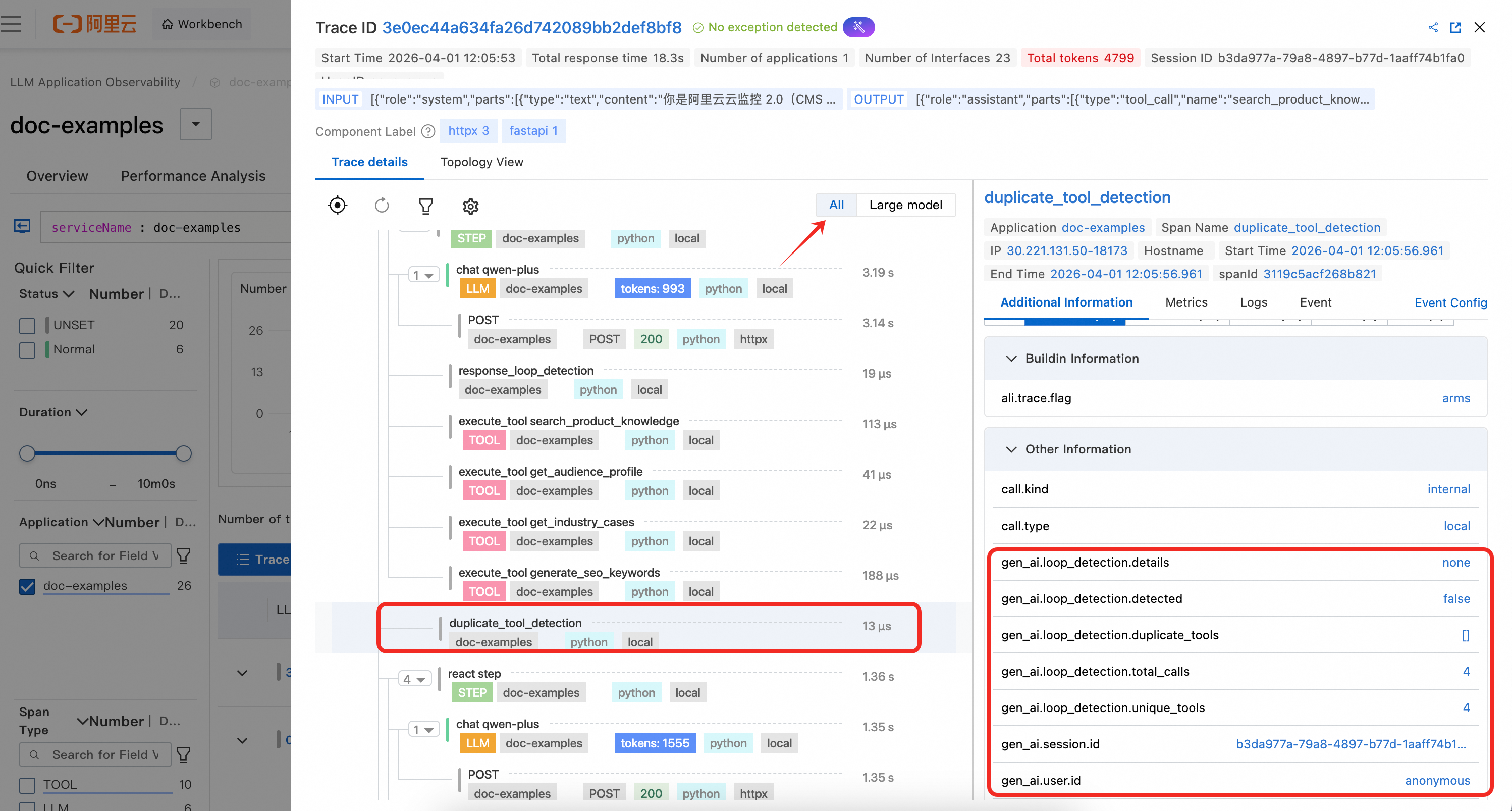
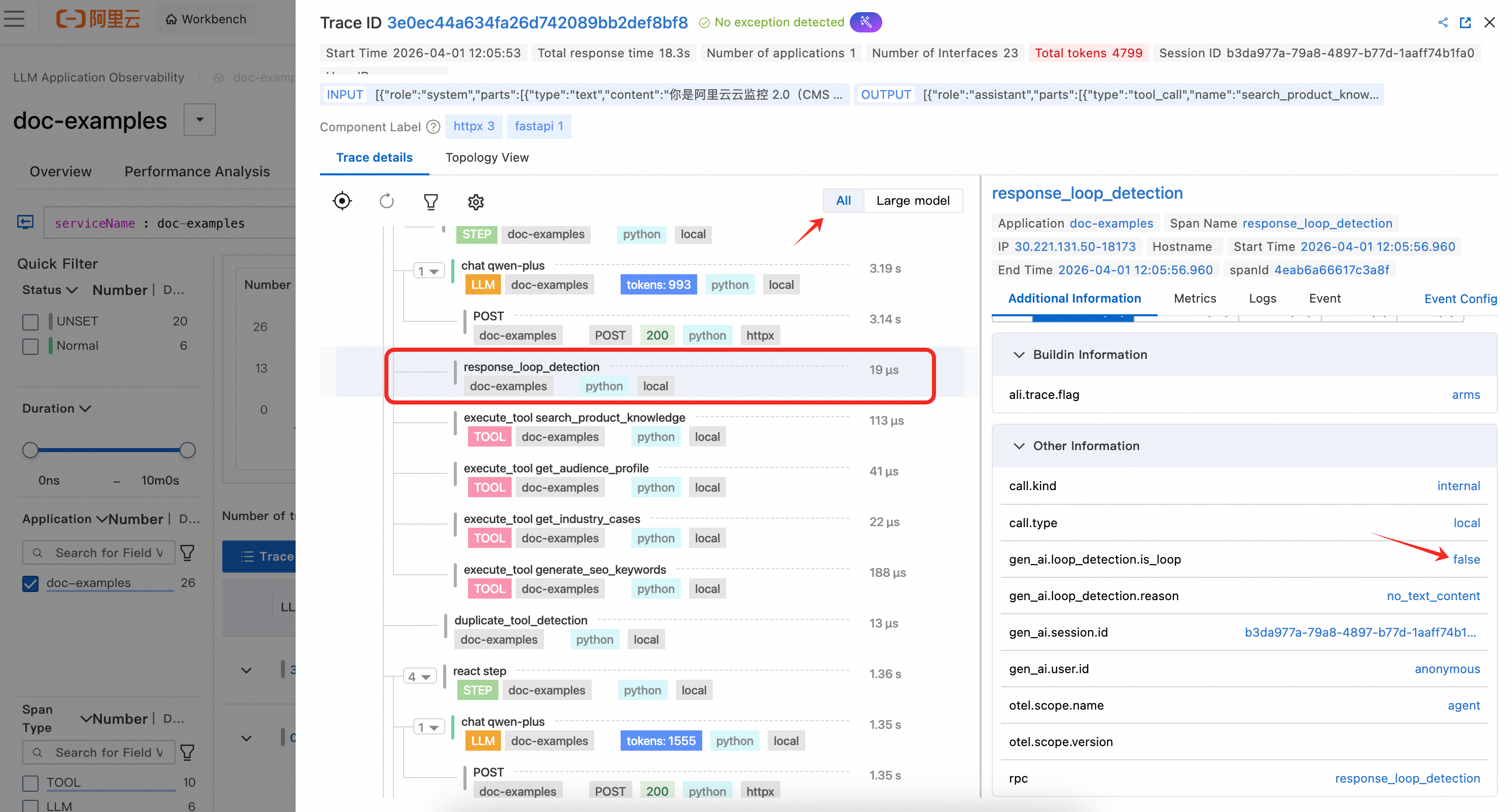
Because custom spans do not follow GenAI semantic conventions, you must switch to the All Views in the trace view of the console to see them.
View monitoring details
Log in to the Cloud Monitor 2.0 console, select the target workspace, and then choose All Features > AI Application Observability in the left-side navigation pane.
On the AI Applications page, you can see your integrated applications. Click an Application Name to view detailed monitoring data.
Instrumentation results
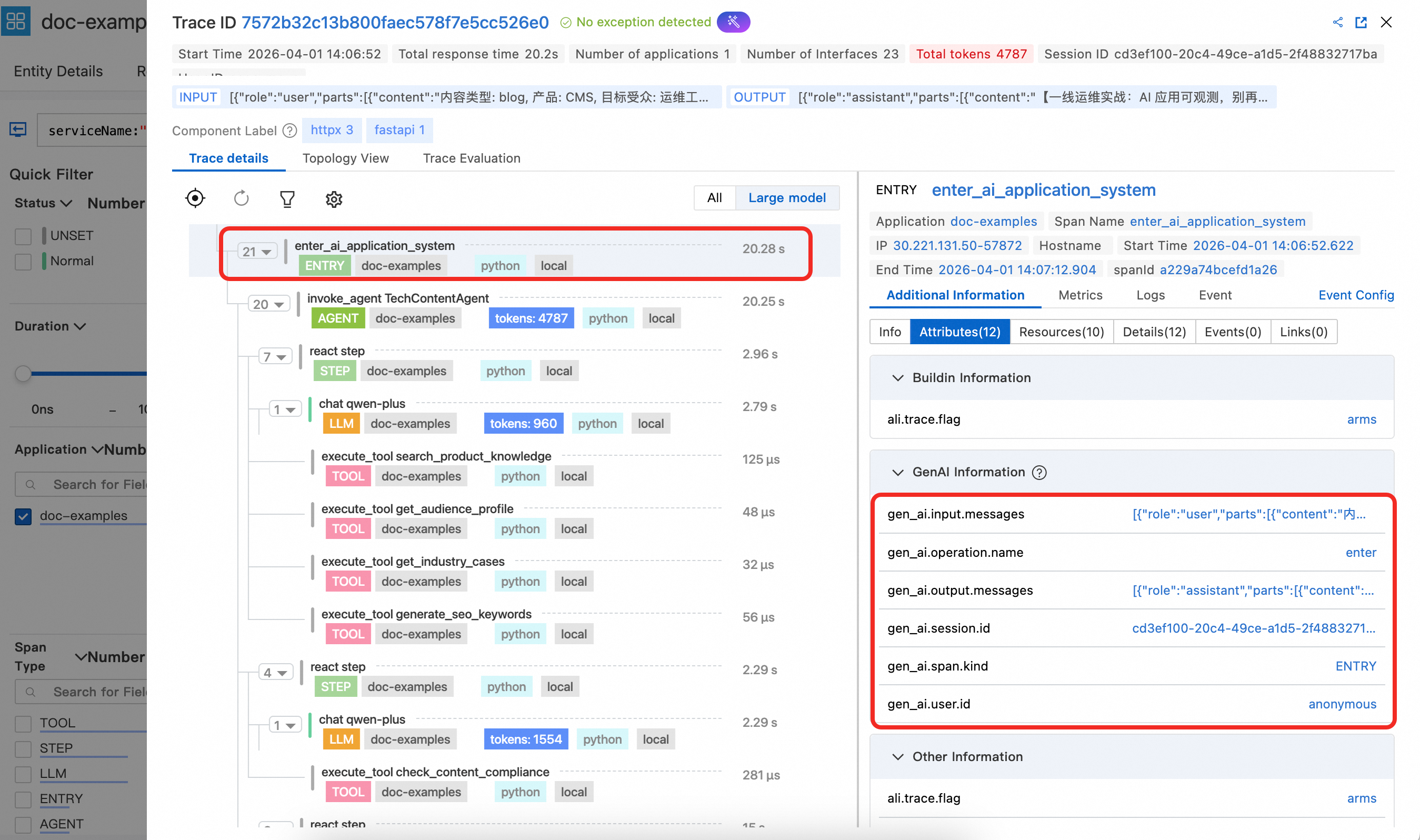
1. Entry span details
The Entry span displays key attributes like gen_ai.session.id and gen_ai.user.id. When set at the function entry point, these attributes are automatically propagated to LLM, Tool, and other spans, allowing for analysis based on session and user information. The Entry span also contains gen_ai.input.messages (user input) and gen_ai.output.messages (final output), making it easy to view the entire interaction content for the request in the console.
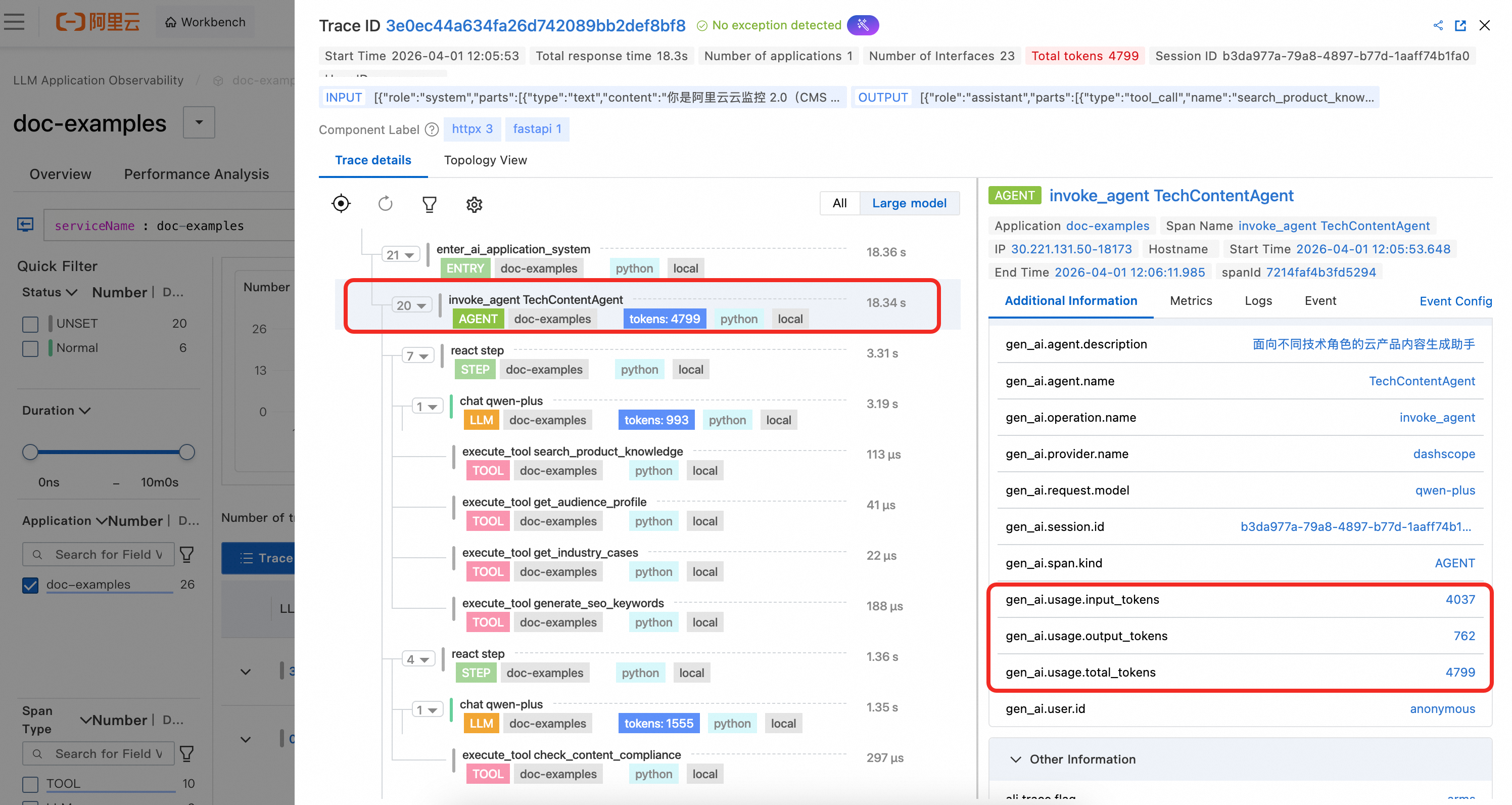
2. Agent span details
The Agent span shows the agent's defined name and description. It also displays the aggregated token usage statistics at the agent level, as calculated in the example code.
3. Tool span details
The Tool span shows the tool's name, its input parameters, and the result of the tool call.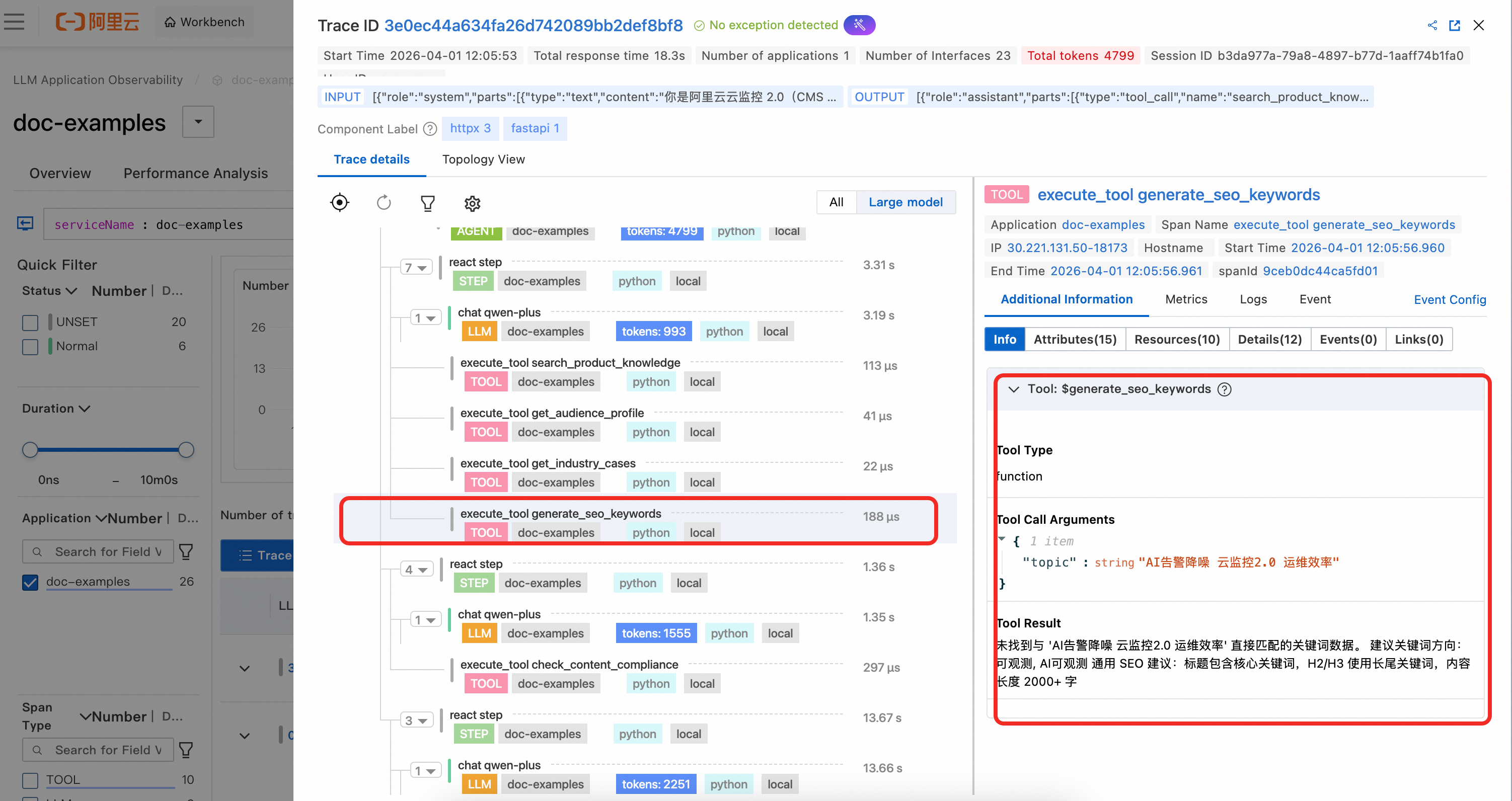
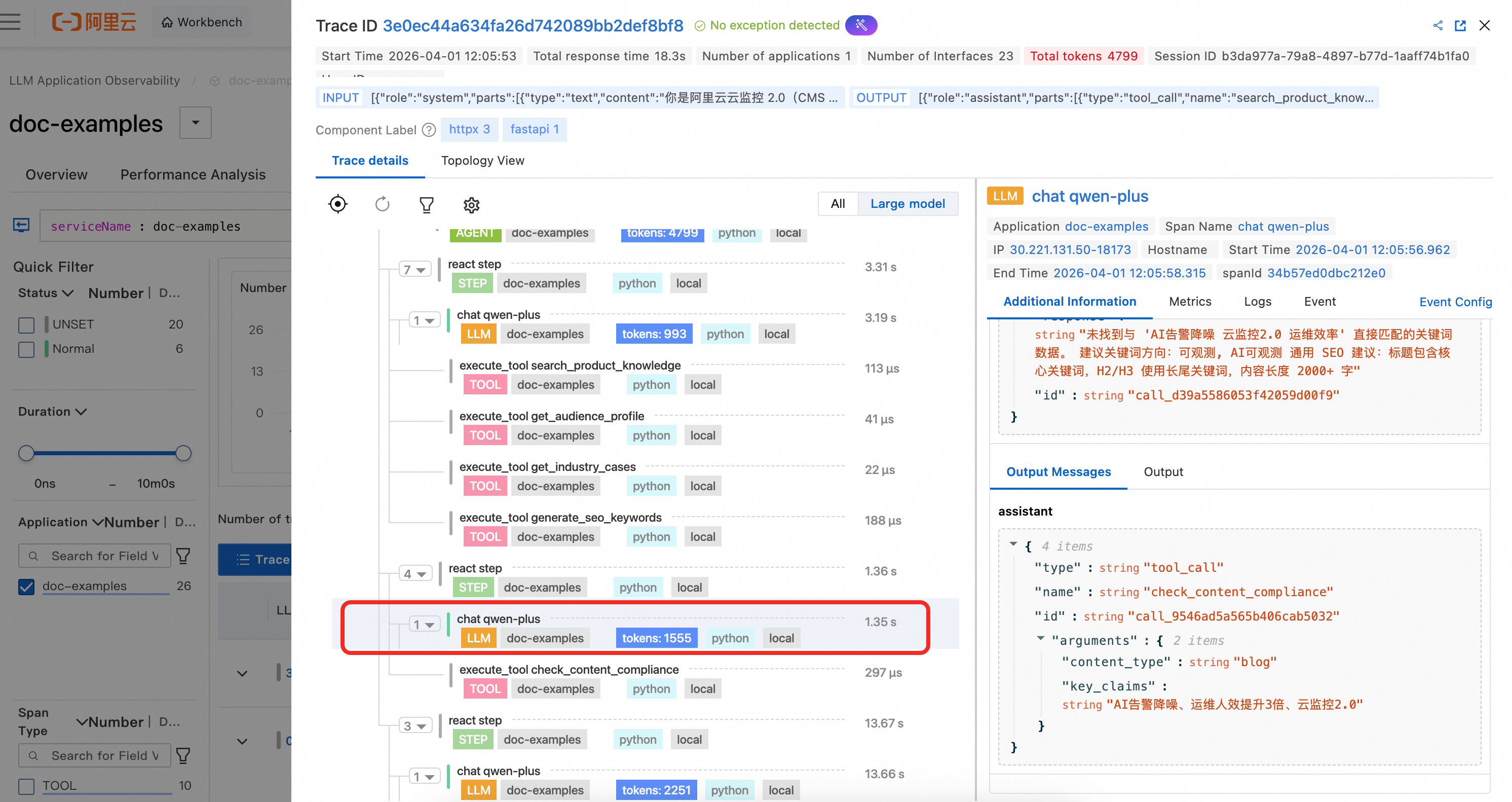
4. LLM span details
In the example code, LLM spans are not manually instrumented. Because they are OpenAI calls, they are automatically captured by the agent. You can clearly observe the complete context information and token consumption for the LLM call.
5. Custom span details
The example code creates two custom business spans with the OpenTelemetry SDK to demonstrate how to combine custom instrumentation with GenAI semantic spans. Since these custom spans are not part of the GenAI semantics, you must switch to All Views to see them.
duplicate_tool_detection: This span is created before each ReAct iteration to detect if the agent is stuck in a loop of repeated tool calls. The span attributes record whether duplicates were detected, the list of duplicate tools, the total number of calls, and the number of unique tools. This helps you quickly diagnose tool call loop issues in ARMS.
response_loop_detection: This span is created after each LLM response to detect if the model is repeatedly returning highly similar content. The span attributes record whether a loop was identified, if the text is identical, the overlap ratio, and the lengths of the current and previous responses. This helps troubleshoot abnormal scenarios where the model is stuck in a repetitive output loop.
References
For detailed usage of all span types supported by
loongsuite-util-genai(such as Embedding, Retrieval, Rerank, and Memory), see the complete loongsuite-util-genai documentation.