This topic describes how to troubleshoot common issues that may occur when you use the log monitoring feature.
Procedure
An error is reported on the Log Monitoring page when you create a log monitoring metric.
The error is reported because your AccessKey pair is in the Disabled state. To resolve this issue, perform the following steps:
Log on to the Alibaba Cloud Management Console with an Alibaba Cloud account.
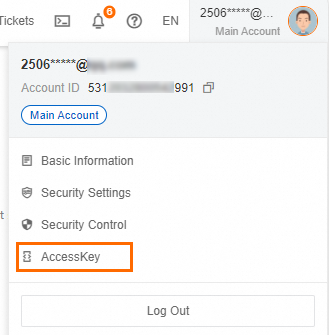
Move the pointer over the profile picture in the upper-right corner of the page that appears and click AccessKey.
In the Main Account AccessKey is not recommended dialog box, confirm and select I am aware of the security risks of using a main account AccessKey and click use Main Account AccessKey.
On the AccessKey Pair page, find the AccessKey pair that you want to enable and click Enable in the Actions column.
In the Enable message, click Enable.
A log monitoring metric is created but no data is available in the monitoring chart of the metric.
If no data is available in the monitoring chart, the related alert rule does not work due to insufficient data.
On the Log Monitoring page, find the metric that you want to manage and click Edit in the Actions column. In the Select SQL section, check whether the generated SQL statement contains Chinese characters.
NoteSQL statements cannot contain Chinese characters.
Make sure that log data can match the Statistical Method and Log Filter parameters that you specified for the metric.
On the Log Monitoring page, find the metric that you want to manage and click Edit in the Actions column. In the Preview section, check whether matched log data exists. You can view the log data of the last hour.
To view more matched log data, log on to the Log Service console.
The metric value reaches the specified threshold value but no alert notification is received.
Check whether alert notifications of the alert rule are muted. By default, the mute period is 24 hours.
If an alert is triggered within the mute period, Cloud Monitor does not resend alert notifications.
If the alert is not cleared after the mute period ends, Cloud Monitor resends alert notifications.