Use a cross-zone migration plan in Cloud Migration Hub (CMH) to migrate major cloud resources from one zone to another.
Video tutorial
Migration process
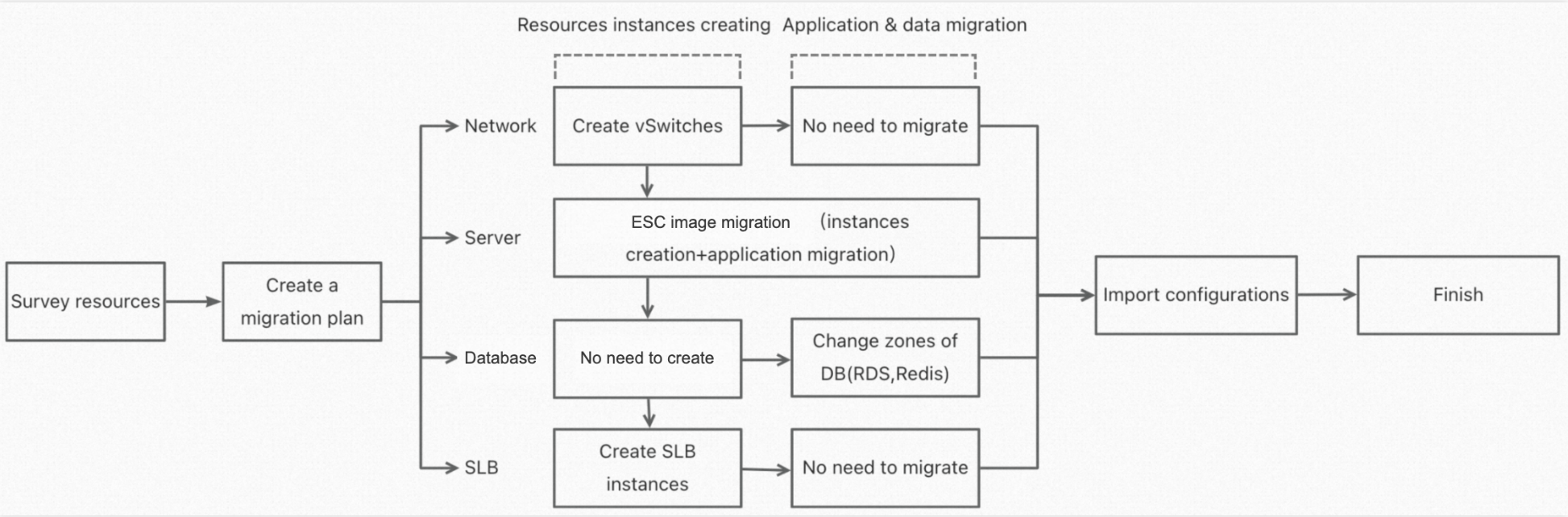
The following flowchart shows the cross-zone migration process on Alibaba Cloud, covering all supported resource types. If you are migrating only some of these resource types, skip the steps that do not apply.
Permissions
During a cross-zone migration, CMH accesses resources under your Alibaba Cloud account to create and migrate them. If you use a RAM user or RAM role, your account must have the required permissions. For more information, see Configure permissions for CMH. The following table lists the permissions required for a cross-zone migration.
|
Access policy name |
Notes |
|
AliyunAPDSFullAccess |
Permissions to manage Cloud Migration Hub (CMH) |
|
AliyunIaCServiceFullAccess |
Permissions to manage Infrastructure as Code (IaC) services |
|
AliyunVPCFullAccess |
Permissions to manage Virtual Private Cloud (VPC) |
|
AliyunSLBFullAccess |
Permissions to manage Server Load Balancer (SLB) |
|
AliyunECSFullAccess |
Permissions to manage Elastic Compute Service (ECS) |
CMH also creates a service-linked role for your account to handle resource discovery, creation, and migration. A prompt to create this role appears the first time you click Alibaba Cloud Discovery. For more information, see Service-linked role for CMH.
Resource discovery
After you confirm your migration requirements, discover the resources in the source zone. In the CMH console, choose Console > Assess > Resource Discovery > Alibaba Cloud Discovery > Start. For more information, see Online discovery of Alibaba Cloud architecture.
Create a migration plan
Create a migration plan in the CMH console. Choose Menu > Prepare > Migration Plan > Create Migration Plan.
Alibaba Cloud cross-zone migration plans support the following resource types: ECS instances, ApsaraDB RDS, Tair (Redis OSS-compatible), Server Load Balancer (SLB), and vSwitches.
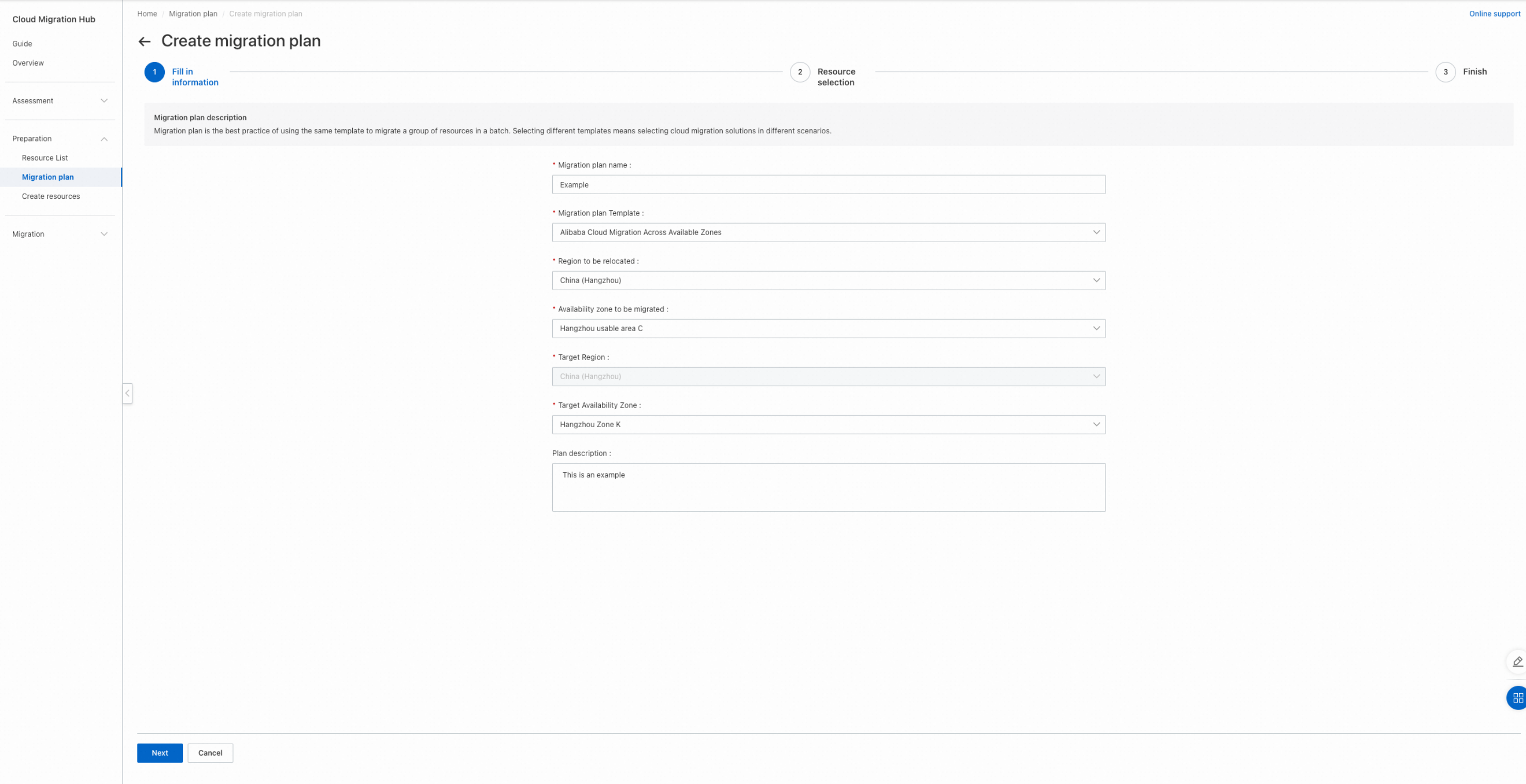
Enter information
Enter a business-friendly name for the migration. Set Migration Plan Template to Alibaba Cloud Cross-zone Migration. Select the source and destination zones, and then click Next.
Select resources
After you enter the migration plan information, a list of resources in the source zone appears. Select the resources that you want to migrate and click Next to create the migration plan.

View the migration plan
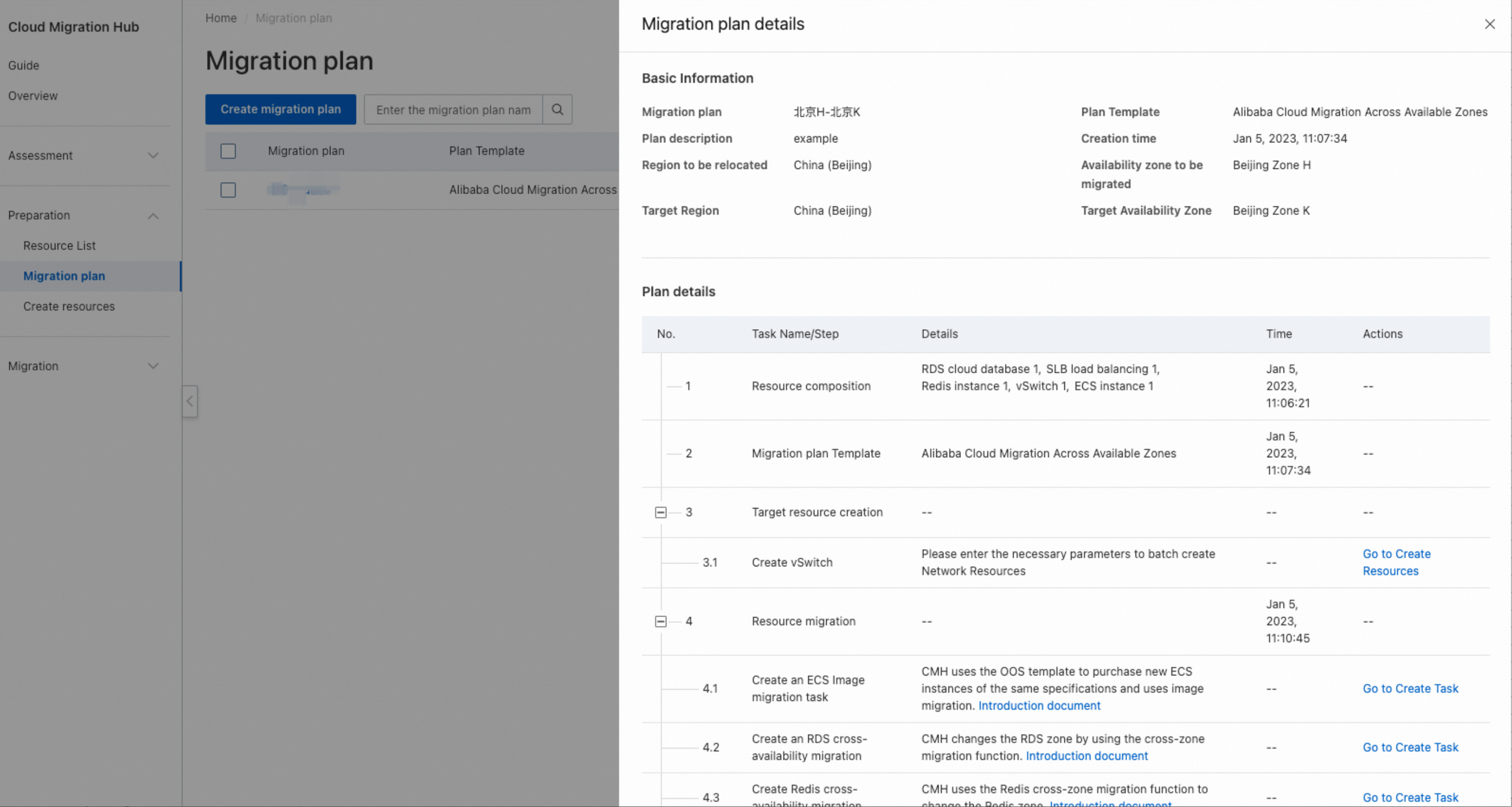
After the plan is created, click View in List to view your migration plans.

Click the name of a migration plan to view its details. Follow the steps in the Plan Details section to proceed.
Create resources
For a cross-zone migration plan, you must create vSwitch and SLB resources. For more information, see Create a vSwitch and Create an SLB instance.
Create resource migration tasks
A cross-zone migration requires migrating three resource types: ECS, RDS, and Redis. Group resources by product, select the resources to migrate, enter the required information, and start the migration tasks in a batch. For product-specific instructions, see Create an SMC migration task and Create a DTS task to migrate database instances.
Post-migration tasks
After all resources are migrated, you may need to perform additional operations, including but not limited to the following:
-
Modify ECS security groups.
-
Modify SLB configurations.
-
Modify RDS whitelists.
-
Manage public IP addresses.
-
Migrate other cloud products that were not migrated.
If you have questions about the cross-zone migration, submit a ticket for technical assistance.