This topic describes how to use Cloud Migration Hub (CMH) to migrate AWS Elastic Load Balancing (ELB) to Alibaba Cloud Server Load Balancer (SLB).
Prerequisites
Before you migrate an Application Load Balancer (ALB), you must associate the AliyunServiceRoleForAlb service-linked role with your Alibaba Cloud account.
Before you migrate a Network Load Balancer (NLB), you must associate the AliyunServiceRoleForNlb service-linked role with your Alibaba Cloud account.
CMH supports the migration of only Classic Load Balancer (CLB), ALB, and NLB instances. Other types of load balancers are not supported.
CMH supports only listeners that forward requests to Elastic Compute Service (ECS) instances. You must migrate the Amazon Elastic Compute Cloud (EC2) instances to ECS instances in the CMH migration plan. You must configure other types of listeners in the SLB console.
If you do not use CMH to migrate your EC2 instances to the destination, CMH cannot associate the destination ECS instances during the ELB migration. The related listeners are skipped and are not automatically created. You must configure these listeners in the SLB console.
Resource discovery
Before you start the migration, you must complete the resource discovery for ELB on the Resource Discovery page in the CMH console.
1. Go to . Select AWS for **Source Cloud Vendor** and include ELB in **Resource Type**.
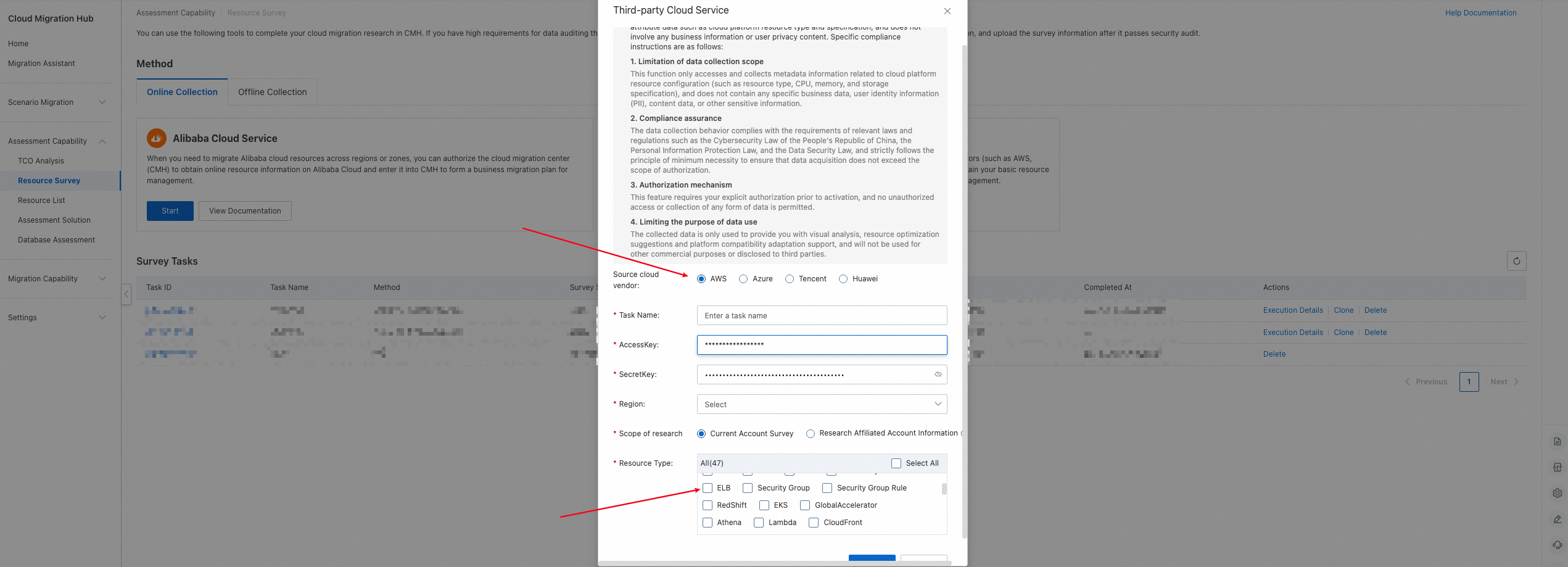
2. Wait for the discovery task to complete. Click Details to view the results.
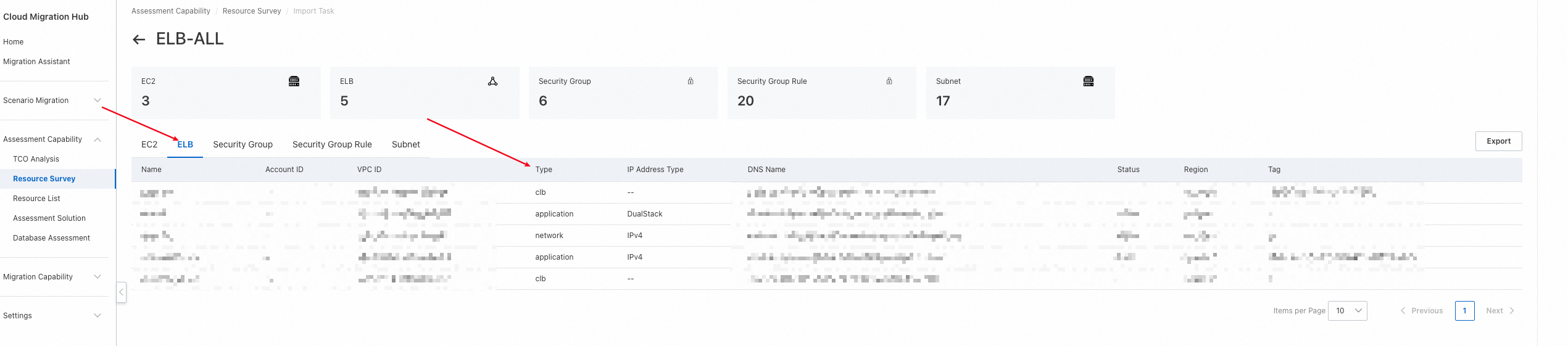
The following table describes the types.
Type | Meaning |
clb | Classic Load Balancer |
application | Application Load Balancer |
network | Network Load Balancer |
3. Click a resource to view its details.
Information | Type | Description |
Basic information |
| Basic information about the load balancer, such as its name and network type. |
Listener List |
| Information about the source listeners. |
Health Check List |
| Information about the source health checks. |
Target Instance List |
| Information about the source target instances. |
Target Group List |
| Information about the source target groups. |
Cross-cloud migration
You can migrate AWS ELB to Alibaba Cloud SLB on the Migration Plan page in the CMH console.
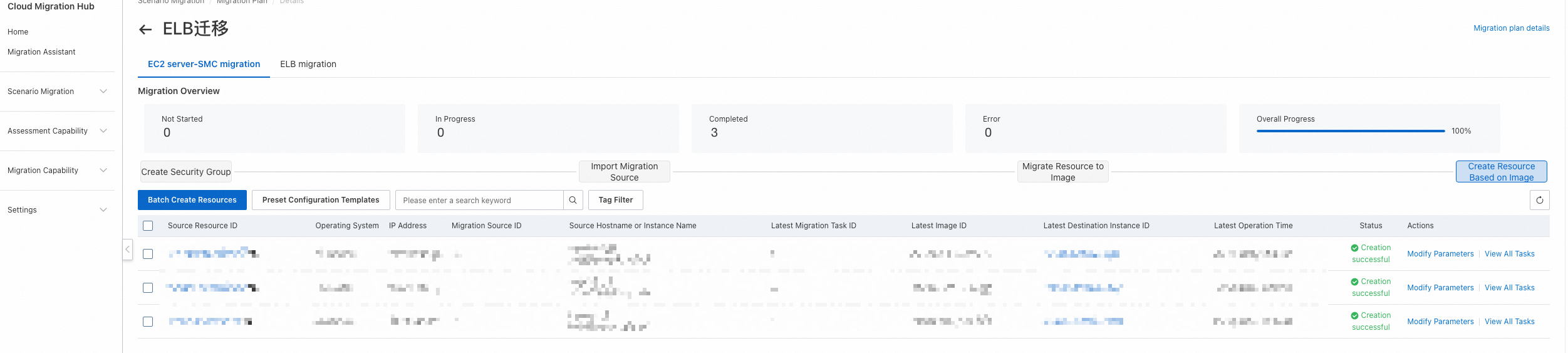
Prerequisite: You must first migrate the source EC2 instances to the destination ECS instances in a CMH migration plan. Otherwise, listeners cannot be created during the ELB migration. If you do not migrate the EC2 instances, the ELB migration creates only the SLB instance and does not configure listeners or server group information.
You can place the EC2 migration and the ELB migration in different migration plans. However, you must ensure that the EC2 migration is completed first.
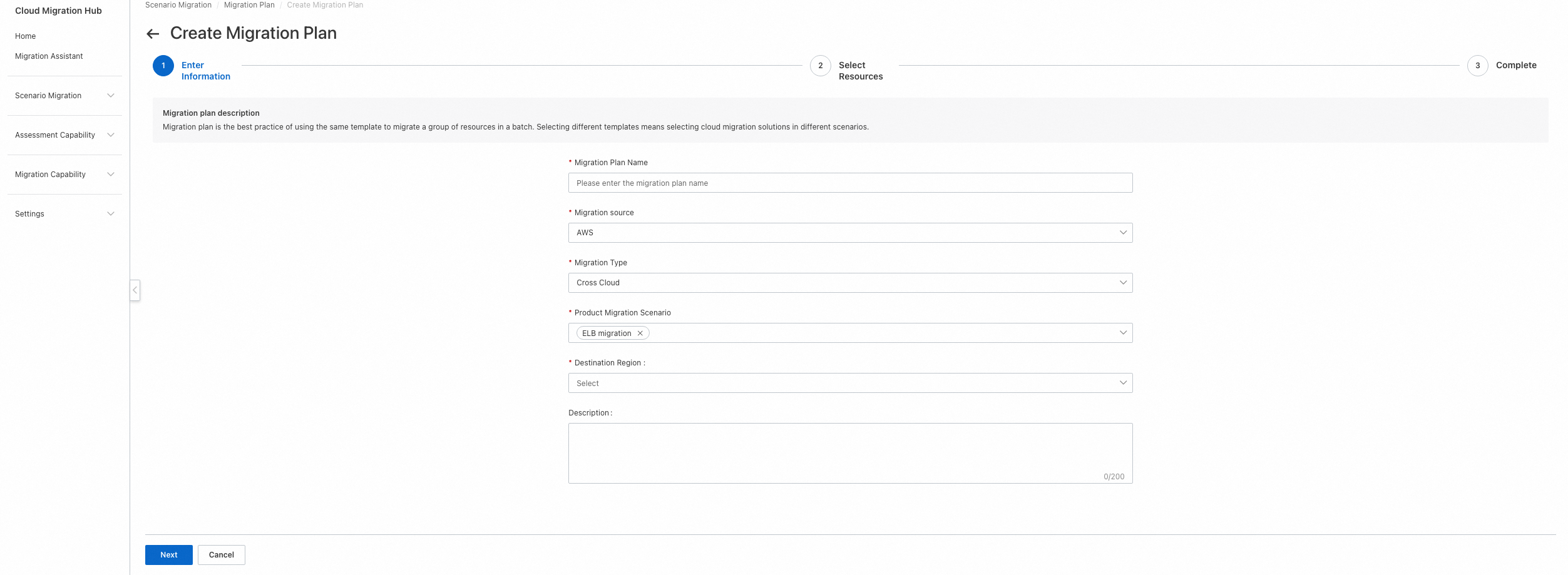
1. Go to and create a new migration plan.
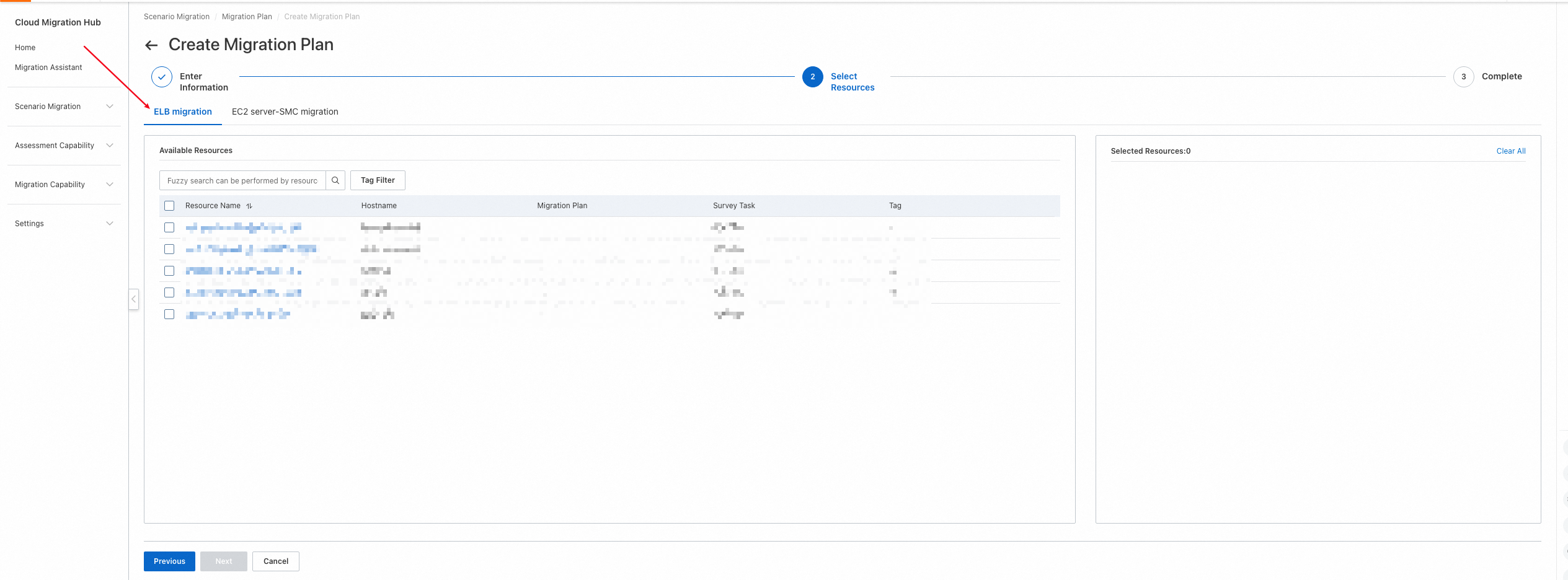
2. To map source listeners, confirm that the destination ECS instances are created.
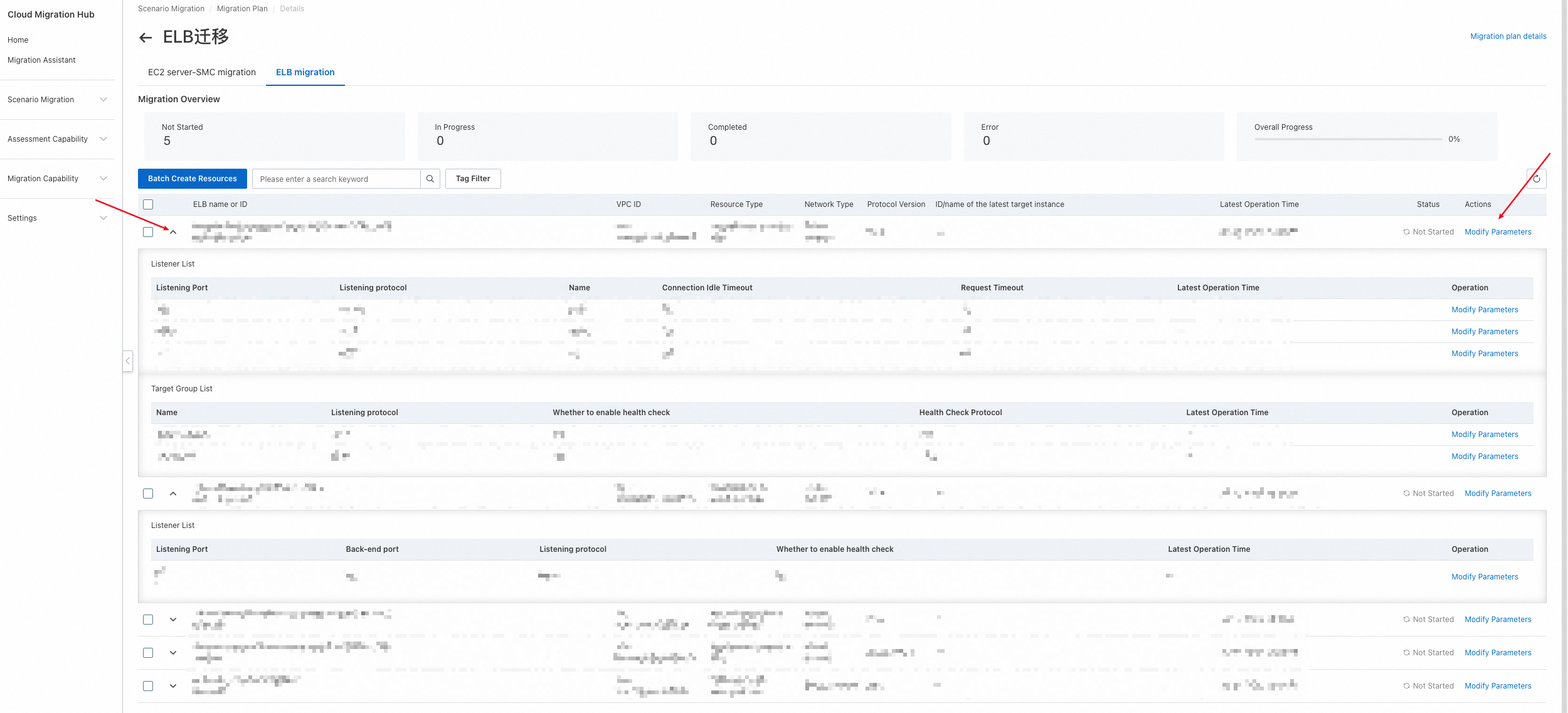
3. Configure the load balancer parameters. Click the arrow on the left to show the listeners and target groups that are mapped from the source instance. Click Modify Parameters on the right to configure the instance, listener, and target group information. After you configure the parameters, select the resources to create and click Batch Create Resources.
CLB parameter descriptions
Instance
Parameter | Description |
Zone | By default, a CLB instance is in multi-zone mode. Select the primary zone for the instance. The backend automatically selects a secondary zone. |
Network Type |
|
Name | Name of the CLB instance. |
VPC ID | Required only for the internal network type. VPC ID |
vSwitch | Required only for the internal network type. ID of the vSwitch in the primary zone. |
Metering method for Internet-facing instance | Required only for the Internet network type. Important When you set the metering method for an Internet-facing instance to pay-by-traffic, you must also set the billing method to pay-as-you-go.
|
Billing method |
|
IP Version |
|
Specify private IP address for the instance | Leave this empty to use a randomly assigned IP address. |
Listener
Parameter | Description |
Listener Protocol | The listener protocol type is mapped from the source and cannot be modified. |
Listener Port | |
Backend Port | |
Listener bandwidth peak | The peak bandwidth of the listener. Unit: Mbps. Valid values:
|
Scheduling Algorithm |
|
Access Control Type |
Important If you want the backend to automatically map the access control policy from the source, leave this empty. Otherwise, the automatic mapping information is overwritten. |
Access Control Policy Group ID | Important If you want the backend to automatically map the access control policy from the source, leave this empty. Otherwise, the automatic mapping information is overwritten. |
Enable Health Check | |
Health Check Type | |
Health Check Port | |
Health Check Timeout | The amount of time to wait for a response from a health check. If a backend ECS instance does not respond correctly within the specified time, the health check fails. |
Health Check Interval | |
Consecutive Successes | The number of consecutive successful health checks required to change the health check status of a backend server from fail to success. |
Consecutive Failures | The number of consecutive failed health checks required to change the health check status of a backend server from success to fail. |
Health Check Status | The HTTP status codes that indicate a successful health check. |
Health Check Domain Name | Important If you use the IP address of the target server as the health check domain name, leave this empty. |
Health Check URI | |
HTTP Health Check Method | |
Custom Listener Name | |
Enable getting the client IP address through the X-Forwarded-For header | |
Enable Session Persistence | |
Cookie Handling Method |
|
Cookie Timeout | |
Cookie configured on the server | |
Get the virtual IP address (VIP) of the client request through the SLB-IP header | |
Get the SLB instance ID through the SLB-ID header | |
Get the listener protocol of the SLB instance through the X-Forwarded-Proto header | |
Enable Gzip compression for specific file types | |
Enable HTTP to HTTPS forwarding | |
Connection Idle Timeout | If no request is received within the timeout period, Server Load Balancer temporarily breaks the current connection. A new connection is established when the next request arrives. |
Request Timeout | If the backend server does not respond within the timeout period, Server Load Balancer stops waiting and returns an |
Get the listener port of the SLB instance through the XForwardedFor_SLBPORT header | |
Get the client port for accessing the SLB instance through the XForwardedFor_ClientSrcPort header | |
Server Certificate ID | |
CA Certificate ID | |
Enable HTTP/2 | |
TLS Protocol |
|
Request string for UDP listener health check | |
Response string for UDP listener health check |
Application Load Balancer parameter descriptions
Instance
Parameter | Description |
Name | |
VPC ID | |
Zone | Select at least two zones and their vSwitches. |
Address Mode |
|
Instance Edition | The edition of the Application Load Balancer. Different editions have different feature limits and billing policies. |
IP Version |
Important When you select Dual-stack, the VPC must support IPv6. |
Network Type |
|
Billing Method |
|
Enable Deletion Protection |
Listener
Parameter | Description |
Protocol | |
Listener Port | |
Listener Name | |
Access Control Type |
Important If you want the backend to automatically map the access control policy from the source, leave this empty. Otherwise, the automatic mapping information is overwritten. |
Access Control Policy Group ID | Important If you want the backend to automatically map the access control policy from the source, leave this empty. Otherwise, the automatic mapping information is overwritten. |
Enable Gzip compression for specific file types | |
Connection Idle Timeout | If no request is received within the timeout period, Server Load Balancer temporarily breaks the current connection. A new connection is established when the next request arrives. |
Request Timeout | If the backend server does not respond within the timeout period, Server Load Balancer stops waiting and returns an |
Server Certificate ID | |
CA Certificate ID | |
Enable HTTP/2 | |
Enable Mutual Authentication |
Target Group
Parameter | Description |
Name | You cannot modify the protocol type of a listener that is mapped from the source. |
Listener Protocol | |
Enable Connection Draining | |
Connection Draining Timeout | |
Scheduling Algorithm |
|
Enable Health Check | |
Health Check Protocol | |
Health Check Port | |
Health Check Timeout | The amount of time to wait for a response from a health check. If a backend ECS instance does not respond correctly within the specified time, the health check fails. |
Health Check Interval | |
Consecutive Successes | The number of consecutive successful health checks required to change the health check status of a backend server from fail to success. |
Consecutive Failures | The number of consecutive failed health checks required to change the health check status of a backend server from success to fail. |
Health Check Status | The HTTP status codes that indicate a successful health check. |
HTTP Health Check Method | |
Enable getting the client IP address through the X-Forwarded-For header | |
Enable Session Persistence | |
Cookie Handling Method |
|
Cookie Timeout | |
Cookie configured on the server | |
Enable IPv6 | |
Enable backend keep-alive | |
Enable cross-zone load balancing for the server group | Enabled by default. |
NLB parameter descriptions
Instance
Parameter | Description |
Name | |
VPC ID | |
Zone | Select at least two zones and their vSwitches. |
Protocol Version |
Important When you select Dual-stack, the VPC must support IPv6. |
Network Type |
|
Billing Method |
|
Enable Deletion Protection | |
Security Group |
Listener
Parameter | Description |
Protocol | |
Listener Port | |
Listener Name | |
Connection Idle Timeout | If no request is received within the timeout period, Server Load Balancer temporarily breaks the current connection. A new connection is established when the next request arrives. |
TLS Protocol |
|
Support carrying the client source address to backend servers through the Proxy Protocol | |
Enable Mutual Authentication |
Target Group
Parameter | Description |
Name | The listener's protocol type cannot be modified once it is mapped from the source. |
Protocol Version | |
Listener Protocol | |
Enable full-port forwarding | |
Enable Connection Draining | |
Connection Draining Timeout | |
Enable client IP address persistence | |
Scheduling Algorithm |
|
Enable Health Check | |
Health Check Type | |
Health Check Port | |
Health Check Timeout | The amount of time to wait for a response from a health check. If a backend ECS instance does not respond correctly within the specified time, the health check fails. |
Health Check Interval | |
Consecutive Successes | The number of consecutive successful health checks required to change the health check status of a backend server from fail to success. |
Consecutive Failures | The number of consecutive failed health checks required to change the health check status of a backend server from success to fail. |
Health Check Status | The HTTP status codes that indicate a successful health check. |
HTTP Health Check Method | |
Health Check URI | |
Request string for UDP listener health check | |
Response string for UDP listener health check |