You can use the management account of a resource directory to specify a member of the resource directory as the delegated administrator account of CloudSSO. Then, you must enable the delegated administrator account for CloudSSO as a CloudSSO administrator. The delegated administrator account of CloudSSO is authorized by the CloudSSO administrator to manage CloudSSO resources.
Scenarios
In your enterprise, you want only senior administrators, such as O&M supervisors and central O&M team members, to use the management account of a resource directory. In addition, you want identity and permission administrators to manage the identities and permissions of multiple accounts without using the management account of the resource directory. In this case, you can specify a member of the resource directory as the delegated administrator account of CloudSSO to manage the identities and permissions of CloudSSO. The identity and permission data of CloudSSO belongs to the management account of the resource directory. The delegated administrator account has only the permissions on specific operations.
For more information, see What is a delegated administrator account?
Limits
You can add at most one delegated administrator account for CloudSSO.
The delegated administrator account of CloudSSO can be used to perform management operations on CloudSSO, but cannot be used to perform the following operations:
Enable or disable CloudSSO.
Create or delete the CloudSSO directory.
Add a delegated administrator account to or remove a delegated administrator account from the resource directory.
Enable or disable a delegated administrator account for CloudSSO.
Provision the access configuration that assigns the access permissions on the management account of the resource directory for CloudSSO users or groups.
Modify the access configuration that assigns the access permissions on the management account of the resource directory.
Create a Resource Access Management (RAM) user provisioning to allow a CloudSSO user to use the management account of the resource directory.
Modify the RAM user provisioning that allows a CloudSSO user to use the management account of the resource directory.
Delete or retry the RAM user provisioning that allows a CloudSSO user to use the management account of the resource directory.
Add and enable a delegated administrator account
Use the management account of a resource directory to log on to the Resource Directory console. Specify a member of the resource directory as the delegated administrator account of CloudSSO.
Use the management account of the resource directory to log on to the Resource Management console.
In the left-side navigation pane, choose .
On the Trusted Services page, find CloudSSO and click Manage in the Actions column.

In the Delegated Administrator Accounts section of the page that appears, click Add.
In the Add Delegated Administrator Account panel, select a member.
Click OK.
Log on to the CloudSSO console as a CloudSSO administrator and enable the delegated administrator account for CloudSSO.
Log on to the CloudSSO console as the CloudSSO administrator.
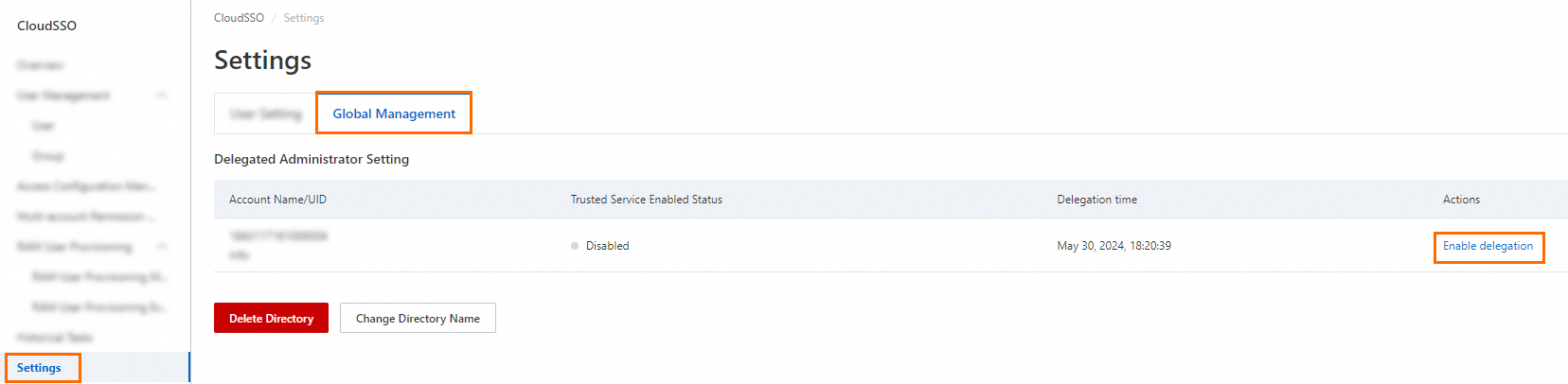
In the left-side navigation pane, click Settings.
On the Settings page, click the Global Management tab. Then, find the delegated administrator account that you want to enable and click Enable delegation in the Actions column.
Disable or remove a delegated administrator account
After you disable or remove the delegated administrator account of CloudSSO, you can no longer use the account to manage CloudSSO resources.
Disable a delegated administrator account
If you want to temporarily stop the delegated administrator account of CloudSSO from performing management operations on CloudSSO, you can disable the delegated administrator account in the CloudSSO console. After the delegated administrator account is disabled, you can enable the delegated administrator account again at any time.
Log on to the CloudSSO console as the CloudSSO administrator.
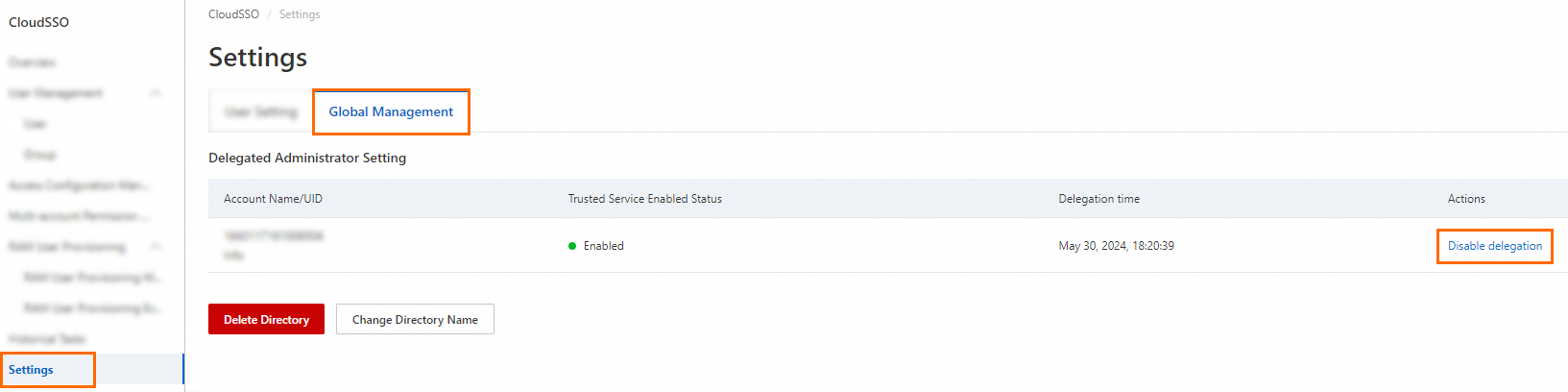
In the left-side navigation pane, click Settings.
On the Settings page, click the Global Management tab. Then, find the delegated administrator account that you want to disable and click Disable delegation in the Actions column.
Remove a delegated administrator account
If you want to change the delegated administrator account of CloudSSO, you can remove the existing delegated administrator account in the Resource Directory console and add another delegated administrator account.
Use the management account of the resource directory to log on to the Resource Management console.
In the left-side navigation pane, choose .
On the Trusted Services page, find CloudSSO and click Manage in the Actions column.
In the Delegated Administrator Account section of the page that appears, find the delegated administrator account that you want to remove, and click Remove in the Actions column.
In the Remove Delegated Administrator Account message, click OK.
Use the delegated administrator account
After you add and enable a delegated administrator account for CloudSSO, you can use the delegated administrator account to manage CloudSSO resources.
The delegated administrator account is a member of the resource directory. Therefore, you can use the delegated administrator account in the same way as you use a member of the resource directory. For more information, see Use a member to log on to the Alibaba Cloud Management Console.
In this example, the CloudSSODA member of the resource directory is specified as the delegated administrator account of CloudSSO. Then, you want the CloudSSO user named Alice to use the delegated administrator account of CloudSSO to manage CloudSSO resources. You can perform the following steps:
Log on to the CloudSSO console as a CloudSSO administrator and use an access configuration to assign the access permissions on the delegated administrator account CloudSSODA to the CloudSSO user named Alice.
Create an access configuration.
The access configuration uses the AliyunCloudSSOFullAccess system policy. For more information, see Create an access configuration.
Use the access configuration to assign the access permissions on the delegated administrator account.
Provision the access configuration that assigns the access permissions on the delegated administrator account CloudSSODA for the CloudSSO user named Alice. This allows the CloudSSO user to use the delegated administrator account to manage CloudSSO resources.
For more information, see Assign access permissions on the accounts in a resource directory.
Log on to the CloudSSO user portal as the CloudSSO user named Alice and use the delegated administrator account CloudSSODA to manage CloudSSO resources.
For more information, see Log on to the CloudSSO user portal and access Alibaba Cloud resources.