Cloud Firewall's log analysis feature stores logs in a dedicated Simple Log Service Logstore. To protect this data at rest, you can choose between two encryption mechanisms: service keys managed by Simple Log Service, or Bring Your Own Key (BYOK) keys backed by Key Management Service (KMS).
Choose an encryption method
| Service key | BYOK | |
|---|---|---|
| Who manages the key | Simple Log Service | You (via KMS) |
| Key lifecycle | Never expires; managed automatically | Tied to your customer master key (CMK) — if the CMK is deleted or disabled, the BYOK key becomes invalid |
| Audit and control | Not auditable by you | You control the CMK in the KMS console |
| Setup complexity | API call only | RAM role + KMS permissions + API call |
| Encryption algorithms | AES (default) or SM4 (sm4) | AES (default) or SM4 (sm4) |
Limitations
The encryption method is permanent. Once configured, you cannot change the encryption mechanism, algorithm, or type. Only the enable parameter can be toggled after the initial configuration.
Specific constraints:
Selecting service keys locks out BYOK, and vice versa.
The
encrypt_typevalue cannot be changed after first configuration.Every
UpdateLogStorecall must include the completeencrypt_confparameter — partial updates are not supported.
Encrypt logs using service keys
Call CreateLogStore to create a Logstore with encryption, or call UpdateLogStore to enable encryption on an existing one. Add the encrypt_conf parameter and do not include the `user_cmk_info` field.
encrypt_conf parameter
| Parameter | Type | Description | Example |
|---|---|---|---|
| object | The data structure of the encryption configuration. | ||
enable | boolean | Enables or disables data encryption. | true |
encrypt_type | string | Encryption algorithm. Required when enable is true. Valid values: default (AES) and sm4. | default |
user_cmk_info | EncryptUserCmkConf | Leave blank for service key encryption. Configuring this field switches to BYOK. | — |
Encrypt logs using BYOK keys
BYOK encryption requires two setup steps: grant Simple Log Service access to KMS via a RAM role, then configure encryption on the Logstore.
Prerequisites
Before you begin, ensure that you have:
Key Management Service (KMS) activated. See Purchase a dedicated KMS instance.
Step 1: Authorize Simple Log Service to access KMS
Log on to the RAM console.
Create a RAM role. See Step 1: Create a RAM role.
Edit the trust policy of the RAM role to allow Simple Log Service to assume it. See Edit the trust policy of a RAM role.
{
    "Statement": [
        {
            "Action": "sts:AssumeRole",
            "Effect": "Allow",
            "Principal": {
                "Service": [
                    "log.aliyuncs.com"
                ]
            }
        }
    ],
    "Version": "1"
}
Grant the AliyunKMSReadOnlyAccess and AliyunKMSCryptoUserAccess permissions to the RAM role. See Grant permissions to a RAM role.
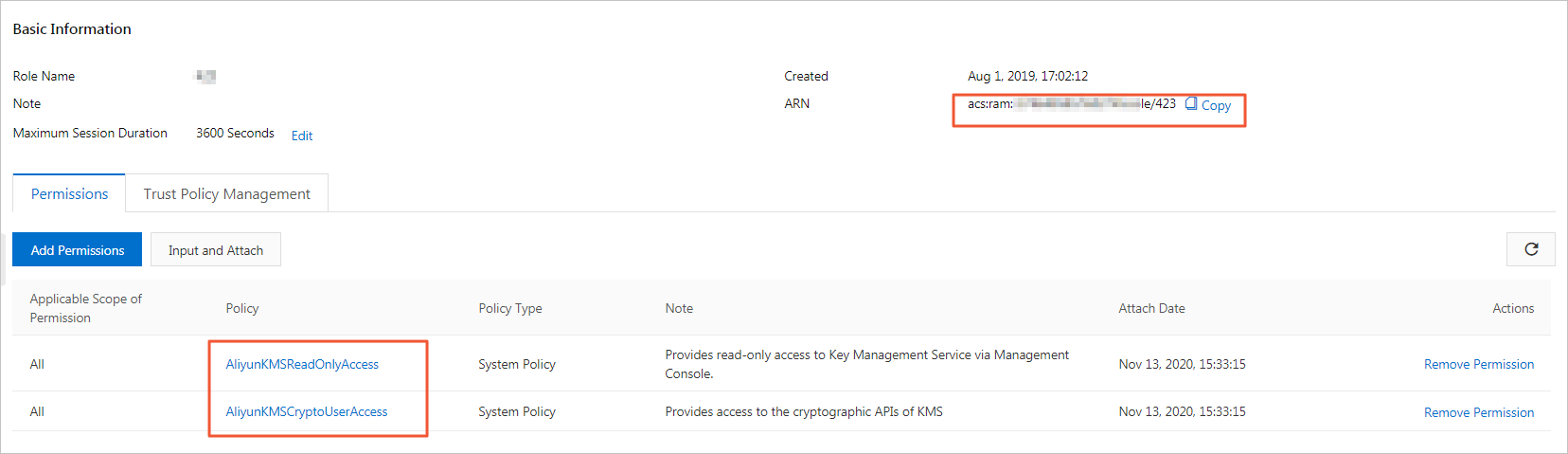
Grant the PassRole permission to the RAM user that will perform the encryption configuration. Create a custom policy with the following content and attach it to the RAM user. See Create a custom policy and Grant permissions to RAM users.
{
    "Version": "1",
    "Statement": [
        {
            "Effect": "Allow",
            "Action": "ram:PassRole",
            "Resource": "acs:ram::*"
        }
    ]
}
Step 2: Configure data encryption for the Logstore
When the log analysis feature is enabled, Cloud Firewall automatically creates a dedicated project and Logstore. Call UpdateLogStore to enable BYOK encryption on that Logstore.
Before calling UpdateLogStore, call GetLogStore to retrieve the current Logstore configuration. Merge the encrypt_conf settings into the full configuration and pass the result to UpdateLogStore.
The encrypt_conf parameter requires the user_cmk_info field for BYOK encryption:
| Parameter | Type | Description | Example |
|---|---|---|---|
| object | The data structure of the encryption configuration. | ||
enable | boolean | Enables or disables data encryption. | true |
encrypt_type | string | Encryption algorithm. Required when enable is true. Valid values: default (AES) and sm4. | default |
user_cmk_info | EncryptUserCmkConf | Required for BYOK. Specifies the CMK and RAM role to use. | See below |
EncryptUserCmkConf fields
| Parameter | Type | Description | Example |
|---|---|---|---|
| object | The data structure of the user-defined encryption configuration. | ||
cmk_key_id | string | ID of the customer master key (CMK). | f5136b95-2420-ab31-xxxxxxxxx |
arn | string | Alibaba Cloud Resource Name (ARN) of the RAM role. | acs:ram::13234:role/logsource |
region_id | string | Region where the CMK resides. | cn-hangzhou |
encrypt_conf = {
    "enable": True,               # Enable data encryption.
    "encrypt_type": "default",    # Encryption algorithm: "default" (AES) or "sm4".
    "user_cmk_info": {
        "cmk_key_id": "",         # CMK ID, for example: f5136b95-2420-ab31-xxxxxxxxx.
        "arn": "",                # ARN of the RAM role.
        "region_id": ""           # Region where the CMK resides.
    }
}
CMK revocation impact
If the CMK is deleted or disabled, all read and write requests to the Logstore fail.