Cloud Firewall can block unauthorized uninstallation of host-based security software such as the Security Center agent. By switching IPS rules from Monitor to Block mode, you prevent attackers or insiders from removing security agents that guard your hosts.
Security risks of unauthorized uninstallation
When the Security Center agent is removed from a host without authorization, the following threats go undetected:
-
Insider threats: An employee who intends to perform unauthorized operations may first uninstall the security software to avoid triggering alerts.
-
Post-intrusion tampering: After gaining access to a host, an attacker can uninstall the security software so that intrusion alerts are no longer sent to security engineers.
-
Malware persistence: Without the agent, activities such as worm propagation, trojan installation, webshell persistence, and data exfiltration generate no alerts.
Switch IPS rules from Monitor to Block
By default, the IPS rules that protect the Security Center agent from uninstallation are in Monitor mode. To actively block uninstallation attempts, switch these rules to Block mode:
-
Log on to the the Cloud Firewall console.
-
In the left-side navigation pane, choose .
-
On the tab, change the action of some or all related rules from Monitor to Block.
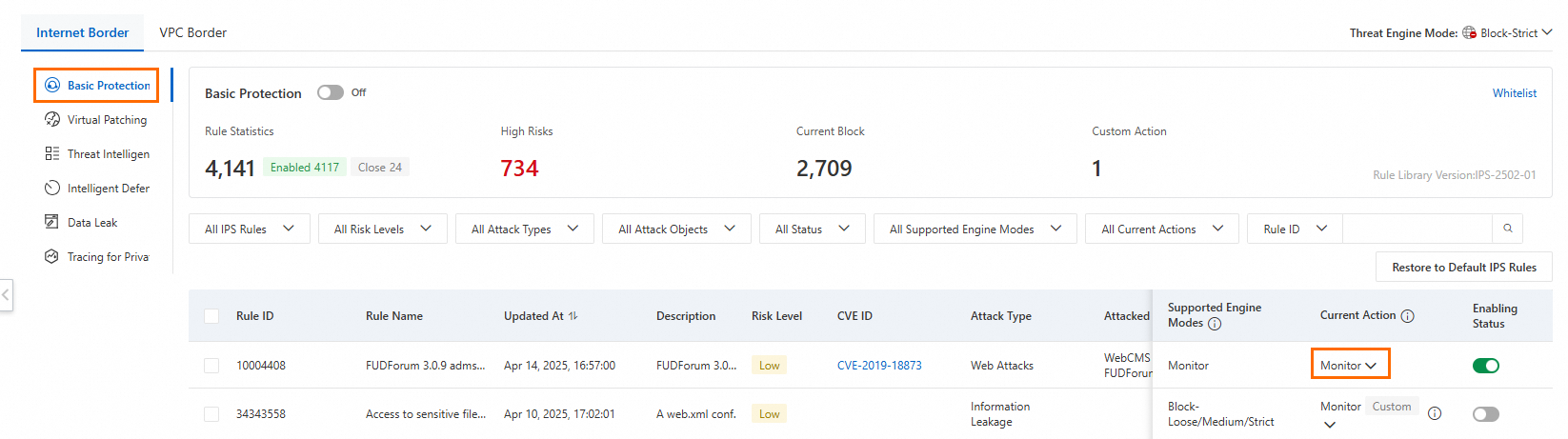
Verify the configuration
After you switch the rules to Block mode, confirm that the rule status displays Block on the Basic Protection tab.