Start replication to copy all data from the production site to the disaster recovery site, where a pay-as-you-go ECS instance is automatically created.
Prerequisites
Instances are added to the protection group. For more information, see Step 5: Add instances to be protected.
Procedure
To start replication:
Log on to the Cloud Backup console.
In the navigation pane on the left, choose .
-
If you are not using EBS Async Replication, click Switch to EBS Async Replication.

-
On the Site Pairs tab, click a site pair, then click the Protection Group tab.
-
On the Protection Group tab, find the protection group and click Enable Replication in the Actions column.
-
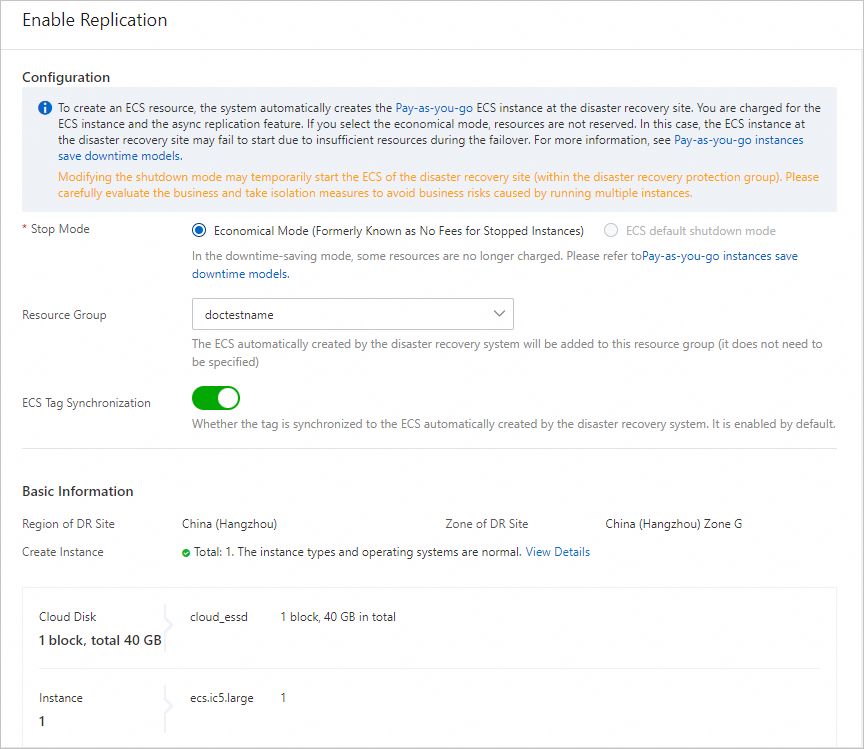
In the Enable Replication panel, verify the configuration and resource details, then click Confirm.
Important-
A pay-as-you-go ECS instance is automatically created at the disaster recovery site. You are charged for the ECS instance and EBS async replication. For more information, see Pay-as-you-go.
-
If you select Economical Mode, resources are not reserved and the disaster recovery ECS instance may fail to start due to insufficient resources. For more information, see Economical mode.
-
To change the instance type or operating system at the disaster recovery site, use Change Instance Type or Modify Operating System. If neither meets your requirements, submit a ticket to Alibaba Cloud technical support.
-
Before enabling replication, use Modify User Data or Modify Disaster Recovery IP if needed. You can specify an IP address on the Network Information tab.
-
If Stop Mode is selected, disaster recovery site instances may start briefly. Assess business impact and implement isolation measures to prevent risks from multiple running instances.
-
Subscription ECS instances do not support release protection.
The protection group status progresses through Enabling Replication, Replicating Full Data, and Replicating Incremental Data.
-
Enabling Replication: Cloud Backup creates an ECS instance at the disaster recovery site and begins data replication.

-
Replicating Full Data: Cloud Backup transmits all valid data from the production instance to the disaster recovery site.
-
Replicating Incremental Data: After full replication completes, Cloud Backup continuously replicates incremental data to the disaster recovery site to meet recovery point objective (RPO) requirements.
-