The precheck feature identifies potential issues that can cause backup failures or other exceptions. After you register a SQL Server instance, we recommend running a precheck on it. This topic describes how to perform this check.
Prerequisites
The SQL Server instance must be registered in the Cloud Backup console and its status must be Online. If the instance status is abnormal, see Register an ECS-hosted SQL Server instance and troubleshoot common issues.
Procedure
Log on to the Cloud Backup console.
In the left-side navigation pane, choose . Select a region and click SQL Server. On the ECS Database Instance tab, find the target SQL Server instance, and in the Actions column, click Precheck.
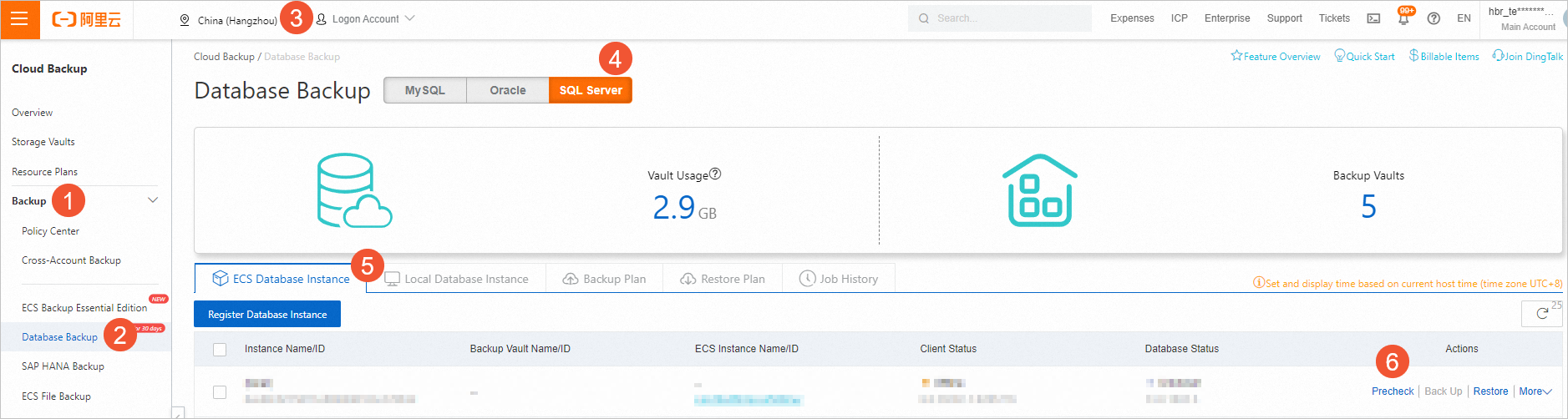
In the dialog box, click Start Check.
You can click Check Last Pre-check Result to view the previous precheck results. The precheck includes the following items:
Check item
Description
OSS Connectivity Check
Checks for VPC connectivity between the SQL Server instance and OSS within the same region. If this check fails, you cannot perform backup and restore operations.
Control network connectivity check
Checks the connectivity from the instance to the control network. If this check fails, you cannot perform any operations on the instance.
Recovery mode check
Checks the recovery model of the database. If a database fails this check, you cannot perform an incremental backup or log backup for that database.
ImportantDue to SQL Server limitations, databases that fail this check support only the Simple recovery model and do not support log backups.
The master database supports only full backups. If you configure an incremental backup or log backup for the master database, Cloud Backup automatically converts the backup job to a full backup.
You can change the database recovery model as needed. For more information, see Before you begin.
Alternatively, see the official SQL Server documentation: View or Change the Recovery Model of a Database (SQL Server).
SQL Server Database Status Check
Checks whether the SQL Server instance is Online. If this check fails, you cannot perform backup or restore operations for the affected databases.
The precheck completes in about one minute and displays the results.
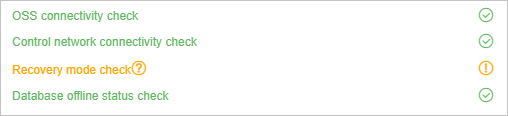 If a check item is marked as abnormal, follow the on-screen instructions to determine whether the issue affects backup and restore operations.
If operations are not affected, the precheck is complete.
If operations are affected, use the check item description to troubleshoot the issue. For example, if the database recovery model is not set to Full, you cannot perform log backups. To set the SQL Server database recovery model to Full, see Step 2 on the Before you begin page.