If you are prompted in the Cloud Backup console that your Resource Access Management (RAM) user does not have the required permissions, you must use your Alibaba Cloud account to authorize the RAM user. After the authorization is complete, you can use the RAM user to access Cloud Backup.
Issue
When you use a RAM user to perform operations, the following message appears: You do not have the required permissions. Contact the owner of the Alibaba Cloud account to grant you the required permissions.
Cause
You have not granted the RAM user the permissions to access and manage Cloud Backup.
Solution
Grant the read-only permission (AliyunHBRReadOnlyAccess) on Cloud Backup or the full permission (AliyunHBRFullAccess) on Cloud Backup to the RAM user.
AliyunHBRReadOnlyAccess: the read-only permission on Cloud Backup. You cannot use the permission to create or modify files in the Cloud Backup console. You can use the permission to only read files in the Cloud Backup console.
AliyunHBRFullAccess: the permission that allows the RAM user to have the same full access to Cloud Backup as your Alibaba Cloud account. After you grant this permission to the RAM user, you can perform O&M operations on Cloud Backup resources as the RAM user.
To ensure data security, we recommend that you follow the principle of least privilege (PoLP) when you grant permissions on Cloud Backup to a RAM user. You can create custom policies to manage permissions in a fine-grained manner. For more information, see Create custom policies.
Log on to the RAM console with an Alibaba Cloud account.
In the left-side navigation pane, choose .
On the Users page, find the RAM user, and then click Add Permissions in the Actions column.
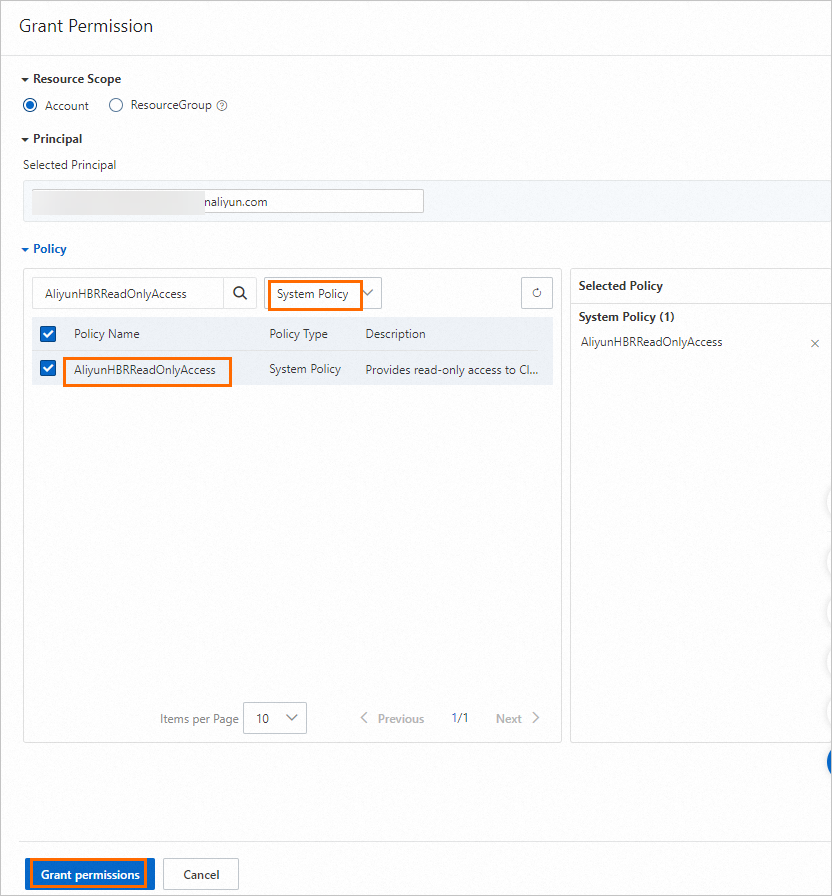
In the Grant Permission panel, select the AliyunHBRReadOnlyAccess or AliyunHBRFullAccess permission under System Policy and click Grant permissions.
Confirm that the authorization is completed and click Close.