To import data from other databases into ApsaraDB for ClickHouse, you must add the VPC CIDR block of the target ApsaraDB for ClickHouse cluster to the whitelist of the source database. Follow this procedure to obtain the VPC CIDR block from the ApsaraDB for ClickHouse and VPC consoles.
Procedure
-
Obtain the VPC ID of the target ApsaraDB for ClickHouse cluster.
-
Log in to the ApsaraDB for ClickHouse console with your Alibaba Cloud account.
-
In the upper-left corner of the page, select the region where the cluster is located.
-
On the Clusters page, select the Instance list tab for the target cluster type, and then click the target cluster ID.
-
On the Cluster Information page, find and copy the VPC ID.
-
-
From the VPC console, obtain the CIDR block of the VPC that contains the ApsaraDB for ClickHouse cluster.
-
Log in to the VPC console with your Alibaba Cloud account.
-
In the upper-left corner of the page, select the region where the VPC is located.
-
Select Instance ID, paste the VPC ID of the target ApsaraDB for ClickHouse cluster that you copied in the previous step into the search box, and click Search.
-
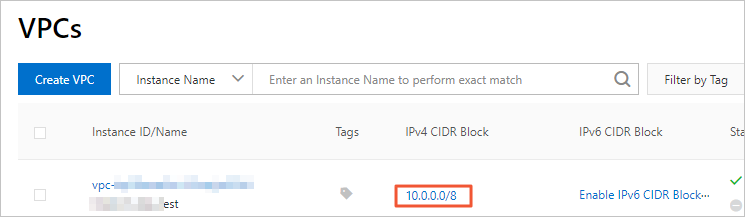
In the list of results, find the corresponding CIDR block.
-
Next steps
Add the CIDR block of the VPC for the ApsaraDB for ClickHouse cluster to the whitelist of the source database.