Learn how to select table partition keys in ApsaraDB for ClickHouse to optimize performance and improve data management efficiency.
Partition keys
The partition feature organizes data into logical segments based on specified keys, dividing data into separate fragments (parts) according to the partition key.
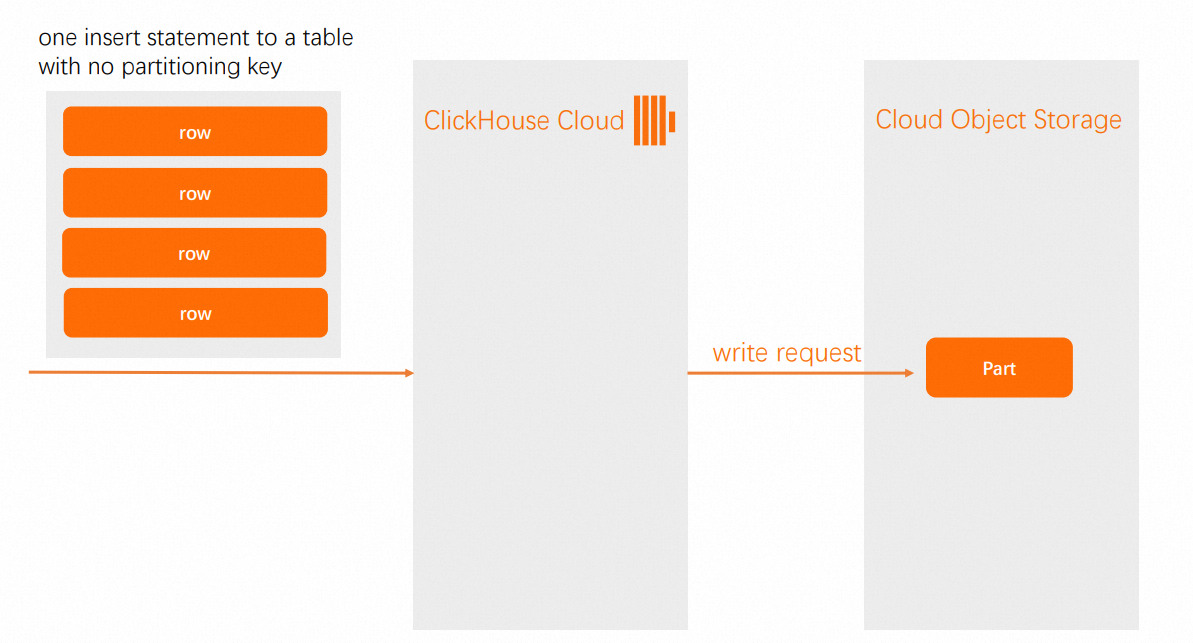
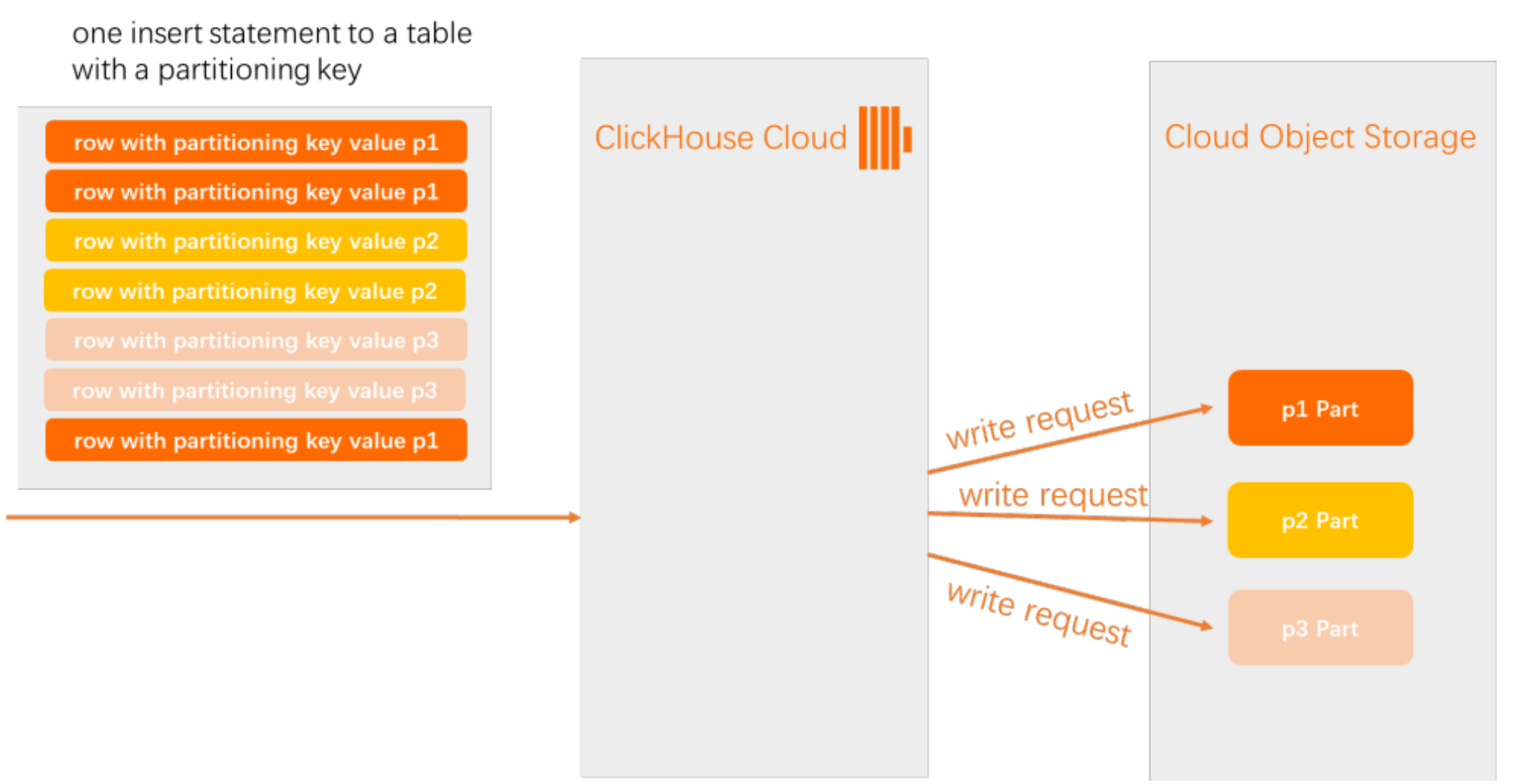
In ApsaraDB for ClickHouse Enterprise Edition, when you insert multiple rows into a table without a partition key, all data is written to a single new data part. When a table uses a partition key, the system performs the following operations:
-
Check the partition key values of the rows that you insert.
-
Create a data part in storage for each unique partition key value.
-
Assign the rows to the corresponding data parts based on the partition key values.
|
Table without a partition key
|
Table with a partition key
|
Core principles
To reduce write requests to the Object Storage Service buckets that store data for ApsaraDB for ClickHouse Enterprise Edition, choose partition keys with low cardinality (few distinct values) and fields that are easy to manage, such as time. Primary keys should cover commonly filtered fields in a logical order. Avoid high cardinality fields, overly fine partitioning, and irrelevant primary keys to fully leverage ClickHouse performance.
-
Partitioning is a data management tool
Use partitioning for data expiration, tiered storage, and batch deletion rather than as a query optimization tool. For more information, see Choosing a Partitioning Key.
-
Choose a low cardinality field as the partition key
Keep the number of partitions between 100 and 1,000. Avoid high cardinality fields (fields with many distinct values, such as user_id or device numbers) as partition keys. Otherwise, the number of parts may grow exponentially, degrading performance or causing "too many parts" errors.
-
Common partitioning method is time-based partitioning
Partition by month or day using functions such as toYYYYMM(date), toStartOfMonth(date), or toDate(date). This simplifies data lifecycle management and hot/cold tiered storage. For more information, see Custom Partitioning Key.
-
Partition keys should be closely aligned with data lifecycle, archiving, cleanup, and other management requirements
Choose dimensions that support batch management from a business perspective. For more information, see Applications of partitioning.
Table design recommendations
Prioritize time-based partitioning
For log, time series, and monitoring scenarios, partition by month or day. For example, a log table partitioned by month, with each month's data in a separate partition, offers the following advantages:
-
Efficient data management: Delete, archive, or move data in batches by partition. For example, instead of using
ALTER TABLE DELETEto delete expired data, useDROP PARTITIONto remove an entire partition without scanning the full table. -
Easy implementation of data lifecycle management (TTL): Combine partitions with TTL policies to automatically clean up expired data, simplifying operations and maintenance.
-
Partition pruning improves query efficiency: When you filter by time, ClickHouse scans only the relevant partitions, reducing I/O and accelerating queries.
Avoid high cardinality fields for partitioning
Avoid using user IDs, order numbers, or device numbers as partition keys. For example, if a table uses user_id as the partition key, each unique user generates a separate partition, resulting in the following drawbacks:
-
Partition explosion: Each unique user ID generates a partition, far exceeding the recommended range of 100-1,000, putting heavy pressure on metadata management and the file system.
-
Background merge failure: ClickHouse merges parts only within the same partition. Too many partitions prevent effective merging, leaving many small parts that degrade query and write performance.
-
Query performance degradation: Scanning large amounts of partition metadata during queries reduces overall query efficiency.
-
Instance resource exhaustion: Excessive partition parts consume large amounts of memory and file handles, potentially causing ClickHouse to start slowly or fail entirely.
Avoid overly fine partitioning
Avoid partitioning by hour, minute, or second unless the data volume is extremely large and specific requirements exist. For example, partitioning by minute with toYYYYMMDDhhmm(event_time) generates 1,440 partitions per day and over 500,000 per year, with the following drawbacks:
-
Too many partitions: Overly fine partitioning far exceeds the recommended range of 100-1,000, greatly increasing the burden on metadata and file system management.
Typical error:
DB::Exception: Too many parts (N). Merges are processing significantly slower than inserts. -
Background merge failure: ClickHouse merges parts only within the same partition. Too many partitions prevent effective merging, leaving many small parts that degrade performance.
-
Query and write performance degradation: Scanning large amounts of partition metadata reduces query efficiency, while the excessive number of parts also slows down writes.
Partition keys should be original fields or simple expressions
Avoid complex functions so that ClickHouse can effectively apply partition pruning.
Design partition keys in conjunction with primary keys
Use primary keys to cover commonly queried filter fields and partition keys for data management.
For example, for a log table that is frequently queried by time range and service name and requires periodic cleanup of expired data:
-
Partition key: toYYYYMM(event_time) creates one partition per month, enabling monthly batch deletion, archiving, and hot/cold tiered storage.
-
Primary key: (service_name, event_time) allows queries such as
WHERE service_name = 'A' AND event_time BETWEEN ...to fully utilize the primary key index for efficient data pruning.
Table design examples
CREATE TABLE logs
(
    event_time DateTime,
    service_name String,
    log_level String,
    message String
)
ENGINE = MergeTree
PARTITION BY toYYYYMM(event_time)         -- Partition by month for easy data management
ORDER BY (service_name, event_time)       -- Primary key covers commonly filtered fields
Not recommended partition key choices
-
Partition key as user_id (high cardinality): One partition per user, resulting in too many partitions, merge failure, and extremely poor performance.
-
Partition key as device_id (high cardinality): As above, causing "too many parts" errors and unmanageable partitions.
-
Partition key as order_id (high cardinality): One partition per order, extreme fragmentation.
-
Partition key as name (high cardinality string): Uncontrollable number of partitions, difficult to manage.
-
Partition key as toHour(event_time) (too fine): 24 partitions per day, extremely large number of partitions over time, merge failure.
-
Partition key as toMinute(event_time) (extremely fine): Partition explosion, severely affecting performance.
-
Primary key as high cardinality field with illogical order: For example, ORDER BY (user_id, event_time), but queries are commonly by event_time, resulting in low utilization of the primary key index.
-
Primary key with too many fields: For example, ORDER BY (a, b, c, d, e, f, g, h, i, j), resulting in large primary key index size and high memory consumption.
-
Primary key as low cardinality field: For example, ORDER BY (status), with only a few status values, resulting in extremely poor primary key index pruning capability.
-
Partition key and primary key completely unrelated, and neither covers common query conditions: For example, partition key is region, primary key is type, but queries are commonly by event_time, resulting in neither partition nor primary key accelerating queries.